


 ממיר וידאו אולטימטיבי
 מקליט מסך
 תיקון וידאו
 הורדה מאובטחת
סקירה מעמיקה של ממיר WAV ל-MP3 לגילוי הממיר הטוב ביותר
בעידן הדיגיטלי של היום, קבצי אודיו ממלאים תפקיד משמעותי בהיבטים שונים של חיינו, מבידור ועד יישומים מקצועיים. עם זאת, קיימים פורמטים שונים של שמע, כל אחד עם מאפיינים ומטרות ייחודיות משלו. תרחיש נפוץ אחד שמשתמשים רבים נתקלים בו הוא הצורך להמיר קבצי אודיו מפורמט WAV ל-MP3. בפוסט סקירה זה, נחקור את הסיבות מאחורי דרישת ההמרה הזו ונעמיק בסקירת ממירי WAV ל-MP3 הטובים ביותר הזמינים.

חלק 1. ממירי WAV ל-MP3 למשתמשים שולחניים ומקוונים
1. Video Converter Ultimate
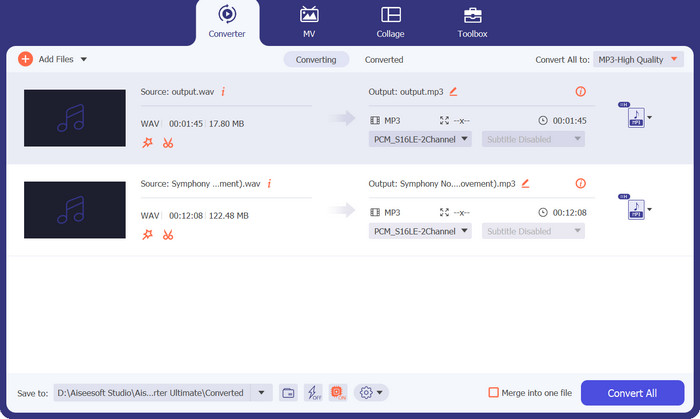
כשמדובר בהמרת קובצי WAV לפורמט MP3, אחד הפתרונות הבולטים שמציעים ביצועים יוצאי דופן ורב־גוניות הוא Video Converter Ultimate. תוכנה זו פותחה כדי לספק חוויית המרה חלקה ויעילה, ו‑Video Converter Ultimate בולטת ככלי מולטימדיה הכולל־הכול, שהיכולות שלו חורגות משמו.
איכות ההמרה ללא תחרות מבטיחה שאיכות השמע של הקבצים שהומרו תישאר בתולי. על ידי שימוש באלגוריתמים מתקדמים וקודקים, תוכנה זו מבצעת המרת אודיו באיכות גבוהה, שומרת על השלמות המקורית של קבצי ה-WAV שלך תוך אספקת קבצי MP3 שנשמעים לא פחות טוב.
הורדה חינמיתעבור Windows 7 או גרסה מאוחרת יותרהורדה מאובטחת
הורדה חינמיתל‑MacOS 10.7 ומעלההורדה מאובטחת
פלטפורמות: Video Converter Ultimate תואמת הן ל‑Windows והן ל‑macOS. היא תומכת במערכות ההפעלה של Windows. בנוסף, היא תואמת לגרסאות macOS, כולל macOS Big Sur, Catalina, Mojave, High Sierra וגרסאות קודמות. תאימות חוצת‑פלטפורמות זו מבטיחה שמשתמשי Windows ו‑macOS כאחד יוכלו ליהנות מהפונקציות והיתרונות שמציעה Video Converter Ultimate לצורכי ההמרה שלהם מ‑WAV ל‑MP3.
מומלץ עבור: בין אם ברצונך לייעל את ניצול שטח האחסון, לשפר תאימות או לייעל הפצת אודיו, Video Converter Ultimate מציע איכות המרה מעולה, תמיכה נרחבת בפורמטים ותכונות ידידותיות למשתמש כדי לענות על צורכיך ביעילות. הוא מומלץ למגוון רחב של משתמשים, כולל חובבי מדיה, אנשי מקצוע בתחום המוזיקה ויוצרי תוכן, שזקוקים לפתרון תוכנה אמין ורב‑תכליתי להמרת קובצי WAV לפורמט MP3.
יתרונות
- המרת אצווה ועיבוד מהיר.
- ממשק קל לשימוש.
- תמיכה נרחבת בפורמטים.
- איכות המרה ללא תחרות.
- כולל שפע של תכונות שימושיות.
חסרונות
- זה עשוי לדרוש כמה מפרטי חומרה מינימליים.
- זו תוכנה בתשלום.
2. Freemake Audio Converter
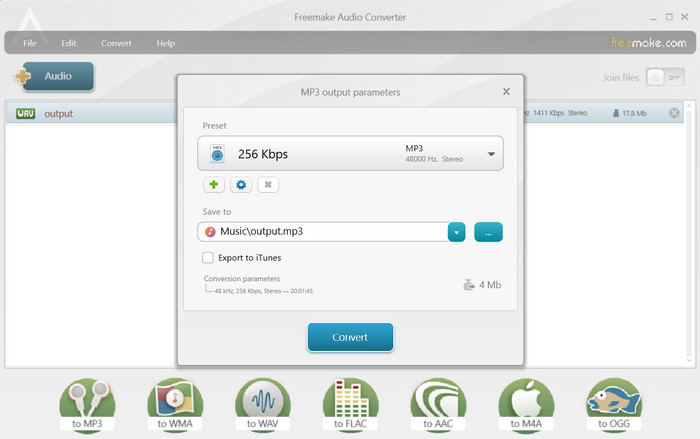
Freemake Audio Converter היא תוכנת שולחן עבודה חינמית ורב-תכליתית הממירה WAV ל-MP3 ופורמטי שמע אחרים. זה מגיע עם ממשק קל לשימוש ומאפשר למשתמשים להמיר מספר קבצים בו זמנית. ממיר זה גם מאפשר לך לבחור אפשרויות פלט כגון קצב סיביות, קצב דגימה וערוצי שמע כדי להבטיח איכות שמע גבוהה. בסופו של דבר, אתה יכול להוריד את ממיר ה-WAV ל-MP3 בחינם.
פלטפורמות: Freemake Audio Converter תואם למערכות ההפעלה Windows. למרבה הצער, Freemake Audio Converter אינו זמין עבור פלטפורמות macOS או Linux. לכן, משתמשי Windows יכולים לנצל את התכונות של Freemake Audio Converter לצורכי המרת האודיו שלהם, בעוד שמשתמשים במערכות הפעלה אחרות עשויים להידרש לחפש פתרונות תוכנה חלופיים.
מומלץ עבור: Freemake Audio Converter מומלץ למי שמחפש פתרון תוכנה חינמי וידידותי למשתמש להמרת קובצי אודיו, כולל WAV ל‑MP3. ממיר זה הוא בחירה מצוינת עבור משתמשים מזדמנים, חובבים ומי שמעריכים פשטות ונוחות שימוש.
יתרונות
- אפשרויות חיוניות להתאמה אישית.
- מגוון רחב של פורמטי קלט.
- התוכנית זמינה בחינם.
חסרונות
- פורמטי פלט מוגבלים.
- הוא חסר תכונות מתקדמות.
3. ממיר אודיו בחינם באינטרנט
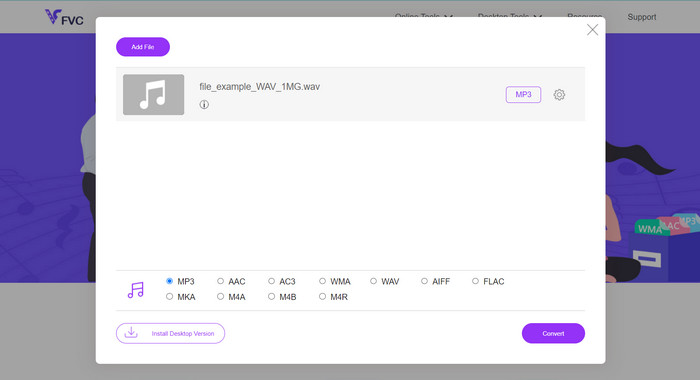
האם אתה מחפש דרך חלקה ויעילה להמרת קובצי WAV שלך לפורמט MP3? אין צורך לחפש עוד! Free Audio Converter Online הוא כלי דינמי מבוסס‑אינטרנט שמפשט את כל תהליך ההמרה בזכות ממשק ידידותי למשתמש ותפעול נטול טרחה. הגיע הזמן להיפרד מהתקנות תוכנה מורכבות ולהגיד שלום להמרת WAV ל‑MP3 ללא מאמץ.
חלפו הימים של הורדה והתקנה של תוכנות במחשב. עם Free Audio Converter Online, אתה יכול להמיר ללא מאמץ את קבצי ה-WAV שלך לפורמט MP3 ישירות מדפדפן האינטרנט שלך. כלי מקוון נוח זה מאפשר לך להמיר את קבצי האודיו שלך בדרכים, בכל זמן ובכל מקום, ללא כל דרישות תוכנה או אחסון נוספות.
פלטפורמות: בזכות היותו בלתי תלוי בפלטפורמה, Free Audio Converter Online מבטיח שמשתמשים במערכות הפעלה ומכשירים שונים יוכלו ליהנות מיכולות ההמרה מ‑WAV ל‑MP3 ללא כל מגבלות. ניתן לגשת אליו ממערכות ההפעלה Windows, macOS ו‑Linux בכל גרסה, וכך מובטחות תאימות ונוחות גם בזמן נסיעה.
מומלץ עבור: Free Audio Converter Online מומלץ למי שמחפש פתרון מהיר ונוח להמרת קובצי WAV לפורמט MP3 בלי צורך בהתקנת תוכנה נוספת. הוא אידיאלי למשתמשים שמעריכים פשטות ונוחות שימוש, וכן למי שעובד על פני מערכות הפעלה או מכשירים שונים.
יתרונות
- המרה ללא מאמץ בקצות אצבעותיך.
- הוא מציע מגוון רחב של פורמטי שמע נתמכים.
- מהירות ואמינות מוגדרות מחדש.
חסרונות
- הסתמכות על זמינות השרת.
4. זמזר
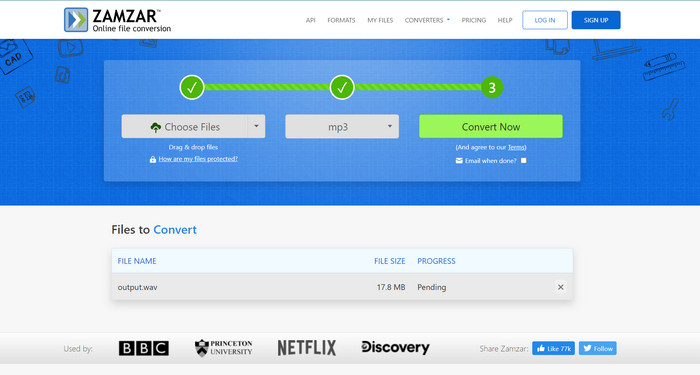
Zamzar היא פלטפורמת המרה מקוונת פופולרית נוספת המציעה מגוון רחב של המרות פורמט קבצים, כולל WAV ל-MP3. זה תומך בהעלאת קבצים מהמחשב שלך או בהזנת קישורי כתובת URL לקבצים מקוונים. Zamzar מבטיח טיפול מאובטח בקבצים ומעביר קבצים מומרים ישירות לכתובת הדוא"ל שלך. זהו ממיר WAV ל-MP3 אמין באינטרנט עבור המרות מזדמנות בדרכים.
פלטפורמות: Zamzar תואם ל‑Windows, macOS, Linux ופלטפורמות מובייל, ומאפשר למשתמשים במערכות הפעלה שונות לגשת לשירותי המרת הקבצים שלו ולהשתמש בהם.
מומלץ עבור: Zamzar מומלץ במיוחד למשתמשים שמעניקים עדיפות לנוחות של פתרון המרת קבצים מבוסס‑אינטרנט, וזקוקים לגמישות להמיר קבצים בין פלטפורמות ומערכות הפעלה שונות בלי צורך בהתקנת תוכנה.
יתרונות
- זה עובד בצורה חלקה על Windows, macOS, Linux ופלטפורמות ניידות.
- מגוון רחב של פורמטים נתמכים.
- הוא שולח הודעות דוא"ל לאחר השלמת המרת הקובץ.
חסרונות
- זה מסתמך על חיבור אינטרנט יציב.
- קחו בחשבון השלכות פרטיות ואבטחה.
חלק 2. ממיר WAV ל-MP3 עבור משתמשים ניידים
1. ממיר מדיה
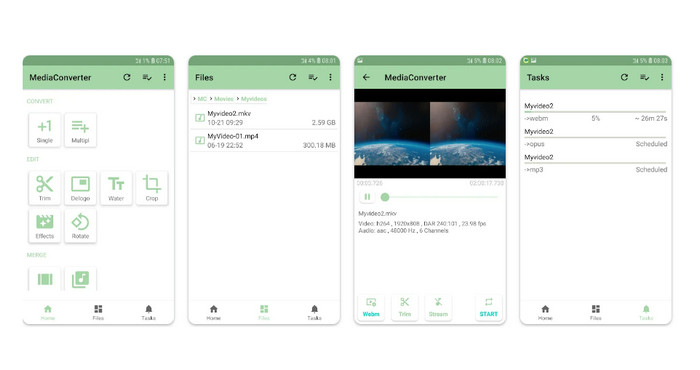
Media Converter הוא אפליקציית אנדרואיד עשירה בתכונות התומכת בהמרות אודיו ווידאו שונות, כולל WAV ל-MP3. עם ממשק פשוט ואינטואיטיבי, זה מאפשר לך להתאים אישית את הגדרות הפלט ומציע יכולות המרת אצווה. Media Converter מספק גם אפשרויות לקצץ קבצי אודיו ותומך בהמרה של קבצים המאוחסנים בשירותי ענן.
פלטפורמות: Media Converter היא אפליקציה סלולרית המיועדת למכשירי Android, ולכן היא תואמת לטלפונים חכמים וטאבלטים עם Android. היא מציעה למשתמשים את הנוחות של המרת קובצי אודיו ווידאו ישירות במכשירי ה‑Android שלהם, ללא צורך במחשב נפרד או בשירות מקוון.
מומלץ עבור: Media Converter מומלצת למשתמשי Android הזקוקים לאפליקציה סלולרית אמינה ורב‑תכליתית להמרת קובצי אודיו ווידאו. היא מתאימה למי שנדרש לעתים קרובות להמיר קובצי מדיה בדרכים, כגון יוצרי תוכן, מוזיקאים ומשתמשים שעובדים תדיר עם פורמטי אודיו ווידאו שונים.
יתרונות
- הוא תומך במגוון פורמטי אודיו ווידאו.
- הוא מציע ממשק ידידותי למשתמש.
- הוא מספק אפשרויות התאמה אישית שונות.
חסרונות
- תמיכה מוגבלת בפלטפורמה.
- מגבלות גודל הקובץ.
2. ממיר קבצים
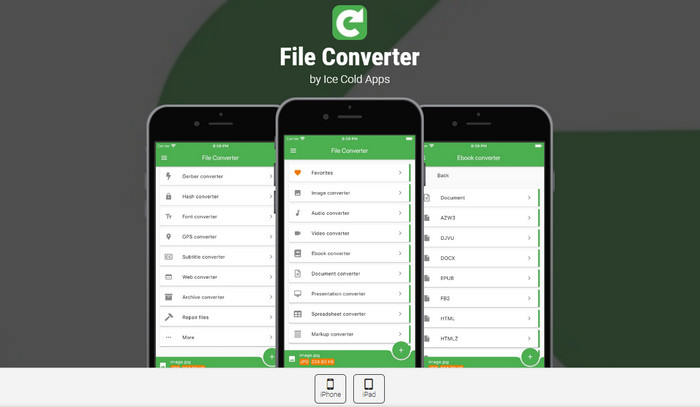
ממיר קבצים הוא גם אפליקציית iOS נהדרת להמרת WAV ל-MP3. זה מאפשר המרה קלה של קבצי אודיו, כולל WAV ל-MP3. הוא תומך במגוון רחב של פורמטים ומספק אפשרויות לכוונון איכות פלט, קצב סיביות ומטא נתונים. אפליקציה זו משתלבת גם עם פלטפורמות אחסון בענן, ומאפשרת לך להמיר קבצים ישירות משירותים כמו iCloud, Dropbox ו-Google Drive.
פלטפורמות: אפליקציית המובייל The File Converter תואמת למכשירי iOS, כולל iPhone ו‑iPad. היא מיועדת במיוחד לפלטפורמת iOS וניתנת להורדה והתקנה מחנות האפליקציות (App Store). תאימות זו מאפשרת למשתמשי iOS להמיר בקלות את קובצי האודיו והווידאו שלהם ישירות במכשירים הניידים באמצעות האפליקציה File Converter.
מומלץ עבור: File Converter מומלץ למשתמשי iOS הזקוקים לאפליקציה סלולרית רב‑תכליתית וידידותית למשתמש להמרת קובצי אודיו ווידאו. היא מתאימה למי שעובד לעתים קרובות עם קובצי מדיה ב‑iPhone או ב‑iPad שלו וזקוק לגמישות להמיר קבצים בדרכים.
יתרונות
- המר ישירות קבצים במכשירי iOS.
- התאם את הגדרות הווידאו והשמע.
- ביצועים מיטביים באייפון ובאייפד.
חסרונות
- זה לא כולל מערכות הפעלה אחרות, כמו אנדרואיד.
- רכישות בתוך האפליקציה.
לקריאה נוספת:
FLAC לעומת MP3: איזה פורמט קובץ אודיו הוא המלך האמיתי
ממירי WAV ל‑MP4 הטובים ביותר להמרה מאודיו לווידאו
חלק 3. השוואה בין התוכניות לעיל
להלן טבלת השוואה המדגישה היבטים שונים של Video Converter Ultimate, Freemake Audio Converter, Free Audio Converter Online, Zamzar, Media Converter וממיר קבצים כממירי WAV ל-MP3:
| ממיר וידאו אולטימטיבי | Freemake Audio Converter | ממיר אודיו בחינם באינטרנט | זמזר | ממיר מדיה | ממיר קבצים | |
| תמיכה בפורמט | טווח רחב | מוגבל | מוגבל | טווח רחב | טווח רחב | טווח רחב |
| המרת אצווה | כן | כן | כן | כן | כן | כן |
| אפשרויות התאמה אישית | נִרחָב | בסיסי | בסיסי | בסיסי | מוגבל | מוגבל |
| מהירות המרה | מָהִיר | מְמוּצָע | מְמוּצָע | מְמוּצָע | מָהִיר | מְמוּצָע |
| מגבלות גודל הקובץ | אף אחד | אף אחד | אף אחד | משתנה | אף אחד | אף אחד |
חלק 4. שאלות נפוצות על ממירי WAV ל-MP3
האם זה חוקי להמיר WAV ל-MP3?
המרת WAV ל-MP3 לשימוש אישי היא בדרך כלל חוקית. עם זאת, שיתוף חומר המוגן בזכויות יוצרים ללא אישור מתאים הוא בלתי חוקי.
האם אוכל להתאים אישית את הגדרות השמע במהלך תהליך ההמרה?
כן, ממירים רבים מאפשרים לך להתאים אישית הגדרות כגון קצב סיביות, קצב דגימה וערוצי שמע כדי להתאים את האיכות של קובץ ה-MP3 שהומר.
האם אוכל להמיר WAV ל-MP3 במכשיר הנייד שלי?
כן, ישנן אפליקציות לנייד כמו Media Converter ו- File Converter המאפשרות לך להמיר WAV ל-MP3 ישירות במכשיר ה-Android או iOS שלך.
האם אני יכול להמיר קבצי WAV ל-MP3 עם קצבי סיביות משתנים?
כן, חלק מהממירים מאפשרים לך לבחור קצבי סיביות משתנים (VBR) במהלך תהליך ההמרה, מה שמתאים את קצב הסיביות באופן דינמי על סמך מורכבות האודיו.
האם אוכל להמיר קבצי WAV ל-MP3 באמצעות כלי שורת פקודה?
כן, ישנם כלי שורת פקודה זמינים, כגון FFmpeg ו-LAME, המאפשרים לך להמיר קבצי WAV ל-MP3 באמצעות פקודות ופרמטרים ספציפיים.
סיכום
המרה מ‑WAV ל‑MP3 היא תהליך נפוץ וחיוני ממגוון סיבות, כולל הקטנת גודל הקובץ, שיפור התאימות ואפשרות להפצה יעילה של אודיו. בעת חיפוש תוכנת ממיר WAV ל‑MP3, מומלץ לקחת בחשבון גורמים כמו תאימות לפלטפורמות, תמיכה בפורמטים, אפשרויות התאמה אישית וחוויית משתמש, כדי לבחור את הממיר המתאים ביותר לצורכיך. בעזרת כלים אלה, תוכל להמיר בקלות את קובצי ה‑WAV שלך לפורמט MP3 וליהנות מהגמישות והנוחות של פורמט האודיו הנפוץ הזה.
-
 הורדת נגן MP3 - 10 נגני המוזיקה MP3 החינמיים הטובים ביותר של 2025
 מהו נגן ה- MP3 הטוב ביותר? כיצד ניתן לשים מוסיקה בנגן MP3? כיצד ניתן להוריד את נגן המוזיקה MP3? פוסט זה נותן לך סקירה מפורטת של 10 נגני MP3 הטובים ביותר בחינם עבור Windows PC ו- Mac.
-
 הדרכה מעשית כיצד להמיר סרטונים לפורמט MP3
 מתקשה להמיר סרטונים ל-MP3? לאחר מכן, עליך להסתמך על הכתבה הזו כאשר אנו בודקים איזה ממיר מספק את ההמרה הטובה ביותר.
-
 3 של עורך המטא נתונים הטוב ביותר של WAV ב-Windows/Mac/Online
 רוצה שיהיה לך עורך מטא נתונים של WAV ב-Windows? מק? באינטרנט? אם כן, המשך לקרוא את המאמר הזה כשסקרנו את עורך המטא הטוב ביותר עבור WAV.
