


 ממיר וידאו אולטימטיבי
 מקליט מסך
 תיקון וידאו
הבן מה זה מטא נתונים: סוגים, דוגמה, חשיבות וכיצד להציג אותם
המטא־דאטה חיונית לכל קובץ משום שהיא מסבירה פרטים רבים על קובץ המדיה. אבל השאלות הן מהי מטא־דאטה? למה היא משמשת? מהן הדוגמאות למטא־דאטה? האם חייבים שתהיה מטא־דאטה? בהמשך המאמר תכיר את התשובות לכל השאלות האלה. בנוסף לכך נספק גם עורך מטא־דאטה מושלם שתוכל להשתמש בו כדי להוסיף או לערוך את המטא־דאטה של קובץ המדיה שלך. קרא את ההסבר המלא להלן ולמד עוד על מטא־דאטה.

חלק 1. מה זה מטא נתונים
הַגדָרָה
מטא נתונים הם נתונים על הנתונים המוסתרים מקובץ המדיה. מה זה מטא נתונים? נניח שאתה רוצה לזהות את תוכן הקובץ ומאפיינים אחרים, אז מטא נתונים הם קוד רמאות. לכל קובץ מדיה יש מטא-נתונים, ואם יהיה לכם קובץ מדיה מסודר, מטא-נתונים יעזרו לכם לסדר את הקובץ אם אתם עוסקים בספריות קבצי מדיה. כעת, כשיש לנו רעיון לגבי מטא נתונים, בואו נסתכל בשלב הבא על סוגי המטא נתונים.
מהם הסוגים השונים של מטא נתונים
האם ידעת שלמטאדטה יש סוגים שונים? אם לא, להלן יעזור לך להבין את ששת מבני המטא נתונים האחרים ואת מטרתם באחסון נתונים. אז עכשיו, כדי לדעת מהן הדוגמאות למטא נתונים, קרא את התרשים למטה.
| סוגי מטא נתונים | תיאור |
| מטא נתונים תיאוריים | הוא מזהה את המשאבים של אובייקט מסוים, כולל מספר אלמנטים כגון כותרת, תקציר, מחבר ומילת מפתח. |
| מטא נתונים ניהוליים | הוא משמש לניהול מידע כמו איזה סוג של משאב, יצירה או רכישה של נתונים, הרשאות ונטייה. |
| Reference Metadata או Metadata הסבר | הנתונים הפנימיים אכן מתארים את התוכן ואת הנתונים הסטטיסטיים האיכותיים מנקודת המבט של האדם. |
| מטא נתונים סטטיסטיים | הוא מתאר את תהליך הנתונים הסטטיסטיים על ידי איסוף, עיבוד והפקתם. |
| מטא נתונים משפטיים | המידע כולל נתונים על בעל זכויות היוצרים, הרישוי הציבורי והבעלות. |
| מטא נתונים מבניים | הנתונים מתארים את סוגו, גרסתו, מערכות היחסים שלו ומאפייני חומר דיגיטלי אחרים. |
מהי החשיבות של מטא נתונים?
מה זה מטא נתונים וסוגיו כבר הוסבר לעיל; כעת, עלינו לקבוע את חשיבותו. עם מטא נתונים, אתה יכול לדעת את המידע האחר על קובץ המדיה, כגון המחבר, תאריך ושעה, חומר דיגיטלי שונה ועוד רבים אחרים. כמו כן, אם אתה רוצה להגן על קובץ המדיה שלך, זו אחת הדרכים הטובות ביותר להשתמש בו במקום להשתמש בסימן מים. לכן, אם קובץ המדיה שלך מכיל מטא נתונים, אתה יכול לעשות הרבה דברים שאתה לא מאמין שאתה יכול לעשות, כמו לארגן אותו בתיקייה או בספרייה שלך.
חלק 2. כיצד להציג את המטא נתונים בפלטפורמות שונות
האם ידעת שאתה יכול לבדוק את המטא נתונים שלך בקובץ המדיה שלך דרך המכשירים שלך מבלי להתקין כלי מיוחד? רוצים לדעת איך עושים את זה? במקרה כזה, עליך לקרוא את הפרטים הבאים כדי לדעת יותר על המטא נתונים בקובץ המדיה שלך.
עבור משתמשי Windows
שלב 1. מצא את הקובץ על שולחן העבודה ולחץ על כפתור הקליק הימני בעכבר.
שלב 2. לאחר מכן לחץ על מאפיינים (Properties) וחפש את לשונית פרטים (Details); מתחתיה תראה את המטא־דאטה של הסרטון שלך.
עבור משתמשי Mac
שלב 1. אתר את קובץ המדיה ב-Finder, לחץ על כפתור הימין בעכבר ולחץ על כלים (Tools).
שלב 2. מתחת לכך, לחץ על Show Inspector.
שלב 3. חלון נוסף יופיע, ואז לחץ על Exit, ותראה את המטא־דאטה של הקובץ שלך.
עבור משתמשי אייפון
שלב 1. פתח את אפליקציית התמונות (Photo).
שלב 2. לחץ על הסרטון או התמונה שברצונך לבדוק את המטא־דאטה שלהם.
שלב 3. סמן את סמל ה‑i, והמטא־דאטה תופיע על המסך.
עבור משתמשי אנדרואיד
שלב 1. הפעל את Google Photos במכשירך – אם עדיין לא הורדת אותה לטלפון, עליך להוריד אותה קודם מחנות Play.
שלב 2. פתח את הקובץ ולחץ על סמל ה‑i כדי לבדוק את המטא־דאטה.
חלק 3. כיצד לערוך או להוסיף מטא נתונים עם עורך המטא נתונים הטוב ביותר בשולחן העבודה
בעזרת עורך מטא־דאטה מצוין תוכל בקלות להוסיף מטא־דאטה לקובץ מדיה שאין בו מטא־דאטה כלל, או לערוך אותה. FVC Video Converter Ultimate הוא הכלי המושלם שכדאי להשתמש בו כדי לשנות או להוסיף מטא־דאטה לכל קובץ מדיה בקלות. לכן, כדי לדעת לשם מה משתמשים במטא־דאטה, תוכל לעקוב אחר השלבים וללמוד בקלות אילו פרטים נוספים אפשר להוסיף למטא־דאטה.
שלב 1. הקש על כפתור ההורדה שלהלן כדי להוריד את הכלי ל-Windows או ל-macOS שלך, לחץ על הקובץ שהורדת, עקוב אחר הוראות ההתקנה ופתח אותו.
הורדה חינמיתל-Windows 7 ומעלההורדה מאובטחת
הורדה חינמיתל-MacOS 10.7 ומעלההורדה מאובטחת
שלב 2. עבור אל חלק הארגז כלים (Toolbox) ואתר את Media Metadata Editor; לחץ עליו כדי לפתוח.
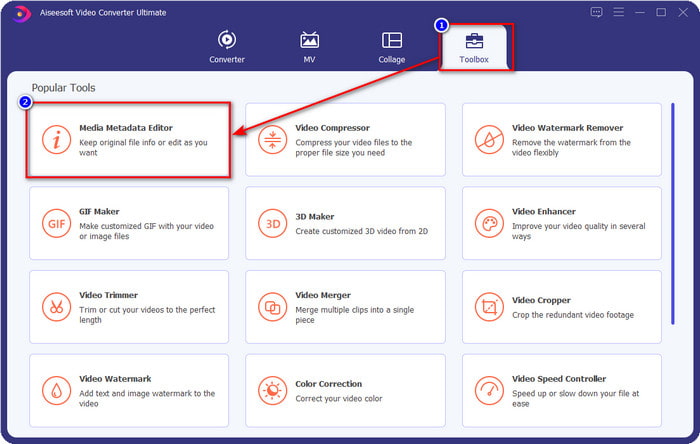
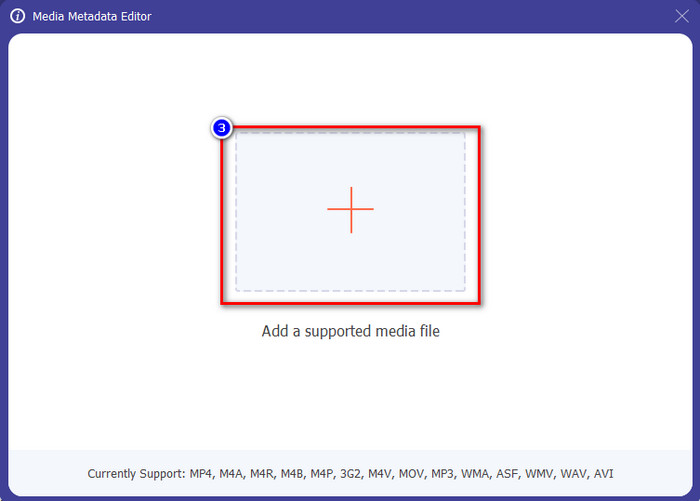
שלב 3. חלונות חדשים יקפצו על המסך; לחץ על כפתור ה+ כדי להוסיף את הסרטון שברצונך להוסיף לו מטא־דאטה או לערוך את המטא־דאטה שלו. אתר את הסרטון בתיקייה במחשב שלך ולחץ על פתח (Open) כדי להמשיך.
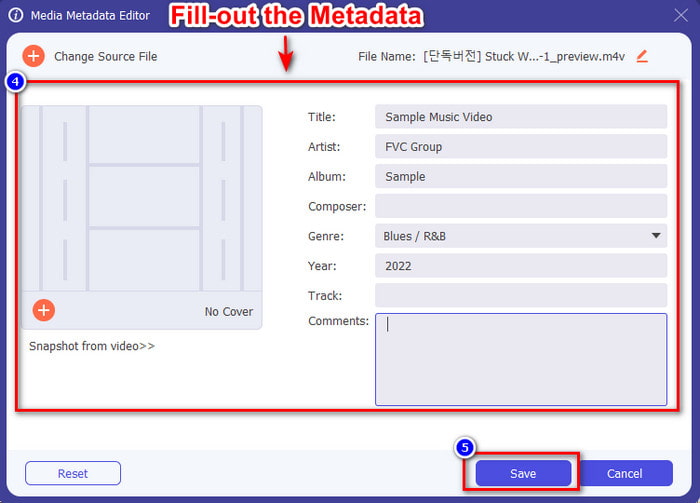
שלב 4. המתן שהכלי יסיים לטעון, ועורך המטא־דאטה יופיע; באזור זה תוכל להוסיף מטא־דאטה מותאמת אישית על‑ידי מילוי השדה הטקסט. לאחר הוספת הנתונים החשובים, לחץ על שמור (Save) כדי להוריד את קובץ המדיה עם המטא־דאטה החדשה. בלי מאמץ רב הוספת או ערכת את המטא־דאטה בקובץ שלך.
קשור:
חלק 4. שאלות נפוצות על מטא נתונים
מדוע גודל הקובץ גדל לאחר הוספת מטא נתונים?
אתה לא צריך להיות מופתע אם גודל קובץ המדיה יהיה גדול יותר בגלל המטא נתונים כי זה יהיה. הסיבה מאחורי זה היא שה-metadata הוא אלמנט המאוחסן בכל קובץ מדיה; מטא נתונים תורמים לגודל הסרטון.
האם מטא נתונים משפיעים על איכות הסרטון?
איכות הסרטון לא תשתנה גם אם תוסיף, תערוך או תוריד סרטון עם מטא נתונים.
מהם המטא נתונים שחשוב להוסיף?
נניח שאתה רוצה להוסיף מטא נתונים לקובץ ללא מטא מידע. תצטרך למלא את הדברים החשובים: שם המחבר, כותרת, תאריך ושעה. כל הדברים חשובים, אבל אלה הם החלק המהותי של המטא נתונים.
סיכום
לבסוף, כעת יש לנו ידע נרחב על מטא־דאטה; כל השאלות שהציקו לך כבר נענו במאמר זה. כעת, כשאתה יודע מהי מטא־דאטה, עליך להוסיף מטא־דאטה לקובץ שלך כדי להוסיף שכבת הגנה בעזרת עורך המטא־דאטה הטוב ביותר לשולחן העבודה. ללא ספק, FVC Video Converter Ultimate הוא הכלי המושלם שכולם יכולים להשתמש בו כדי להחיל בקלות מטא־דאטה על הקובץ שלהם, או לערוך אותה אם כבר קיימת. בעזרת תוכנה זו תוכל לעשות דברים רבים; רוצה לדעת מה הם? ובכן, על‑ידי לחיצה על כפתור ההורדה תראה את שאר הפונקציות המדהימות שהיא מציעה.
-
 3 דרכים יעילות להוסיף סרטונים ותמונות ביחד ב-Tiktok
 רוצה לדעת איך להוסיף תמונות בסרטוני Tiktok? במקרה כזה, לחץ וקרא את המאמר הזה כדי ללמוד כיצד להוסיף את התמונות לסרטון ה-Tiktok שלך בקלות.
-
 הוסף טקסט לסרטון עם שלושת עורכי הווידאו הטובים ביותר [ללא מאמץ]
 הוספת טקסט לסרטון היא משימה קלה עם הכלי הנכון. לכן, היום נציג בפניכם את הכלים השונים שבהם תוכלו להשתמש כדי להוסיף טקסט לסרטון שלכם לפני שתשתפו.
-
 סקירה בתום לב על 6 אפליקציות וידאו טקסט [2022]
 רוצה לדעת מהן אפליקציות וידאו טקסט בהן תוכל להשתמש בכל הפלטפורמה? מאמר זה יספק סקירה בתום לב של שש אפליקציות וידאו הטקסט בשוק.
