


 वीडियो कनवर्टर अंतिम
 स्क्रीन अभिलेखी
 वीडियो मरम्मत
 सुरक्षित डाउनलोड
WTV to MP4 कन्वर्टर: WTV को MP4 में कैसे कन्वर्ट करें
डब्ल्यूटीवी, डीवीआर-एमएस प्रारूप के उत्तराधिकारी के रूप में, माइक्रोसॉफ्ट द्वारा विंडोज मीडिया सेंटर द्वारा रिकॉर्ड की गई टीवी सामग्री को स्टोर करने के लिए विकसित किया गया है। एमपीईजी -2 और एमपीईजी -4 मानक और एमपीईजी -1 लेयर II या डॉल्बी डिजिटल एसी -3 के साथ एन्कोडेड, डब्ल्यूटीवी कुछ सॉफ्टवेयर जैसे एफएफएमपीईजी, विंडोज मीडिया सेंटर, साइबरलिंक पावरडीवीडी 12, नीरो 12, हैंडब्रेक, सीसीएक्सट्रैक्टर, आदि द्वारा समर्थित है।

यदि आप WTV फ़ाइलों को आसानी से देखना या साझा करना चाहते हैं, तो बेहतर होगा कि आप उन्हें लगभग हर डिवाइस पर चलने वाले सबसे लोकप्रिय फ़ॉर्मेट WTV को MP4 में बदलें।.
हमने इंटरनेट पर WTV से MP4 कन्वर्टर की तलाश की और शीर्ष 2 मुफ़्त WTV से MP4 कन्वर्टर्स पाए, जो WTV को MP4 में बदल सकते हैं।.
भाग 1. मुफ्त वीडियो कन्वर्टर - WTV को MP4 ऑनलाइन में बदलें
WTV को MP4 में बदलना काफ़ी आसान है। WTV को MP4 में बदलने का सबसे आसान तरीका इसे ऑनलाइन पूरा करना है। Free Online Video Converter एक फ़्रीवेयर है, जो WTV को MP4 और अन्य मुख्यधारा के वीडियो व ऑडियो फ़ॉर्मेट में बदल सकता है। यह मुफ़्त ऑनलाइन टूल Windows 10/8/7 और Mac OS X 10.7 या उससे ऊपर के वर्ज़न के साथ संगत है, और आप कुछ ही चरणों में आसानी से WTV को MP4 में ट्रांसकोड कर सकते हैं।.
प्रक्रिया को कारगर बनाने के लिए, आप गाइड का पालन कर सकते हैं:
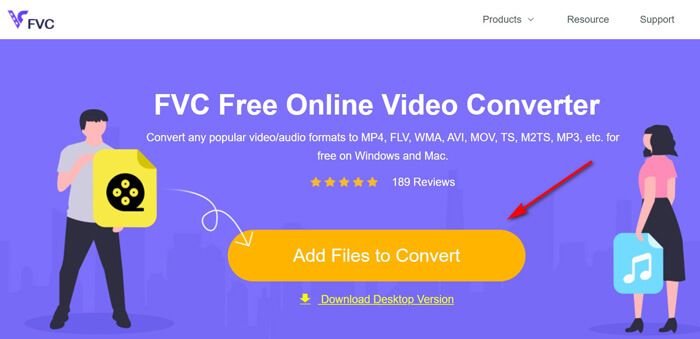
1. Add Files to Convert बटन पर क्लिक करके PC से WTV फ़ाइलें अपलोड करें।.
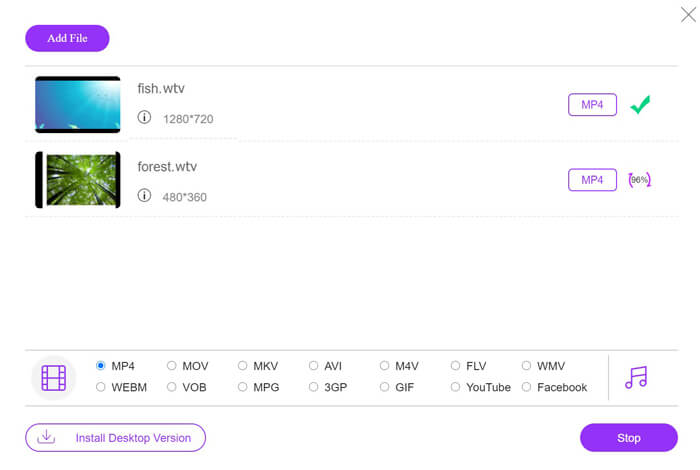
2. चेकबॉक्स से MP4 चुनें।.
3. Convert पर क्लिक करें ताकि WTV फ़ाइलें अपने आप कन्वर्ट होकर डाउनलोड हो जाएँ।.
अब, हम आपको विवरण में WTV को MP4 में बदलने के तरीके के बारे में बताने जा रहे हैं।
चरण 1. WTV फ़ाइलें जोड़ें
अपने ब्राउज़र के ज़रिए इस मुफ़्त ऑनलाइन WTV से MP4 कन्वर्टर को खोलें। Add Files to Convert बटन पर क्लिक करें, और एक पॉप‑अप विंडो आपको लॉन्चर डाउनलोड और इंस्टॉल करने के लिए कहेगी। इसे डाउनलोड कर लें और सफल इंस्टॉलेशन के बाद ओपन‑सोर्स विंडो दिखाई देगी। फिर आप अपने कंप्यूटर से WTV रिकॉर्डिंग्स को अपलोड करने के लिए चुन सकते हैं। यह फ़्रीवेयर बैच कनवर्ज़न को सपोर्ट करता है और आप एक से ज़्यादा WTV फ़ाइलें ऑनलाइन जोड़ सकते हैं।.
कदम 2. MP4 चुनें
नीचे दिए गए MP4 के चेकबॉक्स पर टिक लगाएँ, जहाँ आपको MKV, AVI, M4V, FLV, VOB, GIF, YouTube, Facebook, MP3, AAC, WMA, WAV, FLAC आदि जैसे विभिन्न आउटपुट विकल्प मिलेंगे।.
इसके अलावा, आप आउटपुट MP4 पैन के बगल में मौजूद Settings आइकन पर क्लिक करके एनकोडर, फ़्रेम रेट, रेज़ोल्यूशन, बिटरेट्स और अन्य पैरामीटर समायोजित कर सकते हैं।.

चरण 3. WTV को MP4 में कन्वर्ट करें
सभी सेटिंग्स पूरी होने के बाद, Convert बटन पर क्लिक करें और एक विंडो खुलेगी जो आपसे कन्वर्टेड MP4 फ़ाइलों को स्टोर करने के लिए डेस्टिनेशन चुनने को कहेगी। डेस्टिनेशन चुनें और इस मुफ़्त ऑनलाइन कन्वर्टर पर लौटें, फिर अपने आप MP4 फ़ाइलों को कन्वर्ट और डाउनलोड करना शुरू करने के लिए दोबारा Convert पर क्लिक करें। आप सीधे कन्वर्ज़न प्रोग्रेस प्रतिशत देख सकते हैं।.
भाग 2. हैंडब्रेक - पीसी/मैक पर WTV को MP4 में बदलें
WTV को MP4 में बदलने का एक और मुफ्त तरीका हैंडब्रेक का उपयोग करना है। हैंडब्रेक कुछ सॉफ्टवेयर है जो डब्ल्यूटीवी फाइलों को पढ़ सकता है। इसके अलावा, यह आपके विंडोज और मैक कंप्यूटर पर WTV को MP4/MKV में ट्रांसकोड भी कर सकता है।
हैंडब्रेक ओपन-सोर्स डेस्कटॉप सॉफ्टवेयर है, इसलिए आपको पहले इस मुफ्त कनवर्टर को अपने कंप्यूटर पर डाउनलोड करना चाहिए।
फिर से, हैंडब्रेक में WTV को MP4 में बदलने के सरल चरण इस प्रकार हैं:
1. हैंडब्रेक में डब्ल्यूटीएफ फाइलें या संपूर्ण फ़ोल्डर जोड़ें।
2. हैंडब्रेक में कस्टम MP4 प्रोफ़ाइल।
2. पूर्वावलोकन करें और WTV को MP4 में बदलें।
हैंडब्रेक में WTV को MP4 में बदलने के लिए व्यापक गाइड यहां दी गई है।
चरण 1. HandBrake में WTV फ़ाइलें जोड़ें
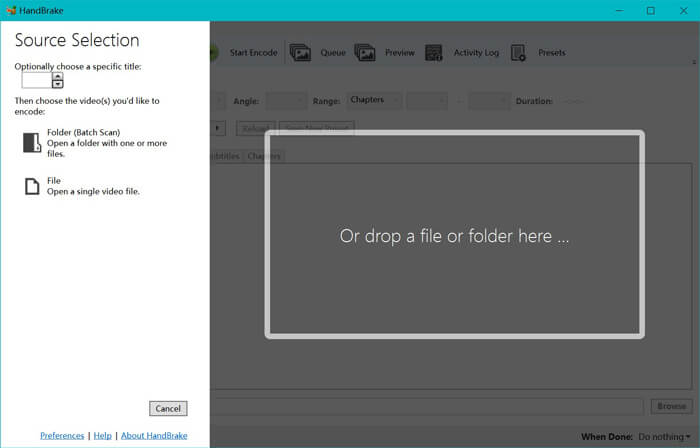
एक बार जब आप अपने कंप्यूटर पर HandBrake इंस्टॉल कर लेते हैं, तो HandBrake डिफ़ॉल्ट रूप से ओपन‑सोर्स डायलॉग दिखाएगा। यहाँ आप मुख्य विंडो में WTV फ़ाइलें या फ़ोल्डर चुनने के लिए Folder या File पर क्लिक कर सकते हैं। वैकल्पिक रूप से, आप WTV फ़ाइलों को ड्रैग‑एंड‑ड्रॉप करके भी इस सॉफ़्टवेयर में ला सकते हैं।.
चरण 2. MP4 फ़ॉर्मेट चुनें
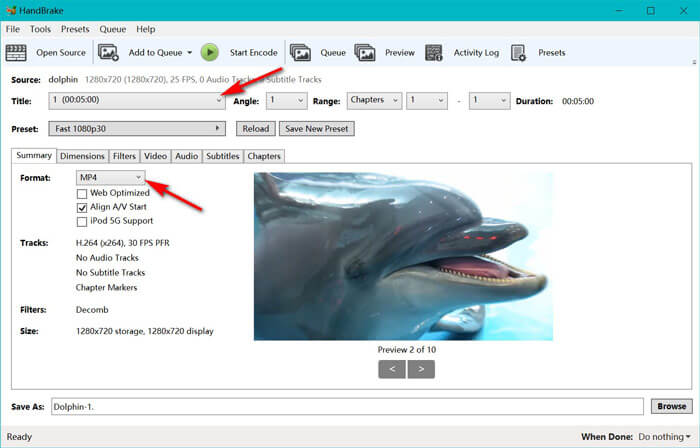
जब आप WTV फ़ाइलें लोड कर लेते हैं, तो आप Title ड्रॉप‑डाउन विकल्प से सटीक WTV फ़ाइल चुन सकते हैं। फिर चुनी हुई WTV फ़ाइल के आउटपुट के रूप में Summary टैब में MP4 चुनें। इसके अलावा, HandBrake आपको डाइमेंशन्स, फ़िल्टर्स, वीडियो कोडेक/क्वालिटी, ऑडियो ट्रैक आदि समायोजित करने की अनुमति देता है। केवल MP4 ही नहीं, यह अन्य फ़ॉर्मेट जैसे AVI, MOV, M2TS आदि को भी MKV में कन्वर्ट कर सकता है।.
चरण 3. WTV का प्रीव्यू करें और MP4 में कन्वर्ट करें
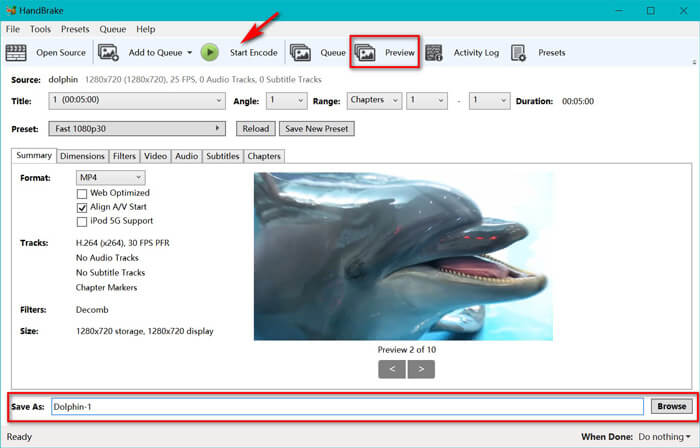
टूलबार पर HandBrake का Preview फ़ीचर आपको एन्कोडिंग से पहले यह देखने देता है कि आपकी नई MP4 वीडियो कैसी दिखेगी। जब आपकी सभी सेटिंग्स ठीक हों, तो कन्वर्टेड MP4 फ़ाइलों का नाम दें और नीचे दिए गए Browse बटन पर क्लिक करके नई वीडियो की लोकेशन चुनें। अंत में, टूलबार पर Start Encode बटन पर क्लिक करके WTV को MP4 में कन्वर्ट करें।.
भाग 3. WTV से MP4 के अक्सर पूछे जाने वाले प्रश्न
हैंडब्रेक MP4 को M4V के रूप में क्यों बचाता है?
MP4 फ़ाइलों के लिए, जब आप AC3 ऑडियो और SRT उपशीर्षक चुनते हैं या MP4 फ़ाइल को अनुकूलित करने के लिए अध्याय मार्कर रखते हैं, तो हैंडब्रेक MP4 फ़ाइलों को स्वचालित रूप से एक्सटेंशन M4V का उपयोग करेगा। लेकिन आप .m4v एक्सटेंशन को सीधे .mp4 में बदल सकते हैं।
क्या वीएलसी प्लेयर डब्ल्यूटीवी फाइलों को चला सकता है?
वीएलसी सीधे डब्ल्यूटीवी फाइलों को नहीं चला सकता है। आपको डब्ल्यूटीवी कोड पैक स्थापित करने के लिए के-लाइट कोड पैक स्थापित करना चाहिए और फिर वीएलसी पर डब्ल्यूटीवी फाइलों को चलाना चाहिए।
क्या मैं संरक्षित डब्ल्यूटीवी फाइलों को परिवर्तित कर सकता हूं?
हाँ आप कर सकते हैं। हालांकि, केवल एमसीईबड्डी संरक्षित वाणिज्यिक डब्ल्यूटीएफ फाइलों के संपादन और रूपांतरण का समर्थन करता है। संरक्षित डब्ल्यूटीवी फाइलों को कॉपी और कन्वर्ट करने के लिए आपको इस सॉफ्टवेयर का उपयोग करना होगा।
निष्कर्ष
विंडो मीडिया सेंटर द्वारा रिकॉर्ड की गई WTV फ़ाइलों को आसानी से उपयोग करने के लिए, आपको सबसे पहले WTV को MP4 में बदलना चाहिए। यह पोस्ट मुफ़्त ऑनलाइन वीडियो कनवर्टर और हैंडब्रेक के माध्यम से WTV को MP4 ऑनलाइन में बदलने के 2 मुफ़्त तरीके साझा करता है। मुफ्त ऑनलाइन वीडियो कन्वर्टर आपको WTV को MP4 और अन्य लोकप्रिय प्रारूपों में बदलने देता है, जबकि हैंडब्रेक आपको सीमित आउटपुट स्वरूप विकल्पों के साथ संपादन के अधिक नियंत्रण प्रदान करता है।
आपका पसंदीदा तरीका कौन सा है?
या हो सकता है कि आपके पास MP4 कनवर्टर के लिए एक बेहतर WTV हो?
किसी भी तरह से, मैं आपसे सुनना चाहूंगा। तो, आगे बढ़ो और नीचे एक टिप्पणी छोड़ दो।
-
 फ्री कन्वर्टर के जरिए MXF को MP4 में कैसे कन्वर्ट करें
 यह पोस्ट कंप्यूटर पर MXF को MP4 में बदलने के लिए विस्तृत गाइड है। आप सरल चरणों में MP4 के लिए MP4 करने के लिए ट्रांसकोड camcorder MXF करने के लिए MP4 कन्वर्टर्स के लिए 4 मुक्त MXF प्राप्त कर सकते हैं।
-
 MP4 को MOV में कनवर्ट करने के शीर्ष 3 तरीके
 मैक पर MP4 को MOV में कैसे बदलें? क्या गुणवत्ता हानि के बिना MP4 को MOV में बदलने का कोई निःशुल्क तरीका है? यह पोस्ट मैक, विंडोज पीसी और ऑनलाइन पर MP4 से MOV में वीडियो रूपांतरण करने में आपकी मदद करने के लिए 3 सरल तरीके साझा करता है।
-
 विंडोज / मैक / ऑनलाइन पर WMV के लिए M2TS कन्वर्ट करने के लिए (उपयोग करने के लिए पूरी तरह से मुक्त)
 M2TS को WMV वीडियो में बदलने के 3 आसान तरीके यहां दिए गए हैं। आप विंडोज, मैक और ऑनलाइन पर एम 2 टी से WMV से वीडियो प्रारूप को मुफ्त में बदल सकते हैं। बैच रूपांतरण समर्थित है।
