


 वीडियो कनवर्टर अंतिम
 स्क्रीन अभिलेखी
 वीडियो मरम्मत
3 ऑनलाइन और ऑफलाइन एमपीजी से एमपी4 कन्वर्टर्स आपको एमपीजी फाइलों को कन्वर्ट करने की कोशिश करनी चाहिए
MP4 आजकल इंटरनेट पर आप जो सबसे आम फ़ाइल फ़ॉर्मेट देखते हैं, उनमें से एक है। हालाँकि MPG और MP4 में बहुत सारी समानताएँ हैं, लेकिन इनमें कुछ अंतर भी हैं। और अगर आप अपनी MPG फ़ाइल को MP4 फ़ाइल फ़ॉर्मेट में कनवर्ट करना चाहते हैं, तो हमने आजकल लोकप्रिय वीडियो कन्वर्टर्स का परीक्षण किया है। इसके अलावा, हमने आपके लिए सबसे अच्छे MPG से MP4 कन्वर्टर्स चुने हैं, जिन्हें आप ज़रूर देखें!

भाग 1. आपको MPG को MP4 में बदलने की आवश्यकता क्यों है?
MPG को MP4 में कनवर्ट करने का क्या महत्व है? MPG और MP4 वे फ़ॉर्मेट हैं जो अक्सर इंटरनेट पर मौजूद वीडियो के लिए इस्तेमाल होते हैं। लेकिन इनमें क्या फर्क है? MPG या MPEG मूल फ़ॉर्मेट है जो MPEG कोडेक का उपयोग करता है। यह एक एन्कोडर है जो उच्च‑गुणवत्ता वाला वीडियो आउटपुट प्रदान करता है।.
दूसरी ओर, MP4 सबसे आम वीडियो फ़ाइल स्वरूपों में से एक है और आधुनिक वीडियो संपीड़न का उपयोग करता है। तो कौन सा बेहतर है? MP4 की उच्च संपीड़न क्षमता किसी भी अन्य वीडियो फ़ाइल प्रारूप जैसे MPG की तुलना में फ़ाइलों को छोटे आकार में संपीड़ित करने की अनुमति देती है।
भाग 2. एमपीजी को एमपी4 में बदलने के 3 तरीके
यहां बेहतरीन वीडियो कन्वर्टर्स दिए गए हैं जिनका आप ऑनलाइन और ऑफलाइन उपयोग कर सकते हैं और एमपीजी को एमपी4 में बदलना सीख सकते हैं।
1. वीडियो कन्वर्टर अल्टीमेट का उपयोग करें
Video Converter Ultimate एक मीडिया फ़ाइल कन्वर्टर है जो आपको आपकी MPG फ़ाइल को आसानी से MP4 फ़ाइल फ़ॉर्मेट में कनवर्ट करने देता है। इस कन्वर्टर का इंटरफ़ेस उपयोग में आसान है, लेकिन आउटपुट काफ़ी प्रभावशाली देता है। इसमें ऐसे फीचर हैं जिनसे आप अपनी MPG फ़ाइल को एडिट, एन्हांस और कम्प्रेस कर सकते हैं। इसके अलावा, आप इस कन्वर्टर में अपनी कई MPG फ़ाइलों को एक साथ बैच में MP4 में बदल सकते हैं।.
वीडियो कन्वर्टर अल्टीमेट में एक विकल्प भी है जहां आप छवियों और वीडियो को कोलाज कर सकते हैं। साथ ही, यदि आप GIF बनाना चाहते हैं, तो इस कनवर्टर में वह सुविधा है। इसके अलावा, इस कनवर्टर का उपयोग करने पर, आप बड़ी फ़ाइलों की गुणवत्ता को खराब किए बिना परिवर्तित कर सकते हैं। भले ही इसकी विशेषताएं पेशेवर जैसी लगती हों, आप उन्हें जल्दी से उपयोग कर सकते हैं क्योंकि वे केवल उपयोग में आसान हैं।
Step 1. इस कन्वर्टर को डाउनलोड करने के लिए नीचे दिए गए डाउनलोड बटन पर क्लिक करें। इंस्टॉलेशन प्रक्रिया का पालन करें, फिर एप्लिकेशन खोलें।.
फ्री डाउनलोडWindows 7 या बाद के संस्करण के लिएसुरक्षित डाउनलोड
फ्री डाउनलोडMacOS 10.7 या बाद के संस्करण के लिएसुरक्षित डाउनलोड
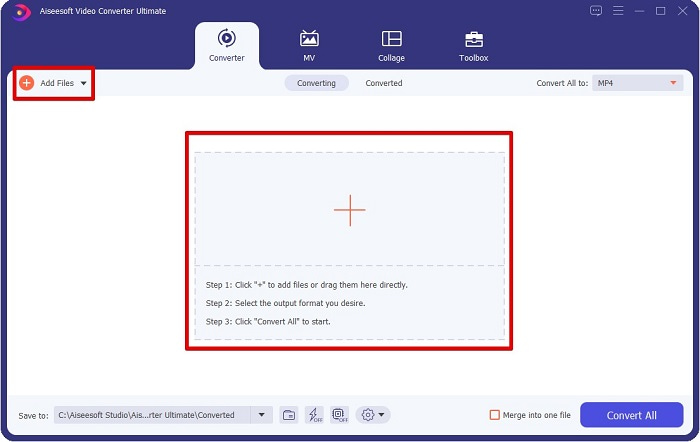
Step 2. कन्वर्टर लॉन्च करने के बाद, अपनी MPG फ़ाइल अपलोड करने के लिए Add Files बटन या + बटन पर क्लिक करें। आपके कंप्यूटर की फ़ाइलें दिखाई देंगी, जहाँ से आप अपने फ़ोल्डर्स में फ़ाइल ढूँढेंगे। फिर अपनी फ़ाइल को क्यू में जोड़ने के लिए Open पर क्लिक करें।.
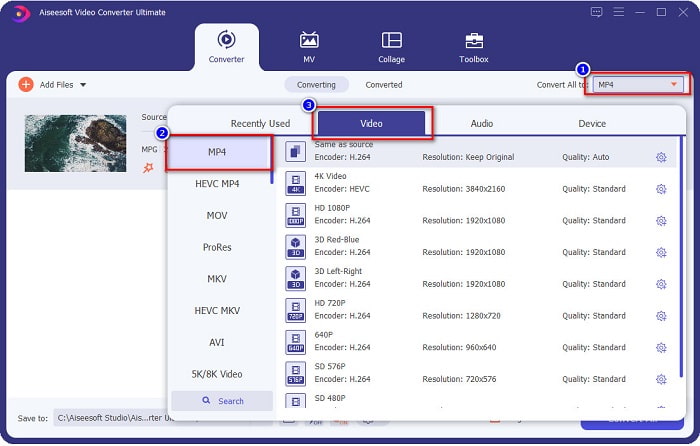
Step 3. अपनी MPG फ़ाइल का फ़ॉर्मेट बदलने के लिए, स्क्रीन के ऊपर दाईं ओर Convert All to पर क्लिक करें। जब आपको फ़ाइल फ़ॉर्मेट्स की सूची दिखाई दे, तो MP4 फ़ाइल फ़ॉर्मेट चुनें।.
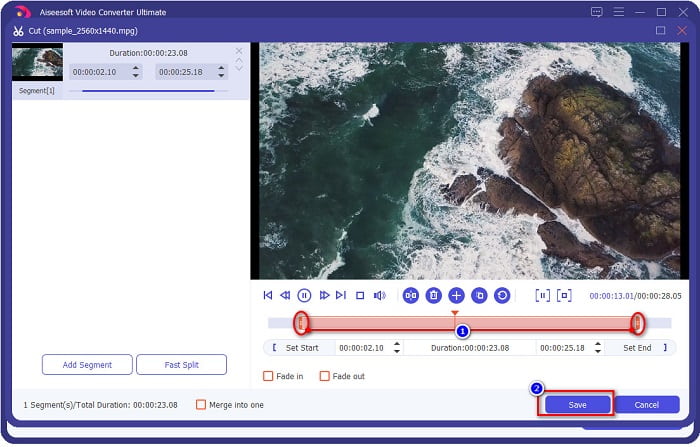
अगर आप अपने वीडियो की लंबाई काटना चाहते हैं, तो वीडियो को ट्रिम करने के लिए scissor बटन पर क्लिक करें। play head बटनों को ड्रैग करके आप अपने वीडियो की लंबाई को एडजस्ट कर सकते हैं। समाप्त करने के लिए Save पर क्लिक करें।.
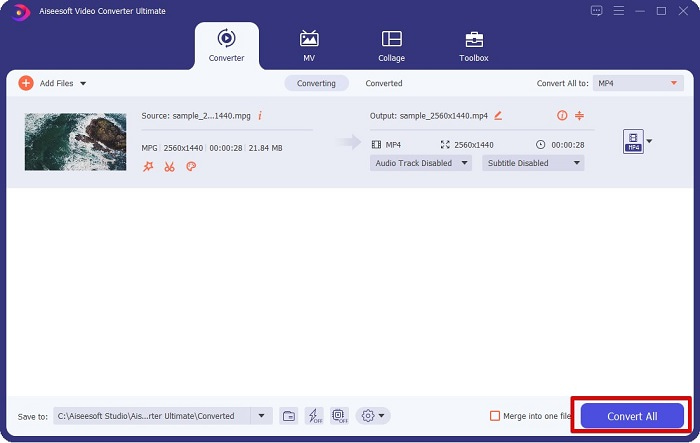
Step 4. जब आप अपनी मनचाही फ़ाइल फ़ॉर्मेट चुन लें, तो अपनी MPG फ़ाइल को MP4 फ़ाइल में कनवर्ट करने के लिए Convert All पर क्लिक करें। थोड़ी देर प्रतीक्षा करें, फिर आपकी MPG फ़ाइल MP4 फ़ाइल में बदल जाएगी। इन सरल चरणों के साथ, आपने आसानी से अपनी MPG फ़ाइल को MP4 में कनवर्ट कर लिया है।.
2. मुफ्त ऑनलाइन कन्वर्टर का उपयोग करें
FVC Free Online Video Converter आपको बिना साइनअप के मुफ्त में अपनी MPG फ़ाइल को MP4 फ़ाइल फ़ॉर्मेट में कनवर्ट करने की सुविधा देता है। यह एक फ्री ऑनलाइन वीडियो कन्वर्टर है जो आपको बिना किसी लिमिटेशन के कन्वर्ट करने देता है। इसके अलावा, आप इस कन्वर्टर से ऑनलाइन बड़ी फ़ाइलें भी कन्वर्ट कर सकते हैं। आपको कुछ भी डाउनलोड करने की ज़रूरत नहीं, क्योंकि आप इसे सीधे ऑनलाइन एक्सेस कर सकते हैं। हालाँकि, इसका एक नुक़सान यह है कि यह इंटरनेट पर निर्भर है, यानी कन्वर्ज़न कितनी तेज़ होगी, यह आपके इंटरनेट पर निर्भर करता है। फिर भी, बहुत से उपयोगकर्ताओं ने इस कन्वर्टर का इस्तेमाल किया है, और यह साबित हो चुका है कि यह एक शानदार वीडियो कन्वर्टर है।.
FVC फ्री ऑनलाइन वीडियो कन्वर्टर में कन्वर्ट करने के चरणों की सूची यहां दी गई है:
Step 1. अपने ब्राउज़र में जाएँ और FVC Free Online Video Converter सर्च करें।.
Step 2. जब आप वेबपेज पर पहुँच जाएँ, तो Add Files to Convert पर क्लिक करें। एक टेक्स्टबॉक्स दिखाई देगा, जहाँ आपको पहले लॉन्चर डाउनलोड करना होगा। लॉन्चर डाउनलोड हो जाने पर आपको आपकी फ़ाइलों पर ले जाया जाएगा, वहाँ वह MPG फ़ाइल चुनें जिसे आप कन्वर्ट करना चाहते हैं।.
फ़ाइलों को बैच में कनवर्ट करने के लिए डेस्कटॉप संस्करण डाउनलोड करें।.
Step 3. MPG फ़ाइल चुनने के बाद, आपको पहली इंटरफ़ेस दिखाई देगी जहाँ वीडियो फ़ॉर्मेट्स की सूची सेट के रूप में दिखेगी। अपनी MPG फ़ाइल को ऑनलाइन MP4 में कन्वर्ट करने से पहले MP4 चुनें।.
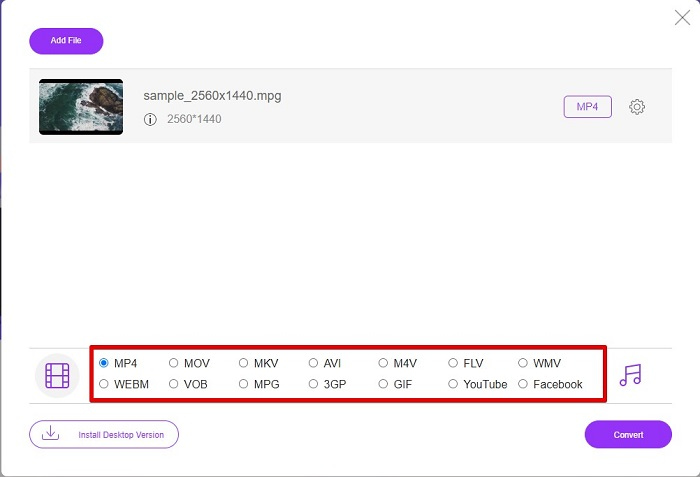
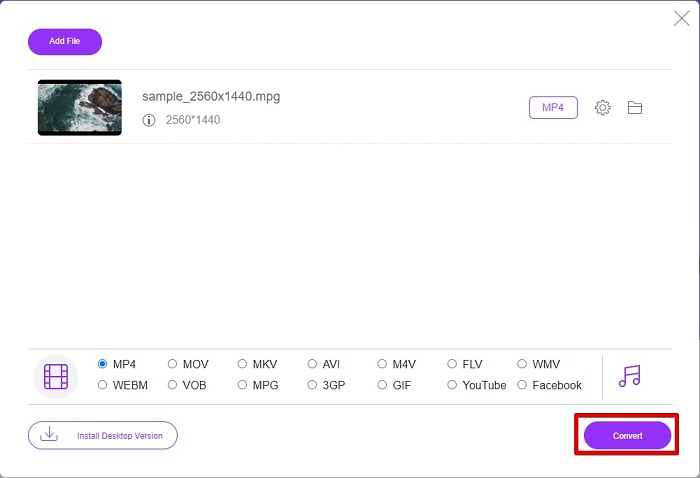
Step 4. कन्वर्ज़न शुरू करने के लिए Convert बटन पर क्लिक करें। एक नया टैब खुलेगा जहाँ आप अपने कंप्यूटर की फ़ाइलों में यह चुनेंगे कि कनवर्ट की गई फ़ाइल कहाँ सेव करनी है, फिर select folder पर क्लिक करें।.
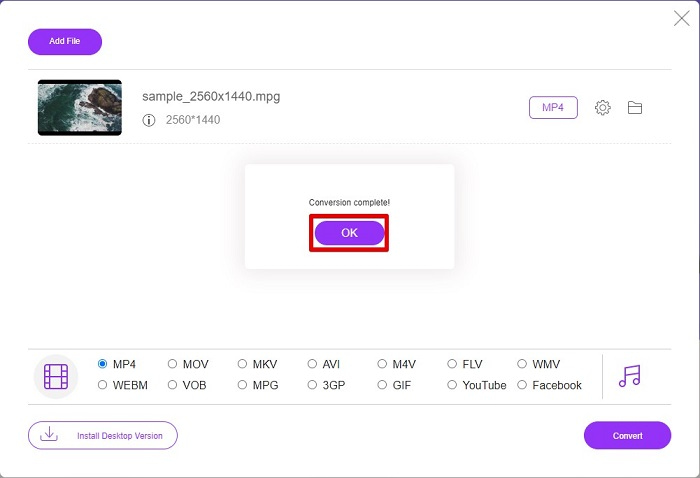
Step 5. अंत में, आपकी फ़ाइल कन्वर्ट होना शुरू हो जाएगी; कन्वर्ज़न पूरा हो जाने पर समाप्त करने के लिए OK पर क्लिक करें। और बस! आपने 1-2-3 जितना आसान कन्वर्ट करना पूरा कर लिया!
3. ConvertFiles.com का प्रयोग करें
ConvertFiles.com आपकी MPG फाइल को MP4 में बदलने के लिए एक मुफ्त ऑनलाइन कन्वर्टर ऐप है। यह आपको फ़ाइल स्वरूपों को 300 प्रकार के फ़ाइल स्वरूपों में परिवर्तित करने की अनुमति देता है। और यदि आप एक एमपीजी से एमपी4 कनवर्टर ऑनलाइन ढूंढ रहे हैं जो आपको दस्तावेज़, चित्र, वीडियो, प्रस्तुतीकरण, और बहुत कुछ परिवर्तित करने में सक्षम बनाएगा। हालाँकि, इस ऑनलाइन कनवर्टर का उपयोग करने में, आपको बहुत सारे परेशान करने वाले विज्ञापन मिलेंगे। फिर भी, यह ऑनलाइन कनवर्टर अभी भी कोशिश करने लायक है और आशाजनक साबित हुआ है।
यहां बताया गया है कि आप अपनी एमपीजी फाइल को एमपी4 फाइल फॉर्मेट में कैसे बदलेंगे:
Step 1. अपने ब्राउज़र में ConvertFiles.com सर्च करें ताकि सीधे वेबपेज पर पहुँच सकें।.
Step 2. अपनी MPG फ़ाइल चुनने के लिए आयताकार बटन या Choose a local file के बगल में मौजूद Browse बटन पर क्लिक करें। अपनी MPG फ़ाइल ढूँढें और उसे चुनें।.
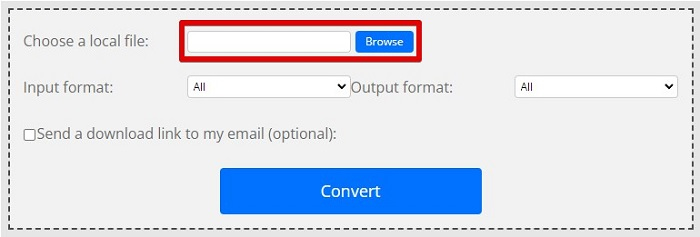
Step 3. जिस MPG फ़ाइल को आप कन्वर्ट करना चाहते हैं उसे चुनने के बाद, आउटपुट फ़ॉर्मेट में .mp4 फ़ॉर्मेट चुनें, इसके लिए drop-down बटन पर क्लिक करें।.
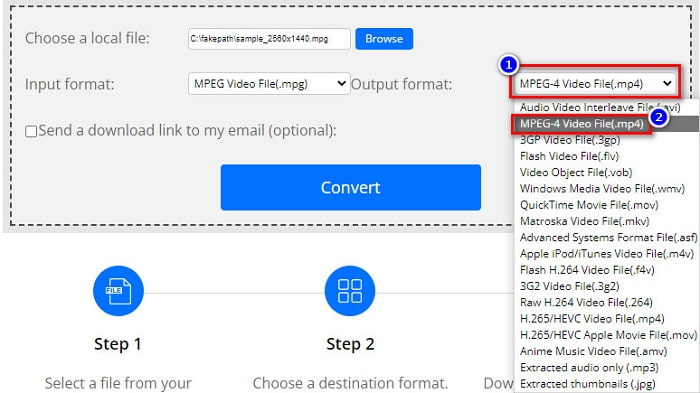
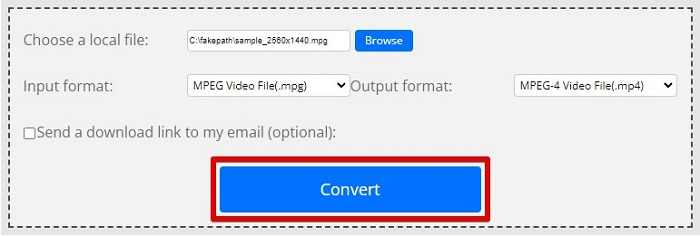
Step 4. जब आप मनचाहा फ़ाइल फ़ॉर्मेट चुन लें, तो Convert पर क्लिक करके अब आप अपनी फ़ाइल को कन्वर्ट कर सकते हैं।.
एमपीजी बनाम एमपी4
मूविंग पिक्चर एक्सपर्ट्स ग्रुप (एमपीईजी) द्वारा निर्मित, एमपीजी वीडियो, ऑडियो और मेटाडेटा जानकारी संग्रहीत करने के लिए एक सामान्य डिजिटल वीडियो प्रारूप है। इंटरनेट पर साझा करने के लिए फिल्में बनाते समय यह काफी उपयोगी है। MPG में उन फ़ाइलों में आमतौर पर MPEG-1 या MPEG-2 वीडियो/ऑडियो संपीड़न होता है।
2001 में मूविंग पिक्चर एक्सपर्ट्स ग्रुप (MPEG) द्वारा जारी, MP4 प्रारूप आपको वीडियो, ऑडियो, उपशीर्षक और छवि डेटा को अलग-अलग ट्रैक में सहेजने में मदद कर सकता है। यह एमपीईजी -4 भाग 14 के लिए छोटा है। साथ ही, यह वीडियो स्ट्रीमिंग और साझा करने के लिए उपयोग किए जाने वाले सबसे लोकप्रिय प्रारूपों में से एक है।
भाग 3. एमपीजी और एमपी4 प्रारूप के बारे में अक्सर पूछे जाने वाले प्रश्न
क्या मैं एमपीजी फाइलों को बिना उसकी गुणवत्ता खोए MP4 में बदल सकता हूं?
हां। वीडियो कन्वर्टर अल्टीमेट आपको अपने एमपीजी को एमपी4 प्रारूप में बदलने की अनुमति देता है, इसकी गुणवत्ता को खोए बिना, इसके फ़ाइल आकार के बावजूद।
मैं एमपीजी फाइलें कहां चला सकता हूं?
MPG फ़ाइलें व्यापक रूप से सपोर्ट की जाती हैं। इसलिए कई मीडिया प्लेयर इस फ़ाइल फ़ॉर्मेट को खोल सकते हैं, जिनमें Microsoft Windows Media Player और VideoLAN VLC Media Player शामिल हैं। अधिक जानकारी के लिए आप यह लेख देख सकते हैं: Best 4 MPG/MPEG Players for Windows/Mac/Android/iPhone [2021]
क्या मैं MP4 को MPG में बदल सकता हूँ?
हां। आप हमारे द्वारा ऊपर सूचीबद्ध किए गए फ़ाइल कन्वर्टर्स का उपयोग करके MPG को MP4 फ़ाइल स्वरूप में परिवर्तित कर सकते हैं।
निष्कर्ष
ऊपर सूचीबद्ध कन्वर्टर्स भरोसेमंद साबित हुए हैं। इन्हें इस्तेमाल करना आसान है और ये मुफ़्त हैं! लेकिन अगर आप ऐसा फ़ाइल कन्वर्टर चाहते हैं जो आपकी MPG फ़ाइल को MP4 फ़ाइल फ़ॉर्मेट में बदल सके और जिसमें आपकी फ़ाइल को बेहतर बनाने के लिए शानदार फीचर भी हों, तो Video Converter Ultimate सबसे अच्छा विकल्प है। इसके अलावा, अगर आप ऐसा ऑनलाइन कन्वर्टर चाहते हैं जो विज्ञापनों से मुक्त हो और बड़ी फ़ाइलों को भी आसानी से कन्वर्ट कर सके, तो FVC Free Online Converter आज़माएँ।.
-
 अपने मैक/विंडोज/ऑनलाइन पर एमपीजी को एमओवी में बदलने के 3 आसान तरीके
 अपनी MPG फ़ाइलों को कनवर्ट करना चाहते हैं और बाद में उन्हें अपने iOS, iPod, iPad या Mac पर ट्रांसपोर्ट करना चाहते हैं? यह आलेख यह पता लगाने में मदद करेगा कि एमपीजी को एमओवी में कैसे परिवर्तित किया जाए।
-
 गुणवत्ता खोए बिना MPG को FLV में कैसे बदलें [सिद्ध]
 आपको इस मीडिया प्लेयर पर अपनी पसंदीदा फिल्म देखनी चाहिए, लेकिन यह एमपीजी का समर्थन नहीं करता है। इस आलेख में पेश किए गए इन कन्वर्टर्स का उपयोग करके अपनी MPG फ़ाइल को FLV में बदलने का प्रयास करें।
-
 एमपीजी को WMV में मुफ्त में बदलने के लिए 2 अल्टीमेट एमपीजी कन्वर्टर्स
 क्या आप MPG को WMV फ्री में बदलना चाहते हैं? उस स्थिति में, आप भाग्यशाली हैं क्योंकि हमें पता चला है कि दो उपकरण हैं जिनका उपयोग आप अपनी एमपीजी फ़ाइलों को परिवर्तित करने के लिए कर सकते हैं।

