


 वीडियो कनवर्टर अंतिम
 स्क्रीन अभिलेखी
 वीडियो मरम्मत
इन ऑनलाइन जीआईएफ से वीडियो कन्वर्टर के साथ अपने जीआईएफ को ऑनलाइन कन्वर्ट करें
बेहतर संदेश व्यक्त करने के लिए संदेशों के साथ GIF भेजना हमारे लिए एक नई दिनचर्या बन गई है। इसके बावजूद, इंस्टाग्राम जैसे प्लेटफॉर्म अभी भी GIF फॉर्मेट को सपोर्ट नहीं करते हैं। यह केवल छवियों और वीडियो प्रारूप का समर्थन करता है, न कि स्थिर छवियों का। इसलिए, यदि आप अपने Instagram में GIF जोड़ने का प्रयास करते हैं, तो एक मौका है कि फ़ाइल लोड नहीं होगी या लोड करने में असमर्थ होगी। दूसरा, आप केवल एक स्थिर छवि प्राप्त कर सकते हैं यदि इसे पोस्ट किया गया हो। लेकिन एक और तरीका है, वह है थर्ड-पार्टी ऐप डाउनलोड करना या जीआईएफ को वीडियो फॉर्मेट में बदलने के लिए इसे ऑनलाइन एक्सेस करना। इन उपकरणों का उपयोग करना सीखना याद रखने के लिए एक महान ज्ञान है। तो, अगर आप वीडियो कनवर्टर के लिए ऑनलाइन GIF की तलाश कर रहे हैं तो आप सही जगह पर हैं। उपलब्ध उपकरण क्या हैं और उनके अनुसार उनका उपयोग कैसे करें, यह जानने के लिए पढ़ते रहें।

शीर्ष 1. इज़गीफ़
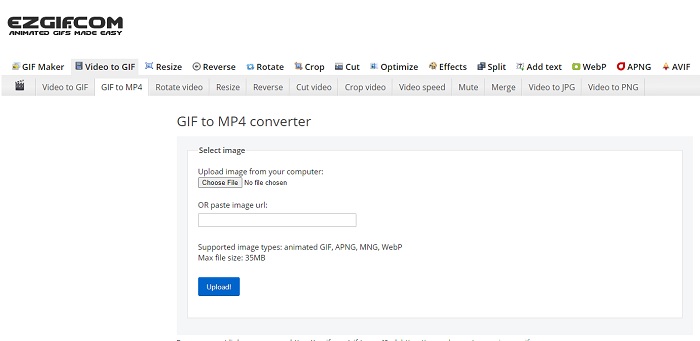
GIF बनाना और उसे कन्वर्ट करना मुश्किल लग रहा है? चिंता करने की ज़रूरत नहीं, क्योंकि Ezgif आपकी मदद के लिए तैयार है। यह ऑनलाइन टूल सिर्फ़ एक काम के लिए ही समर्पित नहीं है, बल्कि आप इसके ज़रिए अपने GIFs को एडिट भी कर सकते हैं। हालाँकि एडिटिंग की क्षमता बहुत ज़्यादा प्रभावशाली नहीं है, लेकिन यह एक मानक स्तर प्रदान करती है। इसके अलावा, GIF फ़ाइल बनाने और कन्वर्ट करने की भी एक सीमा तय है।.
पेशेवरों
- GIF बनाना आदर्श है।
- इसकी वेबसाइट पर सभी विज्ञापन PG-13 प्रतिबंधित हैं।
- शुरुआती के लिए सरल संपादन सुविधाएँ।
विपक्ष
- वेब इंटरफेस देखने में थोड़ा उबाऊ है।
- यदि आप GIF को कनवर्ट करने का प्रयास करते हैं तो केवल MP4 प्रारूप उपलब्ध है।
शीर्ष 2. क्लाउड कन्वर्ट
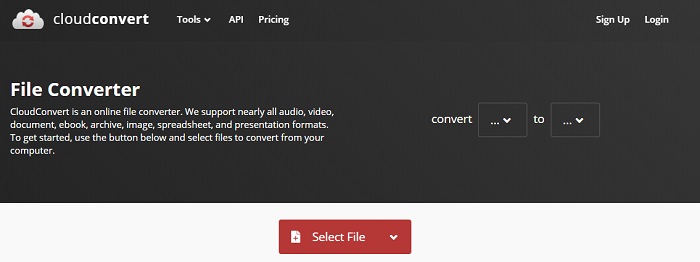
अगर हम कन्वर्ट करने की बात करें, तो Cloudconvert का नाम ज़रूर आएगा। यह ऑनलाइन GIF से वीडियो कन्वर्टर ख़ास तौर पर किसी भी वीडियो और ऑडियो को प्ले होने योग्य फ़ॉर्मेट में बदलने के लिए बनाया गया है। लेकिन इस टूल की एक सीमा है—आप इससे कन्वर्ट किए गए GIFs की क्वालिटी को बेहतर नहीं बना सकते। इसलिए जो है, जैसा है, वैसा ही इस टूल से मिलेगा।.
पेशेवरों
- ऑनलाइन सबसे शक्तिशाली कन्वर्टर्स में से एक।
- आप टूल को डाउनलोड किए बिना इसे एक्सेस कर सकते हैं।
- इसके वेब इंटरफेस पर एक शानदार रंग संयोजन।
विपक्ष
- बेहतर फ़ाइल बनने के लिए आपके द्वारा कनवर्ट की गई फ़ाइल को संपादित नहीं कर सकते।
- बदलने में विफलता की संभावना बहुत अच्छी है। खासकर अगर आपका इंटरनेट बाधित हो गया है।
शीर्ष 3. कन्वर्टियो
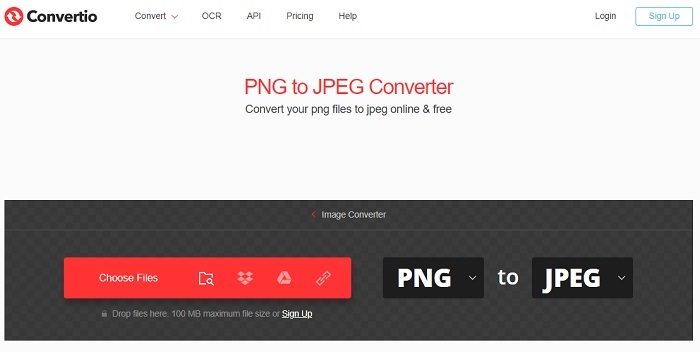
Cloudconvert की तरह ही, Convertio भी सिर्फ़ कन्वर्शन के लिए ही बनाया गया है। यह उतने ही ज़्यादा फ़ॉर्मेट को सपोर्ट करता है जितना इससे पहले वाला टूल करता है। लेकिन इसकी कमी यह है कि इसकी वेब पेज पर हर जगह विज्ञापन (Ads) दिखाई देते हैं, जो थोड़े परेशान कर सकते हैं। फिर भी, इन Ads के बावजूद, यह फ़ाइलों को नए फ़ॉर्मेट में बदलने की प्रैक्टिस के लिए एक अच्छा कन्वर्टर टूल माना जा सकता है।.
पेशेवरों
- वेब पर उपलब्ध ओपन एक्सेस टूल।
- कनवर्ट करना प्रारंभ करने के लिए कोई अतिरिक्त फ़ाइल डाउनलोड करने की आवश्यकता नहीं है।
- चुनें कि फ़ाइल का बिटरेट क्या है।
विपक्ष
- इस टूल और एडिटिंग से GIF भी नहीं बना सकते।
- विज्ञापन हर जगह हैं इसलिए अनावश्यक वेबसाइट न खोलने से बचें।
शीर्ष 4. ज़मज़री
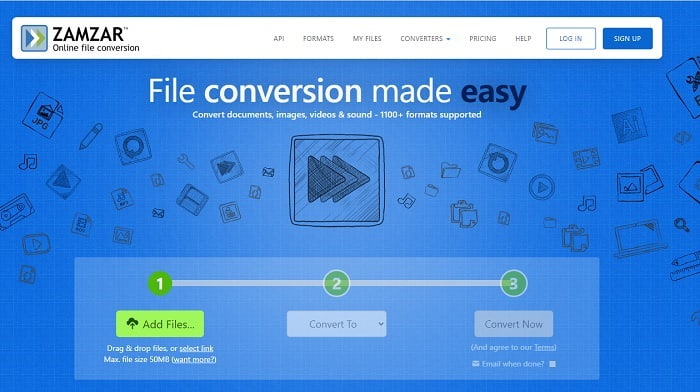
Zamzar का यूज़र इंटरफ़ेस बेहतरीन है और इस टूल का इस्तेमाल करना बेहद आसान है। लेकिन अधिकतम फ़ाइल साइज 50MB तक सीमित है, इसलिए अगर आप इससे ज़्यादा साइज की फ़ाइल कन्वर्ट करना चाहते हैं, तो आपको यह टूल खरीदना होगा या लॉग‑इन करना होगा। साथ ही, अगर कन्वर्शन प्रक्रिया शुरू हो गई हो, तो आप x बटन पर क्लिक करके भी इसे बीच में नहीं रोक सकते। इसलिए कन्वर्ट करने से पहले यह ज़रूर सुनिश्चित कर लें कि आपने सही फ़ाइल चुनी है, क्योंकि प्रक्रिया को रोका नहीं जा सकता।.
पेशेवरों
- यहां सभी वीडियो, इमेज और ऑडियो कन्वर्ट करें।
- यहां सभी फाइलें एक दिन से अधिक समय तक संग्रहीत की जाती हैं।
- एकल फ़ाइल के लिए अधिकतम फ़ाइल आकार 50 mb है।
विपक्ष
- कनवर्ट करने की प्रक्रिया आपके इंटरनेट की गति पर निर्भर करती है इसलिए यदि आपके पास इंटरनेट है तो कनवर्ट करने में बहुत समय लगेगा।
- आपके परिवर्तित वीडियो को बेहतर में संपादित नहीं कर सकता।
अनुशंसित: एफवीसी वीडियो कन्वर्टर अल्टीमेट - बेस्ट जीआईएफ कन्वर्टर
जैसा कि कहा जाता है, सबसे अच्छा आख़िर में बचाकर रखते हैं और यहाँ वह है FVC Ultimate Video Converter। यह प्रीमियम टूल उन सभी कन्वर्टर्स से कहीं ज़्यादा सक्षम है जो यहाँ सूची में हैं, या जो नहीं भी हैं। अगर आप ऐसा टूल ढूँढ रहे हैं जो आपकी कन्वर्शन क्वालिटी को बेहतर बनाए और जिसमें इंटरनेट की आवश्यकता न हो, तो यह आपके लिए उचित विकल्प है। साथ ही, इस टूल की ख़ास बात यह है कि यह न केवल कन्वर्ट कर सकता है, बल्कि एन्हांस, क्रिएट और कन्वर्शन से कहीं अधिक काम कर सकता है। यह उपयोगकर्ता को इसके सभी फ़ीचर्स एक्सप्लोर करने देता है ताकि वह दूसरों से बेहतर आउटपुट तैयार कर सके। नीचे दिए गए चरणों को ध्यान से पढ़ें ताकि आप इस टूल का उपयोग चरण‑दर‑चरण सीख सकें। बाद में आप टूलबार को देखकर कन्वर्ट किए गए GIF को और बेहतर बना सकते हैं।.
चरण 1. सही प्रोग्राम टूल को अपने हार्ड ड्राइव पर इंस्टॉल करें। प्रेफ़रेंस का पालन करें, उन्हें अपनी ज़रूरत के अनुसार बदलें और अंत में Finish पर क्लिक करके टूल लॉन्च करें।.
फ्री डाउनलोडWindows 7 या बाद के संस्करण के लिएसुरक्षित डाउनलोड
फ्री डाउनलोडMacOS 10.7 या बाद के संस्करण के लिएसुरक्षित डाउनलोड
चरण 2. अगर टूल बैकग्राउंड में चल रहा है, तो आपको अपने टैब पर एक छोटा आइकन दिखाई देगा जो यह संकेत देगा कि टूल लॉन्च हो चुका है। साथ ही, आपके डिस्प्ले पर इस तरह का एक इंटरफ़ेस भी दिखाई देगा।.
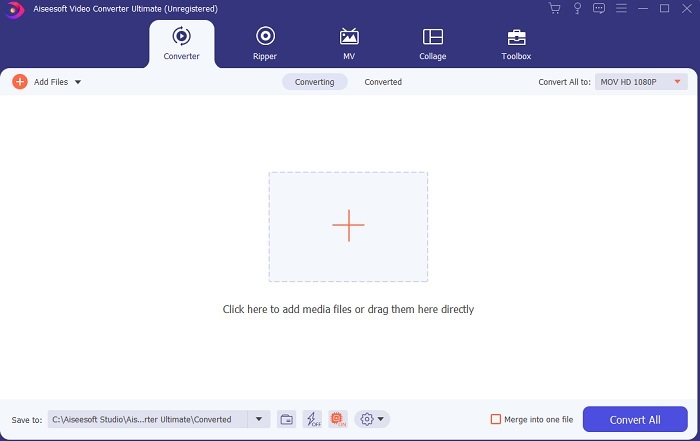
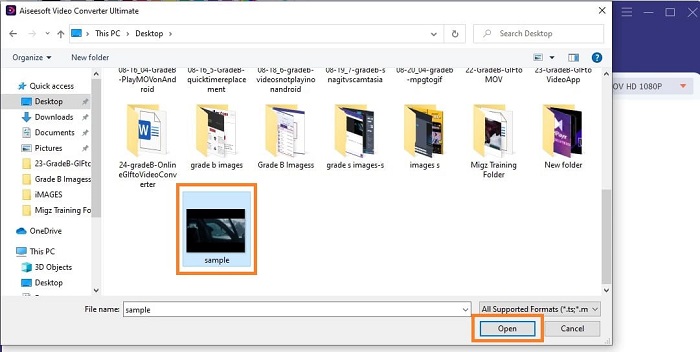
चरण 3. कन्वर्टर में फ़ाइलें जोड़ने के लिए इंटरफ़ेस के बीच में मौजूद Plus साइन पर क्लिक करें। या फिर, अगर 2 या 3 से ज़्यादा फ़ाइलें हों, तो आप उन्हें ड्रैग और ड्रॉप भी कर सकते हैं।.
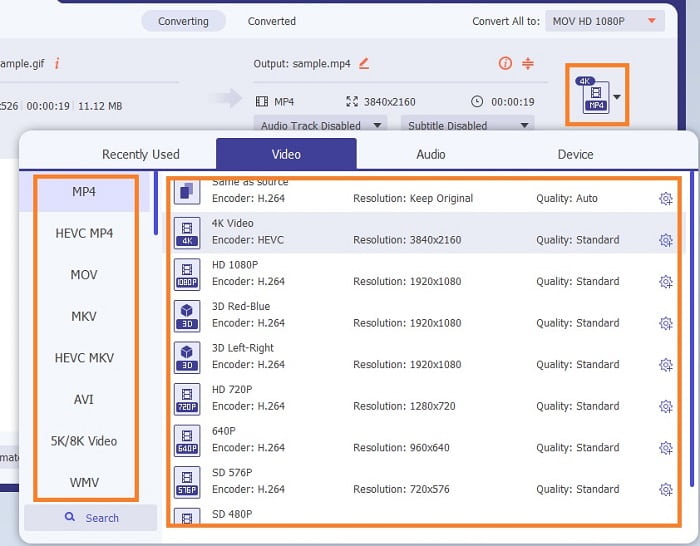
चरण 4. अगर GIF फ़ाइल इंटरफ़ेस में आ चुकी है, तो drop-down बटन दबाएँ और उसके सबमेनू में से वह फ़ॉर्मेट चुनें जिसमें आप कन्वर्ट करना चाहते हैं। कन्वर्शन प्रक्रिया शुरू करने के लिए Convert All पर क्लिक करें।.
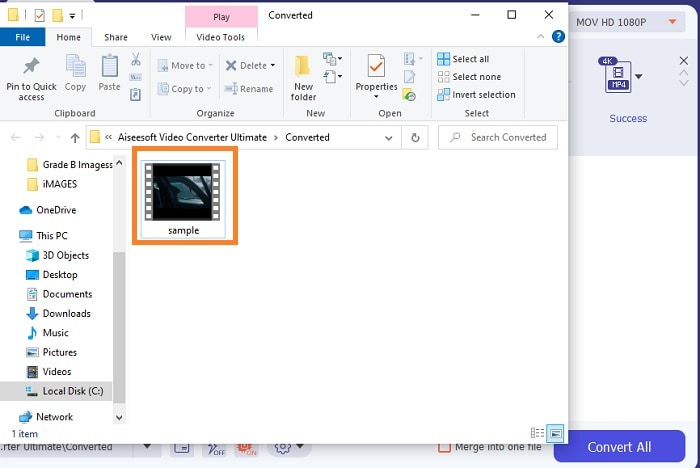
चरण 5. प्रक्रिया पूरी हो जाने पर फ़ाइल मैनेजर अपने‑आप टैब पर खुल जाएगा और आप फ़ाइल को चेक कर सकेंगे। अगर आप कन्वर्ट किए गए GIF को और बेहतर बनाना चाहें, तो बाद में टूलबार में उपलब्ध विकल्पों की जाँच कर सकते हैं।.
पेशेवरों
- यह एक बहुउद्देश्यीय उपकरण है जिसका उपयोग इसके ग्राहक कर सकते हैं।
- दूसरों की तुलना में बहुत बेहतर दिखने के लिए अपने अंतिम आउटपुट में प्रभाव और अधिक जोड़कर अपनी कल्पना को सीमित न करें।
- ऑनलाइन और ऑफलाइन उपलब्ध किसी भी टूल की तुलना में रूपांतरण प्रक्रिया बहुत तेज है।
विपक्ष
- पे पर यूज टूल का मतलब है कि आप इस टूल को मुफ्त में एक्सेस नहीं कर सकते हैं लेकिन यह इतना महंगा नहीं है।
- डाउनलोड करने योग्य टूल, इसका मतलब केवल यह है कि टूल लॉन्च करने के लिए आपको एक अतिरिक्त फ़ाइल की आवश्यकता है। लेकिन इसके बावजूद अगर इंटरनेट बाधित हो गया है तो आप बिना किसी चिंता के इस टूल का इस्तेमाल कर सकते हैं।
ऑनलाइन GIF से वीडियो कनवर्टर के बारे में अक्सर पूछे जाने वाले प्रश्न
क्या मैं GIF के प्रारूप में रिकॉर्डिंग कर सकता हूँ?
जी हाँ, आप अपना ख़ुद का GIF रिकॉर्ड कर सकते हैं। अगर आप इस शक्तिशाली लेकिन हल्के GIF रिकॉर्डर या किसी दूसरे ऐसे रिकॉर्डर का इस्तेमाल करें, जो GIF फ़ॉर्मेट को सपोर्ट करता हो, तो आप आसानी से बना सकते हैं। GIF फ़ॉर्मेट में रिकॉर्डिंग कैसे करें, यह जानने के लिए Best GIF Recorder Review पढ़ें।.
जीआईएफ के लिए सबसे अच्छा विकल्प कौन सा है? वेबएम या एपीएनजी?
जीआईएफ पुराने प्रारूप हैं जो एनिमेटेड और स्थिर छवियों का समर्थन करते हैं लेकिन जैसे-जैसे समय बीतता है। अब WebM और APNG जैसे प्रतियोगी हैं। आइए दोनों की तुलना करें, वेबएम नया जीआईएफ है जो वेबसाइट पर चलती छवियों का समर्थन करता है लेकिन यदि आप खोज इंजन के पुराने संस्करण का उपयोग करने का प्रयास करते हैं तो वेबएम असमर्थित है। दूसरी ओर, एपीएनजी को दोनों की तुलना में अधिक आकर्षक रूप से जाना जाता है क्योंकि यह 24 बिट रंग और पारदर्शिता का समर्थन करता है लेकिन कुछ सोशल मीडिया प्लेटफॉर्म एपीएनजी का समर्थन नहीं करते हैं।
जीआईएफ का संक्षिप्त नाम क्या है?
टेक्स्ट में GIF का मतलब ग्राफिक इंटरचेंज फॉर्मेट है।
निष्कर्ष
अंत में, अब यह समझना आसान हो गया है कि वीडियो कन्वर्टर्स के लिए सबसे अच्छा ऑफ़लाइन और ऑनलाइन GIF क्या है जिसका आप उपयोग कर सकते हैं। यह जानना कि इस उपकरण का उपयोग कैसे करना है, विकसित करने के लिए एक महान कौशल है और शायद भविष्य में, आप इसका उपयोग भुगतान करने के लिए भी कर सकते हैं। यदि आप अंतिम प्रदर्शन चाहते हैं तो आपको बिल्कुल अंतिम उपकरण चुनना होगा। FVC अल्टीमेट वीडियो कन्वर्टर हमेशा किसी भी वीडियो को कन्वर्ट करने और इसे बढ़ाने के लिए सबसे अच्छा टूल होता है ताकि दूसरों पर या किसको डिलीवर किया जा सके। जैसा कि वे कहते हैं, कुछ भी कम की अपेक्षा न करें क्योंकि यह उपकरण अपने नाम के अर्थ से अधिक लाता है।
-
 वेबएम से जीआईएफ - 3 मुफ्त वेबएम से जीआईएफ कन्वर्टर्स अपनी खुद की जीआईएफ बनाने के लिए
 क्या WebM एक GIF है? वीडियो को GIF में कैसे बदलें? क्या जीआईएफ कनवर्टर के लिए कोई मुफ्त वेबएम है? यह पोस्ट WebM को GIF में बदलने में आपकी मदद करने के लिए 3 निःशुल्क तरीके साझा करती है।
-
 फोटोशॉप/एफएफएमपीईजी के बिना एमकेवी वीडियो को एनिमेटेड जीआईएफ में कैसे बदलें
 अपने कंप्यूटर पर एमकेवी फिल्में डाउनलोड करने और देखने के बाद, आप कुछ अद्भुत पल दोस्तों के साथ या इंटरनेट पर जीआईएफ के रूप में साझा करना चाह सकते हैं। इस लेख में, आप एमकेवी को जीआईएफ में बदलने के 2 सबसे आसान तरीकों के बारे में जान सकते हैं।
-
 ऑनलाइन जीआईएफ मेकर के माध्यम से अपना सर्वश्रेष्ठ एनिमेटेड जीआईएफ बनाएं [2021]
 इन सरल ऑनलाइन जीआईएफ निर्माताओं का उपयोग करके जीआईएफ बनाने के तरीके के बारे में एक जानकारीपूर्ण समीक्षा, जिसका आप पहले से ही वेब पर सामना कर रहे हैं या नहीं।
