


 वीडियो कनवर्टर अंतिम
 स्क्रीन अभिलेखी
 वीडियो मरम्मत
 सुरक्षित डाउनलोड
इनपेंट वॉटरमार्क रिमूवर के बारे में एक वॉक-थ्रू समीक्षा
क्या आप यह सीखने के लिए तैयार हैं कि Inpaint का उपयोग करके वॉटरमार्क कैसे हटाया जाए? तो हम आपकी मदद के लिए तैयार हैं! यदि आप यह गाइड पढ़ रहे हैं, तो संभव है कि आप अपनी तस्वीरों से वॉटरमार्क हटाने का सबसे अच्छा तरीका ढूंढ रहे हों। अब आपको खुद को परेशान करने की ज़रूरत नहीं। यह पोस्ट आपको उन प्रोग्रामों की ईमानदार समीक्षा देगी जिन्हें आपको इस्तेमाल करना चाहिए, जैसे कि Inpaint Watermark Remover। आप हर टूल के बारे में पर्याप्त जानकारी जानेंगे, जिनमें उसकी विशेषताएँ, फायदे, नुकसान और कीमत शामिल हैं। साथ ही, हम आपको Inpaint के सबसे अच्छे विकल्प के बारे में भी बताएँगे, जिससे आप अपनी फोटो से वॉटरमार्क हटा सकें। इस तरह आपके पास यह चुनने के लिए एक और विकल्प होगा कि आप कौन‑सा वॉटरमार्क रिमूवर इस्तेमाल कर सकते हैं। आइए इस लेख को पढ़ें और अतिरिक्त उपयोगी जानकारी जानें।.

भाग 1: इनपेंट का अवलोकन
महान और भरोसेमंद सॉफ़्टवेयर Inpaint खास तौर पर तस्वीरों से अनचाहे तत्वों को हटाने के लिए बनाया गया है, जैसे वॉटरमार्क, लोगो, टेक्स्ट, स्टैम्प आदि। बाज़ार में कई उन्नत फोटो‑एडिटिंग प्रोग्राम मौजूद हैं। Inpaint उनमें से नहीं है। यदि आप एक साधारण फ़ोटोग्राफ़र, शुरुआती उपयोगकर्ता, या व्यस्त यूज़र हैं जिसके पास हमेशा Photoshop जैसे जटिल फोटो‑एडिटिंग सॉफ़्टवेयर का उपयोग करने का समय नहीं है, तो आपको Inpaint की सादगी और तेज़ी पसंद आएगी। इसके अलावा, Windows और Mac उपयोगकर्ता Inpaint का उपयोग कर सकते हैं। आप ऐप्स डाउनलोड कर सकते हैं, और सीधे ऑनलाइन भी इसका उपयोग कर सकते हैं। अंत में, Inpaint का बुद्धिमान मार्कर टूल अवांछित वस्तुओं को हटाना बहुत आसान बना देता है। साथ ही, Inpaint आपकी किसी भी क्षतिग्रस्त पुरानी फोटो को बेहतरीन तरीके से बहाल करने में मदद कर सकता है। हालाँकि, यदि आप अपनी इमेज को हाई‑रिज़ॉल्यूशन में सेव करना चाहते हैं, तो आपको सब्सक्रिप्शन खरीदना होगा। मुफ्त संस्करण का उपयोग करते समय यह केवल कम गुणवत्ता प्रदान कर सकता है।.
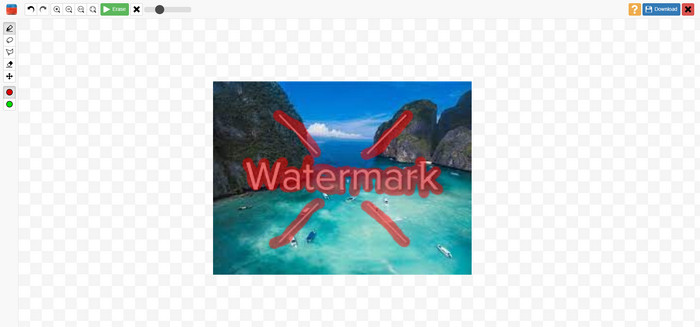
Inpaints की विशेषताएं, पेशेवरों और विपक्ष
विशेषताएँ
◆ एक तस्वीर से अवांछित तत्वों को हटा दें।
◆ पुरानी तस्वीरों की मरम्मत करें।
◆ चेहरे की रीटचिंग में सक्षम
पेशेवरों
- एक सहज इंटरफ़ेस प्रदान करता है, जिसका उपयोग करना आसान है।
- यह वॉटरमार्क को तुरंत हटा सकता है। यह वॉटरमार्क को तुरंत हटा सकता है।
विपक्ष
- जटिल पृष्ठभूमि वाले फ़ोटो पर अच्छा प्रदर्शन नहीं करता है।
- बेहतरीन सुविधाओं का अनुभव करने के लिए सदस्यता खरीदें।
वॉटरमार्क हटाने के लिए इनपेंट का उपयोग कैसे करें
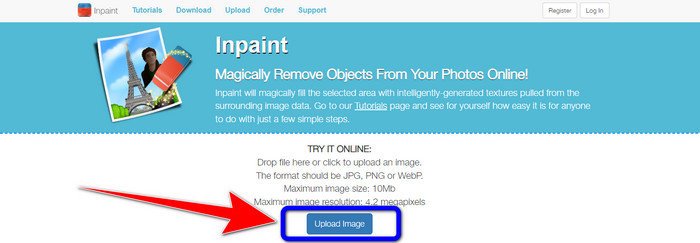
चरण 1: Inpaint की वेबसाइट पर जाएँ। फिर, Upload Image बटन पर क्लिक करें और वह फोटो जोड़ें जिसमें से आप वॉटरमार्क हटाना चाहते हैं।.
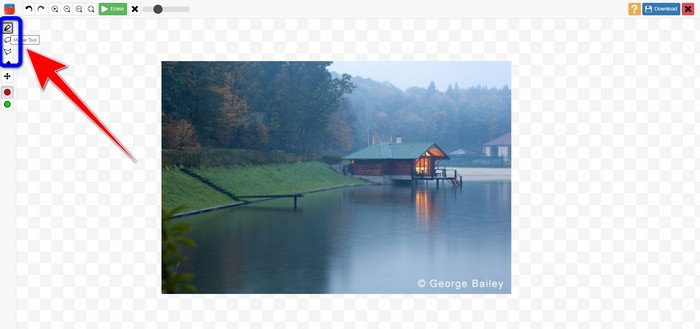
चरण 2: फोटो जोड़ने के बाद, आपको वॉटरमार्क को हाईलाइट करने के लिए वॉटरमार्क रिमूवर टूल्स का उपयोग करना होगा। ये टूल Marker, Polygonal और Lasso हैं।.
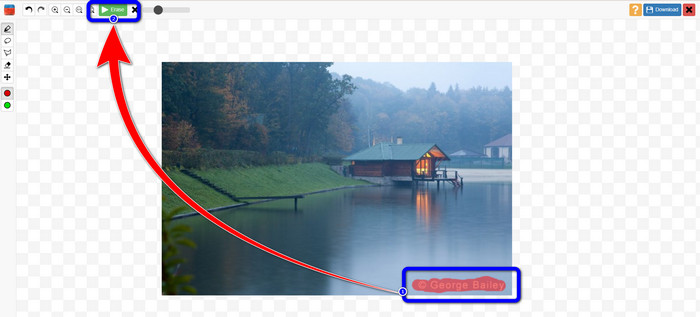
चरण 3: जब आप अपनी फोटो में वॉटरमार्क को हाईलाइट कर लें, तो स्क्रीन के ऊपर बाएँ हिस्से में स्थित Erase बटन पर क्लिक करें और हटाने की प्रक्रिया का इंतज़ार करें।.
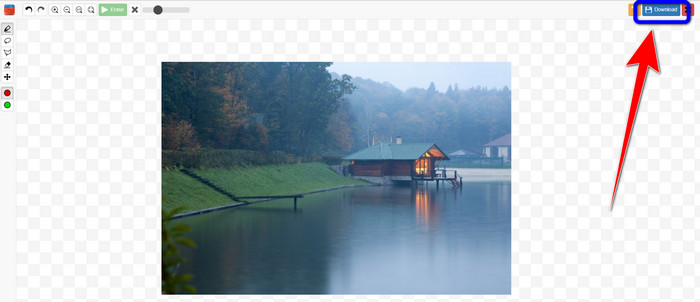
चरण 4: जब वॉटरमार्क हट जाए, तो Download बटन पर क्लिक करें और अपना आउटपुट डेस्कटॉप पर सेव कर लें।.
भाग 2: ऑनलाइन तस्वीरों से वॉटरमार्क हटाने के लिए इनपेंट का सबसे अच्छा विकल्प
वॉटरमार्क को हटाने के लिए इनपेंट का उपयोग करने के प्रभावी तरीके को जानने के बाद, यहाँ सबसे अच्छा विकल्प है जिसका उपयोग आप अपनी तस्वीरों से वॉटरमार्क हटाने के लिए कर सकते हैं।
FVC फ्री वॉटरमार्क रिमूवर
Inpaint के अलावा आप जिस सबसे अच्छे ऑनलाइन टूल का उपयोग कर सकते हैं, वह है FVC Free Watermark Remover। यह ऑनलाइन सॉफ़्टवेयर आपको अपनी इमेज से सभी अनावश्यक तत्व, जैसे वॉटरमार्क, लोगो, टेक्स्ट, सिग्नेचर इत्यादि हटाने की सुविधा देता है। आप कई रिमूवर टूल्स का उपयोग कर सकते हैं, जैसे Brush, Polygonal और Lasso। लेकिन यह सब नहीं है। इस ऑनलाइन सॉफ़्टवेयर में Cropping फीचर भी है, जिसका मतलब है कि आप अपनी फोटो को क्रॉप करके भी वॉटरमार्क हटा सकते हैं। इसकी हटाने की प्रक्रिया तेज़ है, इसलिए आपको ज़्यादा समय नहीं लगाना पड़ेगा। वॉटरमार्क हटाने के बाद, आप अपना अंतिम आउटपुट उसी फ़ॉर्मेट में सेव कर सकते हैं। यह JPG, PNG, BMP और अन्य कई इमेज फ़ॉर्मेट को सपोर्ट करता है। इसके अलावा, इस वॉटरमार्क रिमूवर का इंटरफ़ेस समझने में आसान है और इसमें पालन करने के लिए सरल चरण हैं, जो गैर‑पेशेवर उपयोगकर्ताओं के लिए उपयुक्त हैं।.
विशेषताएँ
◆ वॉटरमार्क को खत्म करने के लिए छवियों को क्रॉप करने में सक्षम।
◆ मूल गुणवत्ता के साथ छवियों का निर्यात करें।
◆ लासो, ब्रश और पॉलीगोनल टूल का उपयोग करके तस्वीरों से अप्रिय तत्वों को हटा दें।
पेशेवरों
- गैर-पेशेवर उपयोगकर्ताओं के लिए बिल्कुल सही।
- इसमें एक बोधगम्य यूजर इंटरफेस है।
- बिलकुल मुफ्त।
- इसकी तेजी से हटाने की प्रक्रिया है।
- प्रत्येक उपयोगकर्ता की गोपनीयता की गारंटी दें।
- एप्लिकेशन इंस्टॉल करने की आवश्यकता नहीं है।
विपक्ष
- एप्लिकेशन को संचालित करने के लिए, इंटरनेट कनेक्शन की आवश्यकता होती है।
Watermark Remover टूल्स का उपयोग करते हुए
चूंकि वॉटरमार्क क्षेत्र आपकी तस्वीर के केंद्र में है, इसलिए हम क्रॉपिंग टूल के बजाय वॉटरमार्क रिमूवर टूल का उपयोग करेंगे। एफवीसी फ्री वॉटरमार्क रिमूवर का उपयोग करके अपनी तस्वीरों से वॉटरमार्क हटाने के लिए नीचे दिए गए इन सरल चरणों का पालन करें।
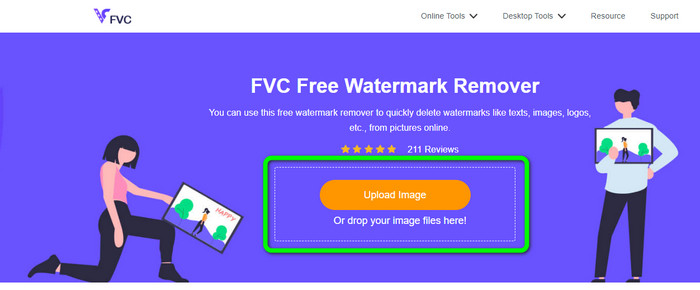
चरण 1: FVC Free Watermark Remover की वेबसाइट पर जाएँ। Upload Image बटन पर क्लिक करके अपना वॉटरमार्क वाला इमेज अपलोड करें। आप सीधे अपनी फ़ाइल को खींचकर (ड्रैग) भी ला सकते हैं।.
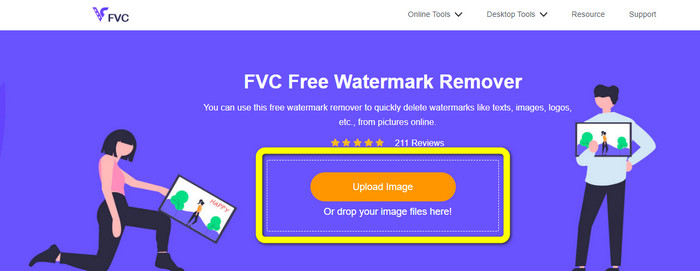
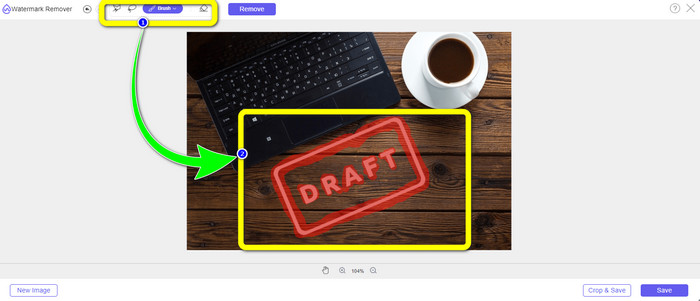
चरण 2: इंटरफ़ेस के ऊपरी हिस्से में दिखाई देने वाले रिमूवर टूल्स का उपयोग करते हुए वॉटरमार्क को हाईलाइट करें।.
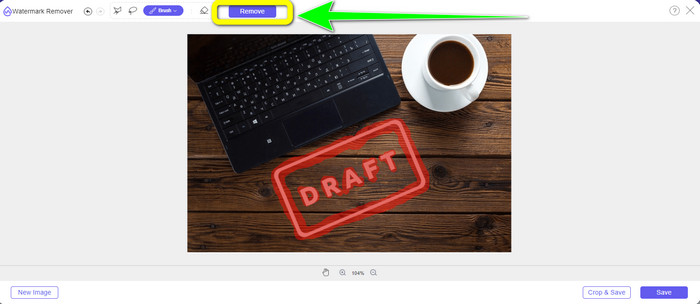
चरण 3: जब आप अपनी इमेज से वॉटरमार्क को हाईलाइट कर लें, तो Remove बटन पर क्लिक करें ताकि वॉटरमार्क हट जाए, और तेज़ हटाने की प्रक्रिया के पूरा होने का इंतज़ार करें।.
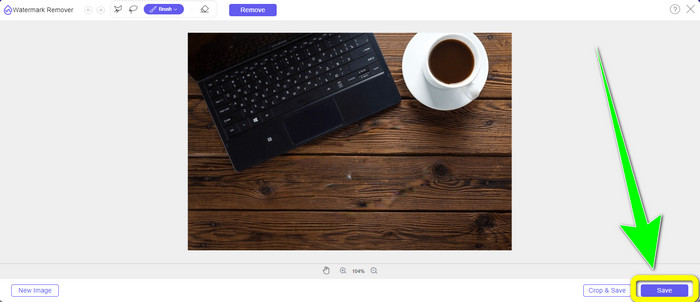
चरण 4: अपनी फोटो से वॉटरमार्क पूरी तरह हट जाने के बाद, फोटो को बिना वॉटरमार्क के डाउनलोड करने के लिए Save बटन पर क्लिक करें।.
Cropping टूल का उपयोग करते हुए
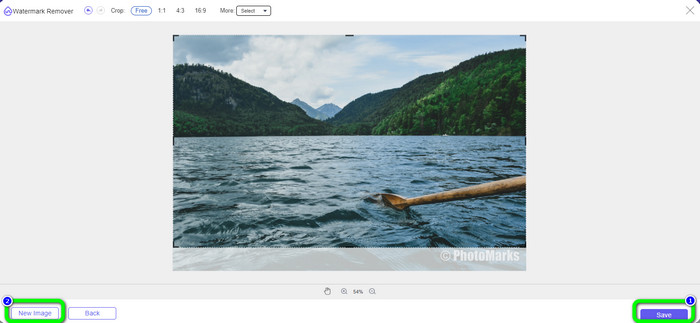
इस विधि में, आपको अपने फोटो से वॉटरमार्क के क्षेत्र पर विचार करना होगा। यदि वॉटरमार्क आपकी छवि के कोने या किनारे पर है, तो आप क्रॉपिंग टूल का उपयोग कर सकते हैं। वॉटरमार्क को हटाने के लिए फ़ोटो को क्रॉप करने का तरीका जानने के लिए नीचे दिए गए सरल चरणों का पालन करें।
चरण 1: Upload Image बटन पर क्लिक करके अपनी वॉटरमार्क वाली फोटो इन्सर्ट करें।.
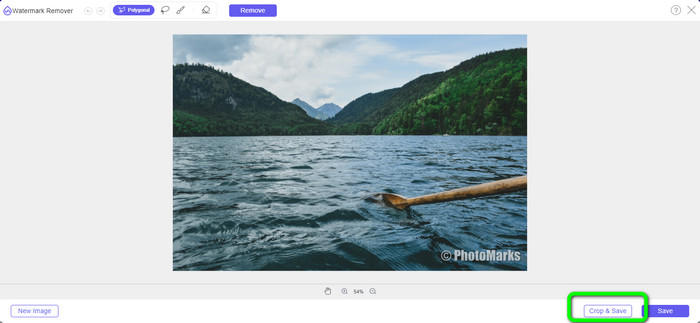
चरण 2: फोटो इन्सर्ट करने के बाद, इंटरफ़ेस के निचले दाएँ हिस्से में स्थित Crop & Save बटन पर क्लिक करें।.
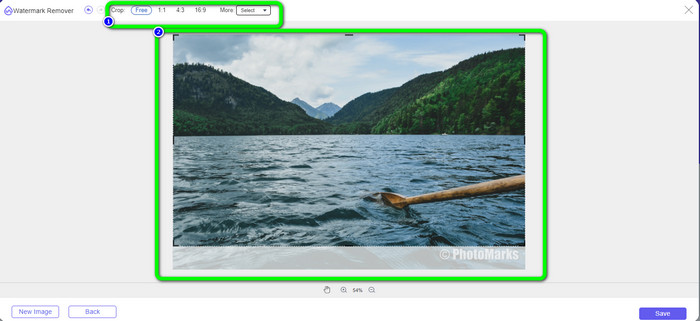
चरण 3: इंटरफ़ेस के ऊपरी हिस्से में क्रॉपिंग विकल्प उपलब्ध हैं, जिन्हें आप फोटो क्रॉप करने के लिए चुन सकते हैं। ये विकल्प आपको अपनी फोटो क्रॉप करने में मदद करेंगे। लेकिन यदि आप फोटो को मैन्युअल रूप से क्रॉप करना चाहते हैं, तो Free विकल्प पर क्लिक करें।.
चरण 4: फोटो को क्रॉप करके वॉटरमार्क हटाने के बाद, बिना वॉटरमार्क वाली फोटो डाउनलोड करने के लिए इंटरफ़ेस के निचले दाएँ हिस्से में मौजूद Save बटन पर क्लिक करें। फिर, यदि आप कोई और फोटो क्रॉप करना चाहते हैं, तो इंटरफ़ेस के निचले बाएँ हिस्से में स्थित New Image बटन पर क्लिक करें।.
संबंधित:
तस्वीरों से Reddit वॉटरमार्क आसानी से हटाने के तरीके
Lightroom Mobile में वॉटरमार्क कैसे हटाएँ [समाधान]
भाग 3: इनपेंट वॉटरमार्क रिमूवर के बारे में अक्सर पूछे जाने वाले प्रश्न
मुझे इनपेंट का उपयोग कब करना चाहिए?
आप इनपेंट का उपयोग अपनी तस्वीरों से अवांछित तत्वों को हटाने के लिए कर सकते हैं, जैसे कि लोग, वॉटरमार्क, लोगो, स्टिकर और बहुत कुछ। इस टूल से, आप अपनी तस्वीर को और अधिक शानदार और अपने दर्शकों की आंखों को भाने वाला बना सकते हैं।
क्या मैं अपने कंप्यूटर पर इनपेंट का उपयोग कर सकता हूँ?
हाँ तुम कर सकते हो! आप इनपेंट डाउनलोड कर सकते हैं क्योंकि यह एक डेस्कटॉप संस्करण प्रदान करता है। इस डाउनलोड करने योग्य एप्लिकेशन में ऑनलाइन संस्करण की तुलना में अधिक शानदार विशेषताएं हैं। आप सीमाओं के बिना छवियों को संलग्न कर सकते हैं, और यह बेहतर इनपेंटिंग एल्गोरिदम के साथ उच्च बहाली गुणवत्ता प्रदान करता है।
क्या इनपेंट एक बेहतर वॉटरमार्क रिमूवर है?
Inpaint फोटो से वॉटरमार्क हटाने में भरोसेमंद है। हालाँकि, इसमें कुछ सीमाएँ हैं। इसमें फ़ाइल साइज़ और रिज़ॉल्यूशन की सीमा है, जो उपयोगकर्ताओं के लिए अच्छा नहीं है। यदि आप बेहतर वॉटरमार्क रिमूवर चाहते हैं, तो आप FVC Free Watermark Remover का उपयोग कर सकते हैं। इसमें ऐसी सीमाएँ नहीं हैं और आप फोटो से वॉटरमार्क मुफ्त में हटा सकते हैं।.
निष्कर्ष
जैसा कि आप देख सकते हैं, इस पोस्ट ने आपको Inpaint Watermark Remover के बारे में एक ईमानदार समीक्षा प्रदान की है। इसके अलावा, यह आपको ऐसे बेहतरीन विकल्प भी प्रदान करता है जिनका उपयोग आप अपनी फ़ोटो से वॉटरमार्क हटाने के लिए कर सकते हैं। यदि आप 100% मुफ्त वॉटरमार्क रिमूवर चाहते हैं, तो आप FVC Free Watermark Remover का उपयोग कर सकते हैं।.
-
 आफ्टर इफेक्ट्स में आसानी से वीडियो से वॉटरमार्क कैसे निकालें
 यह लेख आफ्टर इफेक्ट्स का उपयोग करके वीडियो से वॉटरमार्क हटाने में मदद करेगा। साथ ही, यह परेशान करने वाली वस्तुओं को दूर करने के लिए सर्वोत्तम विकल्प प्रदान करेगा।
-
 वीडियो से इमोजी कैसे निकालें, इस पर चरण-दर-चरण मार्गदर्शिका
 अपने वीडियो पर इमोजी से नाराज़ महसूस कर रहे हैं? यह पोस्ट आपको बेहतरीन टूल का उपयोग करके अपने वीडियो से तुरंत इमोजी हटाने की सर्वोत्तम प्रक्रिया बताएगी।
-
 फोटो और वीडियो से स्टिकर हटाने के बेहतरीन तरीके
 क्या आप आसानी से वीडियो और फ़ोटो से स्टिकर हटाना चाहते हैं? यहाँ प्रभावी तरीके हैं, जिनमें सबसे विश्वसनीय और आसान तरीके शामिल हैं जिन्हें आप आज़मा सकते हैं।
