


 वीडियो कनवर्टर अंतिम
 स्क्रीन अभिलेखी
 वीडियो मरम्मत
 सुरक्षित डाउनलोड
DIVX को MP4 में कैसे बदलें, इस पर विस्तृत तरीके
DIVX सबसे लोकप्रिय वीडियो फ़ॉर्मैट्स में से एक है, लेकिन दुर्भाग्यवश यह फ़ॉर्मैट अन्य आम प्रोग्रामों, जैसे Windows Media Player, Apple QuickTime Player आदि द्वारा समर्थित नहीं है। अपने DIVX वीडियो फ़ाइल को चलाने का सबसे अच्छा तरीका यह है कि इसे MP4 जैसे ऐसे फ़ॉर्मैट में बदलें जिसे लगभग सभी प्रोग्राम सपोर्ट करते हों। इसलिए, यदि आप अपनी DIVX को MP4 फ़ाइल फ़ॉर्मैट में कनवर्ट करना चाहते हैं, तो इस लेख को पढ़ें। हालाँकि फ़ाइलों को कनवर्ट करना कठिन लग सकता है, लेकिन हम आपको सबसे आसान तरीक़े दिखाएँगे जिनसे आप अपनी DIVX फ़ाइल को MP4 फ़ॉर्मैट में बदल सकते हैं।.

भाग 1: मैक पर DIVX को MP4 में बदलने का सबसे अच्छा तरीका
Mac पर DIVX को MP4 में कनवर्ट करने का सबसे प्रभावी तरीक़ा है Video Converter Ultimate का इस्तेमाल करना। यह एप्लिकेशन अपनी शानदार क्षमताओं की वजह से उपयोग करने लायक है। इसमें बैच कन्वर्ज़न प्रक्रिया होने के कारण आप लगातार कई फ़ाइलों को बैच‑दर‑बैच तुरंत कनवर्ट कर सकते हैं। साथ ही, इसके सहज इंटरफ़ेस और सरल कन्वर्ज़न निर्देशों की मदद से DIVX को MP4 में बदलना बच्चों का खेल हो जाता है। इसके अलावा, आप और भी कई वीडियो फ़ॉर्मैट्स कनवर्ट कर सकते हैं। यह 100+ फ़ॉर्मैट्स को सपोर्ट करता है, जिनमें AVI, FLV, MOV, AVI, M4V, MKV, WMV, VOB आदि शामिल हैं। साथ ही, Video Converter Ultimate अन्य कन्वर्टर्स की तुलना में 30 गुना अधिक तेज़ कन्वर्ज़न स्पीड प्रदान करता है। इतनी तेज़ कन्वर्ज़न प्रक्रिया के साथ, आप निश्चिंत रह सकते हैं कि कई फ़ाइलों को कनवर्ट करने में बहुत कम समय लगेगा।.
इसके अलावा, यह कन्वर्टर उपयोगकर्ताओं के मामले में पक्षपाती नहीं है। हर कोई इसे संचालित कर सकता है, भले ही आप एक उन्नत उपयोगकर्ता या शुरुआती हों। इसके अलावा, यह एप्लिकेशन आपके DIVX वीडियो को बेहतर बना सकता है क्योंकि इसमें कई वीडियो संपादन उपकरण हैं, जैसे कि वीडियो बढ़ाने वाला, क्रॉपर, रंग सुधार, और बहुत कुछ। साथ ही, यदि आप छवियों और वीडियो के संयोजन के साथ एक अद्भुत संगीत वीडियो बनाना चाहते हैं, तो आप ऐसा कर सकते हैं। यह संगीत वीडियो निर्माता आपके द्वारा उपयोग की जा सकने वाली कई थीम प्रदान करता है, जैसे हैप्पी, नीट, रोमांटिक, स्नो नाइट, स्ट्राइप्स एंड वेव्स, वेडिंग, स्पोर्ट्स, पुराने समय, और बहुत कुछ।
विशेषताएँ
◆ वीडियो को MP4, DIVX, M4V, AVI, MOV, FLV, MKV, VOB, आदि जैसी विभिन्न फाइलों में कनवर्ट करें।
◆ बैच रूपांतरण उपलब्ध है।
◆ वीडियो एन्हांसर, कंप्रेसर, वॉटरमार्क रिमूवर, ट्रिमर, क्रॉपर आदि का उपयोग करके वीडियो संपादित करें।
◆ बीएमपी, जेपीजी, पीएनजी, टीआईएफ, और अधिक जैसे छवि प्रारूपों को परिवर्तित करें।
FVC वीडियो कन्वर्टर अल्टीमेट का उपयोग करके मैक पर DIVX को MP4 में बदलने के लिए नीचे दिए गए सरल निर्देशों का पालन करें।
चरण 1: नीचे दिए गए Download बटन पर क्लिक करके अपने Mac पर FVC Video Converter Ultimate डाउनलोड करें। फिर इंस्टॉलेशन प्रक्रिया पूरी होने के बाद एप्लिकेशन को लॉन्च करें।.
फ्री डाउनलोडWindows 7 या बाद के संस्करण के लिएसुरक्षित डाउनलोड
फ्री डाउनलोडMacOS 10.7 या बाद के संस्करण के लिएसुरक्षित डाउनलोड
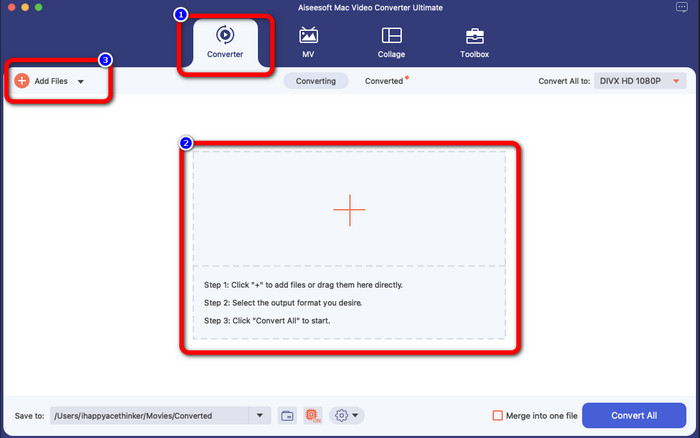
चरण 2: एप्लिकेशन लॉन्च करने के बाद मुख्य इंटरफ़ेस आपकी स्क्रीन पर दिखाई देगा। Converter पैनल पर जाएँ और DIVX वीडियो फ़ाइल जोड़ने के लिए Plus आइकन या Add File बटन पर क्लिक करें। आप फ़ाइल को बॉक्स के अंदर ड्रैग भी कर सकते हैं।.
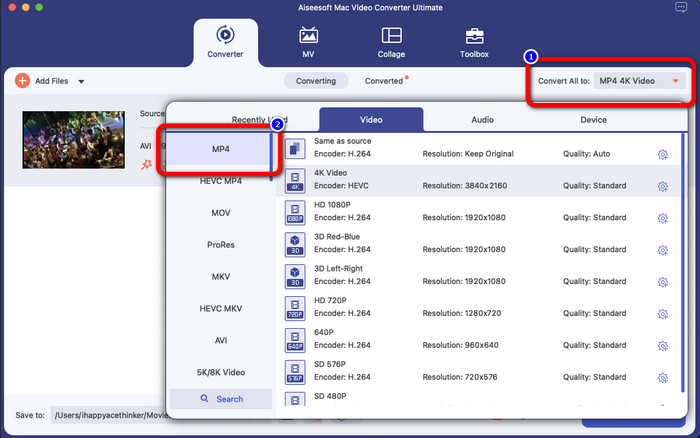
चरण 3: इसके बाद आउटपुट फ़ॉर्मैट बदलें, और Convert All to बटन पर क्लिक करें। स्क्रीन पर फ़ॉर्मैट विकल्प दिखाई देंगे और वहाँ से MP4 file फ़ॉर्मैट चुनें। आप अपनी पसंद के अनुसार रेज़ोल्यूशन चुन सकते हैं, जो 4K Video तक जा सकता है।.
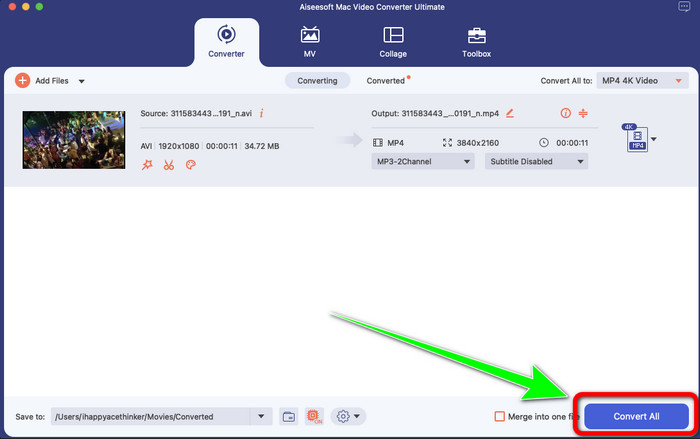
चरण 4: आउटपुट फ़ॉर्मैट बदलने के बाद, कन्वर्ज़न शुरू करने के लिए Convert All बटन पर क्लिक करें। फिर कन्वर्ज़न प्रक्रिया शुरू हो जाएगी। उसके बाद, आपकी वीडियो DIVX फ़ाइल से MP4 फ़ॉर्मैट में कनवर्ट हो जाएगी।.
भाग 2: हैंडब्रेक पर DIVX को MP4 में बदलने का आसान तरीका
क्या आप DIVX को MP4 में बदलने के लिए हैंडब्रेक का उपयोग करना चाहते हैं? फिर, चिंता न करें। इस भाग में, हम आपको सिखाएंगे कि अपने कंप्यूटर पर कन्वर्टर के रूप में हैंडब्रेक का उपयोग करके अपनी फ़ाइलों को कैसे परिवर्तित करें। यह उपकरण कई फाइलों को अन्य प्रारूपों जैसे M4V, MP4, MKV, WEBM, और अन्य में परिवर्तित करने में विश्वसनीय है। हालाँकि, इस उपकरण का उपयोग करने के लिए स्पष्ट करने की आवश्यकता है क्योंकि इसके कई विकल्प हैं जो आप इंटरफ़ेस पर पा सकते हैं। इस मामले में, हम कह सकते हैं कि यह कन्वर्टर नौसिखियों के लिए उपयुक्त नहीं है। साथ ही, कई बार ऐसा भी होता है कि अगर आप फ़ाइलों को MP4 में बदलना चाहते हैं, तो भी यह वीडियो को M4V फ़ाइल के रूप में सहेजता है। शायद यह किसी कारण से गड़बड़ है। लेकिन फिर भी, हैंडब्रेक का उपयोग करके DIVX को MP4 में बदलने के लिए नीचे दिए गए सरल चरणों का पालन करें।
चरण 1: अपने कंप्यूटर पर Handbrake एप्लिकेशन डाउनलोड करें। फिर, एप्लिकेशन इंस्टॉल करने के बाद इसे खोलें।.
चरण 2: DIVX वीडियो फ़ाइल जोड़ने के लिए File विकल्प पर क्लिक करें।.
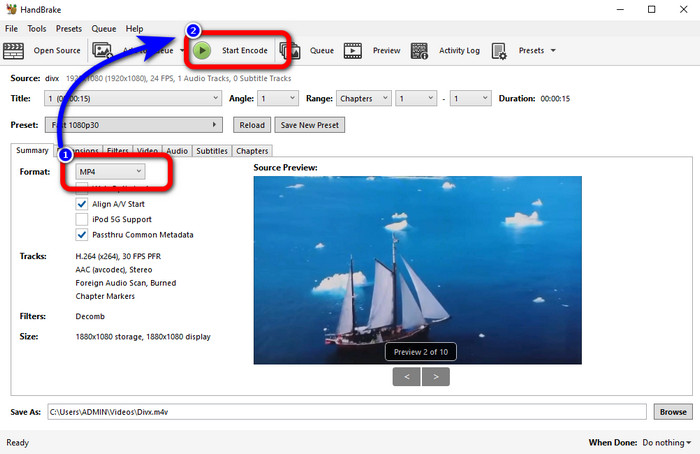
चरण 3: Format विकल्प चुनें और MP4 फ़ॉर्मैट सेलेक्ट करें। उसके बाद, कन्वर्ज़न प्रक्रिया आगे बढ़ाने के लिए Start Encode बटन पर क्लिक करें। बस इतना ही, अब आप अपनी वीडियो को MP4 फ़ाइल फ़ॉर्मैट में चला सकते हैं। यह सॉफ़्टवेयर आपको DIVX को 3GP में कनवर्ट करने की सुविधा भी देता है।.
भाग 3: VLC के माध्यम से DIVX को MP4 में बदलने का आसान चरण
एक अन्य ऑफ़लाइन परिवर्तक जिसका आप उपयोग कर सकते हैं वह है वीएलसी मीडिया प्लेयर। यह एप्लिकेशन DIVX को MP4 में आसानी से बदल सकता है। यह न केवल वीडियो चलाने के लिए अच्छा है बल्कि कनवर्ट करने के लिए भी अच्छा है। इस ऑफ़लाइन टूल की सहायता से, आप फ़ाइलों को एमपीईजी, एवीआई, एएसएफ, डब्लूएमवी और अन्य जैसे अन्य फ़ाइल स्वरूपों में परिवर्तित कर सकते हैं। हालाँकि, यह कनवर्टर नए उपयोगकर्ताओं के लिए अनुपयुक्त है क्योंकि इसमें जटिल फ़ाइल रूपांतरण प्रक्रियाएँ हैं। साथ ही, एप्लिकेशन को डाउनलोड करना कठिन और समय लेने वाला है। VLC का उपयोग करके DIVX को MP4 में बदलने के लिए नीचे दिए गए चरणों का उपयोग करें।
चरण 1: अपने कंप्यूटर पर VLC डाउनलोड और इंस्टॉल करें।.
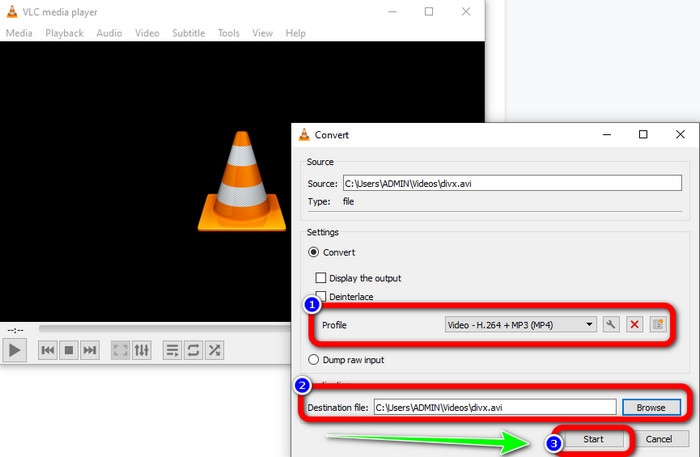
चरण 2: Media मेनू में जाएँ और वह DIVX वीडियो फ़ाइल जोड़ने के लिए जिसे आप कनवर्ट करना चाहते हैं, Convert/Save बटन चुनें।.
चरण 3: इंटरफ़ेस के निचले हिस्से में, फिर से Convert/Save बटन पर क्लिक करें।.
चरण 4: Profile विकल्प पर जाएँ और MP4 फ़ाइल फ़ॉर्मैट चुनें। अपनी मनचाही लोकेशन सेट करने के लिए Destination file बटन पर भी क्लिक करें। आख़िर में, DIVX फ़ाइल को MP4 फ़ॉर्मैट में कनवर्ट करने के लिए Start बटन पर क्लिक करें। आप इसी टूल का उपयोग करके MP4 को DIVX में भी कनवर्ट कर सकते हैं।.
भाग 4: DIVX को MP4 ऑनलाइन में बदलने का प्रभावी तरीका
ऑफ़लाइन इस्तेमाल किए जा सकने वाले सभी कन्वर्टर्स के बारे में जानने के बाद, इस भाग में हम आपको सबसे अच्छा ऑनलाइन DIVX से MP4 कन्वर्टर दिखाएँगे। यह उल्लेखनीय कन्वर्टर है FVC Free Video Converter Online। इसका इंटरफ़ेस सीधा‑सादा है और स्टेप्स भी आसान हैं, इसलिए यह आपके DIVX फ़ाइल को MP4 फ़ॉर्मैट में आसानी से कनवर्ट कर सकता है। यह टूल FLV, WMA, AVI, MOV और अन्य कई वीडियो फ़ॉर्मैट्स को सपोर्ट करता है। साथ ही, आप अपनी DIVX फ़ाइल को बिना वीडियो क्वालिटी खोए कनवर्ट कर सकते हैं, जो उपयोगकर्ताओं के लिए बेहतरीन है। नीचे दिए गए विस्तृत निर्देशों का पालन करें और FVC Free Video Converter Online का उपयोग करके सरल तरीक़े से अपनी फ़ाइलों को कनवर्ट करें।.
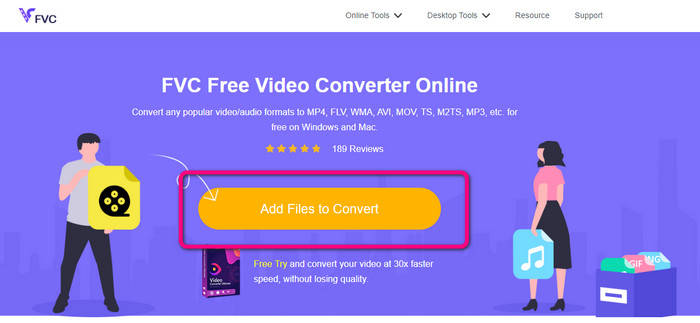
चरण 1: अपने ब्राउज़र पर जाएँ और पर जाएँ FVC फ्री वीडियो कन्वर्टर ऑनलाइन वेबसाइट। फिर, क्लिक करें कन्वर्ट करने के लिए फ़ाइल जोड़ें DIVX फ़ाइल अपलोड करने के लिए बटन।
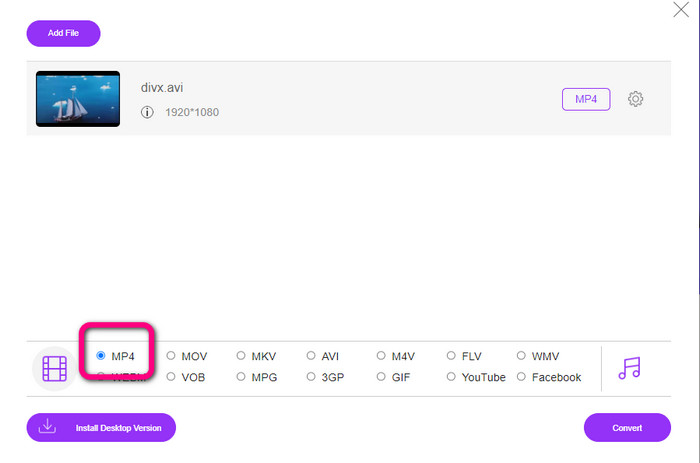
चरण 2: इंटरफ़ेस के निचले हिस्से में, फ़ॉर्मैट विकल्पों में से MP4 फ़ाइल फ़ॉर्मैट चुनें।.
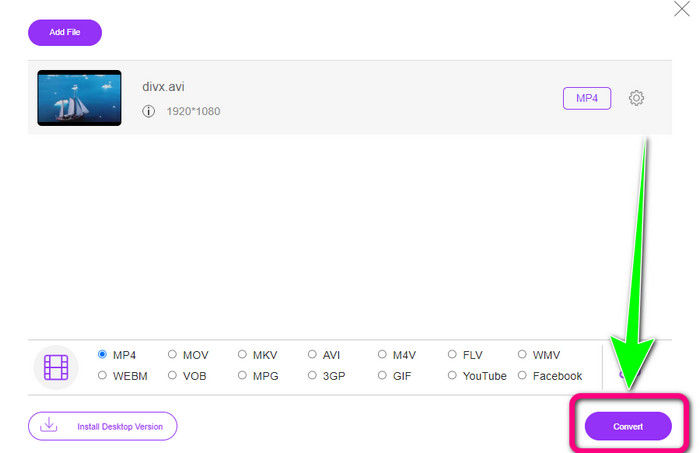
चरण 3: अंतिम चरण के लिए, कन्वर्ज़न प्रक्रिया शुरू करने के लिए Convert बटन पर क्लिक करें। फिर अपनी MP4 वीडियो को अपने डिवाइस पर सेव करें।.
भाग 5: DIVX बनाम MP4
| डिवएक्स | MP4 | |
| दस्तावेज़ विस्तारण | .divx/.avi | .mp4 |
| विवरण | DivX, LLC ने DIVX वीडियो कोडेक विकसित किया। यह कोडेक विंडोज प्रोग्राम के साथ संगत है। इसका उपयोग गेम कंसोल, कार स्टीरियो आदि पर भी किया जा सकता है। इसके अलावा, तीन DIVX कोडेक हैं, HEVC Ultra HD, H.264/MPEG-4 AVC DivX Plus हाई डेफिनिशन वीडियो कोडेक, और MPEG-4 पार्ट 2। | यह QuickTime MOV पर आधारित एक वीडियो कंटेनर है। लेकिन MP4 MPEG सुविधाओं का समर्थन करता है। इसके अलावा, MP4 ऑडियो, वीडियो और उपशीर्षक का समर्थन करता है। ये कोडेक संयोजन MP4 को लचीला बनाते हैं। |
| द्वारा विकसित | डिवएक्स नेटवर्क इंक। | अंतरराष्ट्रीय मानकीकरण संगठन |
| माइम प्रकार | वीडियो/डिवएक्स | वीडियो/mp4 |
| संबद्ध कार्यक्रम | एक्सबॉक्स 360 कार स्टीरियो डीवीडी/ब्लू-रे प्लेयर अलार्म की घडी | VLC मीडिया प्लेयर ऐप्पल क्विकटाइम प्लेयर 5KPlayer विंडोज मीडिया प्लेयर |
भाग 6: DIVX को MP4 में बदलने के बारे में अक्सर पूछे जाने वाले प्रश्न
1. DIVX का उपयोग कौन करता है?
DIVX का उपयोग करने वाले DIVX-प्रमाणित उपभोक्ता इलेक्ट्रॉनिक उपकरण हैं, जिनमें पोर्टेबल वीडियो प्लेयर, DVD, और ब्लू-रे प्लेयर शामिल हैं।
2. क्या MP4 DIVX से बेहतर है?
हाँ। DIVX अब लोकप्रिय फ़ाइल की तुलना में पहले से ही पुराना है, जो कि MP4 है। MP4 प्रारूप सबसे अधिक उपयोग किए जाने वाले प्रारूपों में से एक है, इसलिए MP4 प्रारूप का उपयोग करने की अत्यधिक अनुशंसा की जाती है।
3. MP4 इतना लोकप्रिय क्यों है?
MP4 प्रारूप लोकप्रिय है क्योंकि यह लगभग सभी उपकरणों, जैसे मैक, लिनक्स, विंडोज और विभिन्न मोबाइल उपकरणों द्वारा समर्थित है। इस तरह, सभी उपयोगकर्ता अपने वीडियो को MP4 प्रारूप में बदल देते हैं, जिससे वे अधिक सुलभ और सभी के लिए उपलब्ध हो जाते हैं।
निष्कर्ष
इस लेख को पढ़ने से आपको DIVX को MP4 में कनवर्ट करने के बारे में ज़रूरी जानकारी मिली। आप चार अलग‑अलग कन्वर्टर्स आज़मा सकते हैं। हालाँकि, कुछ अन्य कन्वर्टर्स का इस्तेमाल करना काफ़ी जटिल होता है, जो शुरुआती उपयोगकर्ताओं के लिए उपयुक्त नहीं है। इसलिए, यदि आप फ़ाइलों को और आसानी से कनवर्ट करना चाहते हैं, तो आप दो सुझाए गए कन्वर्टर्स का उपयोग कर सकते हैं: FVC Video Converter Online और Video Converter Ultimate।.
-
 MPG को MP4 में त्वरित रूप से बदलने के 3 सर्वोत्तम तरीके
 अपने MPG को MP4 फ़ाइल स्वरूप में बदलना चाहते हैं? इस लेख में, हम आपके लिए सबसे अच्छे और तेज एमपीजी कन्वर्टर्स की सूची बनाते हैं!
-
 AMV कन्वर्टर - Win / Mac पर MP4 को AMV में कनवर्ट करने के लिए 3 सर्वश्रेष्ठ तरीके
 वीडियो को अमीन म्यूजिक वीडियो में बदलने के लिए AMV कन्वर्टर्स के लिए सबसे अच्छा MP4 क्या हैं, आप लेख से आसानी से वांछित वीडियो प्राप्त करने के लिए 3 सबसे कुशल तरीकों के बारे में जान सकते हैं।
-
 WebM से MP4 | नि: शुल्क वेबएम को MP4 (ऑनलाइन और डेस्कटॉप) में बदलें
 वेब ब्राउजर के बिना वेबएम फाइलें कैसे देखें? आपको WebM को MP4 में बदलना होगा। वेबएम को एमपी4 ऑनलाइन और मैक और विंडोज कंप्यूटर पर बदलने के लिए यहां शीर्ष 10 मुफ्त वेबएम से एमपी4 कन्वर्टर हैं
