


 वीडियो कनवर्टर अंतिम
 स्क्रीन अभिलेखी
 वीडियो मरम्मत
 सुरक्षित डाउनलोड
विंडोज / मैक (नि: शुल्क और ऑनलाइन) पर M4A के लिए MP4 कन्वर्ट करने के लिए कैसे
MP4 एक व्यापक फ़ाइल प्रारूप है जिसका उपयोग कई स्टेशनों और वीडियो खिलाड़ियों के साथ किया जाता है। MP4 फाइलें वीडियो, ऑडियो और अन्य सामग्री को स्टोर कर सकती हैं। अब, कई लोग MP4 वीडियो के ऑडियो ट्रैक को सुनना पसंद करते हैं। गुणवत्ता को संरक्षित करने के लिए, MP4 को M4A में परिवर्तित करना एक महान विचार है। M4A MPEG 4 ऑडियो के लिए खड़ा है। अधिकांश कार्यक्रम M4A फ़ाइलें खेल सकते हैं, जिसमें आईट्यून्स, क्विकटाइम, विंडोज मीडिया प्लेयर और बहुत कुछ शामिल हैं।

आप सोच रहे होंगे कि MP4 फ़ाइल से ऑडियो कैसे निकाला जाए। MP4 फ़ाइल को M4A फ़ाइल में बदलने के कई तरीके हैं। अपने मोबाइल उपकरणों पर भविष्य में सुनने के लिए यह जानने के लिए कि MP4 को M4A में कैसे कन्वर्ट करें, इस पोस्ट को देखें।.
भाग 1। सबसे अच्छा मुफ्त ऑनलाइन तरीका है जिससे क्वालिटी लॉस के बिना MP4 को M4A में बदला जा सके
FVC Free Online Video Converter एक निःशुल्क MP4 से M4A फ़ाइल कन्वर्टर है जो MP4 फ़ॉर्मेट को न केवल M4A में, बल्कि MP3, WAV, M4R, WMA, AIFF, AC3 आदि जैसे अन्य फ़ॉर्मेट्स में भी बदल सकता है। यह आपको बैच कन्वर्ज़न करने की सुविधा देता है ताकि आप कई MP4 वीडियो को एक साथ तुरंत M4A में बदल सकें। इसके अलावा, यह निःशुल्क ऑनलाइन टूल आपको MP4 वीडियो को MOV में कन्वर्ट करने, साथ ही AVI, FLV और अन्य वीडियो फ़ॉर्मेट्स में भी बदलने की सुविधा देता है।.
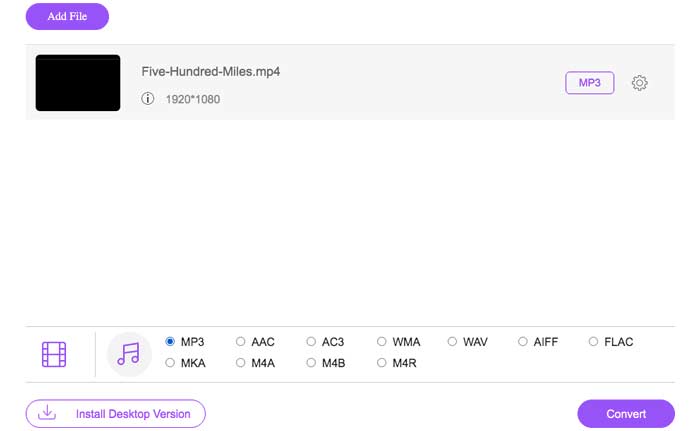
स्टेप 1. अपने ब्राउज़र पर https://www.free-videoconverter.net/free-online-video-converter/ खोलें। Add Files to Convert बटन पर क्लिक करें और फिर इसका लॉन्चर डाउनलोड और इंस्टॉल करें।.

स्टेप 2. वह MP4 वीडियो अपलोड करें जिसे आप कन्वर्ट करना चाहते हैं, और फिर आगे बढ़ने के लिए Open पर क्लिक करें।.
स्टेप 3. अपने वीडियो फ़ाइलों को इस एप्लिकेशन में अपलोड करने के बाद, Audio आइकन पर क्लिक करें और आउटपुट फ़ॉर्मेट के रूप में M4A फ़ॉर्मेट चुनें।.
स्टेप 4. अंत में, दाएँ निचले कोने में स्थित Convert बटन पर क्लिक करें। कुछ समय इंतज़ार करें, और आपको MP4 फ़ाइल से अपना M4A ऑडियो मिल जाएगा।.
भाग 2. मुफ्त ऑडियो कनवर्टर के साथ M4A के लिए MP4 कन्वर्ट करने के लिए कैसे
FVC फ्री ऑडियो कन्वर्टर फ्रीवेयर है जो आपको MP4 फाइलों को आसानी से M4A में बदलने की अनुमति देता है। यह किसी भी वीडियो या ऑडियो फ़ाइल को M4A, MP3, WAV, आदि में बदलने में सक्षम है। रूपांतरण शुरू करने के लिए आप इसे अपने विंडोज पीसी पर डाउनलोड और इंस्टॉल कर सकते हैं।
मुफ़्त डाउनलोडWindows 7 या बाद के लिएसुरक्षित डाउनलोड
मुफ़्त डाउनलोडMacOS 10.7 या बाद के लिएसुरक्षित डाउनलोड
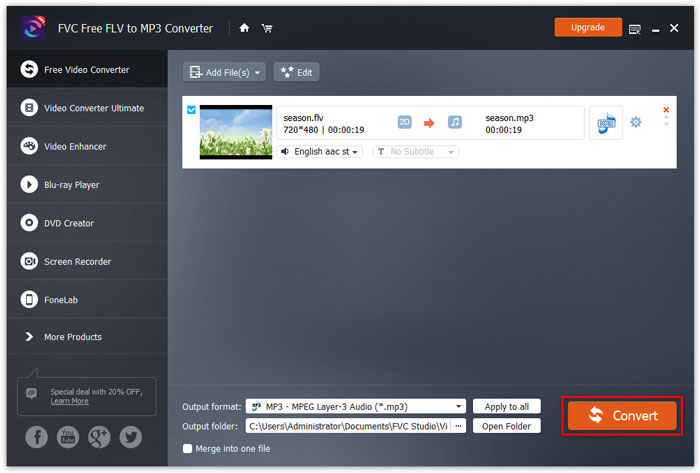
स्टेप 1. अपने कंप्यूटर पर इस ऑडियो कन्वर्टर को लॉन्च करें। MP4 फ़ाइलों को इस प्रोग्राम में अपलोड करने के लिए Add File(s) बटन पर क्लिक करें।.

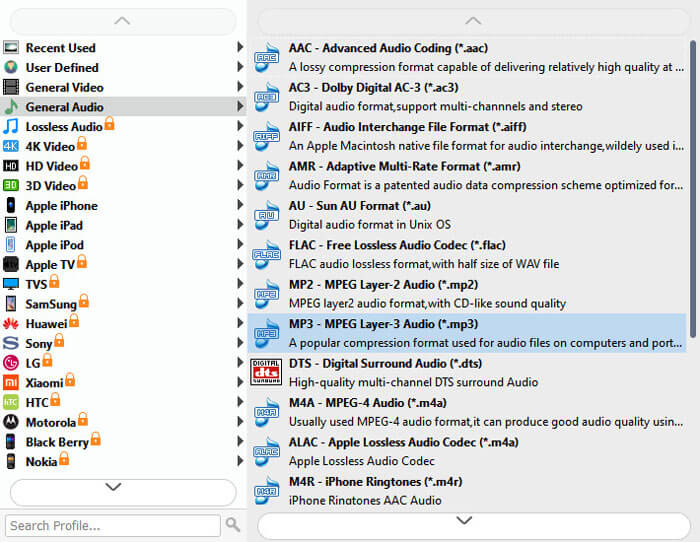
स्टेप 2. Output formats विकल्प खोजें और उसकी ड्रॉप‑डाउन सूची से आउटपुट फ़ॉर्मेट के रूप में M4A चुनें।.
स्टेप 3. MP4 फ़ाइलों को M4A में बदलना शुरू करने के लिए Convert बटन पर क्लिक करें।.
M4A के अलावा, आप इसका उपयोग MP4 को MP3, AAC या अन्य ऑडियो फ़ॉर्मेट्स में कन्वर्ट करने के लिए भी कर सकते हैं।.
भाग 3. iTunes का उपयोग करके M4A के लिए MP4 कन्वर्ट करने के लिए कैसे
विंडोज या मैक के लिए iTunes के साथ MP4 को M4A में कनवर्ट करने के लिए, आपको iTunes आयात सेटिंग्स को बदलने और फिर M4A प्रतिलिपि बनाने के लिए कन्वर्ट मेनू विकल्प का उपयोग करना होगा।
स्टेप 1. अपने Windows PC या Mac पर iTunes खोलें।.
स्टेप 2. मेनू बार में Edit चुनें, फिर Preferences पर क्लिक करें। इसके बाद, General टैब पर जाएँ, और Import Settings पर क्लिक करें।.
स्टेप 3. Import Using के बगल में दिए गए मेनू को खोजें और क्लिक करें, फिर वह एन्कोडिंग फ़ॉर्मेट चुनें जिसमें आप वीडियो को कन्वर्ट करना चाहते हैं। इसके बाद, OK पर क्लिक करें।.
स्टेप 4. अपनी लाइब्रेरी में से वे गाने चुनें जिन्हें आप कन्वर्ट करना चाहते हैं। उसके बाद, File चुनें, फिर Create New Version पर क्लिक करें, और फिर M4A वर्ज़न बनाएं।.
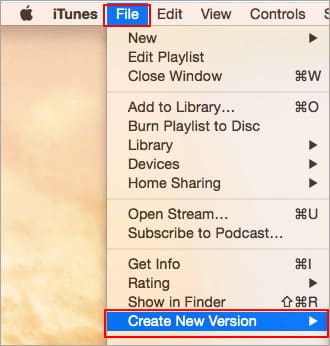
परिवर्तित ऑडियो फ़ाइलें आपकी लाइब्रेरी में मूल फ़ाइलों के बगल में दिखाई देंगी।
भाग 4. M4A रूपांतरण के लिए MP4 के अक्सर पूछे जाने वाले प्रश्न
1. M4A फाइल क्या है?
M4A फाइल एक्सटेंशन के साथ एक फाइल एमपीईजी -4 ऑडियो फाइल है। M4A को अक्सर ऐप्पल के आईट्यून्स स्टोर में गाने डाउनलोड के प्रारूप के रूप में पाया जा सकता है।
2. M4A फाइलें कैसे खोलें?
M4A फाइलें खोलने वाले कार्यक्रमों में iTunes, QuickTime, Windows Media Player, आदि शामिल हैं। Android टैबलेट और फ़ोन, iPhone, iPad और iPod टच भी M4A फ़ाइलों को चलाने का समर्थन करते हैं।
3. MP4 फ़ाइलों को ऑनलाइन मर्ज कैसे करें?
FVC Free Online Video Merger आपको विभिन्न MP4 या अन्य वीडियो फ़ॉर्मेट्स जैसे MOV, AVI, FLV आदि को ऑनलाइन मर्ज या जॉइन करने में मदद कर सकता है।.
4. क्या विंडोज मीडिया प्लेयर MP4 को M4A में बदल सकता है?
विंडोज मीडिया प्लेयर केवल एमपी 3 या WAV के लिए वीडियो फ़ाइलों को परिवर्तित करने का समर्थन करता है।
निष्कर्ष
उपरोक्त तीन तरीके आपको बिना ज्यादा मेहनत किए मुफ्त में MP4 को M4A में बदलने में मदद कर सकते हैं। यदि आप रूपांतरण को ऑनलाइन करना पसंद करते हैं, तो FVC फ्री ऑनलाइन वीडियो कनवर्टर एक बढ़िया विकल्प होना चाहिए। यदि आपकी MP4 फाइलें आकार में बड़ी हैं, तो FVC फ्री ऑडियो कन्वर्टर या आईट्यून्स MP4 फाइलों को M4A में बदलने के लिए अधिक विश्वसनीय होंगे।
-
 मैक / विंडोज के लिए MP4 को WMV में कैसे बदलें
 यह पोस्ट मैक या विंडोज पर MP4 वीडियो को WMV प्रारूप में बदलने का तरीका साझा करता है। हम आपको कई विकल्प भी प्रदान करेंगे, जिसमें डेस्कटॉप सॉफ्टवेयर और वेब-आधारित ऑनलाइन कन्वर्टर्स दोनों शामिल हैं। WMV कन्वर्ट करने वाले टूल के लिए सबसे अच्छा MP4 जानने के लिए तैयार हैं?
-
 WMV को MP3 को डेस्कटॉप और ऑनलाइन में कैसे बदलें
 आप एफवीसी स्टूडियो से कोई भी मुफ्त वीडियो कनवर्टर सॉफ्टवेयर पा सकते हैं। किसी भी वीडियो / ऑडियो प्रारूप का समर्थन किया जाता है, जिसमें MP4, MOV, TS, AVI, WMV, FLAC, MP3, आदि शामिल हैं।
-
 AVCHD को MP4 वीडियो को विंडोज / मैक / ऑनलाइन पर मुफ्त में कैसे बदलें
 आपके कंप्यूटर पर AVCHD को MP4 वीडियो में बदलने के 5 आसान तरीके हैं। आप किसी भी कनवर्टर के साथ गुणवत्ता खोए बिना AVCHD वीडियो को MP4 में बदल सकते हैं।
