


 वीडियो कनवर्टर अंतिम
 स्क्रीन अभिलेखी
 वीडियो मरम्मत
 सुरक्षित डाउनलोड
विभिन्न डिवाइसों पर एमएक्सएफ फ़ाइलें चलाने में कोई परेशानी न हो इसके लिए एमपी4 से एमएक्सएफ
कभी-कभी, कुछ वीडियो संपादन सॉफ़्टवेयर या प्रसारण सिस्टम एमएक्सएफ फ़ाइलों को प्राथमिकता देते हैं। यदि आप इससे निपट रहे हैं, तो सुचारू प्लेबैक और संपादन के लिए अपने MP4 वीडियो को MXF में परिवर्तित करना आवश्यक हो जाता है। वहाँ कुछ उपयोगी उपकरण हैं जो इस रूपांतरण को आसान बना सकते हैं। इसलिए, यदि आप बिना पसीना बहाए इस कार्य को निपटाने में रुचि रखते हैं, तो पढ़ते रहें!
आइए इन शानदार MP4 से MXF कन्वर्टर्स को जानें और वे आसान चरण देखें जिनकी मदद से आप अपने MP4 फ़ाइलों को एक प्रो की तरह MXF में बदल सकते हैं।.

भाग 1. MP4 को MXF में बदलने के सर्वोत्तम 5 तरीके
1. वीडियो कनवर्टर अल्टीमेट
Video Converter Ultimate एक उच्च-स्तरीय टूल है, जो MP4 फ़ाइलों को विभिन्न वीडियो फ़ॉर्मैट्स और डिवाइसों, जैसे iPhone, iPad, Galaxy S6 आदि में बदलने का बेहतरीन समाधान प्रदान करता है। इसका उपयोगकर्ता-अनुकूल इंटरफ़ेस तकनीक से कम परिचित लोगों के लिए भी इसे इस्तेमाल करना बेहद आसान बना देता है। इसकी वीडियो कन्वर्ट करने की गति इतनी तेज़ है कि अन्य सॉफ़्टवेयर उसके सामने फीके पड़ जाते हैं। इसके अलावा, कई फ़ाइलों को एक साथ बदलने के लिए इसका बैच मोड वाकई शानदार है। नीचे दिए गए गाइड को देखें और जानें कि इस शक्तिशाली टूल से MP4 को MXF में कैसे बदलें।.
चरण 1. नीचे दिए गए Free Download बटनों से कन्वर्टर डाउनलोड और इंस्टॉल करें। इंस्टॉल करने के बाद, अपने कंप्यूटर पर ऐप लॉन्च करें।.
Free DownloadWindows 7 या बाद के वर्ज़न के लिएसिक्योर डाउनलोड
फ्री डाउनलोडMacOS 10.7 या उसके बाद के वर्ज़न के लिएसुरक्षित डाउनलोड
चरण 2. जिस MP4 वीडियो को आप कन्वर्ट करना चाहते हैं, उसे अपलोड करने के लिए Plus साइन बटन पर क्लिक करें या अपने कंप्यूटर के फ़ोल्डर को खोलने के लिए Spacebar दबाएँ। फिर ब्राउज़ करके लक्ष्य वीडियो चुनें।.
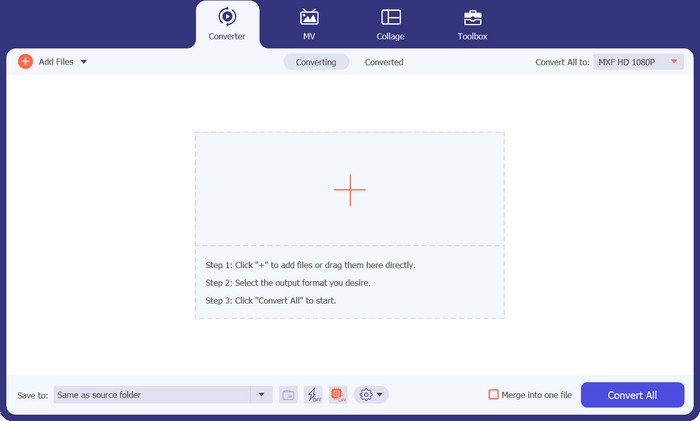
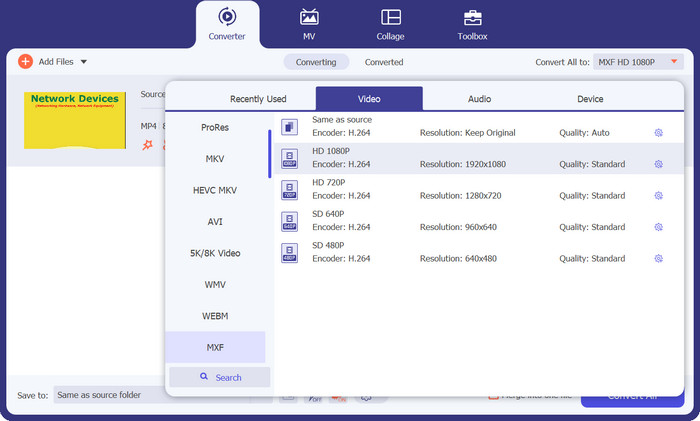
चरण 3. आउटपुट फ़ॉर्मैट के रूप में MXF चुनें। बस ऊपर दाईं ओर स्थित Profile सूची को खोलें, Video टैब में जाएँ और वहाँ से MXF ढूँढें। आप इसे जल्दी खोजने के लिए सर्च बार का भी उपयोग कर सकते हैं। अपने आउटपुट के लिए इच्छित गुणवत्ता चुनें।.
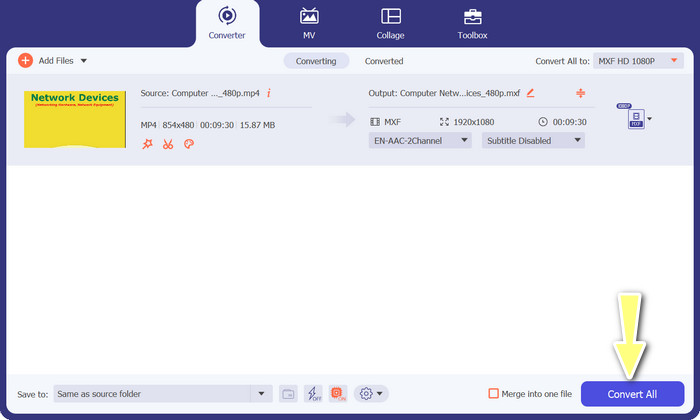
चरण 4. कन्वर्ट करने के लिए तैयार! नीचे दाईं ओर स्थित Convert All बटन पर क्लिक करें, और हो गया! आपकी कन्वर्ट की हुई फ़ाइल अपने आप आपके कंप्यूटर के फ़ोल्डर में सहेज दी जाएगी।.
2. मुफ्त MP4 कन्वर्टर ऑनलाइन
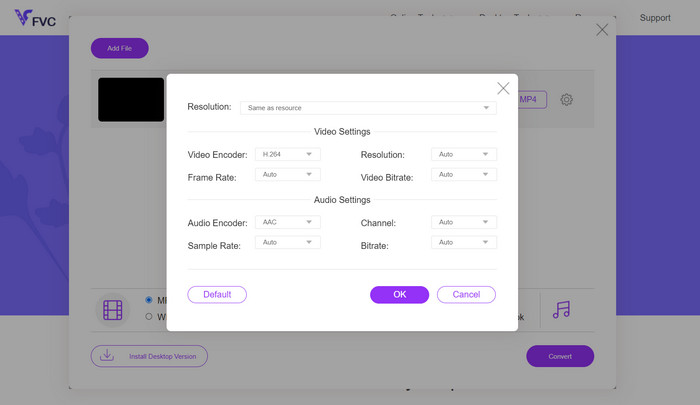
यदि आप एक भरोसेमंद ऑनलाइन MP4 कन्वर्टर की तलाश में हैं, जिससे MP4 को ऑनलाइन MXF में बदला जा सके, तो Free MP4 Converter Online को ज़रूर देखें। यह वेबसाइट आपके MP4 फ़ाइलों को अपलोड करके उन्हें MXF या कई अन्य फ़ॉर्मैट्स में कन्वर्ट करने के लिए एक सुरक्षित और विश्वसनीय प्लेटफ़ॉर्म प्रदान करती है। आप निश्चिंत रह सकते हैं कि हर बार कन्वर्ज़न की गुणवत्ता लगातार उच्च स्तर की रहती है। इतना ही नहीं, आप वीडियो कोडेक और प्रीसेट को एडिट करके कन्वर्ज़न को अपनी ज़रूरत के अनुसार बदल भी सकते हैं। इसे आज़माएँ, और आप अपनी पसंद के मुताबिक कन्वर्ज़न को कस्टमाइज़ कर पाएँगे।.
चरण 1. अपने वेब ब्राउज़र का उपयोग करके उनकी वेबसाइट पर जाएँ। आपको कुछ डाउनलोड करने की ज़रूरत नहीं; बस किसी सामान्य वेबसाइट की तरह इसे खोलें।.
चरण 2. Add Files to Convert बटन पर क्लिक करें या अपनी MP4 वीडियो को वेबसाइट पर ड्रैग और ड्रॉप करें। यह आपकी फ़ाइल को प्रोसेस करना शुरू कर देगा, और आपको एक प्रोग्रेस बार दिखाई देगा।.
चरण 3. अपलोड पूरा हो जाने पर, विकल्प में जाकर सूची से MXF चुनें। यदि गुणवत्ता चुनने का विकल्प हो, तो अपनी पसंद के अनुसार गुणवत्ता चुनें। Convert बटन दबाएँ, और जादू शुरू हो जाएगा!
3. फ्रीफ़ाइल कन्वर्ट
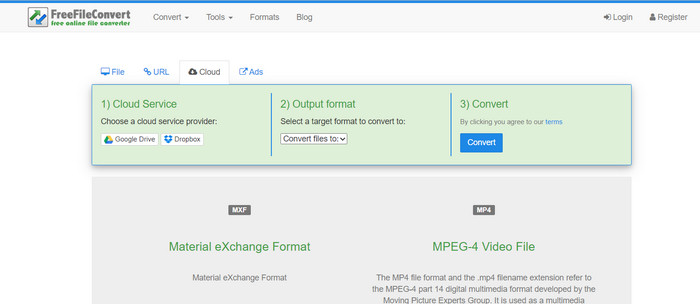
क्या आप कोई अन्य मुफ़्त MXF-टू-MP4 कन्वर्टर खोज रहे हैं? FreeFileConvert को एक मौका दें! यह उपयोगकर्ता-अनुकूल प्लेटफ़ॉर्म एक सरल तीन-चरणीय प्रक्रिया का पालन करता है और आपके वीडियो को परेशानी मुक्त रूप से परिवर्तित करने में मदद करने के लिए एक आसान-से-नेविगेट इंटरफ़ेस प्रदान करता है। बस उनकी वेबसाइट पर जाएँ, अपने कंप्यूटर से अपनी फ़ाइल अपलोड करें, वांछित आउटपुट प्रारूप चुनें और कन्वर्ट पर क्लिक करें। आप न केवल अपने कंप्यूटर से फ़ाइलें अपलोड कर सकते हैं, बल्कि आपके पास अपने ड्रॉपबॉक्स या Google ड्राइव खाते से भी अपलोड करने का विकल्प है।
चरण 1. अपना वेब ब्राउज़र खोलें और FreeFileConvert वेबसाइट पर जाएँ। किसी भी सामान्य वेबसाइट की तरह, यहाँ भी कुछ इंस्टॉल करने की ज़रूरत नहीं है।.
चरण 2. Choose File बटन पर क्लिक करें। यदि यह ज़्यादा सुविधाजनक हो, तो आप Dropbox या Google Drive से भी अपलोड कर सकते हैं।.
चरण 3. Output Format ड्रॉपडाउन मेनू में MXF ढूँढें और इसे अपने इच्छित फ़ॉर्मैट के रूप में चुनें। उसके बाद Convert बटन दबाएँ, और FreeFileConvert को अपना काम करने दें!
4. कोई भी कन्व
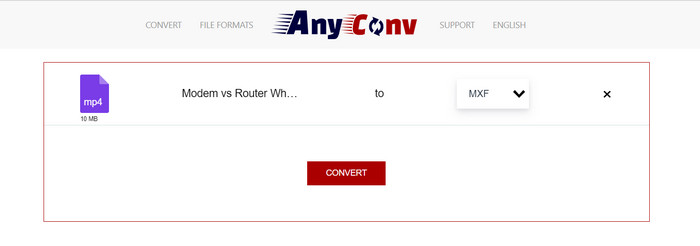
क्या आप MP4 को MXF में बदलने के लिए कोई ऑनलाइन टूल खोज रहे हैं? AnyConv से आगे न देखें! दूसरों की तरह, इसे किसी इंस्टॉलेशन की आवश्यकता नहीं है। साथ ही, यह केवल MP4 से MXF तक सीमित नहीं है; यह विभिन्न अन्य प्रारूप रूपांतरणों को भी संभाल सकता है! श्रेष्ठ भाग? आपको पूर्ण सेवा के लिए पंजीकरण करने की आवश्यकता नहीं है - यह परेशानी मुक्त है। बस नीचे दिए गए चरणों का पालन करें, और कुछ ही समय में आपका MP4 से MXF रूपांतरण हो जाएगा। बहुत आसान।
चरण 1. किसी भी वेब ब्राउज़र का उपयोग करके AnyConv की वेबसाइट खोलें।.
चरण 2. अपनी MP4 वीडियो अपलोड करने के लिए CHOOSE FILES बटन पर क्लिक करें। फिर Profile मेनू को खोलें और MXF फ़ॉर्मैट ढूँढें।.
चरण 3. कन्वर्ट करने के लिए तैयार हैं? नीले Convert बटन पर क्लिक करें, और कन्वर्ज़न प्रक्रिया शुरू हो जाएगी।.
5. धर्मान्तरण
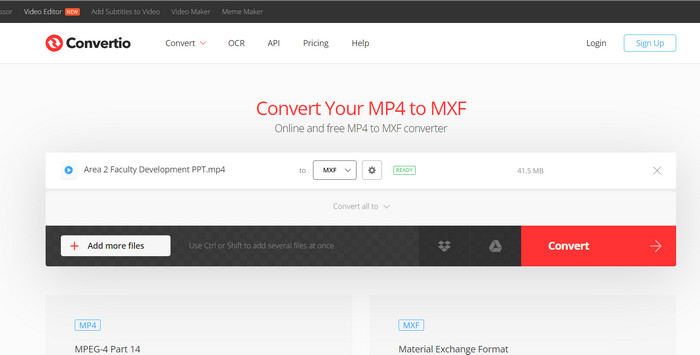
उन सभी उपयोगकर्ताओं को कॉल करना जो अतिरिक्त ऐप्स डाउनलोड करने की आवश्यकता के बिना फ़ाइल कनवर्टर चाहते हैं! Convertio ने आपको कवर कर लिया है। इस टूल के साथ, जटिल सेटिंग्स में बदलाव की परेशानी के बिना MP4 को MXF में ऑनलाइन परिवर्तित करना बहुत आसान है। श्रेष्ठ भाग? यह दस्तावेज़, अभिलेखागार, स्प्रेडशीट, प्रस्तुतियाँ और बहुत कुछ सहित विभिन्न मीडिया फ़ाइल स्वरूपों का समर्थन करता है।
चरण 1. अपने कंप्यूटर पर कोई भी ब्राउज़र चुनें और इस टूल के आधिकारिक पेज पर जाएँ।.
चरण 2. प्रोग्राम के मुख्य इंटरफ़ेस पर, अपनी MP4 फ़ाइलें अपलोड करने के लिए Choose Files बटन पर क्लिक करें। विकल्प के तौर पर, सुविधा के लिए आप बस वीडियो फ़ाइल को ड्रैग और ड्रॉप भी कर सकते हैं।.
चरण 3. Profile मेनू को ढूँढें और Video सेक्शन में से MXF फ़ॉर्मैट चुनें। फिर, कन्वर्ज़न प्रक्रिया शुरू करने के लिए Convert बटन पर क्लिक करें।.
अधिक पढ़ें:
कैमकॉर्डर MXF को सार्वभौमिक प्लेबैक के लिए MP4 में बदलने के 4 मुफ़्त तरीके
[गाइड] Sony X70 से आई MXF वीडियो फ़ाइलों को जोड़ने के 2 सर्वोत्तम तरीके
भाग 2. MP4 से MXF के बारे में अक्सर पूछे जाने वाले प्रश्न
एमएक्सएफ फ़ाइल क्या है?
एमएक्सएफ फ़ाइल मटेरियल एक्सचेंज फॉर्मेट का प्रतिनिधित्व करने वाला एक फ़ाइल एक्सटेंशन है, जो मानक पेशेवर ऑडियो और वीडियो सामग्री के लिए एक कंटेनर के रूप में कार्य करता है। उच्च गुणवत्ता वाले वीडियो को बनाए रखने की क्षमता के कारण इसका उपयोग आमतौर पर टीवी और थिएटर प्रसारण में किया जाता है। संक्षेप में, एमएक्सएफ वास्तविक वीडियो को डिजिटल प्रारूप में संग्रहीत करने के विकल्प के रूप में कार्य करता है, जिससे यह पेशेवर वीडियो सामग्री को संभालने के लिए एक पसंदीदा विकल्प बन जाता है।
क्या मैं MXF को MP4 में बदल सकता हूँ?
बिल्कुल! वीडियो कन्वर्टर अल्टीमेट जैसे टूल के साथ, MP4 को MXF में या इसके विपरीत परिवर्तित करना बहुत आसान है। आपके पास दोनों विकल्पों को आज़माने और यह देखने की सुविधा है कि कौन सा आपके लिए सबसे अच्छा काम करता है।
मैं एमएक्सएफ फ़ाइल कैसे खोलूं?
जब एमएक्सएफ फ़ाइलें खोलने की बात आती है, तो वीएलसी मीडिया प्लेयर एक शीर्ष विकल्प है। यह हल्की और क्रॉस-प्लेटफ़ॉर्म मीडिया उपयोगिता सभी प्रकार की मीडिया फ़ाइलों को देखने में उत्कृष्ट है।
MP4 को MXF में परिवर्तित करने की संभावित कमियाँ क्या हैं?
एमएक्सएफ में उपयोग की जाने वाली विभिन्न संपीड़न विधियों के कारण एमपी4 को एमएक्सएफ में परिवर्तित करने से फ़ाइल का आकार बड़ा हो सकता है। इसके अतिरिक्त, कुछ टूल को ऑनलाइन रूपांतरण के लिए स्थिर इंटरनेट कनेक्शन की आवश्यकता हो सकती है।
क्या मैं रूपांतरण के बाद एमएक्सएफ फाइलों को संपादित कर सकता हूं?
हाँ, MP4 को MXF में परिवर्तित करने के बाद, आप संगत वीडियो संपादन सॉफ़्टवेयर का उपयोग करके MXF फ़ाइलों को संपादित कर सकते हैं। एमएक्सएफ फ़ाइलें पेशेवर वीडियो संपादन टूल और गैर-रेखीय संपादन सिस्टम द्वारा अच्छी तरह से समर्थित हैं।
निष्कर्ष
चाहे आपको MP4 को MXF में बदलना हो, MXF फ़ाइलें खोलनी हों या किसी भी वीडियो फ़ॉर्मैट को संभालना हो, आपके लिए ऐसे उपयोगकर्ता-अनुकूल टूल उपलब्ध हैं जो पूरे प्रोसेस को बेहद आसान बना देते हैं। इन शक्तिशाली और बहुमुखी टूल्स की मदद से आप वीडियो कन्वर्ज़न की दुनिया में आसानी से रास्ता बना सकते हैं और बिना झंझट के मीडिया प्लेबैक का आनंद ले सकते हैं।.
-
 कैसे mxf को कम करने के साथ Premiere Pro और मुफ्त ऑनलाइन
 छोटे फ़ाइल आकार के साथ MXF कैसे संपीड़ित करें? एडोब प्रीमियर प्रो में एमएक्सएफ फ़ाइलों को कैसे संपीड़ित करें? यह पोस्ट MXF फ़ाइलों को संपीड़ित करने के 2 तरीके साझा करता है।
-
 एमएक्सएफ को एमकेवी में परिवर्तित करने पर शीर्ष 4 महानतम समाधान [हल]
 एमएक्सएफ को ऑनलाइन और ऑफलाइन आसानी से एमकेवी में बदलने के लिए इन चार बेहतरीन तरीकों को जानें। इस पोस्ट में शामिल ऐप्स बिना किसी परेशानी के फाइलों को बदलने में आपकी मदद कर सकते हैं।
-
 डेस्कटॉप और ऑनलाइन पर आसानी से MP4 को MPG में कैसे बदलें
 सरल चरणों के साथ अपने पसंदीदा MP4 को MPG में परिवर्तित करना सीखें। कोई तकनीकी सिरदर्द नहीं, बस आपकी मीडिया फ़ाइलों के लिए सहज बदलाव।
