


 वीडियो कनवर्टर अंतिम
 स्क्रीन अभिलेखी
 वीडियो मरम्मत
 सुरक्षित डाउनलोड
4 सर्वश्रेष्ठ MP4 SWF कन्वर्टर्स के लिए उच्च गुणवत्ता के साथ SWF कन्वर्ट करने के लिए MP4
जब आप अपनी वेबसाइट या सोशल मीडिया साइटों पर कुछ MP4 वीडियो साझा करते हैं, तो आपको एक आकर्षक स्नैपशॉट होना चाहिए। बेशक, आप MP4 को SWF फ़ाइलों में भी बदल सकते हैं, जो स्वचालित रूप से प्लेबैक करने में सक्षम है। 4 मुक्त MP4 SWF कन्वर्टर्स के बारे में अधिक जानकारी के लिए और अपनी आवश्यकता के अनुसार वांछित एक का चयन करें।

भाग 1: 4 सबसे अच्छा तरीका है MP4 कन्वर्ट करने के लिए SWF
शीर्ष 1: एफवीसी फ्री ऑनलाइन वीडियो कनवर्टर के माध्यम से MP4 को SWF में कनवर्ट करें
FVC Free Online Video Converter एक बहुउपयोगी MP4 से SWF कनवर्टर है, जो किसी भी लोकप्रिय वीडियो/ऑडियो फॉर्मेट को आसानी से SWF में बदल सकता है। इसके अलावा, यह आपको अपनी आवश्यकता के अनुसार वीडियो बिटरेट, सैंपल, फ़्रेम रेट और रेज़ोल्यूशन संपादित करने में सक्षम बनाता है।.
- 1. सरल उपयोगकर्ता इंटरफ़ेस कुछ ही क्लिक के भीतर MP4 फ़ाइलों को ऑनलाइन SWF में बदलने के लिए।
- 2. वीडियो बिटरेट, नमूना दर, फ्रेम दर, रिज़ॉल्यूशन, वॉल्यूम और अधिक समायोजित करें।
- 3. मूल गुणवत्ता के साथ मुख्यधारा के अधिकांश वीडियो परिवर्तित करने में सहायता।
- 4. आकार सीमा, वॉटरमार्क या पंजीकरण के बिना MP4 कन्वर्ट करने के लिए SWF।
चरण 1. ऑनलाइन MP4 से SWF कनवर्टर पर जाएँ, आप Add Files to Convert बटन पर क्लिक कर सकते हैं। यदि आप पहली बार MP4 फाइलें कनवर्ट कर रहे हैं, तो आपको पहले से ही वीडियो डाउनलोडर लॉन्चर डाउनलोड करना चाहिए।.

चरण 2. इसके बाद, आप अपने कंप्यूटर से वह MP4 वीडियो चुन सकते हैं जिसे आप कनवर्ट करना चाहते हैं। इसके अलावा, आप बैच कनवर्ज़न के लिए और अधिक MP4 फाइलें लोड करने हेतु Add File बटन पर भी क्लिक कर सकते हैं।.
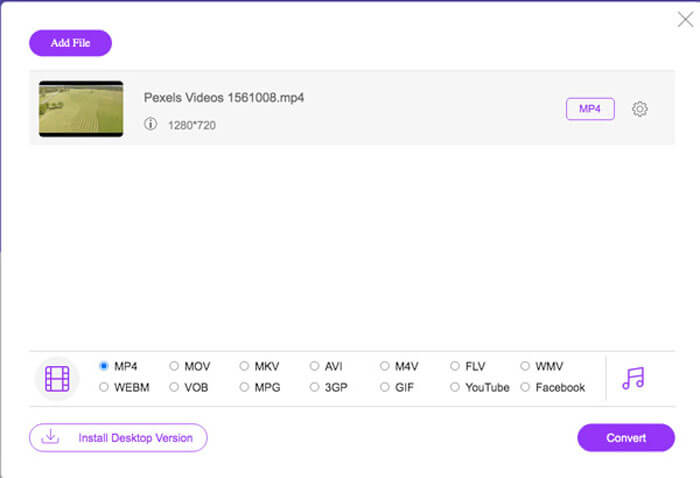
चरण 3. नीचे से आउटपुट फॉर्मेट के रूप में SWF या FLV चुनें। आप Gear आइकन पर क्लिक करके वीडियो एन्कोडर, फ़्रेम रेट, वीडियो बिटरेट, सैंपल रेट और अन्य सेटिंग्स समायोजित कर सकते हैं।.
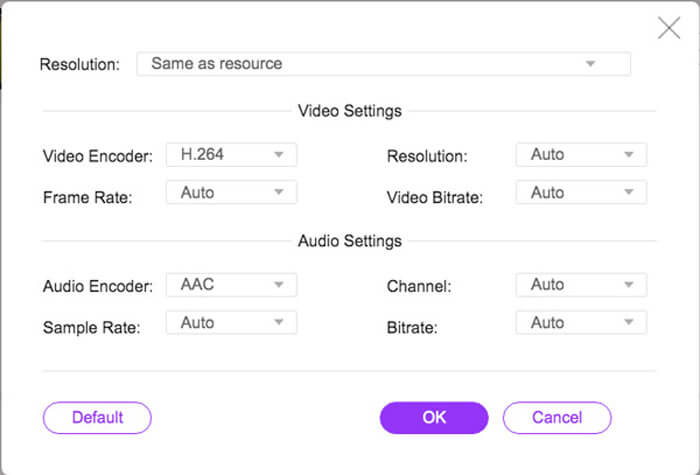
चरण 4. इसके बाद, आप अपने कंप्यूटर पर MP4 को SWF में बदलने के लिए Convert बटन पर क्लिक कर सकते हैं। यह आपको बैच प्रोसेस में कई MP4 फाइलों को इच्छित वीडियो फॉर्मेट में कनवर्ट करने में सक्षम बनाता है। (देखें कि SWF को MP4 में कैसे कनवर्ट करें)
शीर्ष 2: Convertio के साथ SWF के लिए MP4 ट्रांसकोड
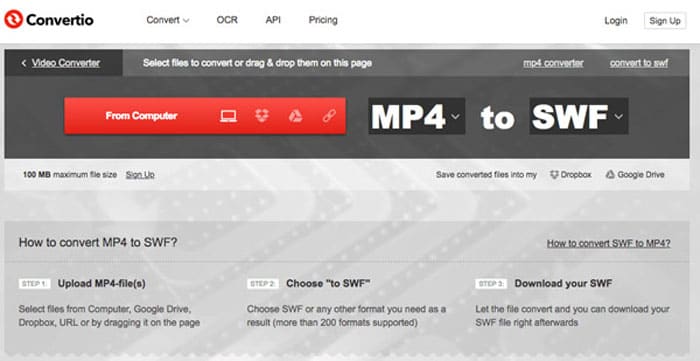
Convertio एक और ऑनलाइन MP4 है SWF कन्वर्टर जो 45 से अधिक फ़ाइल स्वरूपों का समर्थन करता है। यह आपको अलग-अलग स्रोतों से MP4 फ़ाइलों को लोड करने में सक्षम बनाता है, जैसे कि हार्ड ड्राइव, ड्रॉपबॉक्स, Google ड्राइव और अन्य। आप आउटपुट वीडियो के लिए सेटिंग्स को भी ट्वीक कर सकते हैं।
1. MP4 फ़ाइलों को जोड़ने के लिए विभिन्न प्रकार प्रदान करें, जैसे हार्ड ड्राइव, क्लाउड, आदि।
2. MP4, SWF, ऑडियो और अधिक सहित 200 से अधिक प्रारूपों का समर्थन करें।
3. जब MP4 करने के लिए SWF रूपांतरण खत्म हो जाता है आपको सूचित करने के लिए ईमेल भेजें।
4. वीडियो की गुणवत्ता, फ्रेम दर, सीबीआर, ऑडियो कोडेक और अधिक अन्य को समायोजित करें।
चरण 1. किसी भी ब्राउज़र पर Convertio पर जाएँ, आप इनपुट फॉर्मेट के रूप में MP4 विकल्प और आउटपुट फॉर्मेट के रूप में SWF चुन सकते हैं। फिर आप अपने कंप्यूटर हार्ड ड्राइव, Google Drive और Dropbox से MP4 वीडियो चुन सकते हैं।.
चरण 2. यदि आपको वीडियो सेटिंग्स समायोजित करने की आवश्यकता है, तो आप Advanced विकल्प पर क्लिक करके फ़्रेम रेट, CBR, VBR, ऑडियो कोडेक, ऑडियो वॉल्यूम और अन्य कई सेटिंग्स को अपनी ज़रूरत के अनुसार MP4 को SWF में कनवर्ट करने के लिए समायोजित कर सकते हैं।.
चरण 3. इसके बाद, आप लोड किए गए वीडियो को SWF फॉर्मेट में बदलने के लिए Convert बटन पर क्लिक कर सकते हैं। कनवर्ज़न प्रक्रिया में कुछ समय लगता है। आप SWF फाइल को सहेजने के लिए Download बटन पर क्लिक कर सकते हैं।.
शीर्ष 3: CloudConvert के माध्यम से SWF में MP4 स्विच करें
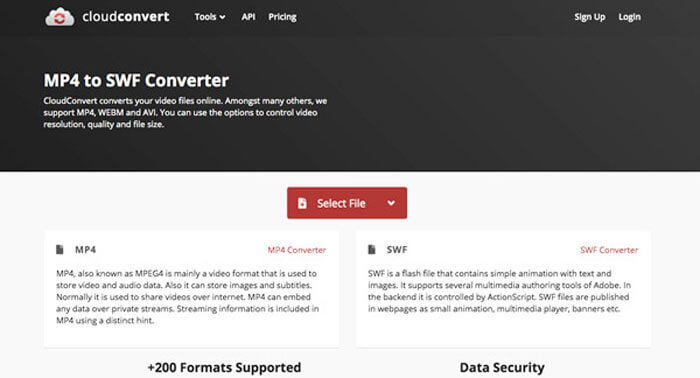
CloudConvert आपको अधिकांश फ़ाइल स्वरूपों को परिवर्तित करने में सक्षम बनाता है, जैसे MP4, SWF, WebM, AVI और अन्य। इसके अलावा, आप आसानी से वीडियो रिज़ॉल्यूशन, वीडियो गुणवत्ता और फ़ाइल आकार को नियंत्रित करने के लिए MP4 से SWF कनवर्टर के विकल्पों का भी उपयोग कर सकते हैं।
1. 200 से अधिक फ़ाइल स्वरूपों का समर्थन करें, जैसे ऑडियो, वीडियो, दस्तावेज़, आदि।
2. फ़ाइलों को परिवर्तित करते समय डेटा सुरक्षा के बारे में चिंता करने की आवश्यकता नहीं है।
3. अपनी आवश्यकताओं के लिए समायोजित सेटिंग, वीडियो की गुणवत्ता और कई अन्य विकल्प।
4. उन्नत एपीआई प्रदान करें जो आपके ऐप के साथ कस्टम एकीकरण की अनुमति दें।
चरण 1. CloudConvert पर जाएँ और MP4 को इनपुट फॉर्मेट तथा SWF को आउटपुट फॉर्मेट के रूप में चुनें। बेशक, आप ब्राउज़र में यह लिंक भी दर्ज कर सकते हैं: https://cloudconvert.com/mp4-to-swf।.
चरण 2. Select File बटन पर क्लिक करें, आप अपने कंप्यूटर, URL, Google Drive, Dropbox और यहाँ तक कि OneDrive से भी MP4 फाइल चुन सकते हैं। आप वीडियो लोड करने के लिए Add more Files पर क्लिक कर सकते हैं।.
चरण 3. यह आपको वीडियो और ऑडियो सेटिंग्स समायोजित करने में भी सक्षम बनाता है। इसके बाद, आप बस Convert बटन पर क्लिक करके MP4 फाइलों को अपनी आवश्यकता अनुसार SWF वीडियो में कनवर्ट कर सकते हैं।.
शीर्ष 4: एक्सपीडिया रिकोड के साथ एसडब्ल्यूएफ में MP4 चालू करें
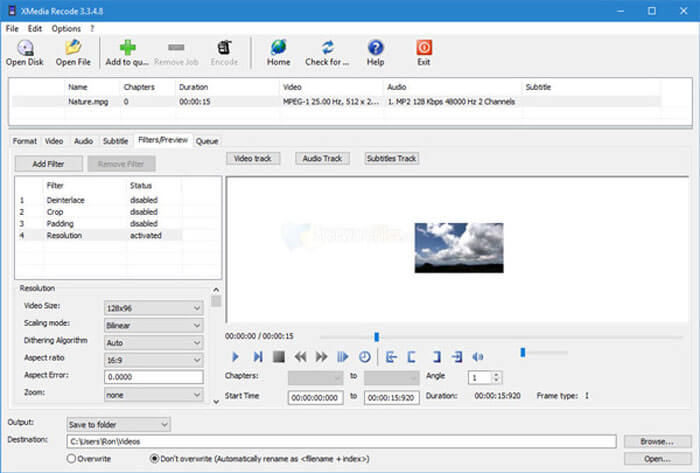
XMedia Recode एक मुफ्त विंडोज MP4 है जो SWF कनवर्टर को एक बैच प्रक्रिया के साथ कई MP4 वीडियो को SWF प्रारूप में बदलने के लिए है। यह आपको कई उन्नत सुविधाओं के साथ वीडियो को संपादित करने में सक्षम बनाता है, जैसे कि बॉक्स ब्लर, कलर कर्व्स, डेनोइस और बहुत कुछ।
1. रूपांतरण के लिए कई और इनपुट और आउटपुट वीडियो प्रारूपों का समर्थन करें।
2. आउटपुट SWF फ़ाइलों को अनुकूलित करने के लिए बिटरेट कैलकुलेटर टूल प्रदान करें।
3. उन्नत वीडियो संपादन सुविधाएँ डी-शोर, फ्लिप, रंग सुधार, आदि।
4. फ्रेम दर, रंग मोड, बिटरेट, जीओपी की लंबाई और अधिक सेटिंग्स।
चरण 1. एक बार जब आपने प्रोग्राम लॉन्च कर लिया, तो आप Open File बटन पर क्लिक करके वे सभी MP4 वीडियो जोड़ सकते हैं जिन्हें आप SWF में कनवर्ट करना चाहते हैं। फिर Format टैब से आउटपुट फॉर्मेट को SWF पर सेट करें।.
चरण 2. जब आप वीडियो संपादित करना चाहें, तो आप Filters में जा सकते हैं और उपलब्ध विभिन्न संपादन विकल्पों का उपयोग कर सकते हैं। आउटपुट SWF फाइलों को कस्टमाइज़ करने के लिए, आप Video and Audio टैब पर जाकर संबंधित कॉन्फ़िगरेशन सेट कर सकते हैं।.
चरण 3. इसके बाद, आप MP4 से SWF कनवर्ज़न शुरू करने के लिए Encode बटन पर क्लिक कर सकते हैं। MP4 को इच्छित वीडियो फॉर्मेट में ट्रांसकोड करने में थोड़ा समय लगता है।.
भाग 2: MP4 को SWF में बदलने के बारे में अक्सर पूछे जाने वाले प्रश्न
1. SWF फाइल फॉर्मेट क्या है?
SWF फ़ाइल Macromedia और Adobe सिस्टम द्वारा विकसित एक Adobe Flash फ़ाइल स्वरूप है। इसे शॉकवे फ्लैश के रूप में भी जाना जाता है, लेकिन बाद में इसे छोटे वेब प्रारूप के रूप में बदल दिया गया। जब आप MP4 को सीधे SWF में परिवर्तित करते हैं, तो इसमें अन्तरक्रियाशीलता और कार्य के एनिमेशन या एप्लेट्स नहीं हो सकते हैं।
2. SWF VS MP4, क्या अंतर हैं?
SWF और MP4 दोनों ऑनलाइन स्ट्रीमिंग साइटों के लिए लोकप्रिय वीडियो प्रारूप हैं। लेकिन मोबाइल डिवाइस, जैसे कि iPhone और iPad SWF फ़ाइलों का समर्थन नहीं करते हैं। MP4 को SWF में परिवर्तित करने का एकमात्र लाभ यह है कि वीडियो प्रारूप आपके दर्शकों के साथ बेहतर तरीके से बातचीत कर सकता है।
3. क्या वीएलसी मीडिया प्लेयर के साथ MP4 को SWF में बदलना संभव है?
सं। VLC मीडिया प्लेयर एक बहुमुखी वीडियो कनवर्टर है, जो आपको SWF को MP4 में बदलने में सक्षम बनाता है, लेकिन यह आउटपुट स्वरूप के रूप में SWF का समर्थन नहीं करता है। बेशक, आप MP4 को SWF में आसानी से बदलने के लिए कुछ प्लगइन्स का उपयोग कर सकते हैं, या इसके बजाय ऑनलाइन विकल्प चुन सकते हैं।
निष्कर्ष
जब आप MP4 को SWF में बदलना चाहते हैं, तो आप लेख से SWF कन्वर्टर्स के लिए 5 सर्वश्रेष्ठ मुफ्त MP4 के बारे में अधिक जान सकते हैं। यदि आपको सीमा के बिना कई MP4 फ़ाइलों को ऑनलाइन रूपांतरित करने की आवश्यकता है, तो FVC फ्री ऑनलाइन वीडियो कनवर्टर प्रारंभिक विकल्प होना चाहिए जो आपको ध्यान में रखना होगा।
-
 कैसे एक पैसा चुकाने के बिना MP4 करने के लिए अपने FLV वीडियो फ़ाइलों को परिवर्तित करने के लिए
 यह मार्गदर्शिका आपकी FLV वीडियो फ़ाइलों को MP4 प्रारूप में विंडोज 10/8/7 / XP और मैक ओएस एक्स में परिवर्तित करने के लिए चार नि: शुल्क तरीके साझा करती है, ताकि आप किसी भी डिवाइस पर वीडियो का आनंद ले सकें।
- 50MB से 5MB तक - सेकंड में MP4 फाइल को कैसे कंप्रेस करें
आप एफवीसी स्टूडियो से कोई भी मुफ्त वीडियो कनवर्टर सॉफ्टवेयर पा सकते हैं। किसी भी वीडियो / ऑडियो प्रारूप का समर्थन किया जाता है, जिसमें MP4, MOV, TS, AVI, WMV, FLAC, MP3, आदि शामिल हैं।
-
 मैं MP4 को WAV ऑनलाइन में मुफ्त में कैसे बदल सकता हूं
 MP4 को WAV में बदलने की पुरजोर कोशिश? पता नहीं कौन सा कन्वर्टर एक पैसा चुकाए बिना आपकी पूरी मदद कर सकता है? इस पोस्ट को पढ़ें और आपके सभी सवालों का जवाब दिया जाएगा।
