


 वीडियो कनवर्टर अंतिम
 स्क्रीन अभिलेखी
 वीडियो मरम्मत
 सुरक्षित डाउनलोड
मैक / विंडोज के लिए MP4 को WMV में कैसे बदलें
कुछ सुझाए गए MP4 से WMV कन्वर्टर्स की सूची देने से पहले, मैं आपसे वीडियो फॉर्मैट्स के बारे में कुछ पूछना चाहता हूँ।.
कंप्यूटर सिस्टम पर डिजिटल वीडियो डेटा सेव करने के लिए हमें वीडियो के लिए बनाए गए किसी फ़ाइल फ़ॉर्मैट का उपयोग करना होता है। तो आप कौन‑कौन से वीडियो फ़ॉर्मैट्स जानते हैं? MP4? WMV? FLV? AVI? ये सभी वास्तव में डिजिटल वीडियो डेटा स्टोर करने के लिए आम तौर पर इस्तेमाल किए जाने वाले वीडियो फ़ॉर्मैट्स हैं। लेकिन क्या आपने कभी सोचा है कि इतने सारे वीडियो फ़ाइल फ़ॉर्मैट्स क्यों हैं? MP4 और WMV में क्या अंतर है?
आम तौर पर, MP4 बाजार पर लगभग हर प्रकार के उपकरणों के साथ संगत है, जिसका अर्थ है कि आप अपने कंप्यूटर या फोन के डिफ़ॉल्ट वीडियो प्लेयर पर भी हर जगह MP4 खेल सकते हैं। हालाँकि, यदि आप विंडोज उपकरणों का उपयोग करते हैं, तो मेरा मानना है कि WMV आपको बेहतर सेवा दे सकता है। केवल इसलिए नहीं कि इसे Microsoft द्वारा विकसित किया गया है, बल्कि इसलिए कि यह HQ वीडियो को एक छोटे डिस्क स्थान में सहेज सकता है।
तो आज आप सीखेंगे कि अनुशंसित बेहतरीन वीडियो कन्वर्टर्स की मदद से MP4 फ़ाइल को WMV में कैसे बदलें।.

भाग 1. मुफ्त में MP4 को WMV ऑनलाइन में कैसे परिवर्तित करें
क्लासिक डेस्कटॉप सॉफ़्टवेयर स्थापित करने के अलावा, वेब-आधारित कन्वर्टर्स का उपयोग करना भी आजकल एक विकल्प है। हालांकि सरल, कई ऑनलाइन कन्वर्टर्स रूपांतरण के दौरान थोड़ा धीमा हैं। कुछ भी आपके द्वारा अपलोड की गई फ़ाइलों के आकार और मात्रा को सीमित करते हैं और आउटपुट वीडियो की गुणवत्ता की गारंटी नहीं दे सकते हैं।
इसलिए यहाँ हम आपका परिचय करा रहे हैं FVC Free Online Video Converter से, जो एक मुफ़्त, तेज़ और प्रभावी वीडियो कन्वर्टर है और जो आपको बहुत‑सी वीडियो या ऑडियो फ़ाइलों को बिना किसी गुणवत्ता हानि के कन्वर्ट करने में मदद कर सकता है।.
एक बहु‑उद्देश्यीय मुफ़्त ऑनलाइन MP4 से WMV कन्वर्टर के रूप में, FVC Video Converter लगभग हर प्रकार के वीडियो फ़ॉर्मैट का समर्थन करता है। आप बड़ी MP4 फ़ाइलों को MKV, MOV, WMV, AVI, TS आदि में या उनसे कन्वर्ट कर सकते हैं। आप अपनी ज़रूरत के अनुसार वीडियो को एडिट भी कर सकते हैं। FVC पर वीडियो बिटरेट, सैंपल रेट, फ़्रेम रेट, रेज़ोल्यूशन और वॉल्यूम समायोजित करना बहुत आसान है। और कन्वर्ट करने के बाद आपकी वीडियो पर कोई वॉटरमार्क नहीं होगा।.
अब आप चिंता कर सकते हैं कि इन सभी विशेषताओं के साथ, यह समझना मुश्किल हो सकता है कि इस कनवर्टर को कैसे संचालित किया जाए। वास्तव में सच्चाई काफी विपरीत है। इस MP4 को WMV कनवर्टर करने के लिए आपको केवल कुछ कदम उठाने होंगे।
स्टेप 1. यहाँ क्लिक करके FVC Free Online Video Converter पर जाएँ। फिर पहले Add Files to Convert पर क्लिक करके FVC Launcher डाउनलोड करें।.
फ़ाइलों को बैच में कनवर्ट करने के लिए डेस्कटॉप संस्करण डाउनलोड करें।.
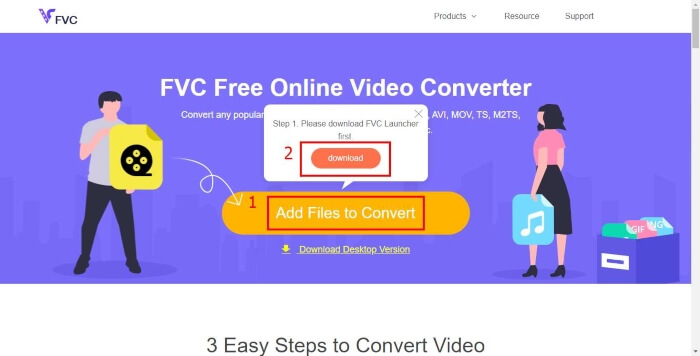
स्टेप 2. लॉन्चर इंस्टॉल करने के बाद Open File विंडो खुल जाएगी। बस वह MP4 फ़ाइल खोजें जिसे आप बदलना चाहते हैं।.
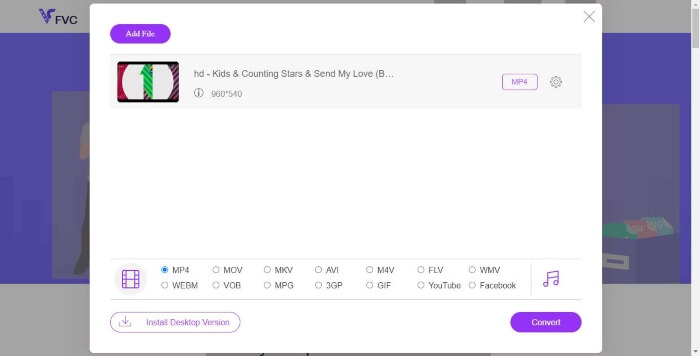
स्टेप 3. फिर कन्वर्टिंग पेज पर आउटपुट फ़ॉर्मैट के रूप में WMV चुनें। वैसे, अगर आप वीडियो के पैरामीटर्स बदलना चाहते हैं, तो Setting आइकन पर क्लिक करके Settings विंडो खोल लें। Convert बटन पर क्लिक करें और कन्वर्ट की गई वीडियो को सेव करने के लिए कोई डेस्टिनेशन फ़ोल्डर चुनें।.
भाग 2. MP4 को डेस्कटॉप सॉफ्टवेयर के साथ WMV में बदलें
1. RealPlayer
RealPlayer 1995 से सबसे लोकप्रिय मीडिया प्लेयर्स में से एक बन चुका है। यह न केवल आपको अपने वीडियो, म्यूज़िक और तस्वीरों को आसानी से मैनेज करने में मदद करता है, बल्कि वीडियो को कई अलग‑अलग फ़ॉर्मैट्स में कन्वर्ट कर सकता है और उन्हें दूसरे मोबाइल डिवाइस पर ट्रांसफ़र भी कर सकता है।.
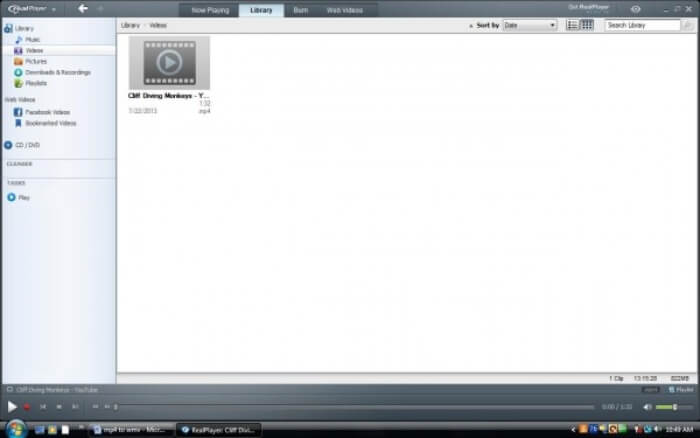
स्टेप 1. अगर RealPlayer आपके कंप्यूटर पर इंस्टॉल है, तो MP4 फ़ाइल को RealPlayer की library में सेव करें। RealPlayer लॉन्च करने के बाद Library चुनें। Video सूची में अपनी फ़ाइल ढूँढें।.
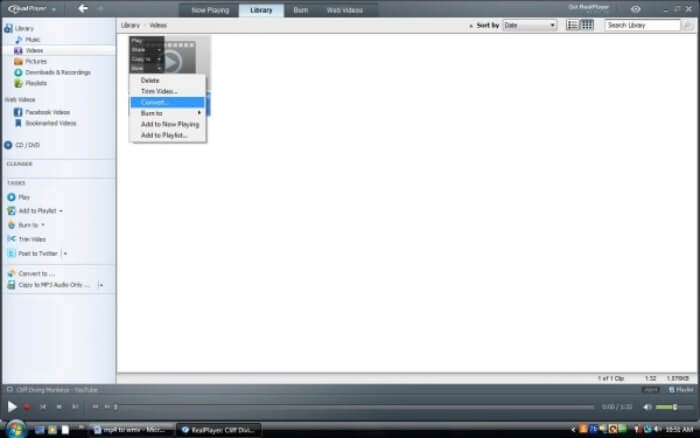
स्टेप 2. फ़ाइल पर क्लिक करें और पॉप‑अप मेनू से More विकल्प चुनें। फिर Convert विकल्प चुनें।.
स्टेप 3. Select a Device मेनू से WMV चुनें और OK पर क्लिक करें। अब Start बटन पर क्लिक करें। कुछ ही सेकंड में आपकी वीडियो RealPlayer लाइब्रेरी में होगी।.
2. वीएलसी मीडिया प्लेयर
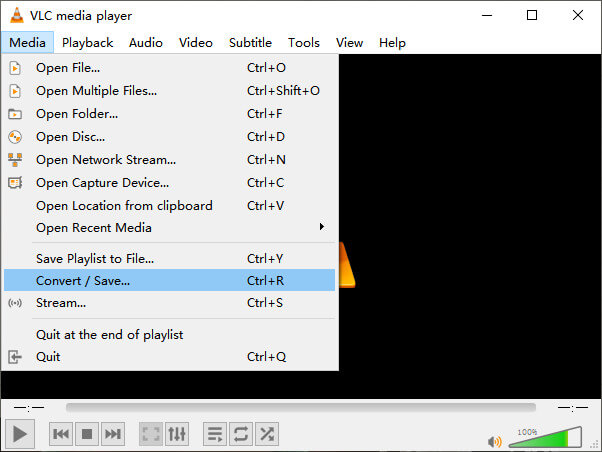
VLC एक ओपन‑सोर्स, क्रॉस‑प्लेटफ़ॉर्म प्लेयर है जो अलग‑अलग फ़ॉर्मैट्स में वीडियो चला सकता है। यह कई लोकप्रिय फ़ॉर्मैट्स में फ़ाइल कन्वर्ज़न को भी सपोर्ट करता है। नीचे दिए गए चरणों का पालन करके आप MP4 से WMV फ़ाइल एक्सपोर्ट कर सकते हैं।.
स्टेप 1. VLC Media Player खोलें और Media मेनू में Convert / Save पर क्लिक करें।.
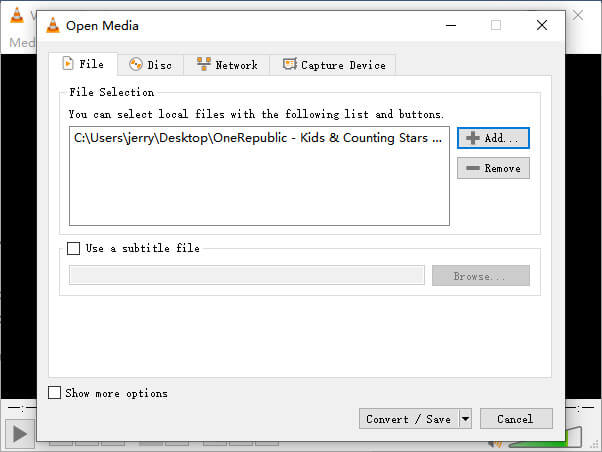
स्टेप 2. फ़ाइल को VLC में जोड़ें। फिर Convert / Save बटन पर क्लिक करें।.
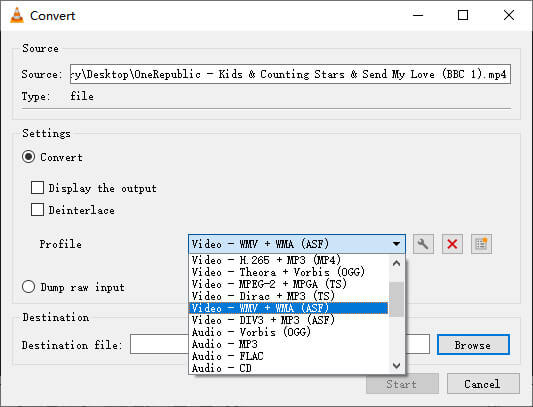
स्टेप 3. Profile से WMV चुनें और आउटपुट फ़ाइल को सेव करने के लिए कोई फ़ोल्डर चुनें। फिर Start पर क्लिक करें।.
MP4 बनाम WMV
2001 में मूविंग पिक्चर एक्सपर्ट्स ग्रुप (MPEG) द्वारा जारी, MP4 प्रारूप आपको वीडियो, ऑडियो, उपशीर्षक और छवि डेटा को अलग-अलग ट्रैक में सहेजने में मदद कर सकता है। यह एमपीईजी -4 भाग 14 के लिए छोटा है। साथ ही, यह वीडियो स्ट्रीमिंग और साझा करने के लिए उपयोग किए जाने वाले सबसे लोकप्रिय प्रारूपों में से एक है।
Microsoft द्वारा निर्मित, WMV 2000 के दशक में सबसे आम वीडियो प्रारूपों में से एक था। इसे वेब पर देखा जा सकता है और विंडोज़ पर विभिन्न मीडिया प्लेयर द्वारा चलाया जा सकता है। और यह विंडोज मीडिया प्लेयर का डिफॉल्ट वीडियो फाइल फॉर्मेट भी है। लेकिन इसे हाल ही में अन्य प्रारूपों द्वारा ले लिया गया है।
भाग 3. MP4 के WMV परिवर्तित करने के लिए अक्सर पूछे जाने वाले प्रश्न
1. क्या हैंडब्रेक MP4 को WMV में बदल सकता है?
रिसर्च करने के बाद, दुर्भाग्य से पता चला कि नवीनतम Handbrake MP4 को WMV में कन्वर्ट नहीं कर सकता। यह सही है कि Handbrake ज़्यादातर आम मल्टीमीडिया फ़ाइलों को सपोर्ट करता है, लेकिन वह केवल input sources के लिए है। आउटपुट फ़ॉर्मैट के विकल्प MP4(.M4V) और MKV हैं।.
2. क्या मैं एक MP4 फ़ाइल को बदल सकता हूं जो कि मुफ्त में WMV के लिए 100MB से अधिक ऑनलाइन है?
यह निर्भर करता है। अलग‑अलग मुफ़्त ऑनलाइन वीडियो कन्वर्टर्स की अलग‑अलग सीमाएँ होती हैं। कुछ कन्वर्टर्स जैसे FVC Free Online Video Converter आपको 100MB से अधिक की फ़ाइलें बदलने की अनुमति देते हैं। लेकिन कुछ अन्य कन्वर्टर्स इसके लिए आपसे शुल्क ले सकते हैं।.
3. क्या विंडोज मीडिया प्लेयर MP4 को WMV में बदल सकता है?
आप Windows Media Player के साथ MP4 फ़ाइल को WMV में कन्वर्ट नहीं कर सकते। इसका कारण यह है कि वह सिर्फ़ एक प्लेयर है, कन्वर्टर नहीं। अगर आप MP4 को WMV में कन्वर्ट करना चाहते हैं तो आपको कोई अच्छा वीडियो कन्वर्टर इस्तेमाल करना चाहिए।.
4. क्या मैं मैक पर WMV फ़ाइल खेल सकता हूँ?
Mac में बने‑बनाए वीडियो टूल्स WMV फ़ाइलें नहीं चला सकते। लेकिन MacOS पर WMV वीडियो चलाने के और तरीके हैं। आप WMV को किसी ऐसे फ़ॉर्मैट में कन्वर्ट कर सकते हैं जो Mac सपोर्ट करता हो। या फिर Windows Media Player for Mac इंस्टॉल करके WMV फ़ाइलें चला सकते हैं।.
निष्कर्ष
हालाँकि MP4 और WMV दोनों में कुछ समानताएँ हैं, फिर भी उनकी अपनी‑अपनी विशेषताएँ हैं। इसलिए आपको विशेष परिस्थितियों के अनुसार ही चुनाव करना चाहिए। आशा है कि इस पोस्ट को पढ़ने के बाद MP4 को WMV में कन्वर्ट करने से जुड़ी दिक्कतें अब आपकी समस्या नहीं रहेंगी। अगली बार जब आपको WMV फ़ाइल चाहिए हो, तो बस ऊपर दिए गए गाइड का पालन करें और आसानी से फ़ाइल कन्वर्ट कर लें।.
-
 गुणवत्ता हानि के बिना एनिमेटेड GIF छवियों के लिए अपने MP4 वीडियो फ़ाइलों को परिवर्तित करने के लिए कैसे
 अपने MP4 वीडियो को एनिमेटेड GIF में बदलने का सबसे अच्छा तरीका खोज रहे हैं? फ़ोटोशॉप, विंडोज मूवी मेकर, ऑनलाइन वीडियो कनवर्टर और बहुत कुछ करने के लिए यहां एक विस्तृत मार्गदर्शिका दी गई है।
-
 कैसे एक पैसा चुकाने के बिना MP4 करने के लिए अपने FLV वीडियो फ़ाइलों को परिवर्तित करने के लिए
 यह मार्गदर्शिका आपकी FLV वीडियो फ़ाइलों को MP4 प्रारूप में विंडोज 10/8/7 / XP और मैक ओएस एक्स में परिवर्तित करने के लिए चार नि: शुल्क तरीके साझा करती है, ताकि आप किसी भी डिवाइस पर वीडियो का आनंद ले सकें।
-
 खोये हुए क्वालिटी के बिना MOV को MP4 में कैसे कन्वर्ट करें
 MOV (Apple QuickTime मूवी) फ़ाइलों को MP4 में कनवर्ट करना चाहते हैं? यह पोस्ट विंडोज 10/8/7 / XP और मैक ओएस एक्स पर अपने MOV वीडियो फ़ाइलों को MP4 प्रारूप में बदलने के लिए 4 मुक्त तरीके साझा करता है।

