


 वीडियो कनवर्टर अंतिम
 स्क्रीन अभिलेखी
 वीडियो मरम्मत
 सुरक्षित डाउनलोड
एयरशौ स्क्रीन रिकॉर्डर की समीक्षा: कुछ बातें जो आपको जाननी चाहिए
जैसे‑जैसे चीज़ें ऑनलाइन होने लगी हैं, जैसे वर्चुअल मीटिंग्स और क्लासेज़, हमें कभी‑कभी उन्हें अपने Android या iOS फ़ोन से रिकॉर्ड करने की ज़रूरत पड़ती है। खैर, स्क्रीन रिकॉर्डर टूल की ज़रूरत यहीं खत्म नहीं होती। अगर आप अपने फ़ोन की स्क्रीन पर होने वाली किसी भी गतिविधि को रिकॉर्ड करना चाहते हैं, तो आपको शायद इसकी ज़रूरत पड़ेगी। यदि आप यह काम करने के लिए AirShou इंस्टॉल करने पर विचार कर रहे हैं, तो हम आपकी मदद के लिए तैयार हैं! इस विस्तृत समीक्षा में, हम इसकी मुख्य विशेषताओं की जाँच करेंगे, जो बातें हमें पसंद आईं उन्हें हाईलाइट करेंगे और जहाँ सुधार की गुंजाइश है उसे भी पहचानेंगे। साथ ही, अगर AirShou आपकी उम्मीदों पर खरा न उतरे, तो हम एक विकल्प भी सुझाएँगे। और जानने के लिए आगे पढ़ें!

भाग 1. एयरशौ स्क्रीन रिकॉर्डर क्या है?
AirShou एंड्रॉइड और iOS के लिए एक स्क्रीन रिकॉर्डिंग ऐप है। यह बिना रूट या जेलब्रेक एक्सेस के उच्च-गुणवत्ता वाले स्क्रीन वीडियो रिकॉर्ड करने की अपनी क्षमता के लिए जाना जाता है। यह ऐप एक सरल इंटरफ़ेस प्रदान करता है जिससे उपयोगकर्ता बस कुछ ही टैप से रिकॉर्डिंग शुरू कर सकते हैं, जिससे यह गेमर्स, कंटेंट क्रिएटर्स और शिक्षकों के बीच लोकप्रिय हो गया है। इसके अलावा, यह स्क्रीन रिकॉर्डिंग ऐप स्पष्ट ऑडियो के साथ स्क्रीन गतिविधि को कैप्चर कर सकता है, और यह विभिन्न रिज़ॉल्यूशन और बिटरेट को सपोर्ट करता है, जिससे उपयोगकर्ताओं को वीडियो क्वालिटी में लचीलापन मिलता है।
अनुकूलता:
AirShou iOS 9 और उससे पहले के संस्करणों के साथ संगत है। कोई भी अपडेट किया गया iOS संस्करण अब संगत नहीं है। Android के लिए, संस्करण 5.0 और उससे ऊपर वाले डिवाइस संगत हैं।
निर्णय:
AirShou अपने समय में एक बेहतरीन स्क्रीन रिकॉर्डर रहा होगा, लेकिन आज यह एक व्यावहारिक विकल्प नहीं रहा। पुराने iOS 9 और उससे पहले के वर्ज़न तक सीमित समर्थन और इसे अनधिकृत स्रोतों से साइडलोड करने की ज़रूरत के कारण, यह परेशानी या संभावित जोखिमों के लायक नहीं है। अगर आप किसी आधुनिक डिवाइस का इस्तेमाल कर रहे हैं, तो बेहतर होगा कि आप एक ऐसा स्क्रीन रिकॉर्डर चुनें जो पूरी तरह से अनुकूल हो, अतिरिक्त सुविधाएँ और सक्रिय समर्थन प्रदान करता हो।
भाग 2. एयरशौ स्क्रीन रिकॉर्डर का एक गहन अवलोकन
इसी बीच, अगर आप ऐसा डिवाइस इस्तेमाल कर रहे हैं जो अभी भी AirShou को सपोर्ट करता है, तो यह सामान्य उपयोग के लिए एक विश्वसनीय स्क्रीन रिकॉर्डर के रूप में काम कर सकता है। वास्तव में, यह बुनियादी स्क्रीन रिकॉर्डिंग ज़रूरतों के लिए उपयोगी फ़ंक्शन देता है, जिनके विकल्पों को नेविगेट करना और सेट करना आसान है। नीचे, आइए इसकी मुख्य विशेषताओं के साथ‑साथ इसके फ़ायदे और कमियों पर विस्तार से नज़र डालते हैं।.
मुख्य विशेषताएं:
• HD में स्क्रीन रिकॉर्ड करता है.
• समायोज्य रिज़ॉल्यूशन, बिटरेट और फ्रेम दर।
• आंतरिक और बाहरी ऑडियो रिकॉर्डिंग का समर्थन करता है
• आसान टैप-टू-स्टार्ट और पॉज़ रिकॉर्डिंग नियंत्रण।
• हल्का, कम CPU उपयोग के साथ।
पेशेवरों
- शुरुआती-अनुकूल इंटरफ़ेस.
- आउटपुट वीडियो पर कोई वॉटरमार्क नहीं।
- उच्च गुणवत्ता वाली स्क्रीन रिकॉर्डिंग तैयार करता है।
विपक्ष
- आधुनिक iOS संस्करणों, जैसे iOS 10 और इसके बाद के संस्करणों के साथ असंगत।
- अब ऐप स्टोर या गूगल प्ले पर उपलब्ध नहीं है।
- स्थापना के लिए तीसरे पक्ष के स्रोतों की आवश्यकता होती है।
भाग 3. iOS/Android पर AirShou कैसे स्थापित करें?
AirShou स्क्रीन रिकॉर्डर अब ऐप स्टोर और गूगल प्ले पर उपलब्ध नहीं है। इसे डाउनलोड करने के लिए, आपको इसकी आधिकारिक वेबसाइट पर जाना होगा। इस टूल को इंस्टॉल करने के विस्तृत चरणों के लिए, नीचे दिए गए चरणों का पालन करें:
विधि 1: iPhone के लिए AirShou स्क्रीन रिकॉर्डर डाउनलोड करें
स्टेप 1. अपने iPhone पर Safari खोलें और AirShou Screen Recorder सर्च करें।.
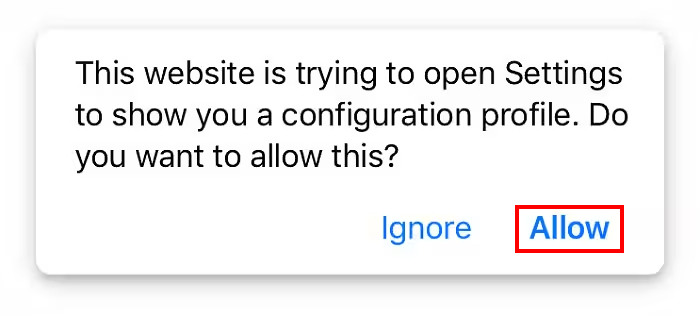
स्टेप 2. इसके बाद, Allow बटन पर टैप करके अपने iOS को ऐप इंस्टॉल करने की अनुमति दें।.
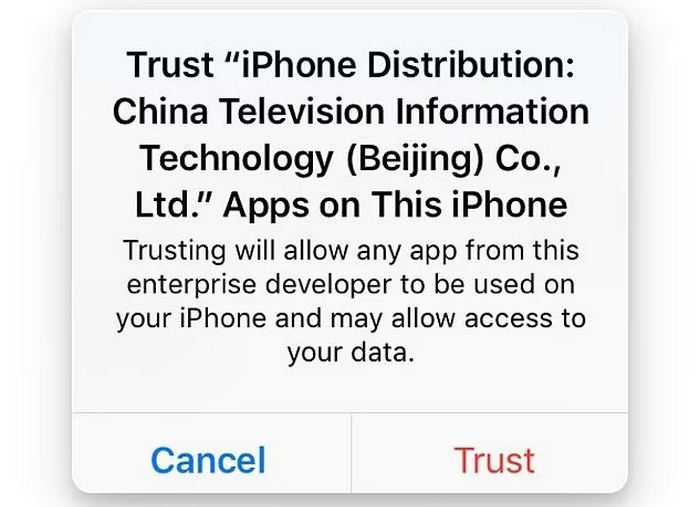
स्टेप 3. उसके बाद एक और संदेश दिखाई देगा; Trust बटन पर टैप करें।.
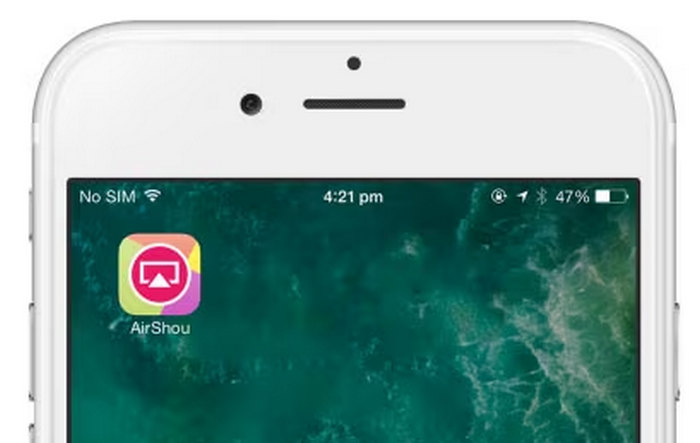
स्टेप 4. अंत में, अपने iPhone पर ऐप लॉन्च करें।.
हालाँकि, कृपया ध्यान दें कि यह ऐप सभी डिवाइस पर, खासकर नए iOS वर्ज़न पर, हमेशा सुचारू रूप से काम नहीं कर सकता। इंस्टॉलेशन के बाद यह ज़रूर जाँच लें कि यह ठीक से चल रहा है या नहीं। इसके अलावा, थर्ड-पार्टी स्रोतों से डाउनलोड करते समय सावधानी बरतें और अपने डिवाइस को सुरक्षित रखने के लिए अनावश्यक अनुमतियाँ देने से बचें।
विधि 2: Android के लिए AirShou स्क्रीन रिकॉर्डर डाउनलोड करें
चूंकि AirShou अब गूगल प्ले स्टोर पर उपलब्ध नहीं है, इसलिए एंड्रॉयड उपयोगकर्ताओं को इसे APK फ़ाइल के माध्यम से मैन्युअल रूप से इंस्टॉल करना होगा।
स्टेप 1. अपने Android ब्राउज़र का उपयोग करके AirShou APK फ़ाइल खोजें और डाउनलोड करें।.
स्टेप 2. अपने Settings में जाएँ और Security खोजें। Unknown Sources को सक्षम करें ताकि Play Store के अलावा अन्य स्रोतों से ऐप इंस्टॉल किए जा सकें। APK फ़ाइल इंस्टॉल करने के लिए यह क़दम ज़रूरी है।.
स्टेप 3. डाउनलोड पूरा होने के बाद, अपने Downloads फ़ोल्डर या वह लोकेशन खोलें जहाँ फ़ाइल सेव हुई है। AirShou APK ढूँढें, उस पर टैप करें और इंस्टॉल करने के लिए निर्देशों का पालन करें।.
स्टेप 4. इंस्टॉल होने के बाद, आपको अपने होम स्क्रीन पर AirShou का आइकन दिखेगा। उस पर टैप करें, ऐप खोलें और अपनी स्क्रीन रिकॉर्ड करना शुरू करें।.
नोट: चूँकि AirShou आधिकारिक ऐप स्टोर्स पर उपलब्ध नहीं है, इसलिए सुरक्षा जोखिमों से बचने के लिए APK किसी विश्वसनीय स्रोत से ही डाउनलोड करें। हमेशा फ़ाइलों को मैलवेयर के लिए स्कैन करें और ऐप को दी जाने वाली अनुमतियों के प्रति सतर्क रहें।.
अगर आप इच्छुक हैं तो Camtasia Recorder रिव्यू के बारे में और पढ़ने के लिए यहाँ क्लिक करें।.
भाग 4. एयरशौ स्क्रीन रिकॉर्डर का सबसे अच्छा विकल्प
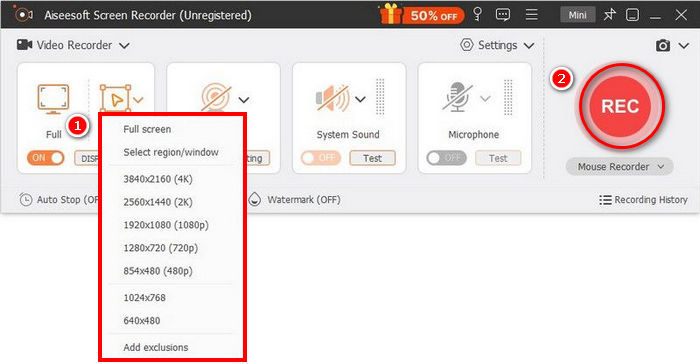
यदि आप AirShou Screen Recorder का इस्तेमाल उसकी पुरानी कम्पैटिबिलिटी और अप्रत्यक्ष इंस्टॉलेशन प्रक्रिया की वजह से लेकर झिझक रहे हैं, तो इससे बेहतर विकल्प है FVC Screen Recorder। यह स्क्रीन रिकॉर्डिंग टूल अपने सरल और सहज इंटरफ़ेस के लिए जाना जाता है, जो उपयोगकर्ताओं को आसानी से अपनी स्क्रीन रिकॉर्ड करने की सुविधा देता है।.
मुफ़्त डाउनलोडWindows 7 या उससे बाद के लिएसुरक्षित डाउनलोड
मुफ़्त डाउनलोडMacOS 10.7 या उससे बाद के लिएसुरक्षित डाउनलोड
पेशेवरों
- आपको पूर्ण स्क्रीन, चयनित विंडो या कस्टम क्षेत्र रिकॉर्ड करने की अनुमति देता है।
- वीडियो कॉल, मीटिंग, गेमप्ले और ऑनलाइन कक्षाएं रिकॉर्ड करें
- रिकॉर्डिंग करते समय पाठ, रेखाएँ, हाइलाइट्स और आकृतियाँ जोड़ने की अनुमति देता है।
- सिस्टम ऑडियो और माइक्रोफ़ोन आवाज़ दोनों रिकॉर्ड कर सकते हैं।
- विभिन्न वीडियो और ऑडियो आउटपुट प्रारूपों का समर्थन करता है।
- HD में वीडियो स्क्रीन रिकॉर्ड करें.
विपक्ष
- निःशुल्क संस्करण सीमित लग सकता है।
भाग 5. एयरशौ स्क्रीन रिकॉर्डर के बारे में अक्सर पूछे जाने वाले प्रश्न
क्या AirShou अभी भी ऐप स्टोर या गूगल प्ले पर उपलब्ध है?
नहीं, AirShou स्क्रीन रिकॉर्डर अब ऐप स्टोर और गूगल प्ले जैसे आधिकारिक ऐप स्टोर पर उपलब्ध नहीं है। इसे इंस्टॉल करने के लिए, उपयोगकर्ताओं को इसे किसी तृतीय-पक्ष स्रोत से डाउनलोड करना होगा, जिससे सुरक्षा संबंधी जोखिम हो सकते हैं।
क्या मैं AirShou को नए iOS या Android संस्करणों पर उपयोग कर सकता हूँ?
AirShou स्क्रीन रिकॉर्डर केवल iOS 9 और उससे पहले के संस्करणों के साथ संगत है। हो सकता है कि यह नए iOS संस्करणों पर ठीक से काम न करे या बिल्कुल भी काम न करे। Android पर, यह संस्करण 5.0 और उसके बाद के संस्करणों को सपोर्ट करता है, लेकिन इंस्टॉलेशन APK फ़ाइलों के माध्यम से ही करना होगा।
क्या एयरशौ आज भी काम करता है?
हाँ, लेकिन कुछ सीमाओं के साथ। AirShou स्क्रीन रिकॉर्डर पुराने डिवाइस पर, खासकर iOS 9 या उससे पहले के वर्ज़न और Android 5.0 या उसके बाद के वर्ज़न पर, अभी भी काम कर सकता है। हालाँकि, यह अब आधिकारिक ऐप स्टोर पर उपलब्ध नहीं है, और हो सकता है कि यह नए ऑपरेटिंग सिस्टम पर ठीक से काम न करे। आपको इसे किसी तीसरे पक्ष के माध्यम से मैन्युअल रूप से इंस्टॉल करना होगा, जिससे सुरक्षा और स्थिरता को खतरा हो सकता है।
क्या AirShou डेस्कटॉप उपयोग के लिए उपयुक्त है?
नहीं, AirShou स्क्रीन रिकॉर्डर डेस्कटॉप इस्तेमाल के लिए नहीं बनाया गया है। इसे विशेष रूप से मोबाइल उपकरणों, खासकर Android फ़ोन और पुराने वर्ज़न वाले iOS उपकरणों के लिए विकसित किया गया है। Windows या macOS के लिए AirShou का कोई आधिकारिक संस्करण उपलब्ध नहीं है।
निष्कर्ष
AirShou Screen Recorder मौजूदा समय के लिए काफ़ी पुराना हो चुका है। हालाँकि, जिन डिवाइसों पर यह सपोर्टेड है, उन पर यह ठीक‑ठाक काम कर सकता है और एक भरोसेमंद स्क्रीन रिकॉर्डिंग टूल साबित हो सकता है। बस यह ध्यान रखें कि इसमें थर्ड‑पार्टी स्रोतों से इंस्टॉल करना पड़ता है, इसलिए सुरक्षा जोखिम मौजूद हैं। अगर आप अधिक सुरक्षित और पूरी तरह सपोर्टेड स्क्रीन रिकॉर्डिंग विकल्प की तलाश में हैं, तो आप FVC Screen Recorder जैसे दूसरे विकल्प आज़मा सकते हैं, जो Windows और macOS सहित ज़्यादा डिवाइसों की रेंज को सपोर्ट करता है।.
-
 ShareX स्क्रीन रिकॉर्डर की समीक्षा और ShareX के साथ स्क्रीन रिकॉर्ड करने के लिए कैसे
 ShareX स्क्रीन रिकॉर्डर किसके लिए उपयोग किया जाता है? मैं ShareX पर अपनी स्क्रीन कैसे रिकॉर्ड करूं? यह पोस्ट ShareX की समीक्षा देता है और दिखाता है कि ShareX के साथ स्क्रीन कैसे रिकॉर्ड करें।
-
 स्क्रीन वीडियो कैप्चर करने के लिए 4 सर्वश्रेष्ठ मुफ्त वेब लॉन्च रिकॉर्डर
 एक पैसे का भुगतान किए बिना अपने डेस्कटॉप पर ऑनस्क्रीन गतिविधियों को रिकॉर्ड करने का सबसे अच्छा तरीका खोज रहे हैं? यहां 4 सबसे अधिक बार उपयोग किए जाने वाले मुफ्त वेब लॉन्च रिकॉर्डर हैं।
-
 कंप्यूटर, आईओएस और एंड्रॉइड के लिए 3 सर्वश्रेष्ठ फेसबुक कॉल रिकॉर्डर
 जब आप मूल्यवान चीजों को सहेजने के लिए फेसबुक कॉल रिकॉर्ड करना चाहते हैं, तो चुनने के लिए बहुत सारे फेसबुक कॉल रिकॉर्डर हैं। यहां आप पीसी, आईओएस और एंड्रॉइड के लिए फेसबुक वीडियो कॉल रिकॉर्ड करने के लिए 3 सर्वश्रेष्ठ टूल सीख सकते हैं।
