


 वीडियो कनवर्टर अंतिम
 स्क्रीन अभिलेखी
 वीडियो मरम्मत
 सुरक्षित डाउनलोड
MP4 वीडियो से वॉटरमार्क हटाने की सरल प्रक्रिया
क्या आपको ऐसे समस्याओं का सामना करना पड़ता है, जैसे कि आपको बिल्कुल अंदाज़ा न हो कि अपने Mac और Windows जैसे डिवाइस का इस्तेमाल करते हुए अपने MP4 वीडियो से वॉटरमार्क कैसे हटाएँ? तो यह लेख आपके लिए सबसे बेहतरीन समाधान लाया है। यदि आप उन लोगों में से हैं जिन्हें फ़िल्में, क्लिप्स और अन्य वीडियो देखना पसंद है, तो आप इस बात से भी रिलेट कर सकते हैं कि अपने पसंदीदा वीडियो को वॉटरमार्क या MP4 वीडियो पर दिखने वाली किसी भी अनावश्यक चीज़ के साथ देखना कितना परेशान करने वाला और चिड़चिड़ा होता है। साथ ही, आप अपनी स्क्रीन का पूरा हिस्सा भी नहीं देख पाते क्योंकि ये वॉटरमार्क उसे ढक लेते हैं। और सबसे निराशाजनक बात यह है कि कुछ वीडियो पर तो बहुत बड़े-बड़े वॉटरमार्क होते हैं, जिनकी वजह से आप अपने पसंदीदा वीडियो का आनंद भी नहीं ले पाते।.
शुक्र है, वीडियो वॉटरमार्क रिमूवर के साथ पहले से ही एक जबरदस्त और उल्लेखनीय सॉफ्टवेयर एप्लिकेशन है जिसका उपयोग आप अपने वीडियो पर उन अनावश्यक वस्तुओं को खत्म करने के लिए कर सकते हैं, जैसे वॉटरमार्क, लोगो, टेक्स्ट, चित्र, और बहुत कुछ। आप इन वस्तुओं को जल्दी से मिटा सकते हैं या हटा सकते हैं और इन अनुप्रयोगों के साथ अपने वीडियो देखने या चलाने का आनंद ले सकते हैं। इन अनुप्रयोगों के साथ, आप अब कभी निराश या चिड़चिड़े नहीं होंगे। फिर, यदि आप इस विषय से प्रभावित हैं, तो आपको पर्याप्त जानकारी देने के लिए इस लेख को अवश्य पढ़ना चाहिए, विशेष रूप से आपके MP4 वीडियो पर आसानी से वॉटरमार्क हटाने के लिए।

भाग 1: MP4 वीडियो से वॉटरमार्क हटाने का सबसे अच्छा तरीका
मान लीजिए कि आप MP4 वीडियो से वॉटरमार्क हटाने के लिए सबसे बेहतरीन और शानदार एप्लिकेशन की तलाश में हैं; तो Video Converter Ultimate सबसे अच्छा टूल है। यह एप्लिकेशन आपके वीडियो में मौजूद परेशान करने वाली चीज़ों, जैसे वॉटरमार्क, लोगो, टेक्स्ट या तस्वीरों को हटाने में सक्षम है। इसके अलावा, आपको सेविंग प्रक्रिया के दौरान ज़्यादा इंतज़ार भी नहीं करना पड़ेगा, क्योंकि वॉटरमार्क हटाने के बाद आप अपने वीडियो बहुत जल्दी सेव कर सकते हैं।.
इसके अलावा, वीडियो कन्वर्टर अल्टीमेट में बहुत सारे संपादन उपकरण हैं जिनका आप उपयोग कर सकते हैं, जैसे कि वीडियो बढ़ाने वाला, वॉटरमार्क हटाना, वॉटरमार्क जोड़ना, एक वीडियो स्पीड कंट्रोलर, जीआईएफ मेकर, कोलाज मेकर, वीडियो और ऑडियो रिकॉर्डर, वीडियो / ऑडियो कंप्रेसर, विभिन्न फाइलों को परिवर्तित करना प्रारूप, जैसे MP4, FLV, MOV, TRP, MTS, M2TS, MKV, AAC, MP3, और बहुत कुछ। इसके अलावा, सबसे अच्छी बात यह है कि अब आपको इस एप्लिकेशन को खरीदने या खरीदने की आवश्यकता नहीं है। इसे आप फ्री में ऑपरेट कर सकते हैं। साथ ही, यह एप्लिकेशन बहुत ही सरल और उपयोग में आसान है। यदि आप अपने MP4 वीडियो पर वॉटरमार्क हटाना चाहते हैं, तो वीडियो कन्वर्टर अल्टीमेट आपको दो तरीके प्रदान कर सकता है। अपने वीडियो पर वॉटरमार्क मिटाने के इन दो तरीकों को जानने के लिए लगातार पढ़ें।
1. वीडियो वॉटरमार्क रिमूवर का उपयोग करना
चरण 1: Video Converter Ultimate की वेबसाइट पर जाएँ। एप्लिकेशन को मुफ़्त में डाउनलोड करें। फिर इंस्टॉलेशन प्रक्रिया आगे बढ़ाएँ।.
फ्री डाउनलोडWindows 7 या बाद के संस्करण के लिएसुरक्षित डाउनलोड
फ्री डाउनलोडMacOS 10.7 या बाद के संस्करण के लिएसुरक्षित डाउनलोड
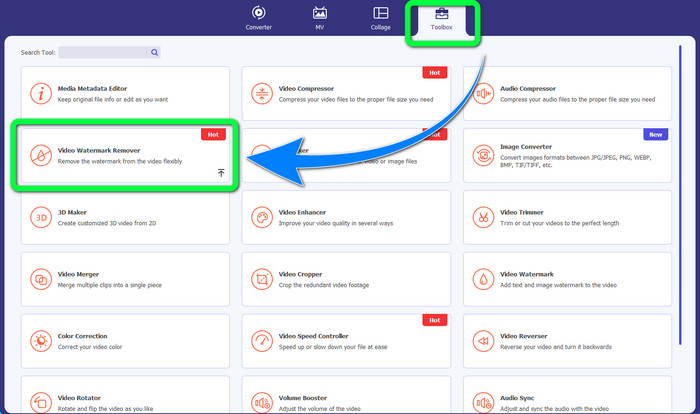
चरण 2: एप्लिकेशन लॉन्च करें। Toolbox > Video Watermark Remover चुनें।.
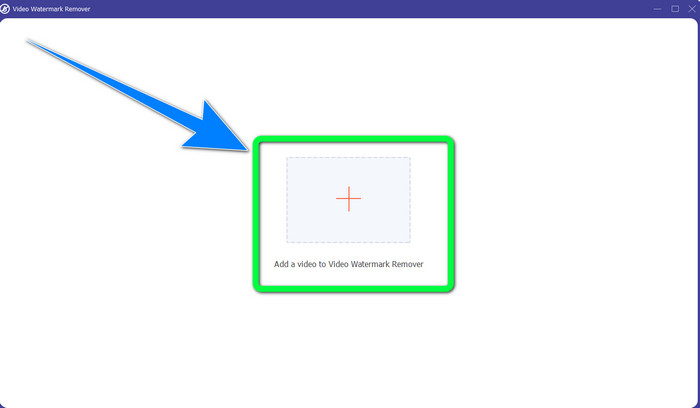
चरण 3: एक और इंटरफ़ेस दिखाई देगा। Plus चिन्ह वाले बटन का चयन करें और अपना वॉटरमार्क वाला MP4 वीडियो जोड़ें।.
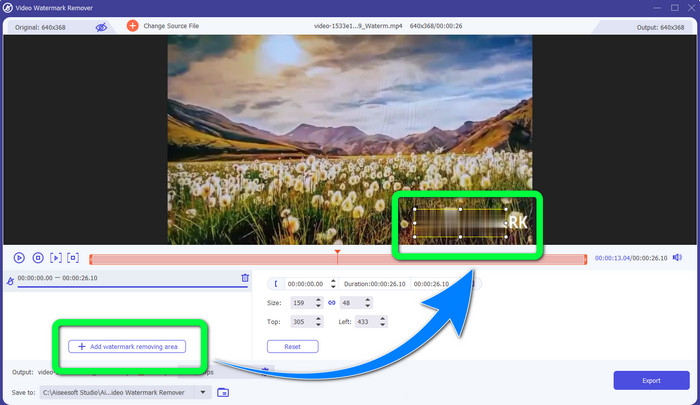
चरण 4: Add Watermark Removing Area बटन पर क्लिक करें। फिर आपके वीडियो पर एक छोटा बॉक्स दिखाई देगा, इस बॉक्स को खींचकर ले जाएँ और इसका इस्तेमाल अपने वीडियो पर मौजूद वॉटरमार्क को ढकने के लिए करें।.
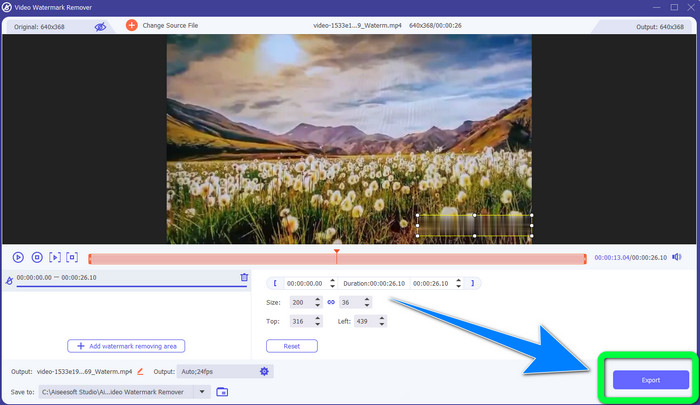
चरण 5: जब आप वॉटरमार्क हटाने का काम पूरा कर लें, तो अपने वीडियो को सेव करने के लिए Export बटन पर क्लिक करें। अब आप अपने पसंदीदा फ़िल्मों को बिना वॉटरमार्क के देखते हुए हर पल का आनंद उठा सकते हैं।.
2. वीडियो क्रॉपर का उपयोग करना
चरण 1: Video Converter Ultimate लॉन्च करें। फिर Toolbox > Video Cropper पर क्लिक करें।.
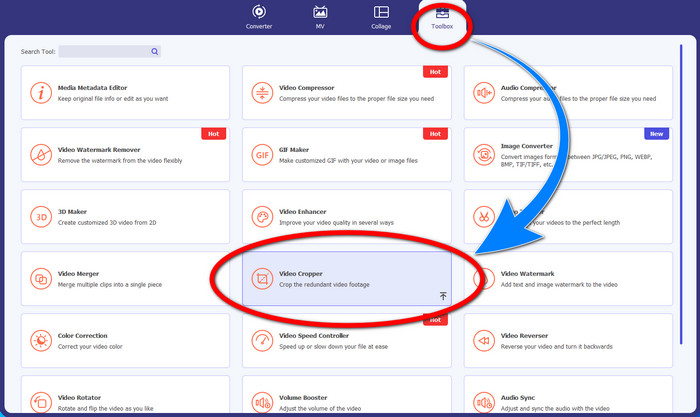
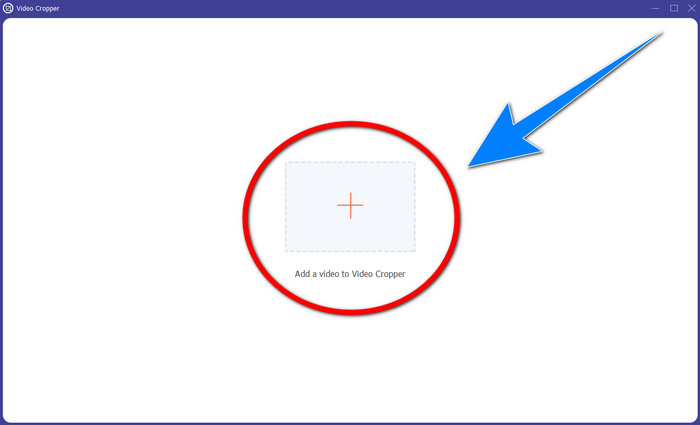
चरण 2: Video Cropper पर क्लिक करने के बाद एक और इंटरफ़ेस पॉप-अप होगा। वॉटरमार्क वाले अपने MP4 वीडियो को जोड़ने के लिए Plus प्रतीक पर क्लिक करें।.
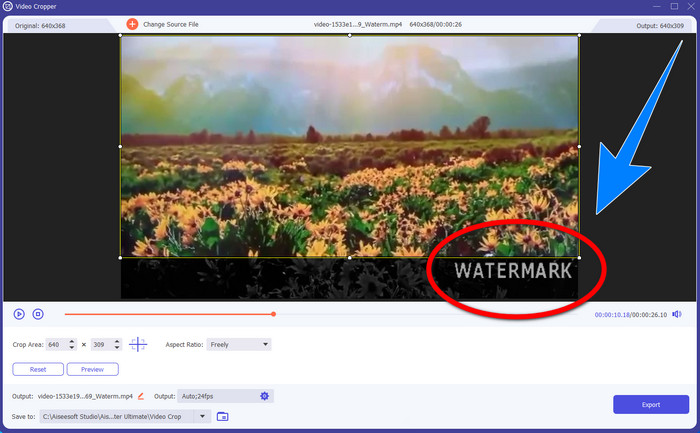
चरण 3: जब आप अपना वीडियो अटैच कर लें, तो आप अपने MP4 वीडियो को क्रॉप कर सकते हैं और वॉटरमार्क हटा सकते हैं।.
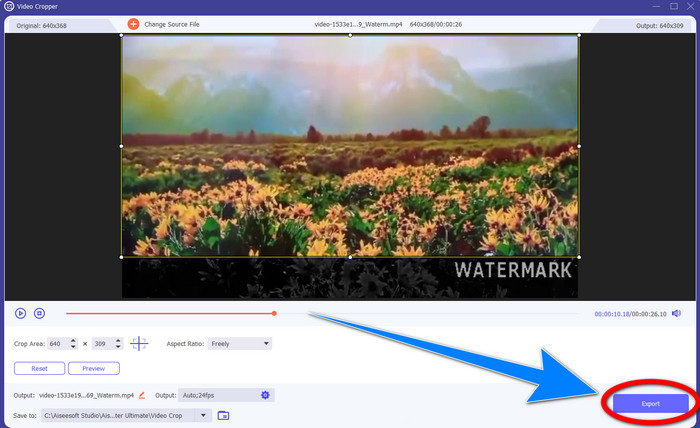
चरण 4: यदि आप वॉटरमार्क हटाने के लिए वीडियो को क्रॉप करना पूरा कर चुके हैं, तो वीडियो को सेव करने के लिए Export बटन पर क्लिक करें। इस तरह आप अपना वीडियो बिना वॉटरमार्क के देख सकेंगे।.
भाग 2: MP4 वीडियो ऑनलाइन से वॉटरमार्क हटाएं
क्या आप ऐसा बेहतरीन एप्लिकेशन ढूंढ रहे हैं जिसका उपयोग करके आप अपना MP4 वीडियो ऑनलाइन मुफ़्त में वॉटरमार्क से मुक्त कर सकें? तो HitPaw Online Watermark Remover वह एप्लिकेशन है, जिस पर आप भरोसा कर सकते हैं। इसके अलावा, आपको इस एप्लिकेशन का उपयोग करने के लिए कुछ भी खरीदने की ज़रूरत नहीं है, क्योंकि यह पूरी तरह मुफ़्त है। साथ ही, आप वॉटरमार्क, लोगो और सिग्नेचर बिना किसी सीमा के हटा सकते हैं, और इसमें कोई विज्ञापन नहीं हैं। यह इस्तेमाल में आसान और सरल भी है। आप केवल तीन चरणों में अपने वीडियो से वॉटरमार्क हटा सकते हैं, जो शुरुआती उपयोगकर्ताओं के लिए एकदम उपयुक्त है।.
HitPaw ऑनलाइन वॉटरमार्क रिमूवर विंडोज, मैक, आईफोन और एंड्रॉइड जैसे किसी भी डिवाइस के लिए सुलभ है। यह एप्लिकेशन भी सुरक्षित है, और यह सुनिश्चित करता है कि केवल आप ही अपने वीडियो देख और संपादित कर सकते हैं। हालाँकि, यदि आप अपने वीडियो पर वॉटरमार्क हटाते हैं, तो क्षेत्र कभी-कभी धुंधला और परेशान करने वाला हो जाएगा। इसके अलावा, बचत प्रक्रिया धीमी है। यदि आप अपने MP4 वीडियो पर वॉटरमार्क ऑनलाइन हटाना चाहते हैं, तो नीचे दिए गए आसान चरणों का पालन करें।
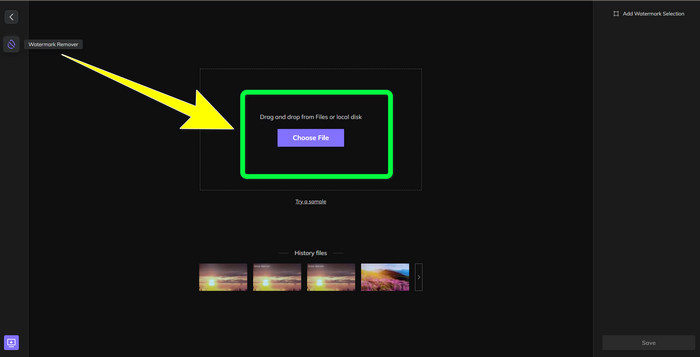
चरण 1: HitPaw Online Watermark Remover की वेबसाइट पर जाएँ। Remove Watermark Now पर क्लिक करें, फिर Choose File चुनें और अपना वॉटरमार्क वाला MP4 वीडियो जोड़ें।.
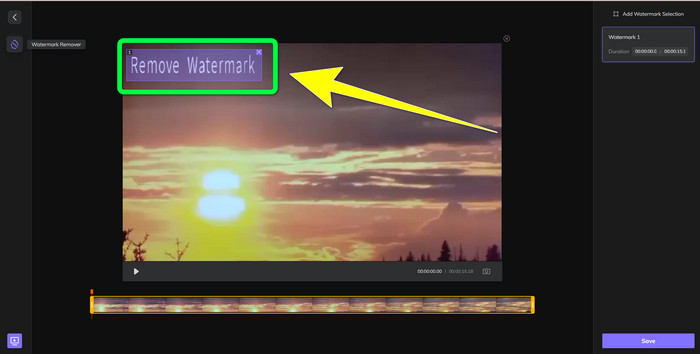
चरण 2: वीडियो जोड़ने के बाद, आपके वीडियो पर एक आयताकार आकार दिखाई देगा। इसे खींचकर वहाँ ले जाएँ ताकि आप अपने वॉटरमार्क को ढककर हटा सकें।.
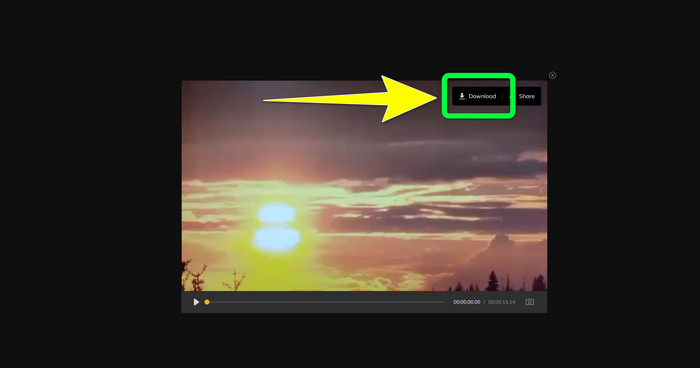
चरण 3: वीडियो से वॉटरमार्क हटाने के बाद Save बटन पर क्लिक करें। सेविंग प्रक्रिया पूरी होने तक प्रतीक्षा करें, फिर इसे अपने डिवाइस पर रखने के लिए Download बटन पर क्लिक करें।.
भाग 3: MP4 से वॉटरमार्क हटाने के बारे में अक्सर पूछे जाने वाले प्रश्न
क्या मेरे वीडियो पर हस्ताक्षर हटाना भी संभव है?
हाँ, यह संभव है। Video Converter Ultimate आपके वीडियो से सिग्नेचर हटाने में भी सक्षम है। आपके वीडियो पर मौजूद कोई भी अनावश्यक और परेशान करने वाली वस्तु को इस एप्लिकेशन की मदद से आसानी से हटाया जा सकता है।.
क्या MP4 वीडियो से वॉटरमार्क हटाने में समय लगता है?
यह आपके द्वारा उपयोग किए जा रहे एप्लिकेशन पर निर्भर करता है। यदि आप अपने MP4 वीडियो पर वॉटरमार्क हटाना चाहते हैं, तो वीडियो कन्वर्टर अल्टीमेट का उपयोग करें। यह तुरंत वॉटरमार्क हटा सकता है।
सबसे अच्छा वीडियो वॉटरमार्क रिमूवर कौन सा है जिसका मैं उपयोग कर सकता हूं?
यदि आप ऐसा भरोसेमंद एप्लिकेशन ढूंढ रहे हैं जो आपके वीडियो से वॉटरमार्क हटा सके, तो Video Converter Ultimate एक उत्कृष्ट सॉफ़्टवेयर है जिसका आप उपयोग कर सकते हैं। आप वॉटरमार्क हटा सकते हैं और अपने वीडियो को उनकी गुणवत्ता खोए बिना सेव कर सकते हैं।.
क्या मैं वॉटरमार्क को खत्म करने के लिए HitPaw ऑनलाइन वॉटरमार्क रिमूवर पर क्रॉपिंग टूल का उपयोग कर सकता हूं?
बिल्कुल हाँ! यदि आप अपने वीडियो पर वॉटरमार्क हटाना चाहते हैं, खासकर यदि वॉटरमार्क आपके वीडियो के कोने या किनारे पर थे, तो आप इस एप्लिकेशन के क्रॉप टूल का भी उपयोग कर सकते हैं।
वॉटरमार्क हटाने के अलावा, क्या मेरे वीडियो पर वीडियो कन्वर्टर अल्टीमेट का उपयोग करके वॉटरमार्क जोड़ना संभव है?
निश्चित रूप से हाँ! वीडियो कन्वर्टर अल्टीमेट केवल आपके वीडियो पर वॉटरमार्क हटाने तक ही सीमित नहीं है। यह एप्लिकेशन आपके वीडियो में वॉटरमार्क भी जोड़ सकता है, खासकर यदि आप कुछ टेक्स्ट, लोगो, हस्ताक्षर आदि डालना चाहते हैं।
निष्कर्ष
उपरोक्त में लिखे अनुसार, आप आसानी से Video Converter Ultimate का उपयोग करके अपने MP4 वीडियो से वॉटरमार्क हटा सकते हैं। इसके अलावा, इस लेख में आपको ऐसा कुछ सॉफ़्टवेयर भी दिखाया गया है, जिसका उपयोग करके आप ऑनलाइन MP4 वीडियो से अनावश्यक वस्तुएँ हटा सकते हैं।.
-
 अपने वीडियो या प्रोजेक्ट पर Filmora वॉटरमार्क को मुफ्त में कैसे हटाएं
 Filmora वॉटरमार्क कैसे निकालें? यह प्रश्न वेब के चारों ओर घूमता है, और यहां हम आपके द्वारा उपयोग किए जा सकने वाले विभिन्न तरीकों को सूचीबद्ध करते हैं!
-
 वीडियो से Adobe स्टॉक वॉटरमार्क हटाने की सबसे तेज़ तरकीब [ट्यूटोरियल]
 क्या आपको Adobe स्टॉक वॉटरमार्क में कोई समस्या है? इसे पढ़ें और वीडियो से एडोब स्टॉक वॉटरमार्क हटाने का तरीका जानें।
-
 पेशेवर तरीके से वीडियो से वॉटरमार्क हटाने के 5 तरीके
 किसी वीडियो को पेशेवर दिखाने के लिए उससे वॉटरमार्क निकालने की आवश्यकता है? खैर, इस लेख को पढ़ें क्योंकि हम इसे कैसे करना है पर एक ट्यूटोरियल जोड़ते हैं!
