


 Video Converter Ultimate
 Snimač zaslona
 Video popravak
Kako pretvoriti MP4 u 3GP online i offline
MP4 je popularan video format koji se može reproducirati na MP4 uređajima, mobitelima i tabletima. Filmovi koje preuzmemo s web stranice obično ostaju u MP4 formatu. Ali neki mobiteli podržavaju samo reprodukciju 3GP videozapisa. Ovaj članak će vam pokazati 3 besplatna pretvarača MP4 u 3GP, a MP4 možete pretvoriti u 3GP bez muke.

Dio 1. Kako pretvoriti MP4 u 3GP na sustavima Windows i Mac
Ako želite izvan mreže pretvoriti MP4 u 3GP, možete koristiti stolni pretvarač MP4 u 3GP. FVC Free FLV to 3GP Converter besplatan je i jednostavan program za pretvaranje videozapisa za Windows i Mac. Može lako pretvoriti razne videozapise poput FLV, MP4, MOV, MKV, MTS, M2TS itd. u 3GP. Osim toga, nudi funkcije uređivanja za dodavanje tema te prilagodbu autora, vremena i pružatelja na početnom/završnom dijelu.

- Pretvorite video zapise u MP4, MKV, AVI, MOV, MP3, AAC, AIFF, itd. U 3GP.
- Izvezite 3GP videozapise i audio datoteku bez gubitaka iz MP4 datoteke jednim klikom.
- Omogućite korisnicima uređivanje davatelja, naslova, autora, vremena i dodavanje teme.
- Skupno pretvorite MP4 u 3GP za igranje na nekim mobilnim telefonima.
Besplatno preuzimanjeZa Windows 7 ili novijiSigurno preuzimanje
Besplatno preuzimanjeZa MacOS 10.7 ili novijiSigurno preuzimanje
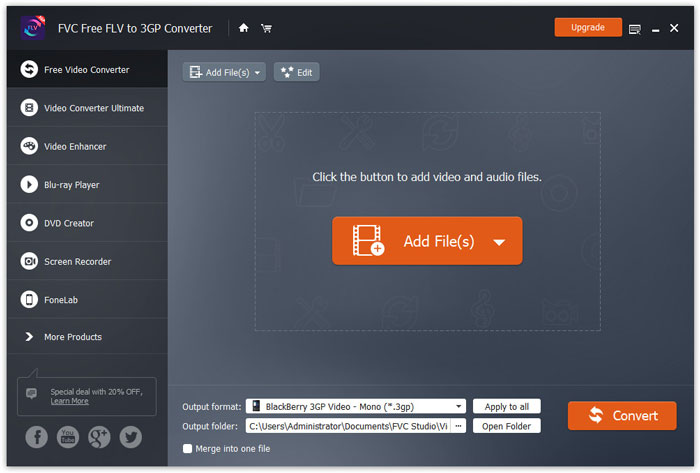
Korak 1. Besplatno preuzmite, instalirajte i pokrenite FVC Free FLV to 3GP Converter na svom Windows ili Mac računalu. Kliknite gumb Add Files za učitavanje MP4 datoteka s računala. Možete istodobno pretvoriti više MP4 datoteka.
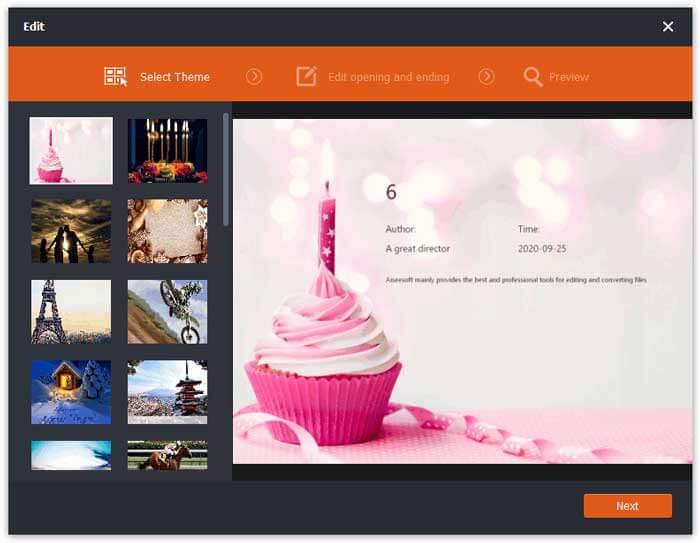
Korak 2. Kliknite na svoju MP4 datoteku i zatim na gumb Edit. Možete dodati temu svom MP4 videozapisu te urediti početni i završni sadržaj. Zatim kliknite Next da biste pregledali i spremili promjene.
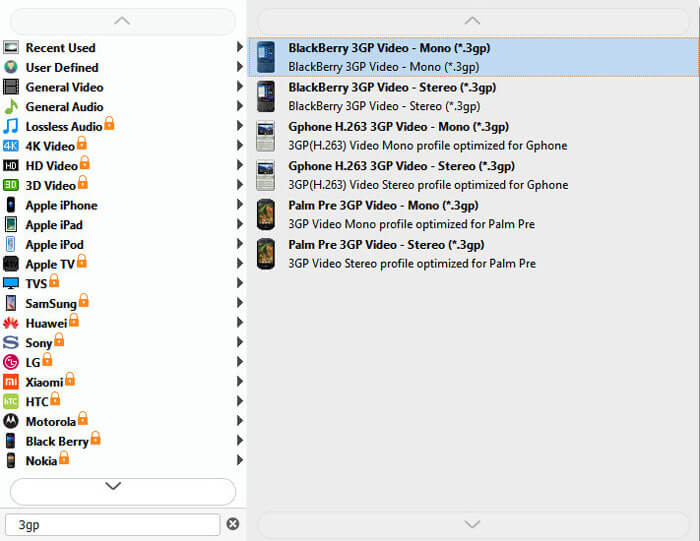
Korak 3. Odaberite 3GP s padajućeg popisa Output format na dnu. Možete odabrati BlackBerry 3GP Video - Mono (*.3gp) ili neku drugu željenu opciju.
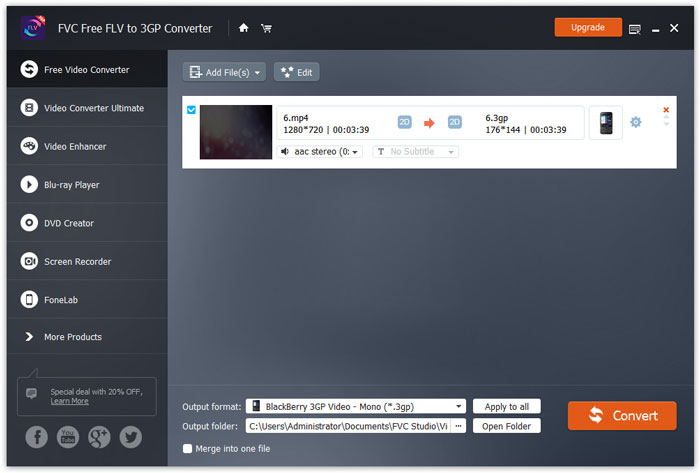
Korak 4. Na kraju potražite izlaznu mapu na računalu i kliknite gumb Convert da biste započeli pretvorbu MP4 u 3GP.
Dio 2. Izvezite 3GP iz MP4 s 2 mrežna 3GP pretvarača
U usporedbi s instaliranjem stolnog 3GP pretvarača, korištenje mrežnog pretvarača puno je jednostavnije i lakše za pretvorbu MP4 u 3GP. U ovom ćemo dijelu podijeliti 2 mrežna 3GP pretvarača koji će vam pomoći da pretvorite MP4 u 3GP bez poteškoća.
1. FVC Besplatni internetski video pretvarač
FVC Free Online Video Converter poznata je platforma za pretvaranje videozapisa na kojoj možete pretvarati popularne video i audio formate u 3GP, MKV, MOV, WMV, AVI, MP3 i druge.
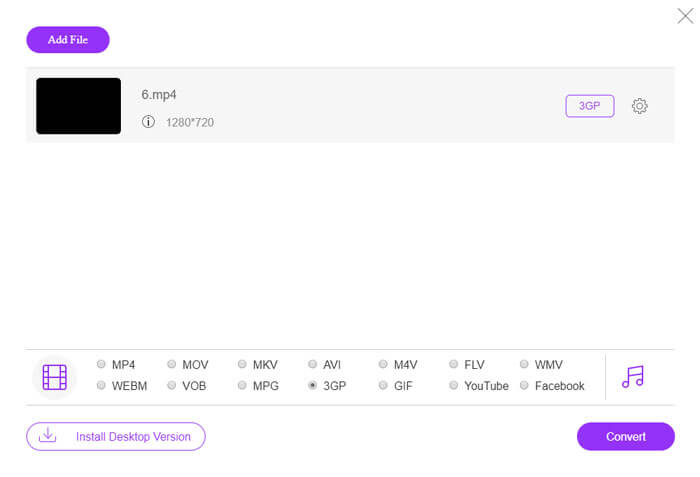
Korak 1. Otvorite službenu web-stranicu FVC Free Video Convertera. Kliknite gumb Add Files to Convert da biste preuzeli i instalirali pokretač (launcher).
Preuzmite desktop verziju za skupno pretvaranje datoteka.

Korak 2. Odaberite MP4 datoteke s lokalnog računala. Možete kliknuti ikonu zupčanika kako biste prilagodili bitrate videa, sample rate, frame rate, rezoluciju i glasnoću.

Korak 3. Na dnu postavite izlazni format na 3GP. Zatim kliknite gumb Convert da biste započeli pretvaranje MP4 u 3GP. Možete skupno pretvoriti više MP4 datoteka u 3GP u isto vrijeme.
2. Zamzar
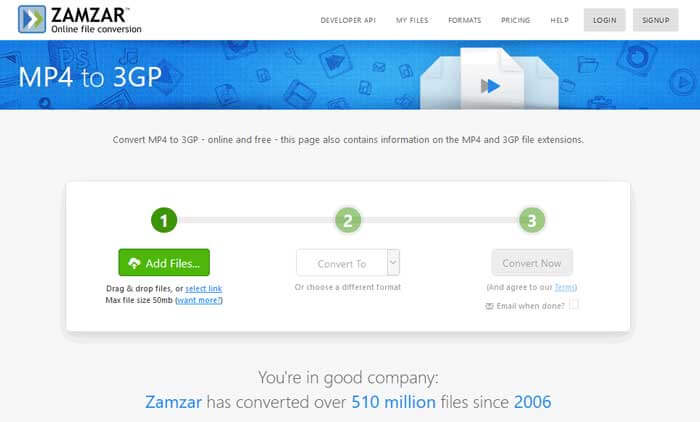
Zamzar je mrežni video pretvarač, audio pretvarač, pretvarač slika i pretvarač e-knjiga. Pogodno je pretvoriti MP4 u razne druge formate pomoću Zamzara. Slijede jednostavni koraci za pretvaranje MP4 u 3GP.
Korak 1. Idite na zamzar.com/convert/mp4-to-3gp/ i kliknite gumb Add Files da biste učitali svoje MP4 datoteke.
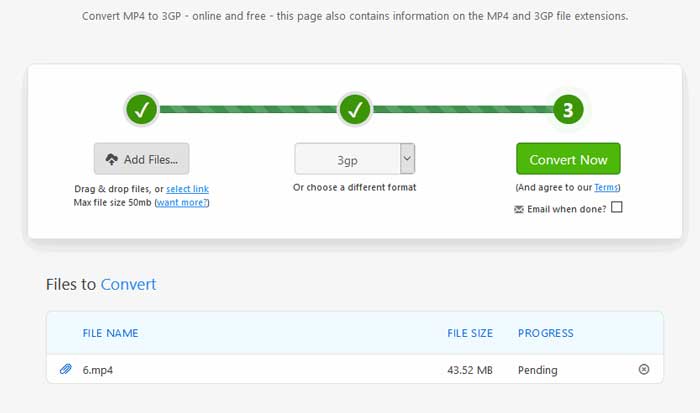
Korak 2. Možete odabrati drugačiji izlazni format. Uobičajeno će 3gp biti postavljen kao zadani izlazni format. Kliknite gumb Convert Now da biste započeli pretvaranje MP4 u 3GP.
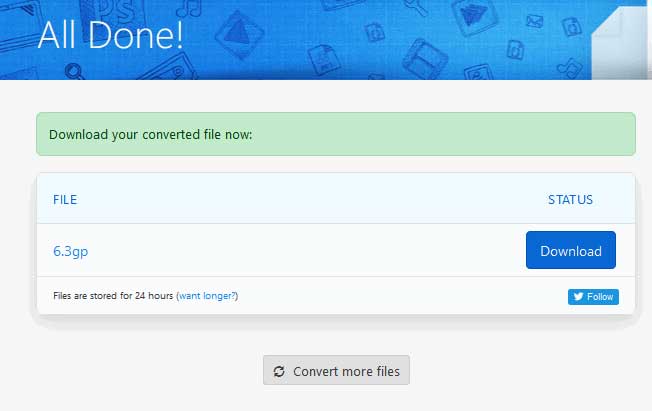
Korak 3. Zatim će vas preusmjeriti na drugu stranicu. Možete kliknuti gumb Download da biste spremili pretvorenu 3GP datoteku na svoje računalo.
Što ako je vaša MP4 datoteka velike veličine? Pogledajte ovdje kako komprimirati MP4 datoteke.
MP4 u odnosu na 3GP
Format MP4, koji je izdala Grupa stručnjaka za pokretne slike (MPEG) 2001., može vam pomoći u spremanju video, audio, titlova i slikovnih podataka u zasebne zapise. To je skraćenica od MPEG-4 Part 14. Osim toga, to je jedan od najpopularnijih formata koji se koristi za streaming i dijeljenje videozapisa.
Partnerski projekt 3. generacije (3GPP) proizveo je 3GP/3GPP format kao format multimedijskog spremnika. Zapravo se temelji na ISO formatu medijske datoteke. Često ga koristimo za spremanje video/audio streamova koji se prenose između 3G mobilnih telefona i interneta.
Dio 3. Česta pitanja o pretvaranju MP4 u 3GP
1. Je li 3GP bolji od MP4?
3GP je dizajniran za mobilne telefone u 3G mreži. 3GP datoteke možete reproducirati u programima kao što su QuickTime, VLC i RealPlayer. MP4 je mnogo kompatibilniji od 3GP. Univerzalno je podržan od strane mnogih prijenosnih medijskih reproduktora i pametnih telefona.
2. Što je 3GP?
3GP je format multimedijskog spremnika definiran od strane 3. generacije. Može pohraniti videozapise i zvučne tokove koji se reproduciraju na 3G mobitelima, ali se mogu reproducirati i na nekim 2G ili 4G telefonima.
3. Kako pretvoriti MP4 u FLV?
Uz pomoć FVC Free Online Video Convertera možete jednostavno pretvoriti MP4 u FLV na mreži. Otvorite ovu online stranicu i kliknite gumb Add Files to Convert da biste instalirali pokretač. Zatim odaberite MP4 datoteke s računala i označite FLV kao izlazni format. Kliknite gumb Convert da biste pretvorili MP4 u FLV.
Zaključak
Uglavnom smo razgovarali o 3 metode za pretvaranje MP4 u 3GP na sustavima Windows i Mac. Ako više volite internetsko rješenje, možete isprobati FVC Free Online Video Converter ili Zamzar online. Ako želite urediti svoju MP4 datoteku radi daljnjeg usavršavanja, umjesto toga možete koristiti besplatni pretvarač FLV u 3GP. Ako imate bilo kakvih boljih rješenja, nemojte se ustručavati ostaviti komentar.
-
 Top 3 besplatna načina za brzo pretvaranje MP4 u VOB
 Kako pretvoriti MP4 u VOB na Windows PC-u i Macu? Da biste riješili ovaj problem, ovaj će post podijeliti 3 najbolja načina koji će vam pomoći da besplatno pretvorite MP4 u VOB.
-
 Besplatno | 3 najbolje metode za pretvaranje MP4 u WMV bez gubitka kvalitete
 Ovaj post dijeli kako pretvoriti MP4 video u WMV format na Macu ili Windowsu. Također ćemo vam ponuditi nekoliko opcija, uključujući softver za stolna računala i mrežne pretvarače putem weba. Jeste li spremni znati najbolje alate za pretvorbu MP4 u WMV?
-
 3 metode za pretvaranje MP3 u MP4 sa slikom
 Kako pretvoriti MP3 u MP4 u visokoj kvaliteti? Ovaj post prikazuje 3 učinkovite i besplatne metode za promjenu MP3 u MP4 sa slikama na sustavima Windows i Mac.

