


 Video Converter Ultimate
 Snimač zaslona
 Video popravak
Kako jednostavno pretvoriti F4V u MP4 pomoću izvanmrežnih i mrežnih alata
Format datoteke FLV jedan je od standardnih formata koje koristi Adobe Flash, ali ako želite reproducirati video veće kvalitete, morate svoj F4V pretvoriti u druge formate, poput MP4. MP4 format možete reproducirati na gotovo svim uređajima, kao što su iPhone, iPad, Android i računala. Dakle, ako preferirate video visoke kvalitete, pružit ćemo vam najučinkovitije metode za pretvaranje F4V u MP4 uz pomoć izvanmrežnih i mrežnih alata.

Dio 1: Osnovna metoda za pretvaranje F4V u MP4 na Mac i Windows
Ako ste korisnik Maca i volite pretvarati video datoteke, možete koristiti Video Converter Ultimate. Ovaj izvanmrežni pretvarač izvrstan je za pretvaranje F4V u MP4 na Macu i Windowsu, što ga čini praktičnim za sve korisnike. Također, može pretvoriti gotovo sve video datoteke jer podržava AVI, MP4, MOV, FLV, VOB, MTS, SWF, MKV, WMV i druge formate. Osim toga, pretvaranje F4V datoteka u ovoj aplikaciji je jednostavno jer ima lako razumljivo sučelje s osnovnim metodama konverzije. Na taj način možete biti sigurni da je prikladan za korištenje, osobito za početnike. Štoviše, što se tiče brzine pretvaranja, uvijek ćete biti zadovoljni. Video Converter Ultimate nudi ultrabrz proces konverzije, koji je 30x brži od drugih pretvarača. Također možete istodobno pretvoriti više video datoteka jer omogućuje skupnu (batch) konverziju. Nadalje, u ovoj aplikaciji možete učiniti više od samog pretvaranja videa. Iz ovog alata možete, ako želite, stvoriti i glazbeni video. Aplikacija nudi kreator glazbenih videozapisa i pruža razne teme, poput simple, happy, snowy night, neat i drugih. Osim toga, ovaj video pretvarač ima značajku izrade kolaža, pomoću koje možete napraviti kolaž s različitim predlošcima i filtrima. Možete iskusiti još više izvrsnih značajki kada koristite FVC Video Converter Ultimate.
Značajke
◆ Pretvorite 100+ formata video datoteka, kao što su MP4, F4V, MOV, AVI, MKV, WMV, VOB, itd.
◆ Izradite kolaž s besplatnim predlošcima i filtrima.
◆ Napravite fantastičan glazbeni video s raznim temama.
◆ Komprimirajte video na željenu veličinu datoteke.
◆ Podesite brzinu videa od 0,125x do 8x brže od prosječne brzine videa.
◆ Dodajte i uklonite vodeni žig s videa.
◆ Pretvorite formate slikovnih datoteka, kao što su BMP, PNG, JPG, TIF, itd.
Slijedite jednostavne metode u nastavku za brzo pretvaranje F4V u MP4 koristeći FVC Video Converter Ultimate.
Korak 1: Preuzmite Video Converter Ultimate na svoje računalo klikom na gumb Download u nastavku. Zatim prijeđite na proces instalacije i pokrenite aplikaciju.
Besplatno preuzimanjeZa Windows 7 ili novijiSigurno preuzimanje
Besplatno preuzimanjeZa MacOS 10.7 ili novijiSigurno preuzimanje
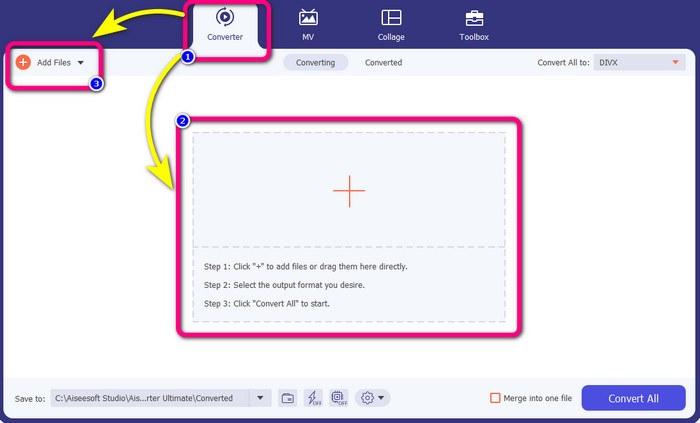
Korak 2: Da biste pretvorili svoj F4V video, idite na opciju Converter i odaberite ikonu Plus ili gumb Add File kako biste umetnuli svoj video u F4V formatu datoteke.
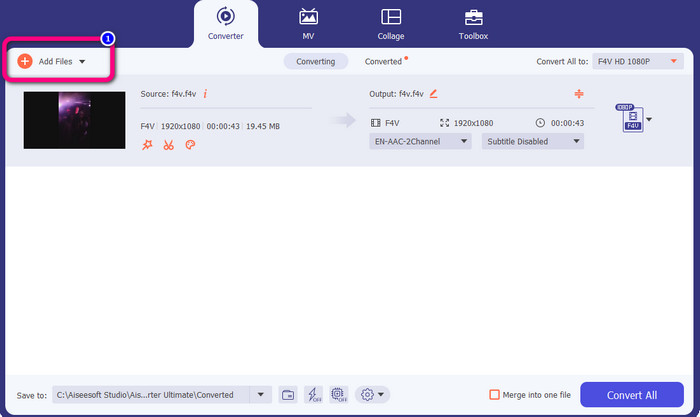
Korak 3: Ako želite istodobno pretvoriti više F4V datoteka, pritisnite gumb Add Files i umetnite još jednu F4V datoteku.
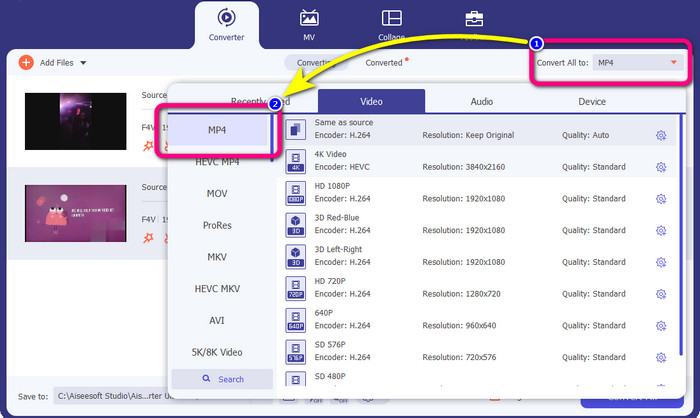
Korak 4: Idite na gumb Convert All to kako biste promijenili izlazni format. Vidjet ćete mogućnosti formata i odabrati format MP4. Možete odabrati i željenu kvalitetu videa.
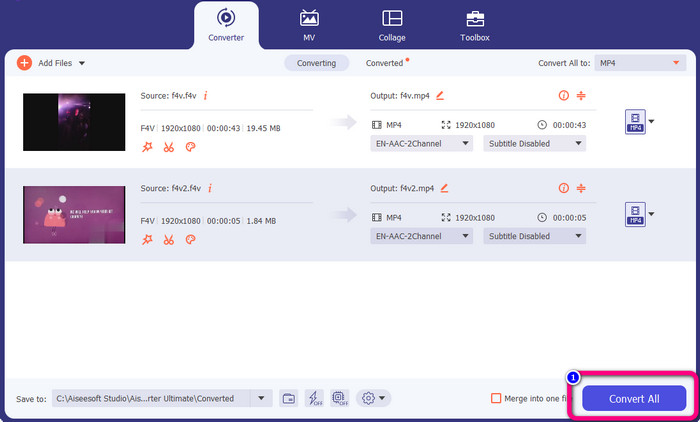
Korak 5: Kada završite s promjenom izlaznog formata, možete pretvoriti datoteke klikom na gumb Convert All. Proces konverzije će započeti i vaš F4V video pretvorit će se u MP4 datoteku u samo nekoliko sekundi.
Dio 2: Jednostavni koraci za pretvaranje F4V u MP4 pomoću VLC-a
U ovom ćete dijelu naučiti kako pretvoriti F4V u MP4 koristeći VLC Media Player. Da! Dobro ste pročitali! Osim reprodukcije videa, VLC je još jedan alat koji možete koristiti za pretvaranje datoteka. Također, podržava različite formate datoteka, kao što su MP4, WEBM, OGG, TS, ASF i još mnogo toga. Međutim, morate znati dovoljno o ovom alatu jer ima zbunjujuće sučelje. Pogledajte vodiče ili pitajte neke napredne korisnike da dobiju ideju o pretvaranju datoteka pomoću VLC-a. Također, preuzimanje ovog pretvarača oduzima puno vremena. Slijedite dolje navedene postupke za pretvaranje F4V u MP4 pomoću VLC Media Playera.
Korak 1: Preuzmite VLC Media Player na svoje računalo. Pokrenite aplikaciju nakon završetka instalacije.
Korak 2: Idite na Media > gumb Convert/Save. Zatim kliknite gumb Add kako biste dodali svoj F4V video.
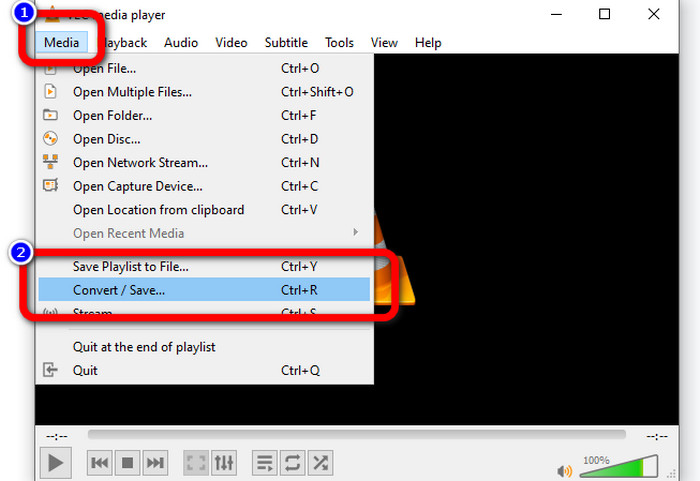
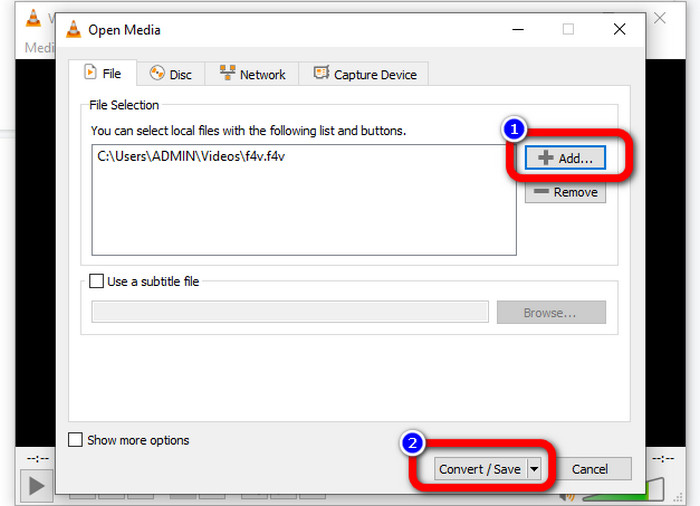
Korak 3: Nakon dodavanja F4V videa ponovno kliknite gumb Convert/Save na donjem dijelu sučelja.
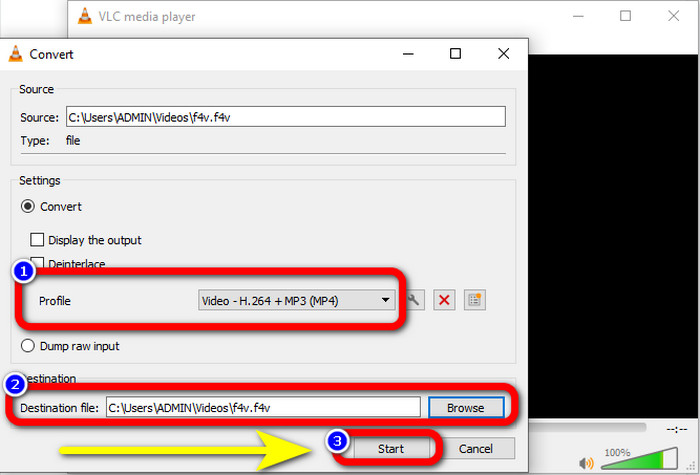
Korak 4: Idite na profil i odaberite format datoteke MP4. Zatim idite na Browse kako biste postavili lokaciju datoteke na koju želite spremiti svoj video. Pritisnite gumb Start za nastavak procesa konverzije.
Dio 3: Jednostavan način pretvaranja F4V u MP4 pomoću ručne kočnice
Ako još uvijek tražite drugi F4V u MP4 pretvarač za Windows, možete koristiti Handbrake. To je izvanmrežni alat koji podržava nekoliko video formata, kao što su MP4, MKV, WEBM itd. Međutim, ovaj je alat složen jer ima mnogo opcija koje mogu zbuniti. Slijedite korake u nastavku da biste pretvorili svoju F4V datoteku u MP4 format.
Korak 1: Preuzmite Handbrake na svoje Windows računalo. Zatim pokrenite aplikaciju kada završite s instalacijom.
Korak 2: Kliknite gumb File kako biste dodali svoju F4V datoteku.
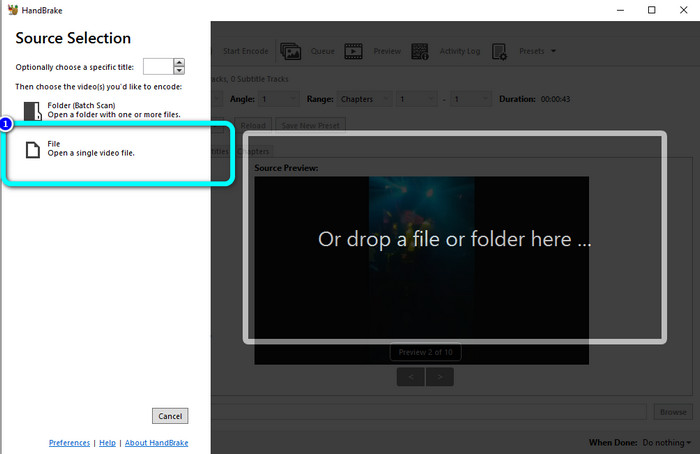
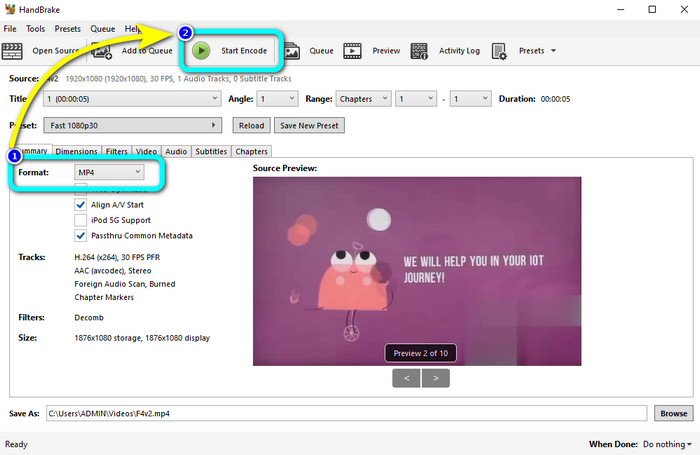
Korak 3: Idite na opcije formata i odaberite format datoteke MP4. Zatim pritisnite gumb Start Encode. Pričekajte proces konverzije i spremite svoj konačni video.
Dio 4: Detaljni koraci za pretvaranje F4V u MP4 besplatno na mreži
Želite li koristiti mrežnu aplikaciju za besplatno pretvaranje F4V u MP4? Upotrijebite FVC Free Video Converter Online. Možete pretvoriti svoju F4V datoteku a da ne potrošite ni lipe. Također, ovaj pretvarač ima jednostavno sučelje, što je pogodno za neprofesionalne korisnike. Podržava razne video formate, kao što su FLV, WMA, MOV, AVI, WMV i drugi. Najbolji dio je što možete pretvarati video datoteke bez gubitka kvalitete. Slijedite detaljne korake u nastavku kako biste lako pretvorili F4V u MP4.
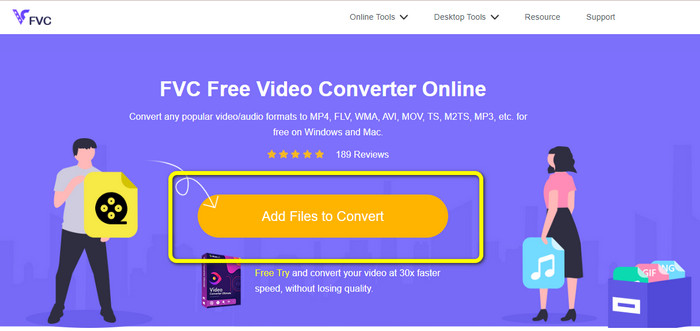
Korak 1: Posjetite web-stranicu FVC Free Video Converter Online. Pritisnite gumb Add Files to Convert kako biste prenijeli svoju F4V video datoteku.
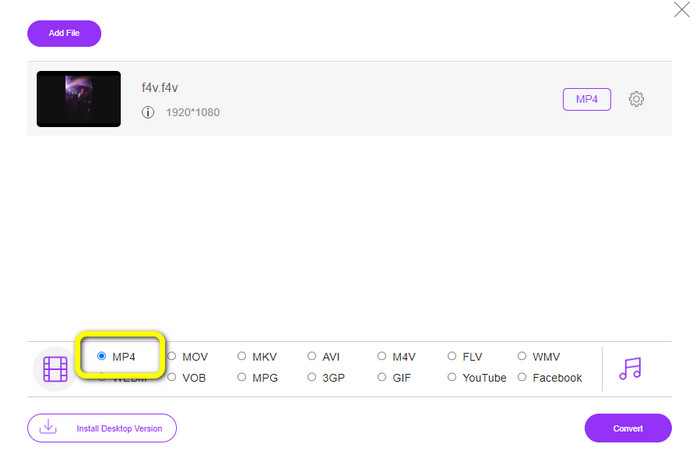
Korak 2: Nakon učitavanja videa, idite na donji dio sučelja i kliknite format datoteke MP4.
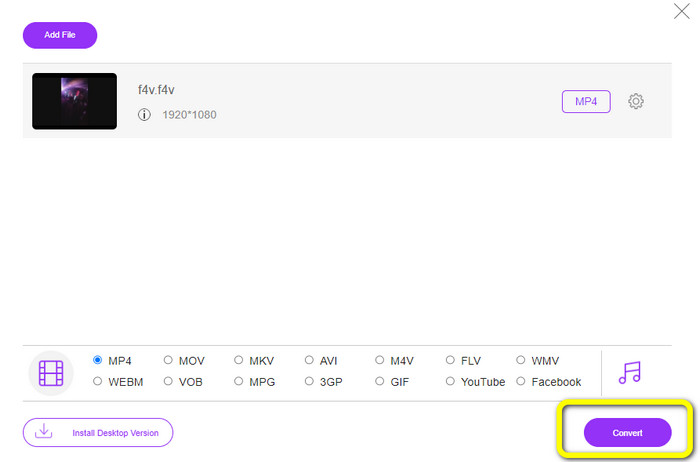
Korak 3: Na kraju pritisnite gumb Convert. Pričekajte proces konverzije i spremite svoju datoteku na željenu lokaciju.
Dio 5: F4V protiv MP4
U nastavku pogledajte dodatne informacije o ova dva formata datoteka.
| F4V | MP4 | |
| Ekstenzija datoteke | .f4v | .mp4 |
| Razvijen od | Jabuka | Grupa stručnjaka za pokretne slike |
| Opis | Ovo je izvorni format flash datoteke. Također se temelji na ISO osnovnom formatu medijske datoteke koji podržava flash player 9. Također, F4V datoteke se ne mogu reproducirati na iOS uređajima, ali ih možete reproducirati u preglednicima koji podržavaju flash. | Ovo je multimedijska datoteka. Spremnik može pohraniti podatke o titlovima, audio i video zapise. Također, kao i drugi formati spremnika, MP4 omogućuje streaming na internetu. |
| Pridruženi programi | XVLC Media Player Video LAN Windows Media Player FFDShow Microsoft Windows Preglednik galerije fotografija | Apple QuickTime Player Video LAN VLC Media Player Apple iTunes Microsoft Windows Media Player |
Daljnje čitanje:
2 omiljena izbora pretvarača za pretvaranje F4V u WMV [2023]
2 najbrža načina za pretvaranje F4V u FLV [online i izvanmrežno]
Dio 6: Često postavljana pitanja o pretvaranju F4V u MP4
1. Mogu li pretvoriti MP4 u F4V?
Da, možete! Možete koristiti Video Converter Ultimate. Ova aplikacija može odmah pretvoriti vašu MP4 datoteku u F4V format.
2. Koja je razlika između F4V i FLV?
Glavna razlika između ova dva formata je da F4V podržava video zapise visoke kvalitete kodirane H.264, ali FLV format općenito koristi H.263.
3. Kako koristiti FFmpeg za pretvaranje F4V u MP4?
Preuzmite FFmpeg na svoje računalo. Otvorite naredbeni redak. Upišite Desktop za promjenu naredbenog retka. Naredba za pretvorbu počinje s FFmpeg-i, zatim upišite naziv videozapisa i njegov format datoteke. Također, tip izlazne datoteke. Pritisnite Enter i pričekajte proces konverzije. Nakon toga svoju datoteku možete vidjeti na radnoj površini
Zaključak
Ovaj vodič daje vam detaljne upute za pretvaranje F4V u MP4 online i izvanmrežno. Korisnici preferiraju jednostavniji i brži način pretvaranja videa. Tada možete koristiti Video Converter Ultimate za trenutačno pretvaranje svojih video datoteka jer ima 30x veću brzinu konverzije od drugih pretvarača. Također možete koristiti FVC Free Video Converter Online za jednostavno pretvaranje videa, što zahtijeva samo nekoliko klikova.
-
 4 najnovija mrežna i izvanmrežna pretvarača za pretvaranje F4V u AVI format
 Zar'nemate pojma koji pretvarač trebate koristiti za pretvaranje F4V u AVI ili bilo koji drugi video format? Zatim pročitajte ovaj članak dok učimo kako pretvoriti pomoću dostupnog alata.
-
 Kako pretvoriti F4V u MOV bez gubitka kvalitete [riješeno]
 Ako se trudite prihvatiti neke video formate kao što je F4V. Pročitajte ovaj članak da biste saznali više o F4V i MOV video formatu i naučili kako pretvoriti F4V u MOV koristeći različite metode.
-
 Uspješne metode za odmah pretvoriti DIVX u MP4
 Kako pretvoriti DIVX u MP4? Ako tražite najbolje rješenje, na pravom ste članku. Pokazat ćemo vam kako lako pretvoriti DIVX u MP4
