


 Video Converter Ultimate
 Snimač zaslona
 Video popravak
Kako pretvoriti MKV u MP4 na Windowsima / Macima
Kad reproducirate film, ustanovite da ga nije moguće otvoriti jer neki program ne podržava MKV format. Tada se možete zapitati zašto se to događa i kako to riješiti.
Razlog zašto ne možete reproducirati MKV može biti uzrokovan nedostatkom određenih kodeka na vašem uređaju. Zbog toga, iako danas MKV možete vidjeti svugdje, neki uređaji ili programi još uvijek ne podržavaju MKV format. Dakle, trebate ga pretvoriti u uobičajeniji format, poput MP4, puno korisnijeg formata koji se može pravilno učitati na gotovo svaki uređaj.
Danas ćemo vam predstaviti 2 besplatna pretvarača koji će vam pomoći da pretvorite MKV datoteke u MP4.

Dio 1. Kako promijeniti MKV u MP4 na mreži i besplatno
Ako ne podnosite instaliranje mnogo softvera na svoje računalo baš poput mene, predlažem da isprobate mrežni pretvarač zasnovan na webu.
Na tržištu postoji mnoštvo besplatnih internetskih video pretvarača, ali da budem iskren, većina tih takozvanih 'besplatnih' pretvarača ima bezbroj ograničenja. Morate im platiti da biste dobili bolji plan. Samo na taj način možete brzo pretvoriti velike datoteke u skupinama bez vodenog žiga.
Dakle, postoji li uistinu besplatan, brz i moćan video pretvarač? Odgovor je da.
FVC Free Online Video Converter je učinkovit video pretvarač iz MKV u MP4 koji vam može pomoći pretvoriti videozapise bez ograničenja. Podržava pretvaranje gotovo svih uobičajenih videozapisa u popularne formate kao što su MP4, MOV, WMV, AVI i FLV u nekoliko sekundi. Također podržava serijsku konverziju, što znači da možete odjednom pretvoriti više videozapisa i istovremeno zadržati njihovu izvornu kvalitetu.
Budući da je FVC Free Online Video Converter internetski alat, možete ga lako koristiti i na Windowsu i na Macu, sve dok imate stabilnu mrežu i preglednik. Što se tiče uporabe, ovim pretvaračem iz MKV u MP4 ovladat ćete u samo nekoliko koraka.
Korak 1. Otvorite web-stranicu FVC Free Online Video Converter u svom pregledniku. Zatim kliknite gumb Add Files to Convert. Ako prethodno niste preuzeli FVC Launcher na svoje računalo, dobit ćete podsjetnik da ga najprije preuzmete. Samo slijedite upute i instalirajte launcher.
Preuzmite desktop verziju za skupno pretvaranje datoteka.

Korak 2. Nakon instalacije, prozor Open File pojavit će se automatski. Sada odaberite MKV datoteku koju želite pretvoriti. Usput, ako želite odjednom pretvoriti nekoliko MKV videozapisa, označite sve MKV datoteke koje su vam potrebne.
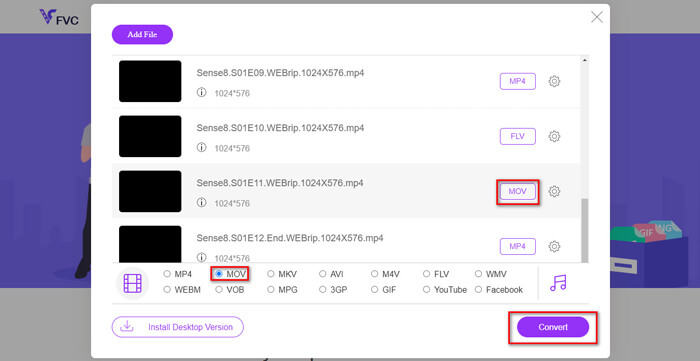
Korak 3. Zatim kliknite Open i vidjet ćete popis odabranih datoteka. Odaberite izlazni format MP4 ispod tog popisa.
Možete također odabrati različite formate za različite datoteke zasebno tako da kliknete format pokraj ikone Setting i promijenite izlazni format ispod. No to možete i preskočiti i kliknuti gumb Convert. Nakon toga odaberite odredište za spremanje pretvorenih videozapisa.
Dio 2. Kako pretvoriti MKV u MP4 pomoću VLC Media Player-a
Možda znate VLC kao multimedijski reproduktor koji je dostupan za većinu stolnih operativnih sustava. No zapravo je on i skriveni video pretvarač. Omogućuje vam pretvaranje MKV datoteka u MP4 format. Ako već imate VLC na svom računalu, možete ga isprobati.
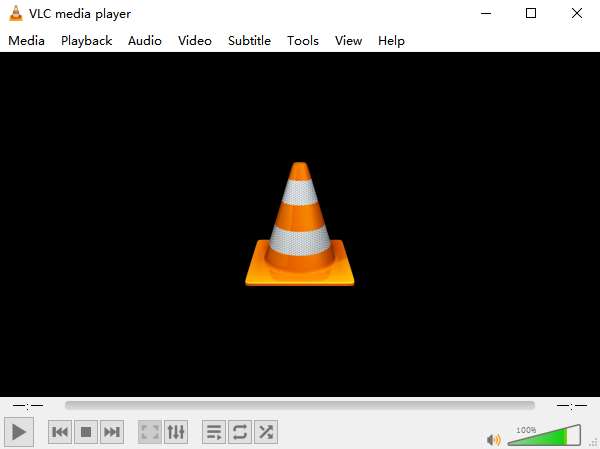
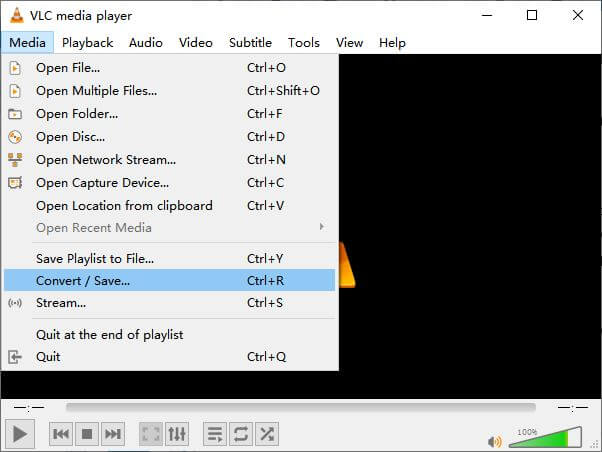
Korak 1. Najprije pokrenite VLC Media Player na svom računalu. Kliknite izbornik Media. U padajućem popisu pronađite Convert / Save.
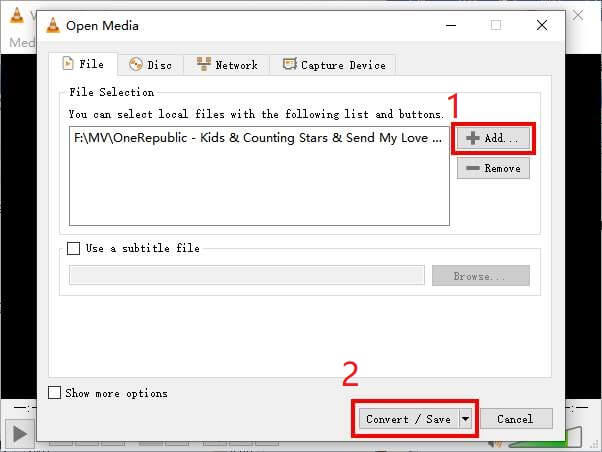
Korak 2. Kliknite + Add i pronađite MKV video koji želite pretvoriti. Zatim kliknite gumb Convert / Save ispod.
Korak 3. Odaberite format MP4 u prozoru Convert.
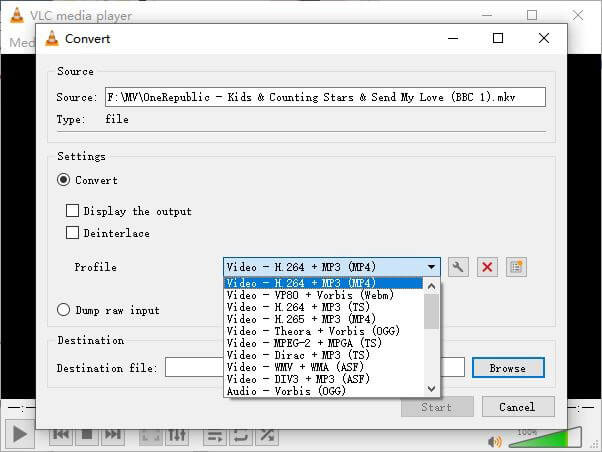
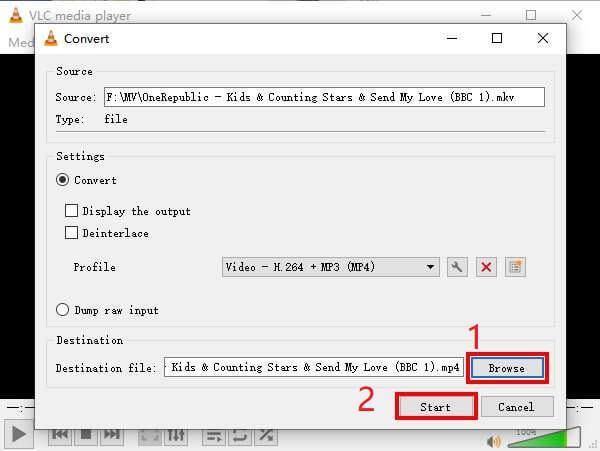
Korak 4. Kliknite gumb Browse kako biste potvrdili odredište za spremanje. Na kraju Start započnite pretvorbu i pričekajte svoj MP4 video.
MKV nasuprot MP4
Format multimedijskog spremnika Matroska, objavljen 2002., je format otvorenog koda koji može uključivati brojne video, audio, slike i titlove. Dakle, možete ga koristiti za jednostavno pohranjivanje kratkih videoisječaka, TV emisija i filmova. Prilično je popularan za obožavatelje animea.
Format MP4, koji je izdala Grupa stručnjaka za pokretne slike (MPEG) 2001., može vam pomoći u spremanju video, audio, titlova i slikovnih podataka u zasebne zapise. To je skraćenica od MPEG-4 Part 14. Osim toga, to je jedan od najpopularnijih formata koji se koristi za streaming i dijeljenje videozapisa.
Dio 3. Česta pitanja o pretvaranju MKV u MP4
1. Može li ffmpeg pretvoriti MKV u MP4?
Da, možete pretvoriti MKV u MP4 pomoću ffmpega. Ali možda će vam biti malo komplicirano razumjeti kako to funkcionira, iako je najučinkovitiji korak zapravo samo niz znakova: ffmpeg -i my_movie.mkv -vcodec copy -acodec copy my_movie.mp4
2. Može li HandBrake izvesti MP4 iz MKV-a?
Ako nakon pretvorbe želite samo MP4 datoteku, HandBrake vam u tome doista može pomoći. Međutim, ne može pretvoriti vaše datoteke u druge formate poput WMV, MOV, FLV. HandBrake doduše podržava većinu uobičajenih multimedijskih datoteka, ali to su njegovi podržani izvorni ulazni formati. Za izlazne formate vaše su mogućnosti MP4(.M4V) i MKV.
3. Gubi li pretvaranje MKV u MP4 kvalitetu?
Većina pretvarača video zapisa izgubi kvalitetu kada pretvorite MKV datoteke u MP4, možda 1% ili 5%. Tijekom ponovnog kodiranja MKV datoteka u MP4, teško je u potpunosti izbjeći gubitak podataka. Ali možete povećati razlučivost slika kako biste kvalitetu izvezenih MP4 videozapisa približili izvornom videozapisu.
Zaključak
Postoji bezbroj video pretvarača koje možete odabrati. Teško je pronaći besplatni i učinkoviti pretvarač sasvim sam. Ovaj vam je post predstavio 2 metode za pretvaranje MKV u MP4. Jedan je VLC Media Player, a drugi je FVC Free Online Video Converter.
Ako želite samo MP4 datoteku, VLC je dovoljan. Međutim, VLC podržava samo konačan broj formata. Dakle, ako želite profesionalniji pretvarač, čini se da je FVC Free Online Video Converter bolji izbor.
Nadam se da će vam ovaj post biti koristan. I ne ustručavajte se reći nam svoje mišljenje.
-
 Kako pretvoriti vaše MP4 video datoteke u animirane GIF slike bez gubitka kvalitete
 Tražite li najbolji način za pretvaranje MP4 videozapisa u animirane GIF-ove? Evo detaljnog vodiča za to u Photoshopu, programu Windows Movie Maker, mrežnom video pretvaraču i mnogim drugim.
-
 Kako pretvoriti MOV u MP4 bez gubitka kvalitete
 Želite pretvoriti MOV (Apple QuickTime Movie) datoteke u MP4? Ovaj post dijeli 4 besplatne metode za pretvorbu MOV video datoteka u MP4 format na Windowsima 10/8/7 / XP i Mac OS X.
-
 4 jednostavna načina za pretvaranje WMV u MP4 na Macu i Windowsima
 Kako pretvoriti WMV datoteke u MP4? Evo 4 jednostavna načina za pretvaranje WMV u MP4 na Macu i Windowsu jednostavnim koracima.

