


 Video Converter Ultimate
 Snimač zaslona
 Video popravak
3 laka i pristupačna načina kako povećati glasnoću MP4
Horor je jedan od najpopularnijih filmskih žanrova koje ljudi vole gledati zbog napetosti i uzbudljive atmosfere koju pruža tijekom gledanja. Jedan od glavnih čimbenika napetosti ili iznenađenja jest iznenadni vrhunac glasnoće zvuka. Horor je poznat po kreativnim obratima u radnji i mnogobrojnim „jump scareovima“, ali što ako ste ljubitelj horor filmova, a ne možete doživjeti napetost zato što je glasnoća zvuka na vašem računalu toliko tiha da ne možete uistinu doživjeti te iznenadne trenutke? Zbog ove česte dileme, ovaj članak nudi više načina kako povećati glasnoću svojih MP4 videozapisa te predstavlja različite programe koji mogu riješiti problem preniske glasnoće zvuka.

Dio 1: Kako povećati glasnoću MP4 koristeći Video Converter Ultimate
Kad je riječ o MP4 datotekama, one se svrstavaju u digitalne multimedijske kontejnerske formate jer sadrže velike količine komprimiranih podataka — neenkodiranih podataka pohranjenih u male datoteke umjesto da im se pristupa izravno. Budući da su MP4 datoteke standardni video format, mnogi ih video reproduktori mogu puštati, ali neki prigušuju zvuk i čine ga tišim u usporedbi s drugim reproduktorima. Video Converter Ultimate nudi svoju funkciju Video Booster, koja može povećati glasnoću MP4 videa kako biste u potpunosti mogli uživati u gledanju svojih omiljenih filmova. Slijedite korake u nastavku da biste saznali kako koristiti ovaj softver.
Korak 1: Da biste preuzeli softver, kliknite gumb Free Download (Besplatno preuzimanje). Zatim instalirajte program i podesite ga prema vlastitim željama.
Besplatno preuzimanjeZa Windows 7 ili novijiSigurno preuzimanje
Besplatno preuzimanjeZa MacOS 10.7 ili novijiSigurno preuzimanje
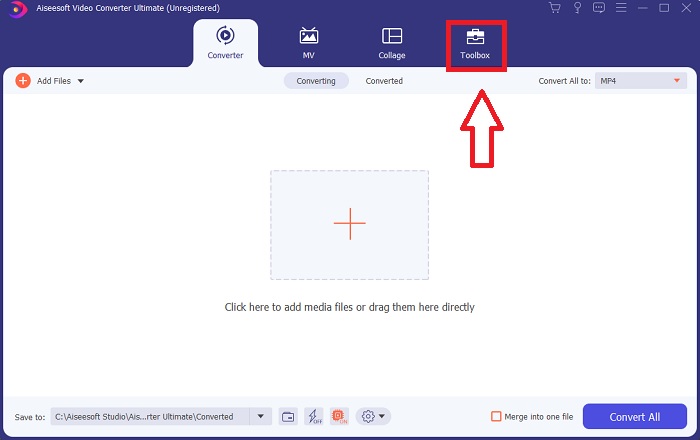
Korak 2: Pokrenite softver nakon instalacije, kliknite značajku Toolbox (Alatni okvir) i nastavite na Volume Booster.
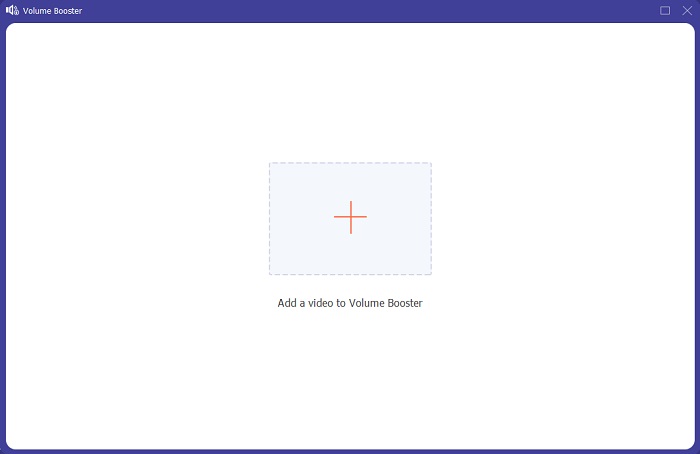
Korak 3: Dodajte bilo koju datoteku klikom na gumb + prema vlastitoj želji i nastavite s uređivanjem videoisječka.
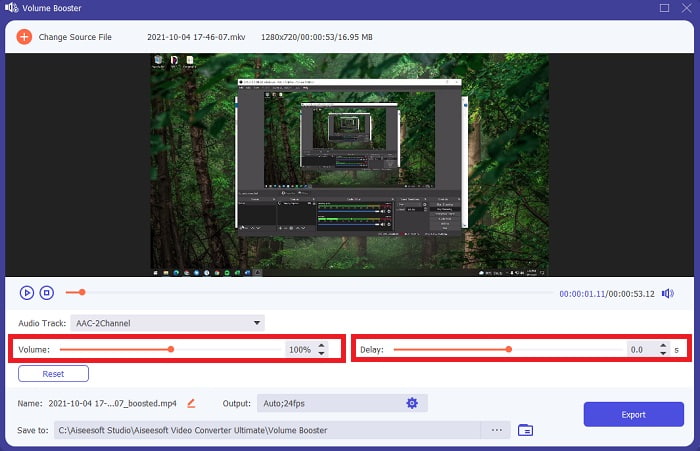
Korak 4: Podesite klizač glasnoće zvuka videoisječka. U ovom sučelju možete podesiti i kašnjenje zvuka.
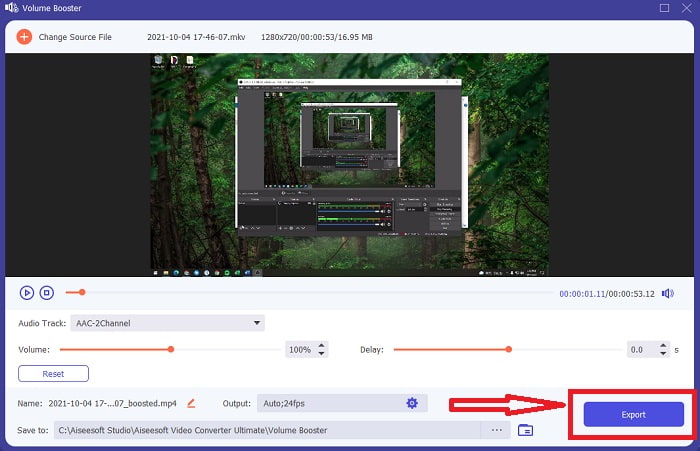
Korak 5: Nakon što uskladite i uredite videoisječak, kliknite Export (Izvezi) i odaberite odredišnu mapu za datoteku.
Povezano:
Kako komprimirati MP4 datoteke
Dio 2: Kako povećati glasnoću MP4 koristeći VideoLouder
Ako na web-stranicama tražite pojačivač glasnoće za mp4, VideoLouder je praktičan internetski alat pomoću kojeg možete povećati glasnoću videozapisa i filmova na mreži besplatno, koristeći ovu besplatnu uslugu. Može pojačati glasnoću mrežnog video i audio sadržaja izravno u vašem pregledniku bez potrebe za preuzimanjem ikakvih programa.
Korak 1: Upišite VideoLouder u tražilicu i odaberite svoje datoteke s računala klikom na Browse (Pregledaj).
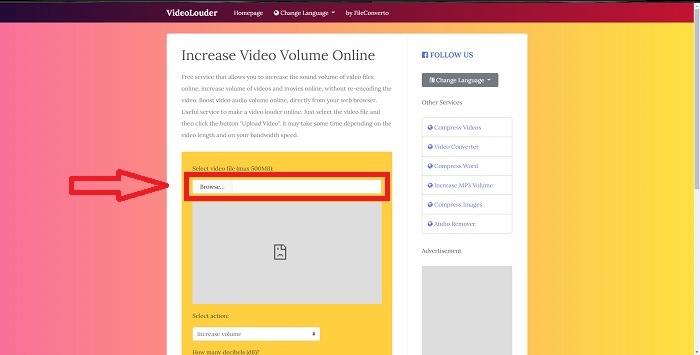
Korak 2: Odaberite želite li povećati ili smanjiti glasnoću svog videoisječka.
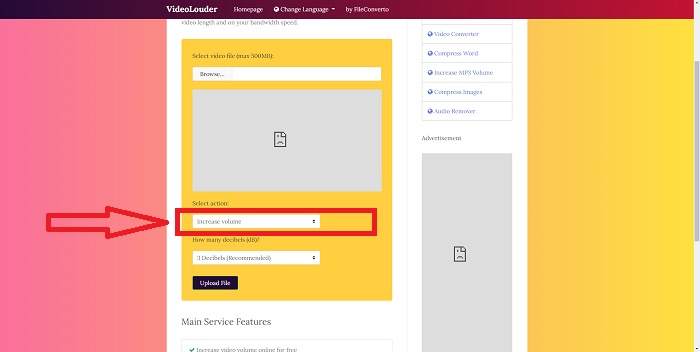
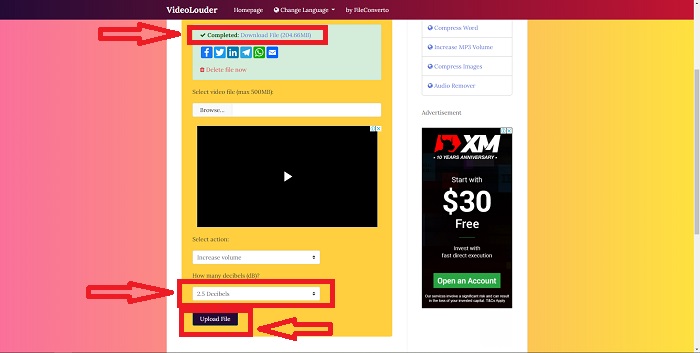
Korak 3: Na kraju odaberite broj decibela koje želite primijeniti na svoj videozapis. Što je više decibela, to je glasnoća zvuka veća. Kada ste već prilagodili željene postavke datoteke, kliknite Upload File (Učitaj datoteku) kako biste započeli konverziju. Kada datoteka bude spremna, pojavit će se u gornjem dijelu kartice preglednika; zatim je preuzmite kako biste je izvezli na svoje računalo.
Dio 3: Kako povećati glasnoću MP4 koristeći MAGIX
Korisnici Windows računala koji su poluprofesionalci ili DIY korisnici mogu koristiti Magix Movie Edit Pro, program za uređivanje videa ove tvrtke. To je najprodavaniji video softver u Europi, a korisnici ga vole zbog jednostavnosti učenja i stabilnog renderiranja. Ovaj softver također može na drugačiji način povećati glasnoću mp4, ali ovdje ćemo vam pokazati najjednostavniji i najlakši postupak.
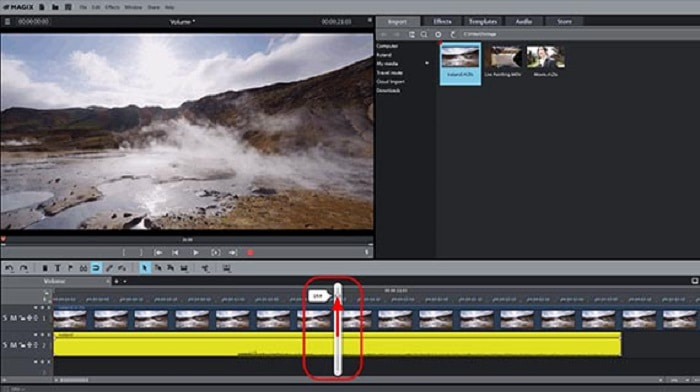
Korak 1: Da biste pomaknuli audio objekt, jednostavno povucite ručicu prema sredini audio objekta. Kada prilagodite glasnoću, na zaslonu će se pojaviti fader.
Korak 2: Povećajte glasnoću videa povlačenjem fadera udesno. Postupak je vrlo jednostavan. S druge strane, rezanje signala (clipping) vrlo je često u glasnim dionicama. Clipping možete prepoznati po pucketajućem zvuku u vašem audiju.
Korak 3: Tijekom reprodukcije ponekad se mogu čuti pucketanje ili šuštanje. Ako se to dogodi, otvorite mikser pritiskom na tipku 'M' (ili putem gumba za mikser na alatnoj traci s desne strane). Provjerite dolazi li do clippinga pomoću peak metra. Također vam mogu pomoći vrhunci u prikazu valnog oblika. Vrijednost na peak metru ni u jednom trenutku ne smije biti viša od 0 dB; ako jest, dodatno smanjite glasnoću audio objekta.
Dio 4. Često postavljana pitanja o povećanju glasnoće MP4
Što su decibeli?
Logaritamske jedinice poput decibela (dB) služe za mjerenje razine zvuka. Druga uobičajena primjena je u elektronici, gdje služi kao signalni ili komunikacijski kanal između uređaja. Jača buka povezana je s povećanjem razine decibela. Povećanje glasnoće od deset decibela odgovara deseterostrukom povećanju intenziteta (ili snage) u glasnoći zvuka.
Gubim li kvalitetu zvuka ako povećam glasnoću?
Na razini hardvera možete smanjiti glasnoću, ali krajnji rezultat ovisi o tome kako je regulacija glasnoće implementirana. Zbog toga je malo vjerojatno da će korištenje jednog ili drugog rješenja imati velik utjecaj na kvalitetu zvuka ako koristite digitalne metode. Međutim, povećavanje glasnoće ponekad može narušiti kvalitetu zvuka. U nekim aplikacijama i programima, ako previše pojačate glasnoću, možete čuti iskrivljen, „napuknut” ili „glitchy” zvuk. Koristite Video Converter Ultimate kao pojačivač glasnoće za mp4 zahvaljujući njegovoj funkciji Volume Booster, koja može povećati glasnoću vašeg videa. Osim toga, sadrži i druge korisne i lako dostupne funkcije koje vam mogu pomoći poboljšati kvalitetu vaših videozapisa.
Mogu li VideoLouder i MAGIX podnijeti bilo koju veličinu datoteke?
Video datoteke možete pretvoriti samo u VideoLouder do maksimalno 500 MB, dok možete staviti bilo koji videoisječak bez ograničenja na veličinu datoteke. VideoLouder je web alat kojem je besplatan pristup na internetu, dok MAGIX Movie Edit Pro prvo morate kupiti prije nego što možete koristiti cijeli softver.
Zaključak
Više nema muke pri gledanju filmova s niskom kvalitetom zvuka zahvaljujući brojnim načinima prikazanim u članku iznad kako riješiti ovaj problem. Neka su rješenja potpuno besplatna na internetu, a neka je potrebno kupiti prije korištenja, ali preporučujemo da koristite Video Converter Ultimate za povećanje glasnoće MP4 videozapisa jer je besplatan i jednostavan za upotrebu.
-
 [Besplatno i na mreži] 3 brza rješenja za pretvaranje MP4 u OGG
 Želite pretvoriti MP4 u OGG? Ovaj post prikazuje 3 učinkovita načina za jednostavnu promjenu MP4 u OGG. Cijela konverzija je 100% besplatna, sigurna i bez gubitka kvalitete.
-
 Najbolji MP4 uređivač za Windows i Mac 2021. godine
 Bilo da koristite svoje računalo za uređivanje MP4 videa ili samo radite na telefonu, ovdje ćete moći pronaći neke sjajne opcije, uključujući najbolji MP4 uređivač za Windows i Mac.
-
 [Potpuno besplatno] Top 6 najboljih MP4 Joiners za početnike
 Na raspolaganju su mnogi MP4 stolari za spajanje različitih MP4 isječaka. U ovom smo članku odabrali nekoliko besplatnih MP4 stolara za Windows 10/8/7 i Mac.
