


 Video Converter Ultimate
 Screen Recorder
 Videó javítás
Tanulja meg, hogyan alakíthatja át az AMV-t MOV-vé a minőség romlása nélkül
Az AMV egy proprietáris videoformátum, amelyet S1 MP3- és MP4‑médialejátszókon történő videólejátszások tárolására használnak. Ez az .amv fájlkiterjesztés alacsony felbontású, és tömörített, hogy elférjen ezen a hordozható médialejátszón. Bár a formátum még mindig létezik, a telefonokhoz kompatibilis médialejátszót nehéz találni, mivel ez a formátum már régi. Ahelyett, hogy kompatibilis médialejátszót keresne, miért nem alakítja át az AMV‑fájlokat egy új, széles körben támogatott formátumba, például MOV‑ba? Tehát ha szeretné megtudni, mi a legjobb módja az AMV MOV‑vá konvertálásának, kezdjük is el a vizsgálatot.

1. rész. Az AMV és a MOV rövid bemutatása
Az Action Media Video vagy az AMV ötlete az MP4 helyett univerzális formátum, mert ez a formátum jobb és sokkal tömörebb. Ezenkívül ez a formátum az AVI formátum jobb verziója. A formátumot azonban ebben az új korszakban figyelmen kívül hagyták, mert nem kap semmilyen frissítést a felbontás minőségének javítására. És most, ha ezt a formátumot tárolja mobileszközeinken, és lejátssza, számítson rá, hogy nem tudja lejátszani, mert a formátum nem támogatott. Tehát ha ebben a formátumban szeretne videót lejátszani, le kell töltenie egy harmadik féltől származó médialejátszót az AMV-hez. MOV, ez a formátum nagy támogatottságot nyer, mivel ez a QuickTime által kifejlesztett natív fájlformátum.
2. rész AMV konvertálása MOV-vé az Ultimate Desktop Software segítségével
FVC Video Converter Ultimate
Alakítsa át az AMV‑t MOV‑vá ennek a professzionális videokonverternek a segítségével, amely olyan kiváló minőségű kimenetet produkál, amelyhez senki sem ér fel: FVC Video Converter Ultimate. Ez az átalakító PC‑n és Macen is elérhető, és mindkét rendszeren ugyanazokat a fejlett funkciókat kínálja. Továbbá a gyors konvertálás és a hardveres gyorsítás, amely PC‑n elérhető, Macen is használható. Sok felhasználó már ezt a szoftvert választotta első számú konverterének problémái megoldására. Mielőtt azonban használhatná az eszközt, meg kell vásárolnia a FVC‑től. Bár fizetős, nem fog több száz dollárt elkölteni, és az ár megéri. Minden további mellébeszélés nélkül próbáljuk ki ezt az eszközt, hogy lássuk, elérhetjük‑e azt a „végső” konvertálást, amit a neve ígér.
Lépések az AMV MOV‑vá konvertálásához a FVC Video Converter Ultimate segítségével:
1. lépés. Töltse le a FVC Video Converter Ultimate programot az asztali gépére az alábbi gombra kattintva, majd a letöltés után telepítse a szoftvert.
Ingyenes letöltés Windows 7 vagy újabb rendszerre Biztonságos letöltés
Ingyenes letöltés macOS 10.7 vagy újabb rendszerre Biztonságos letöltés
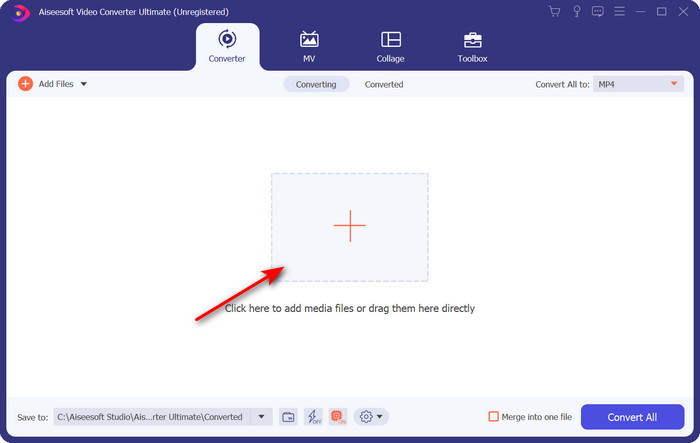
2. lépés. Nyissa meg a szoftvert, és az .amv fájl feltöltéséhez kattintson a + jelre. Keresse meg a fájlt a mappában, majd a beszúráshoz nyomja meg az Open gombot.
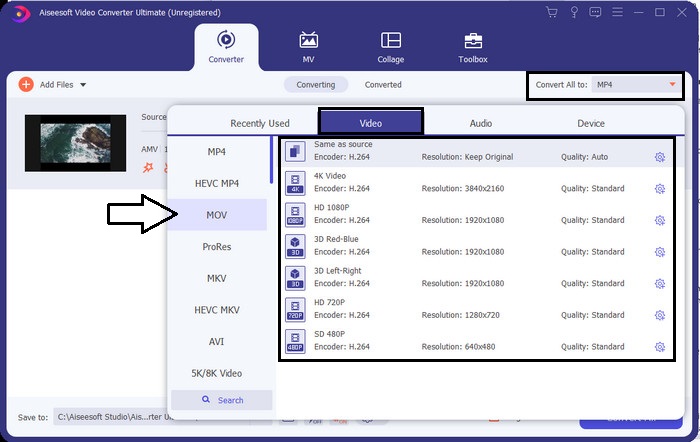
3. lépés. A formátum MOV‑ra való módosításához kattintson a Convert All to: opcióra, és válassza ki a MOV‑ot, vagy azt a formátumot, amelyre át szeretné alakítani.
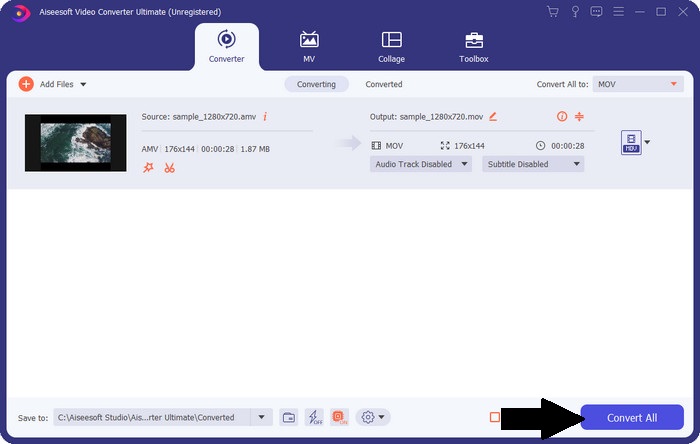
4. lépés. Az AMV‑fájl MOV‑vá alakításához kattintson a Convert All gombra a konvertálási folyamat elindításához.
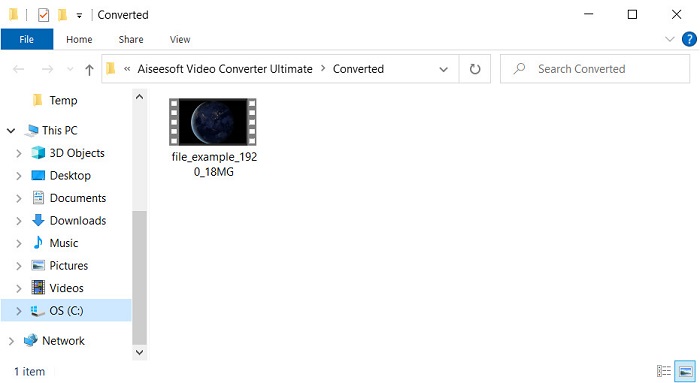
5. lépés. A fájl konvertálása csak néhány másodpercet vesz igénybe. Ezután várja meg, amíg megjelenik a mappa az előzőleg létrehozott .mov fájllal; kattintson a fájlra, hogy lejátszhassa az alapértelmezett médialejátszóján.
3. rész AMV konvertálása MOV-vé a 2 elérhető online szolgáltatás-átalakítóval
1. Fájlok konvertálása
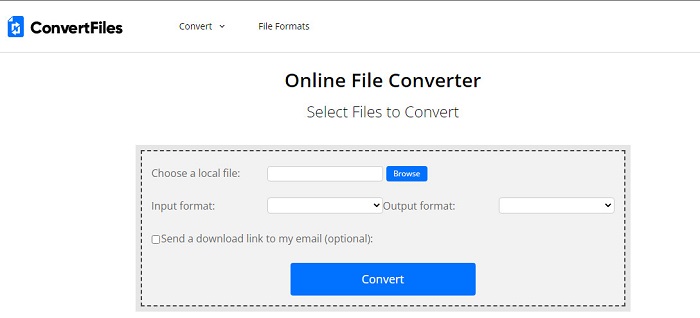
Az egyik legjobb online konverter, amelyet kedvenc böngészőjében elérhet, a ConvertFiles. Ez az online eszköz gond nélkül képes formátumát egy új formátummá átalakítani. Emellett ez az eszköz egy kisebb formátumkészletet támogat, amelyek közül választhat. Hátránya viszont, hogy az átalakított fájl letöltése sok időt vesz igénybe, mert nem biztosít gyors konvertálást. Másik negatívum a rengeteg reklám: az interfészen nagyon sok hirdetés jelenik meg. A letöltési folyamat és a reklámok okozta gondok ellenére ez az eszköz jól teljesít, mint ingyenes online megoldás.
Lépések az AMV MOV‑vá konvertálásához a ConvertFiles segítségével:
1. lépés. Nyissa meg kedvenc böngészőjét, és keresse meg a ConvertFiles weboldalt.
2. lépés. Miután megnyílt a weboldal, kattintson a Browse gombra, hogy megkeresse a fájlt a mappában; az Output Format résznél keresse meg a MOV‑ot, majd kattintson a Convert gombra.
3. lépés. Ha a konvertálás befejeződött, kattintson a kékkel kiemelt részre, hogy letöltse a fájlt a számítógépére.
2. MConverter
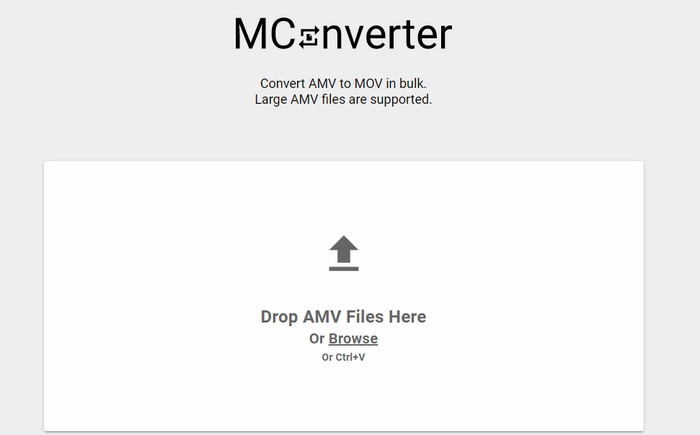
Nem szeretne reklámokat látni a felületen, hogy nyugodtan konvertálhassa az AMV‑t MOV‑vá? Akkor próbálja ki a böngészőben elérhető MConverter eszközt. Ez az eszköz a FVC Video Converter Ultimate-hez hasonlóan támogatja a kötegelt konvertálást is, így hatékonyabbá teszi az átalakítást. Az online eszköz hátránya viszont, hogy a fájlméret nem haladhatja meg a 200 MB‑ot. Tehát ha egy hosszú videót szeretne átalakítani, és a fájlméret túllépi a támogatott méretet, akkor ez nem a megfelelő választás. Ha azonban a ConvertFiles‑nél jobb konvertálási élményre vágyik, kövesse az alábbi lépéseket.
Lépések az AMV MOV‑vá konvertálásához az MConverterrel:
1. lépés. Keresse meg az MConvertert a keresőjében, és nyissa meg.
2. lépés. Kattintson az Upload gombra a fájl beszúrásához, várjon egy pillanatot, amíg a webes eszköz betölt, keresse meg a MOV‑ot, majd kattintson rá. A fájl konvertálása azonnal megkezdődik, miután a MOV formátumra kattintott.
3. lépés. Nyomja meg a Download All gombot a fájl mentéséhez.
4. rész. GYIK az AMV-ről és a MOV-ról
Átalakíthatom az MP4-emet AMV-re?
Az MP4‑et AMV‑vé alakíthatja, hogy gyorsabban továbbíthassa a fájlt online. Különösen, ha a videó egyórás, javasoljuk, hogy alakítsa át a .mp4 fájlokat .amv formátumba, mert méretben sokkal kisebb, ha a két formátumot összehasonlítjuk.
A VLC támogatja az AMV-t?
Szerencsére használhatja a VLC Media Playert az .amv fájlok lejátszására ezen a médialejátszón, még akkor is, ha már elavult. De tudta, hogy léteznek olyan médialejátszók, amelyek felülmúlják ezt a lejátszót? Ha szeretné megtudni, melyik médialejátszóról van szó, akkor kattintson erre a linkre, és ismerje meg az 5 VLC‑alternatív médialejátszót.
Hogyan állíthatom át az AMV-t AVI-ra?
Az AMV az AVI jobb verziója, azonban ha a minőségről beszélünk, az AVI kiemelkedő teljesítményt nyújt ehhez a régi formátumhoz képest. Emellett az AVI nagyon kompatibilis minden platformmal. Ha tehát az AMV‑videóit jobb minőségben és minden platformon szeretné nézni, meg kell tanulnia, hogyan konvertálhatja az AMV‑t AVI‑vá.
Következtetés
A vitának itt véget kell érnie; annak ellenére, hogy egy AMV fájlt szeretnénk tárolni a lemezünkön, a kompatibilitási probléma az egyik oka annak, hogy konvertálni kell. Végül is az AMV korábban népszerű volt, mivel ez a tároló hogyan tömöríti a fájlt. Ma azonban fontolóra kell vennie egy új formátumba való átalakítását, hogy továbbra is használni tudja. Ráadásul az itt kínált megoldások hatékonyan konvertálnak. Ennek ellenére az FVC Video Converter Ultimate fenomenálisan teljesít a másik két eszközhöz képest. Tehát, ha szeretné megtapasztalni a legjobb eszközt, akkor feltétlenül töltse le ezt a számítógépére, és másolja le a fenti lépéseket.
-
 4 legjobb módszer a MOV konvertálására MP3-ba Windows és Mac rendszeren
 Ha ki akarja vonni az MP3 audiofájlokat MOV fájlokból, többet megtudhat a 4 leghatékonyabb MOV to MP3 konverterről, hogy a kívánt fájlokat megszerezze a cikkből.
-
 MKV-ból MOV-ba - Hogyan lehet konvertálni az MKV-t MOV-ba
 Hogyan konvertálhatom az MKV-t MOV-ra Mac-en? Az iMovie képes olvasni az MKV-t? Mit jelent a MOV formátum? Ez a bejegyzés 2 egyszerű módszert ismertet az MKV konvertálásához MOV-ba ingyenes online és professzionális videokonverterekkel.
-
 FLV-ból MOV-ba - Hogyan konvertálhatom az FLV-t MOV-ra Mac / PC / Online ingyen
 Hogyan lehet átalakítani FLV-t MOV-vá? Hogyan konvertálhatom az FLV-t MOV-ra Mac-en? Van-e ingyenes mód a YouTube FLV konvertálására MOV-ra online? Ez a bejegyzés 3 FLV – MOV konvertert oszt meg, hogy az FLV fájlokat MOV-vá változtassák.
