


 Video Converter Ultimate
 Screen Recorder
 Videó javítás
 Biztonságos letöltés
Egyszerű lépések a fénykép átméretezéséhez a Facebookhoz
Many millennials and adults use Facebook as the most popular social media platform. Facebook is an app where you can upload images and share or send them to your friends. And many people want to have a great quality image to upload on Facebook. If you also want to upload high-resolution and high-quality photos, we have the tool to help you. Luckily, we found apps on iPhone, Android, and Online that can resize images quickly and efficiently. So, buckle up on your seats because, in this post, you will quickly learn how to resize photos for Facebook.

1. rész: Fotó átméretezése iPhone-on a Facebookhoz
Ha iPhone-eszközt használ, alkalmazásokat tölthet le az AppStore-ból, amelyek segítenek átméretezni a fényképet. Ezenkívül vannak ingyenes alkalmazások, amelyeket iPhone-eszközén használhat. Azonban nem minden alkalmazás produkál jó minőségű kimenetet. Ezért kerestük a legjobb alkalmazást a képek azonnali átméretezéséhez.
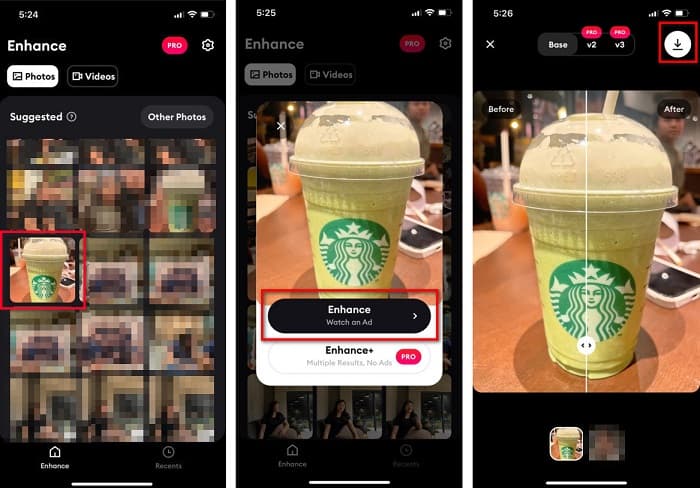
Remini is the most popular photo resizer application you can download on your iPhone. This app has a user-friendly interface because it has intuitive functions. In addition, Remini can enhance your image using its AI (Artificial Intelligence) enhancer, which automatically resizes your image and enhances it at its finest quality. And not only that, with this app, you can improve your video with its video enhancer feature. Furthermore, it supports all common image formats, like JPEG, JPG, and PNG. What’s also fantastic about this app is that you can download it for free on AppStore. So, if you like to use this app to resize a photo for Facebook cover, follow the procedures below.
Kép átméretezése a Remini alkalmazással:
Step 1. Open your AppStore, browse the Remini app and download it on your device. After installing the app, open it.
Step 2. After opening the app, you will see your photos and select the image you like to enhance. And then, tap the Enhance button to go to the following interface.
Step 3. Before proceeding to the next interface, you must first watch an ad. And then, you will see the before and after of your image. Tap the Download icon at the top-right side of your screen.
2. rész: Fotó átméretezése Androidon a Facebookon
Ön Android felhasználó? Ne aggódj; bemutatunk egy alkalmazást is, amellyel átméretezhet egy képet. Bár sok alkalmazást letölthetsz a PlayStore-ból, mi közülük a legjobbat választottuk, hogy bemutathassuk. Az alábbiakban megtudhatja, hogyan lehet átméretezni a képeket Androidon a Facebookon.
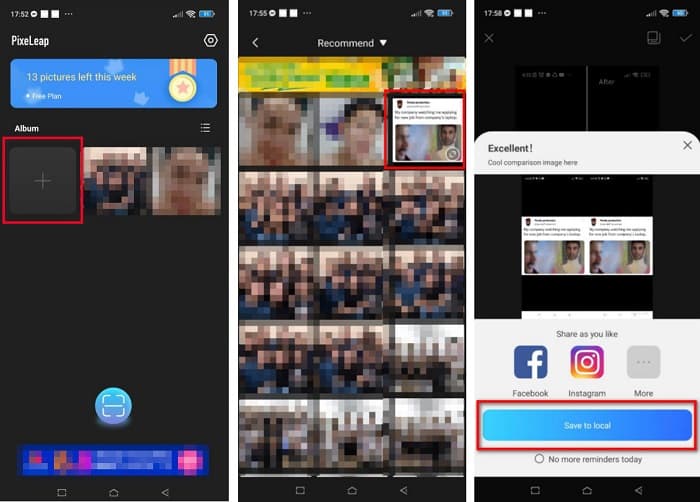
AI Photo Enhancer & PixelLeap is another great app that will help you resize your image for better quality. This photo resizer is free to download on your PlayStore app and safe to use. Additionally, if you want to enhance or restore an old image, then AI Photo Enhancer & Pixel Leap. And with its AI technology, just upload the image you want to resize, then the app will automatically enhance your image. Furthermore, it has a simple user interface, which is a very great app if you are a beginner user. Also, it has other editing features you can use, such as rectify, colorize, animate, emote, and brighten your image. However, the problem with this app is that it contains many ads that take time to finish and leaves a watermark on your output. Nevertheless, this app is the solution if you want to resize a photo for Facebook without cropping.
Kép átméretezése az AI Photo Enhancer és a PixelLeap segítségével:
Step 1. Install AI Photo Enhancer & PixelLeap on your Android device.
Step 2. And then, on the app’s main user interface, tap the + sign box to upload the image you want to resize. And then, the app will let you watch an ad before proceeding to the next interface.
Step 3. Browse the image you want to resize, then tap it. After selecting the image, tap the Enhance option. Then, the app will automatically enhance your image. Tap the Save to local to download your output.
3. rész. Hogyan lehet átméretezni a fényképet online a Facebookon
Az online alkalmazás használatának előnye, hogy helyet takaríthat meg készülékén. Ezen kívül számos ingyenesen elérhető webalkalmazás található, amelyeket a böngészőjében használhat. Tehát, ha egy online alkalmazást szeretne használni egy kép átméretezésére, hogy feltöltse a Facebookra, megmutatjuk, hogyan lehet átméretezni egy fényképet a Facebook számára.
FVC Free Image Upscaler is the best online photo resizer that allows you to upscale your image up to 2x, 4x, 6x and 8x magnification. With its simple user interface, beginners can easily resize an image. Moreover, it supports all image formats, including JPEG, JPG, PNG, and BMP. What’s even more impressive about this application is that it uses an AI technology that automatically detects the low-resolution part of an image and then enhances it. Additionally, it can fix the lost pixels, color textures, and more details entirely and perfectly. Also, it is accessible on all web browsers, including Google, Firefox, and Safari. Therefore, if you want to use FVC Free Image Upscaler to resize or enhance your image, follow the easy steps below.
Kép átméretezése a Facebook számára az FVC Free Image Upscaler használatával:
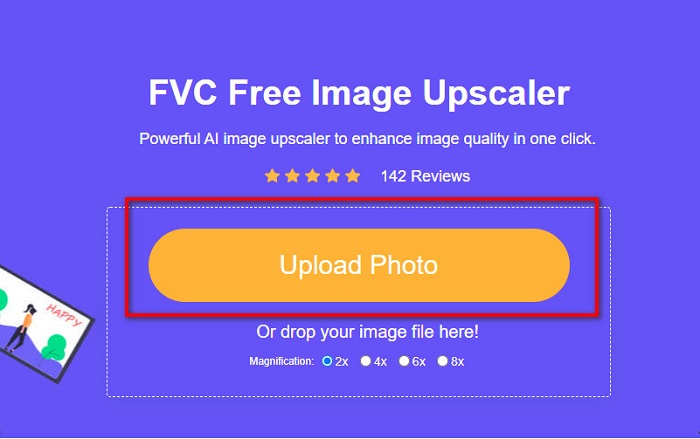
Step 1. Open your browser and type FVC Free Image Upscaler on the search box. You can click the provided link to be directed to the website. Click the Upload Photo to launch the app.
Step 2. And on the software’s main user interface, click the Upload Photo to import the image you want to resize.
Step 3. On the next interface, select the magnification preset you want for your image output. You can select between 2x, 4x, 6x, and 8x magnification. Then proceed to the next step.
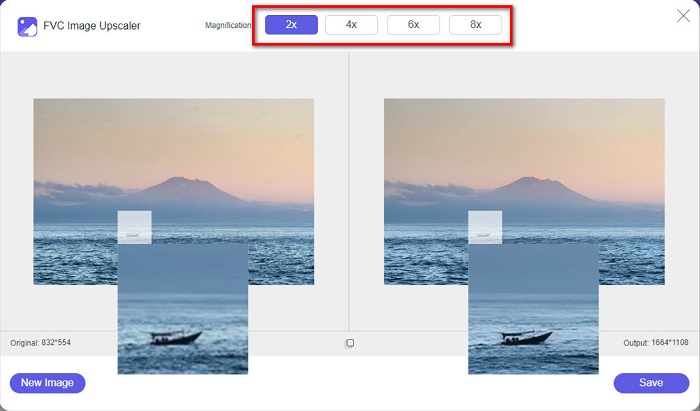
Step 4. Finally, tick the Save button to save your output on your computer. And you will see the difference between your original file and the resized image. In just a second, your image will be saved.
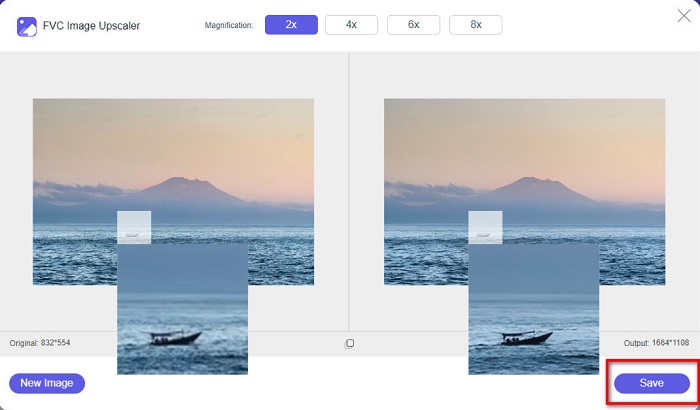
És ez az! A képe olyan egyszerű, mint az ABC, most javítva és átméretezve.
Kapcsolódik:
How to Sharpen Image Online and Offline With 4 Easy Ways
How to Resize Image – Adobe Resize Image [Online and Offline]
4. rész. GYIK a fénykép átméretezéséről a Facebookon
Mi a legjobb képarány a Facebook számára?
Ami a fényképarányt illeti, a legjobb a 4:5 képarányú, 1200 x 1500 px függőleges kép használata. Ha pedig négyzet alakú képet szeretnénk, akkor a felbontásnak 1080 x 1080 px-nek kell lennie.
Mekkora egy Facebook-bejegyzés?
A Facebook-bejegyzés ajánlott képmérete 1200 x 630 pixel a képpontosodás elkerülése és a gyorsabb betöltés érdekében.
Milyen képformátumot a legjobb feltölteni a Facebookra?
A Facebookra a legjobb és ajánlott képformátum a JPG formátum. A legjobb, ha olyan JPG formátumot tölt fel, amelynek RGB színe 15 MB-nál kisebb.
Következtetés
We have the above solutions if you want to resize a photo for Facebook. By reading this article comprehensively, we hope you have learned all the necessary things you must do. You can surely resize any image you want using iPhone, Android, or Online apps. But for better results, use FVC Free Image Upscaler, which will also enable you to save space on your device.
-
 A legjobb Photo Resizer alkalmazás online, offline, Android és iPhone-on
 Melyek a legjobb fényképátméretező alkalmazások? Kattintson az oldalra, hogy megismerje az öt leghatékonyabb fényképátméretező alkalmazást, amellyel javíthatja vagy átméretezheti a fájlt.
-
 Kép átméretezése - Adobe Kép átméretezése [Online és offline]
 Ha Adobe átméretező képet keres, akkor mi megtaláljuk a megoldást. Tekintse meg alaposan ezt a bejegyzést, hogy megtudja, hogyan lehet átméretezni a képeket az Adobe segítségével számítógépén.
-
 A 4 legjobb offline és online GIF-nagyító, amelyet nem szabad kihagyni
 Ez a bejegyzés neked szól, ha a legjobb GIF-nagyítókat keresed. Felsoroltuk a legjobban teljesítő online és offline GIF-nagyítókat számítógépéhez.
