


 Video Converter Ultimate
 Screen Recorder
 Videó javítás
 Biztonságos letöltés
TS videofájlok tömörítése - Hogyan lehet tömöríteni a TS fájlokat kisebb méretre
Ha van néhány video_ts fájl DVD-ről, a fájlok nagyméretűek és elfogyasztják a merevlemez-helyet. Ha el kell mentenie a TS fájlokat a NAS vagy a média könyvtárba, tömörítenie kell a TS videókat. Természetesen az online TS videokompresszornak kell lennie a kezdeti választásnak. De az online szolgáltatások többségében korlátozottak a videók mérete. Megtekintheti az ingyenes online TS kompresszort és a professzionális eszközt a cikkből.

1. rész: A TS fájlok online tömörítése ingyen
Lehetséges online tömöríteni TS videófájlokat? Mivel a TS fájlok mérete nagy, nehéz olyan online TS tömörítőt találni, amelynél nincs méretkorlát. A Free Video Compressor egy sokoldalú online TS tömörítő, amely korlátozás nélkül támogatja a nagy méretű TS fájlokat. Csak csökkenti a TS videók fájlméretét, miközben megőrzi az eredeti videóminőséget.
- 1. Tömörítse a TS videókat 4K felbontásban, lenyűgöző minőséggel.
- 2. Ne adjon vízjelet a tömörített TS videofájlokhoz.
- 3. Tömörítse a TS fájlokat 30x gyorsabban, mint más eszközök.
- 4. Adatai védelme érdekében biztosítson adatvédelmi funkciókat.
1. lépés: Nyisson meg bármely webböngészővel egy online videotömörítőt, majd kattintson az Add Files to Compress (Fájlok hozzáadása a tömörítéshez) gombra az installer letöltéséhez. Ezután kattintson újra a gombra, hogy a TS fájlt méretkorlát nélkül importálja az online videotömörítőbe.

2. lépés: Miután online feltöltötte a TS fájlokat, különböző paramétereket állíthat be, például a Size (Méret), Format (Formátum), Resolution (Felbontás) és Bitrate (Bitráta) értékét az igényeinek megfelelő videóméret eléréséhez. Ezután kattintson a Compress (Tömörítés) gombra, hogy ingyen tömörítse TS videóját.

2. rész: A TS fájlok tömörítése a minőség romlása nélkül
Amikor különböző TS fájlokból származó filmklippeket szeretne egyesíteni, TS fájlokat szeretne tömöríteni Android telefonokra, vagy akár TS-t MP4-re vagy MKV-re konvertálni, a Video Converter Ultimate egy többfunkciós TS tömörítő, amely fejlett algoritmusokkal csökkenti a videók méretét. Lehetővé teszi továbbá a nem kívánt részek eltávolítását és a videoklipek egyetlen filmmé egyesítését.
Ingyenes letöltés Windows 7 vagy újabb rendszerre Biztonságos letöltés
Ingyenes letöltés macOS 10.7 vagy újabb rendszerre Biztonságos letöltés
1. lépés: Töltse le és telepítse a Video Converter Ultimate programot a számítógépére, majd indítsa el. Kattintson a Converter menüre, és válassza az Add Files gombot a TS fájlok importálásához.
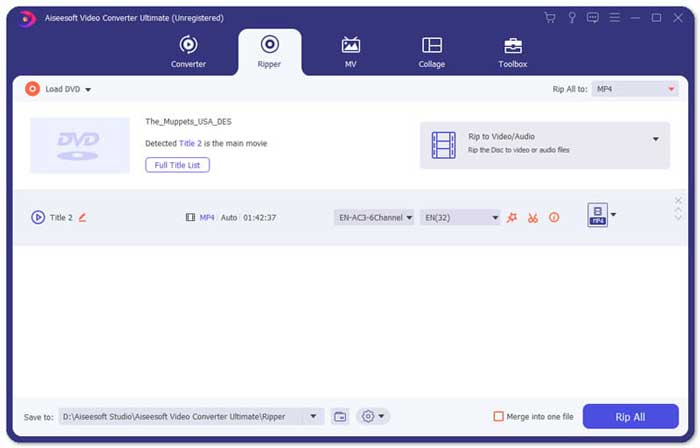
2. lépés: Miután importálta a TS fájlokat, lépjen a Tool menübe, és kattintson a Video Compressor opcióra. Módosítsa a célfájl méretét, nevét, formátumát, felbontását és bitrátáját. Ha elérte a kívánt videóméretet, kattintson a Compress gombra a TS fájlok tömörítéséhez.

3. lépés: Kiválaszthatja az MKV vagy MP4 formátumot is kimenetként. Így a program TS-ből MKV-t vagy MP4-et hoz létre viszonylag kis fájlmérettel. Kattintson az Scissors (Olló) ikonra a kívánt TS részek kivágásához. A különböző TS klipeket a Merge into one (Egyesítés egy fájlba) opcióval egyetlen videóvá is összefűzheti.
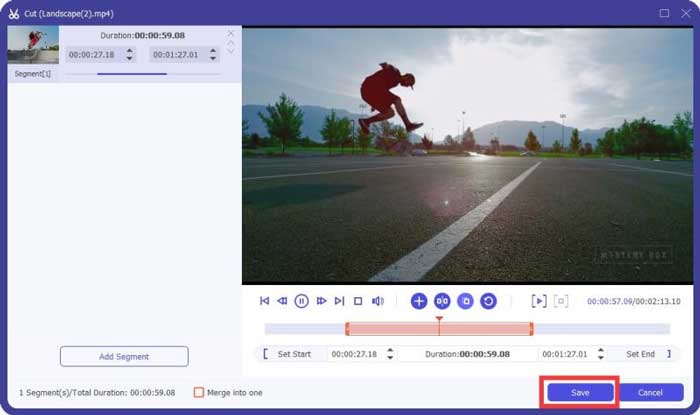
4. lépés: Ha elégedett a tömörített videóval, válasszon célmappát a tömörített TS videók számára. Ezután kattintson a Convert All gombra, hogy elindítsa a TS fájlok tömörítését a DVD-ről az eredeti minőség elvesztése nélkül.

3. rész: Gyakran feltett kérdések a TS videofájlok tömörítéséről
1. Mi az a TS fájlformátum?
TS, hiányzik a Transport Stream, amely egy csomagformátum. A TS teljes neve MPEG2-TS, amely egy szabványos adattároló formátum audio, video, műsorok stb. Továbbítására és tárolására. Főleg digitális műsorszóró rendszerekben használják, például DVB, ATSC és IPTV.
2. Tömörítsem a TS-t MP4-re vagy MKV-re?
Igen. Amikor meg kell őriznie az eredeti videominőséget, egyszerűen tömörítheti a TS-t az MKV-ba az eredeti videokodekkel. De ha tömöríteni szeretné a TS-t egy Android telefonhoz vagy iPhone-hoz, az MP4-nek kell lennie a legjobb választások között.
3. Mennyi ideig tart a .TS fájlok tömörítése a H.264 használatával?
Ez a .TS fájl fájlméretétől függ. Ami a H.264-et illeti, 15 MBPS tömörítésű bitrátával, amelynek tömörítése alig 2 percet vesz igénybe. 484 MB tömörített fájlt hoz létre. Ha 9 GB-os DVD-ről kell tömörítenie a TS-t, ez körülbelül egy órát vehet igénybe.
Következtetés
A cikk 2 működő módszert oszt meg a TS videofájlok tömörítésére. A Free Video Compressor segítségével korlátlanul tömörítheti a nagy TS fájlokat. Ha a TS fájlokat minőségromlás nélkül kell tömörítenie, akkor mindig a Video Converter Ultimate kell a legjobb választás.
-
 Hogyan lehet konvertálni a TS-t AVI / MKV / MOV / WMV online és ingyenes formátumba Win / Mac rendszeren
 Szeretné gyorsan átalakítani a TS fájlokat AVI / MKV / MOV / WMV fájlokká? Ez a cikk online és offline videokonvertereket mutat be teljes útmutatóval. Talán itt kaphatja meg a legjobb ingyenes TS átalakítót.
-
 MTS VS M2TS - Különbség az MTS és az M2TS között
 Mi az MTS vagy M2TS fájl? Mi a különbség az M2TS és az MTS között? Hogyan nézhetem meg a kamerával rögzített MTS vagy M2TS fájlt? Az összes választ megtalálja ebben a bejegyzésben.
-
 10 ingyenes módszer a TS fájl konvertálására MP3, AIFF, ALAC, FLAC és egyebekké
 Hogyan lehet átalakítani TS fájlt ingyenesen MP3 formátumra? Ebben az útmutatóban 11 egyszerű módot talál a TS fájl TS-ből történő hangjának kivonására az ingyenes audio és az online átalakító eszközökbe.
