


 Video Converter Ultimate
 Screen Recorder
 Videó javítás
 Biztonságos letöltés
Az M2TS átalakítása iPad kompatibilis formátumokká Windows / Mac / Online rendszeren
Lehet közvetlenül M2TS-fájlt lejátszani iPaden? Sajnos a válasz: nem. Az M2TS nem kompatibilis az iPaddel. Ha M2TS lejátszást szeretnél iPaden, telepítened kell egy M2TS lejátszó appot az iPadre, vagy át kell konvertálnod az M2TS-t iPad-nek megfelelő formátumra. Ez a cikk egyértelműen az utóbbi megoldást választja. Olvasd tovább, és tudd meg, hogyan lehet iPaden formátumot váltani M2TS-ről.

1. rész: Az M2TS konvertálása iPad-re Windows és Mac rendszeren
Milyen formátumokat támogat az iPad? Valójában az iPad elfogadja a H.264, MP4, M4V, MOV, MPEG-4 és M-JPEG általános videó formátumokat. Ahhoz, hogy az M2TS-t iPadre helyezze, először meg kell konvertálnia az M2TS-t iPad videó formátumra.
Hogyan konvertálhatom az M2TS-t iPad-re Windows alatt ingyen
A FVC Free M2TS Converter egy teljesen ingyenes, kötegelt M2TS–iPad átalakító. Több M2TS-fájlt is átkonvertálhatsz iPadre akár 50-szer gyorsabban, mint a hagyományos M2TS konverterekkel. Így az sem gond, ha nagy méretű M2TS videókat kell egyszerre, nagy tételben iPadre alakítanod. Az ingyenes M2TS–iPad konverter ezt tökéletesen kezeli.
Ezen felül összefűzheted az M2TS-fájlokat, és témákat adhatsz hozzá a M2TS–iPad átalakítás előtt. A valós idejű előnézeti ablak azonnal megmutatja a videóeffektusokat. Röviden: Windows rendszeren egyetlen lépésben szerkesztheted és konvertálhatod az AVCHD M2TS fájlokat iPadre, teljesen ingyen.

Ingyenes M2TS Converter
113 456+ letöltés- M2TS konvertálása iPad H.264, MP4, MOV, MPEG-4 és más kompatibilis formátumok.
- 50x gyorsabb sebesség a kötegelt átalakítás támogatásával.
- Tartsa fenn a magas színvonalat, miközben minden HD videokameráról iPadre konvertál.
- Az M2TS to iPad átalakító Windows 10/8/7 számítógéppel működik.
Ingyenes letöltésWindows 7 vagy újabb rendszerhezBiztonságos letöltés
Ingyenes letöltésMacOS 10.7 vagy újabb rendszerhezBiztonságos letöltés
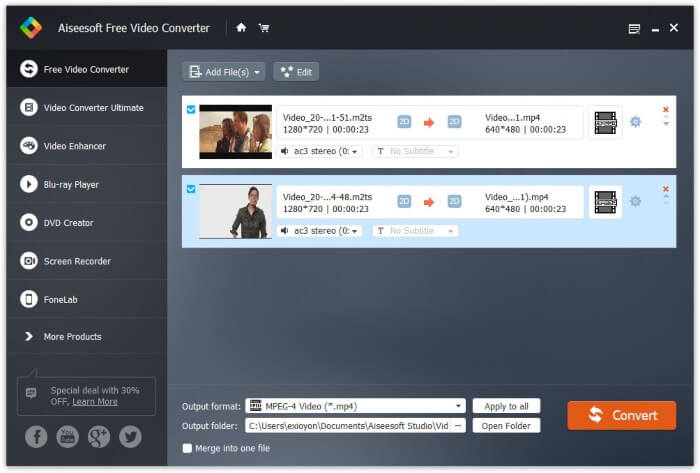
1. lépés: Töltsd le ingyen, telepítsd és indítsd el az FVC Free M2TS Converter programot. Húzd és ejtsd be az M2TS fájlokat a fő felületre.

2. lépés: Nyisd le az Output format (Kimeneti formátum) listát alul. Ha Windows alatt szeretnél M2TS-t iPadre konvertálni, egyszerűen válaszd ki a kimeneti formátumot az Apple iPad kategóriából.

3. lépés: Kattints a fogaskerék alakú Settings ikonra a videokódoló, képfrissítési ráta és egyéb beállítások módosításához. Végül kattints a Convert gombra, hogy a videót M2TS-ről iPad-formátumra alakítsd.
Az M2TS átalakítása iPad-be Mac-en ingyen
Ha az M2TS videót ingyenesen konvertálja iPad-re Mac-en, akkor a VLC Media Player lehet a jó választás. Ez egy ingyenes és nyílt forráskódú M2TS lejátszó és átalakító multiplatformhoz.
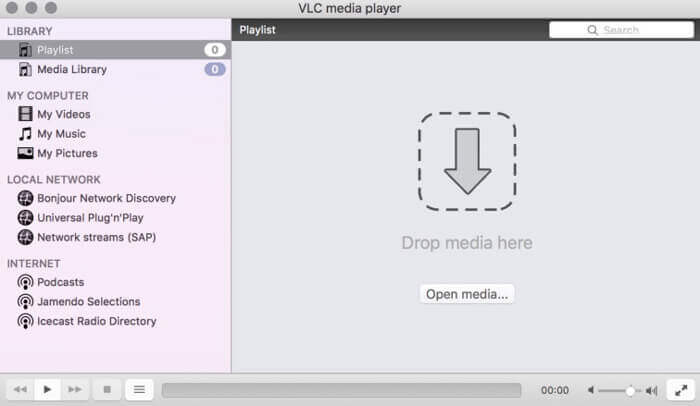
1. lépés: Nyisd meg a VLC Media Player programot Macen. Válaszd a Convert/Save lehetőséget a Media legördülő listából.
2. lépés: Kattints az Add gombra egy M2TS-fájl importálásához. Ezután jelöld ki a fájlt, és kattints alul az Open gombra a folytatáshoz.
3. lépés: Kattints alul a Convert/Save gombra a következő ablak megnyitásához.
4. lépés: Válaszd ki az iPad formátumot a Profile legördülő listából. A mellette lévő Tools ikonra kattintva módosíthatod a videóbeállításokat.
5. lépés: Kattints a Start gombra, hogy M2TS-fájlt iPadre konvertálj Macen a VLC segítségével.
2. rész: Az M2TS konvertálása iPad Online-ra
A mobil felhasználók számára az online M2TS-iPad átalakító használata is jó választás. Az M2TS fájlokat ingyenesen konvertálhatja iPad-be letöltés, telepítés vagy regisztráció nélkül.
1. lépés: Nyiss meg egy online M2TS–iPad konvertert, például a FVC Free Online Video Converter oldalt.

2. lépés: Töltsd le a FVC launcher modult az Add Files to Convert gombra kattintva, majd telepítsd.

3. lépés: Keresd meg a számítógépeden az átalakítandó M2TS-fájlt. Ne felejtsd el kiválasztani a formátumot sem.

4. lépés: Kattints a Start Converting gombra az M2TS–iPad átalakítás ingyenes, online elindításához.
3. rész: Gyakori kérdések az M2TS átalakításáról iPad-re
Mi történik, ha hirtelen nincs hang az M2TS fájlokban az iMovie-ban?
Az M2TS-t natív módon nem támogatják az Apple-eszközök. A probléma megoldásához át kell alakítania az M2TS fájlt Mac formátumba.
Hogyan nyithatom meg az M2TS fájlokat iPhone-on és iPad-en?
Az AVCHD M2TS nem kompatibilis az iOS eszközökkel. Ha ragaszkodik az M2TS videók lejátszásához iPaden, akkor a VLC Media Player alkalmazást használhatja a videók lejátszásához.
Van valami jó videolejátszó alkalmazás iPad-hez?
Nagyobb kijelzőt kaphat az iPad-en, mint az iPhone. Tehát a videónézési élmény is jobb lesz. Az ajánlott videolejátszók közé tartozik a PlayerXtreme Media Player, a KMPlayer, a VLC, az AirPlayer és még sok más. Bármelyiket választhatja, hogy rugalmasan kezelhesse a videovezérlőket.
Ennyi az egész: így lehet M2TS-t iPadre konvertálni online és offline eszközökkel. Ezek az M2TS videókonverterek ingyenesek és biztonságosan használhatók. Akárhány M2TS-fájlt szeretnél iPad-kompatibilis formátumokra átalakítani, itt a lehető leggyorsabb sebességet érheted el.
-
 Hogyan lehet átalakítani az M2TS-t MP4-re a minőség romlása nélkül
 Szeretné konvertálni a videót HD kameráról közös MP4-re? Íme 4 egyszerű és ingyenes módszer az M2TS fájl MP4-re változtatására Windows és Mac rendszeren.
-
 Hogyan lehet az M2TS-t konvertálni MKV-re a minőség romlása nélkül
 Szeretné átalakítani az M2TS-t MKV formátumba, az eredeti minőség megőrzése mellett? Ez a bejegyzés ingyenes és online módszereket mutat be az M2TS veszteség nélküli MKV-re történő megváltoztatására.
-
 Mi a különbség az MTS és az M2TS között
 Mi az MTS vagy M2TS fájl? Mi a különbség az M2TS és az MTS között? Hogyan nézhetem meg a kamerával rögzített MTS vagy M2TS fájlt? Az összes választ megtalálja ebben a bejegyzésben.
