


 Video Converter Ultimate
 Screen Recorder
 Videó javítás
 Biztonságos letöltés
2 egyszerű módja az MTS konvertálásának MP3-ba
Különböző igények esetén kivonja a hangsávot a videóból. Például, érdemes a videót MP3-ba konvertálni a fájlméret csökkentése érdekében. Bizonyos esetekben csak egy film háttérzenéjére van szükség, és kiválaszthatja, hogy kivonjon-e belőle hangot.

Az MTS egy nagy felbontású videoformátum, amely támogatja a 720p és 1080i HD-t. Ez az AVCHD (Advanced Video Coding High Definition) fájlkiterjesztése. Amikor MTS fájlt kapsz, nem tudod közvetlenül lejátszani a médialejátszóddal, videoszerkesztőddel vagy hordozható iOS/Android eszközeiddel. Ezért elég szükséges az MTS-t MP3-ra vagy MP4-re konvertálni a jobb lejátszás vagy szerkesztés érdekében. Ebben a bejegyzésben megmutatjuk, hogyan lehet ingyen MTS-t MP3-ra konvertálni.
1. rész: Hogyan lehet ingyenesen konvertálni MTS-t MP3-ba minőségromlás nélkül
Az interneten rengeteg MTS-MP3 konvertáló eszköz kínálkozik, amelyek elősegítik az MP3-hang kivonását MTS vagy M2TS videóból. De észreveheti, hogy sok közülük, különösen néhány ingyenes, nagyobb valószínűséggel gyenge minőségű MP3-fájlokat ad ki.
Ezt figyelembe véve, az első részben szeretnénk számodra ajánlani a legjobb ingyenes MTS–MP3 átalakító szoftvert, a Free Video Convertert. Képes az AVHCD fájlt MP3 formátumba konvertálni úgy, hogy közben pontosan megőrzi az eredeti hangminőséget. Most ingyen letöltheted, és a következő útmutató alapján kinyerheted az MP3 hangsávot az MTS/M2TS videódból.
Ingyenes letöltésWindows 7 vagy újabb rendszerhezBiztonságos letöltés
Ingyenes letöltésmacOS 10.7 vagy újabb rendszerhezBiztonságos letöltés
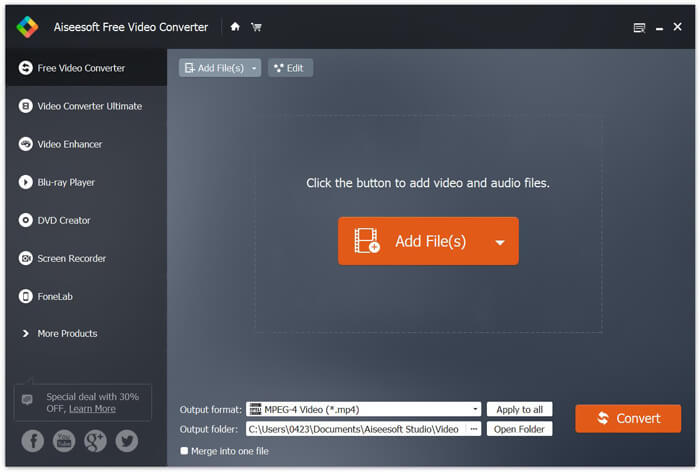
1. lépés. Először telepítsd ezt az ingyenes MTS–MP3 konvertert a számítógépedre, a fenti letöltés gombra való dupla kattintással. Amikor belépsz a fő felületre, kattints az Add File(s) gombra, hogy importáld az átalakítani kívánt MTS fájlt.
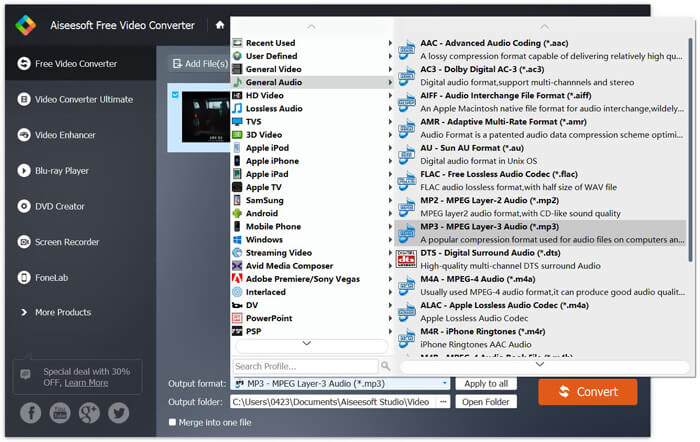
2. lépés. Kattints az Output formátumra, majd válaszd ki az MP3-at kimeneti formátumként. Ennél a lépésnél ki is jelölhetsz egy megfelelő mappát az átalakított MP3 hangfájl számára. Ezután kattinthatsz a Convert gombra, hogy megkezdődjön az AVHCD fájl MP3-ra konvertálása.
A fejlett gyorsító technológia alkalmazásával igazán gyors MTS-MP3 konverziós sebességet nyújthat. Ennél is fontosabb, hogy ez az ingyenes MTS - MP3 konvertálás biztosítja, hogy az átalakítás során ne csökkenjen hangminőség. Szerkesztési funkciókkal is tervezték, hogy segítsenek a video audio fájlok szerkesztésében és a kimeneti effektusok beállításában.
2. rész: Hogyan lehet ingyenesen konvertálni MTS-t MP3-ba az Online Converter segítségével
Ha kis méretű AVHCD fájlod van, és ki szeretnéd belőle nyerni az MP3 hangsávot, igénybe vehetsz egy ingyenes online konvertert. Ahogy fentebb említettük, számos online átalakító eszköz létezik, amely segíthet az MTS–MP3 átalakításban. Ha nem tudod, melyiket válaszd, itt bemutatunk egy népszerű online MTS–MP3 konvertert: a FVC Free Online Video Convertert.
Az FVC Free Online Video Converter az egyik legnépszerűbb videó és audio konvertáló eszköz, amely segíthet az MTS ingyenes konvertálásában MP3-ba. Az AVCHD fájlkonvertálás mellett más médiafájl-átalakításokat is lehetővé tesz. A következő lépések megmutatják, hogyan lehet az MTS-t MP3-ba konvertálni online ezzel az online video-átalakítóval.
1. lépés. Nyisd meg a böngésződet, és lépj az FVC Free Online Video Converter hivatalos weboldalára. Egy speciális MTS–MP3 átalakító oldalt is kínál, a következőt: https://www.free-videoconverter.net/free-online-video-converter/. Az átalakításhoz elnavigálhatsz ide.
2. lépés. Keresd meg és kattints a Add Files to Convert gombra a segédprogram letöltéséhez és telepítéséhez. A segédprogram aktiválása után töltsd fel az átalakítani kívánt MTS fájlt.

3. lépés. Győződj meg róla, hogy a kimeneti formátum MP3, majd kattints a Convert gombra, hogy megkezdődjön az MP3 hang kinyerése az AVCHD fájlból. Ezután a program automatikusan elindítja az MTS–MP3 átalakítást.

Ennek az oldalnak az elolvasása után két egyszerű és ingyenes módszert ismerhetsz meg, hogyan lehet MTS-t MP3-ra konvertálni. Ha nagy méretű AVCHD fájlt szeretnél veszteségmentesen MP3-ra alakítani, támaszkodhatsz a Free Video Converterre. Vagy használhatod az FVC Free Online Video Convertert egy 100 MB-nál kisebb MTS/M2TS videó kezelésére. Ha még mindig vannak kérdéseid, írj nekünk üzenetet.
-
 Hogyan lehet konvertálni a WMV-t MP3-ra asztali és online
 Bármely ingyenes videokonverter szoftvert megtalálhat az FVC stúdióban. Bármilyen video / audio formátum támogatott, beleértve az MP4, MOV, TS, AVI, WMV, FLAC, MP3 stb.
-
 4 legjobb módszer az M4A konvertálására MP3-ra hangminőség-romlás nélkül
 Nem tudja lejátszani az M4A-t, és MP3-ra kell konvertálni? Van-e ingyenes módszer az M4A MP3-ra konvertálására online? Ez a bejegyzés négy ingyenes módszert oszt meg az M4A MP3 konvertálásához az iTunes, az online és a professzionális audio konverterek segítségével.
-
 Hogyan konvertálhatunk M2TS fájlokat MP3-ba ingyen
 Konvertálható egy M2TS fájl MP3-ba? Ebben a bejegyzésben felsoroltuk a legjobb 6 ingyenes és online módszert, amelyek segítenek az M2TS átalakításában MP3, AAC, AIFF és még több audio formátumba.
