


 Video Converter Ultimate
 Screen Recorder
 Videó javítás
Tanulja meg az MTS-t WMV-vé konvertálni különböző módokon

1. rész. A legjobb eszköz, amely az MTS-t WMV Online-ra konvertálja
A legtöbbünk nem szívesen foglalkozik kényelmetlenségekkel, ezért nem akarunk szoftveres átalakítót telepíteni. Sokan inkább egy online átalakítót keresnek, amely képes a fájltípusok konvertálására. A FVC Free Video Converter Online egy teljesen ingyenes online videókonverter. Bár ez a program ingyenesen használható, a minőség miatt nem kell aggódnia, mert a FVC Free Video Converter nem áldozza fel a minőséget az átalakítás során.
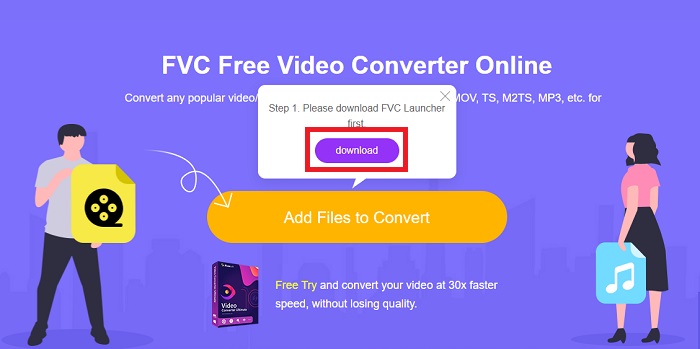
1. lépés: Először kattintson erre a linkre, amely átirányítja a weboldalra. Ott kattintson az Add Files to Convert gombra a launcher letöltéséhez; ezután fel kell töltenie a konvertálni kívánt fájlokat.
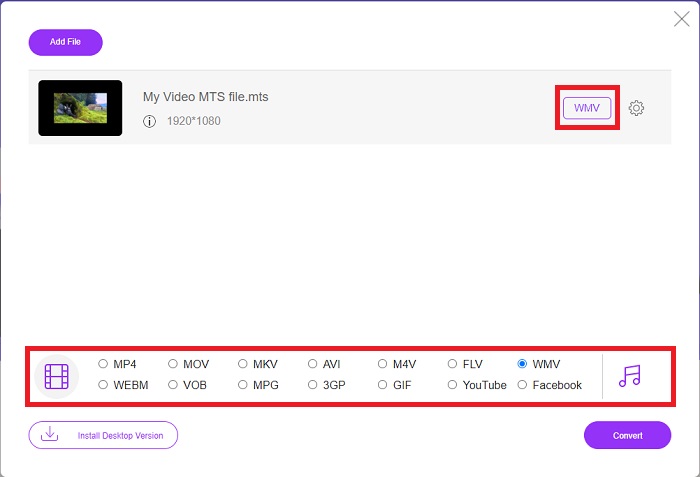
2. lépés: Ezt követően ismét a gombra kattintva feltöltheti a videófájlt. Az alján látni fogja az összes elérhető formátumot, és ezek közül válassza a WMV formátumot.
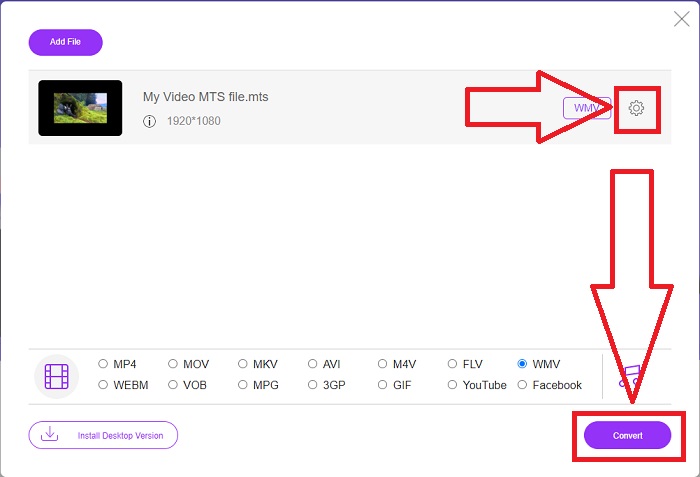
3. lépés: A további beállítások továbbra is rendelkezésre állnak. Kattintson a fogaskerék ikonra, ekkor megjelennek azok a módosítási lehetőségek, amelyeket a videóján elvégezhet. Miután kiválasztotta a formátumot, kattintson az OK gombra a módosítások mentéséhez, majd kattintson a Convert gombra, hogy végre elindítsa az átalakítást.
2. rész. Hogyan lehet MTS-t WMV-vé konvertálni a legjobb offline konverterrel
Konverter választásakor figyelembe kell vennünk az egyszerűséget, hiszen nem szeretnénk egy drága, nehezen használható átalakítót. Örömmel mutatjuk be a Video Converter Ultimate programot és annak felhasználói felületét. Ennek a konverternek rendkívül egyszerű a felülete, és mivel letisztult, használata is a legegyszerűbb. Emellett gyorsan hozzáadhatja fájljait és megtekintheti a támogatott fájltípusokat. Számos további funkció is a rendelkezésére áll, amelyek még kényelmesebbé teszik a szerkesztési élményt. Ha első kézből szeretné kipróbálni, kövesse ezeket az egyszerű lépéseket:
1. lépés: Először magát a szoftvert kell telepítenie. Ehhez töltse le az .exe fájlt az alábbi Free Download gombra kattintva Windowsra vagy Macre. Várja meg, míg a letöltés befejeződik, majd nyissa meg a fájlt a telepítési folyamat elindításához. Kattintson a Start Now gombra, majd indítsa el a szoftvert.
Ingyenes letöltés Windows 7 vagy újabb rendszerre Biztonságos letöltés
Ingyenes letöltés macOS 10.7 vagy újabb rendszerre Biztonságos letöltés
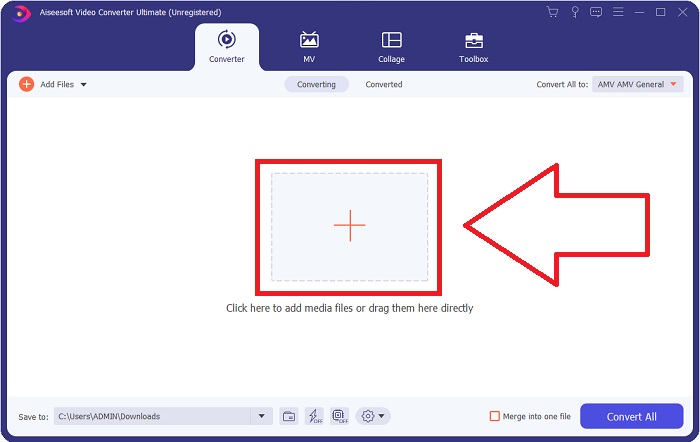
2. lépés: Megnyitás után egy felület jelenik meg egy + gombbal a közepén. Kattintson rá az átalakítani kívánt MTS videófájl feltöltéséhez, vagy egyszerűen húzza a fájlt az ablakba a gyorsabb használat érdekében.
3. lépés: Ha a folyamat sikeres, és a fájl megjelenik a felületen, a jobb oldalon láthatja az aktuális formátumot, amelyben a videó jelenleg van. Kattintson a legördülő nyílra, és megjelenik az összes elérhető formátum. Görgessen le és válassza a WMV formátumot, vagy egyszerűen írja be a keresősávba. Ezen felül a fül jobb oldalán kiválaszthatja a kívánt minőséget is.
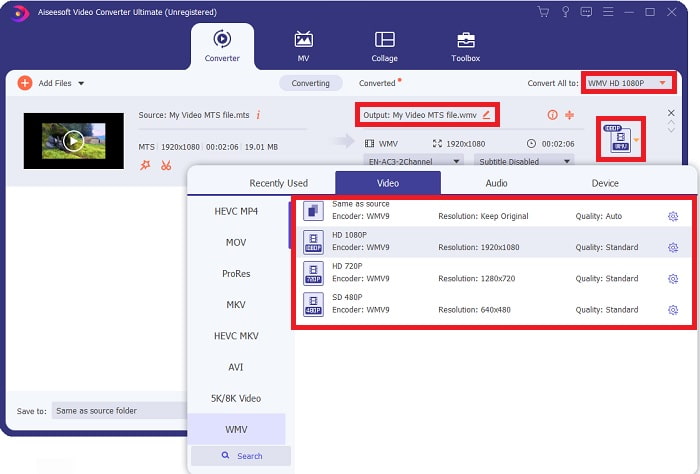
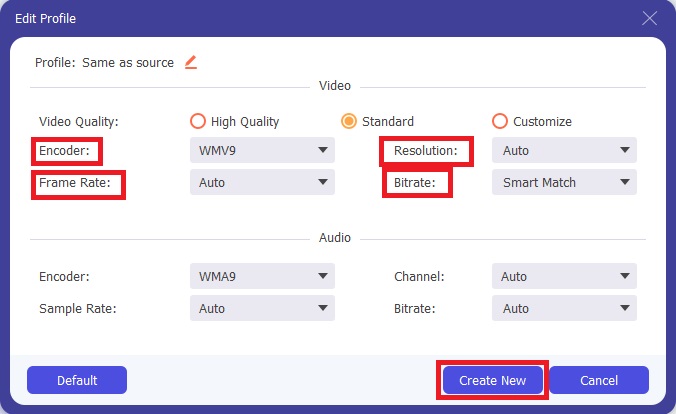
4. lépés: További beállításokhoz kattintson a videóminőség jobb oldalán található fogaskerék ikonra. Innen tovább szerkesztheti videóját, például a felbontást, a képkockasebességet, a bitrátát és még sok mást. Ha végzett a beállításokkal, kattintson a Create New gombra.
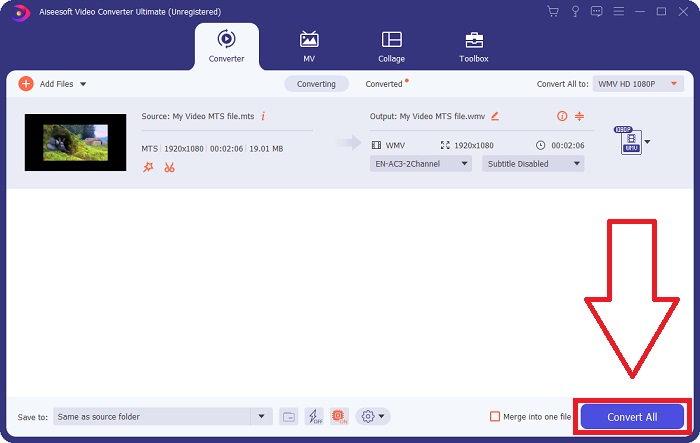
5. lépés: Ha minden szükséges beállítást elvégzett, kattintson a jobb alsó sarokban található Convert All gombra az átalakítás elindításához, és várja meg, amíg befejeződik.
3. rész Kibővített ismeretek az MTS VS-ről. WMV
| Fájlkiterjesztés | .mts | .wmv |
| Leírás | Az Advanced Video Coding High Definition (AVCHD) egy videóformátum, amely az MTS fájlnévkiterjesztést használja fájlnévként. Egyes videokameramárkák, például a JVC, a Sony, a Canon és a Sanyo HD MPEG videóformátumot használnak, és fájljaikat .mts fájlnévkiterjesztéssel mentik. | A Microsoft Windows Media keretrendszerének részeként a WMV (Windows Media Video) különféle videokodekeket és kódolási formátumokat tartalmaz. Kezdetben az volt a célja, hogy versenyezzen az RM formátummal az online streaming alkalmazásokban. A WMV technológia segítségével a videók tárolhatók, tömöríthetők és Blu-ray/DVD-lemezeken továbbíthatók. |
| Kapcsolódó programok | ◆ Roxio Creator NXT Pro 7 ◆ Turmixgép ◆ VLC Media Player ◆ Apple Final Cut Pro X | ◆ VLC Media Player ◆ MPlayer ◆ Media Player Classic ◆ Windows Media Player |
| Által kifejlesztett | Sony/Panasonic | Microsoft |
| Fájltípus | Videó/mp2t | Video/x-ms-asf |
4. rész. GYIK az MTS WMV-vé konvertálásával kapcsolatban
Melyik lejátszó tudja lejátszani az MTS fájlt?
Ha MTS videója van, szerkesztheti a Sony és Panasonic HD kamerákhoz mellékelt szoftverrel, vagy használhatja az alábbi programok egyikét is: Blender – több összetevő „összekeverésére” alkalmas (cross-platform) MAGIX Vegas – számos különféle vizuális effektus létrehozását lehetővé tevő szoftvercsomag (Windows) CyberLink PowerDirector – videoszerkesztő program (Windows, Mac, Android).
Az MTS fájloknak van hangja?
Számos tényező okozhat hangvesztést az MTS-fájlokban. A legáltalánosabb az, hogy a megfelelési folyamatot nem engedték befejezni, aminek következtében nem jött ki hang vagy a hang megszakadt, és nem sikerült a teljes mappastruktúrát (nem csak a médiafájlokat) átmásolni a memóriakártyáról.
Mire jó a WMV?
A Microsoft a WMV fájlformátumot videokodekek sorozataként vezette be a Windows Media Playerben. A WMV a 'Windows Media Video' rövidítése, egy tömörített videokonténer-formátum, amelyet a Windows Media keretrendszerhez fejlesztettek ki. Online értékesítéshez, illetve HD DVD-ken és Blu-ray lemezeken történő terjesztéshez a WMV videófájlok a leginkább megfelelő formátumok. A WMV-fájlok lejátszásához kattintson ide, és ismerje meg a hasznos WMV lejátszókat.
Következtetés
Az összes fent említett konverter megbízható és ajánlott eszköz az MTS WMV-vé konvertálásához. A Video Converter Ultimate és a Free Video Converter Ultimate a két legjobb konverter, amelyek összehasonlíthatatlanok más online eszközökkel és szoftverekkel. Különféle kiemelt eszközöket kínál, és számos videóformátumot támogat.
-
 [Ingyenes és online] 5 módszer az M2TS MP4-re konvertálására
 Szeretné konvertálni a videót HD kameráról közös MP4-re? Íme 5 egyszerű és ingyenes módszer az M2TS fájl MP4-re változtatására Windows és Mac rendszeren.
-
 Hogyan lehet átalakítani az M2TS-t MKV Free & Online-ra
 Szeretné átalakítani az M2TS-t MKV formátumba, az eredeti minőség megőrzése mellett? Ez a bejegyzés ingyenes és online módszereket mutat be az M2TS veszteség nélküli MKV-re történő megváltoztatására.
-
 [2021] A legjobb 6 ingyenes és online módszer az M2TS MP3-ra konvertálására
 Konvertálható egy M2TS fájl MP3-ba? Ebben a bejegyzésben felsoroltuk a legjobb 6 ingyenes és online módszert, amelyek segítenek az M2TS átalakításában MP3, AAC, AIFF és még több audio formátumba.
