


 Video Converter Ultimate
 Screen Recorder
 Videó javítás
Ismerje meg az MTV-fájlok MOV-formátumba konvertálásának módjait minőségromlás nélkül
Az MTV egy az MP4-et helyettesítő formátum a kínai hordozható médialejátszó‑eszközökön. Bár ez a formátum erősen hasonlít az .amv‑re, amikor át szeretnéd vinni a fájlt iOS‑, iPod‑ vagy iPad‑készülékre, illetve Macre, az .mtv fájl ugyan átmegy, de nem fog megnyílni az alapértelmezett médialejátszóval. Szeretnéd tudni, hogyan orvosolhatod ezt? Akkor olvasd el ezt a cikket, amely bemutatja azokat az átalakítókat, amelyekkel az MTV‑t MOV‑vá konvertálhatod, majd lejátszhatod iOS‑en, iPodon, iPaden vagy Macen.

1. rész. Bevezetés az MTV-hez és a MOV-hoz
Az MTV formátumok lejátszhatók a Kínában létrehozott MP4 lejátszókkal. Ez a fájlformátum támogatja a videolejátszást egy alacsony költségű kínai MP4-lejátszón. Bár ez egy MP4-lejátszó, amely továbbra is .mp4 fájlkiterjesztéssel játssza le a videókat, itt nem támogatott. Különösen akkor, ha egyes Apple-termékekre viszi át a fájlt, a formátum a kompatibilitás miatt nem játszható le. Ezenkívül felhatalmazza a gyártót, hogy több játékost hozzon létre kevesebb licencdíjjal.
A MOV az Apple által készített fejlesztés egyik alapértelmezett médiaformátuma. Ez a médiaformátum az egyik legjobb választás, ha részletesen szeretné szerkeszteni a videókat. Ezenkívül ez a formátum MPEG-4 kódolót használ, hogy a fájl minőségének romlása nélkül kisebb legyen. Minőségi, kompatibilitási és tömörítési szempontból a MOV minden említett szolgáltatásban jobb, mint az MTV.
Az MTV és a MOV médiafájlok vagy adatok, például videó, hang és szöveg konténerei. De a MOV-ot minden Apple eszköz nagy mértékben támogatja. Tehát, ha az MP4 médialejátszón lévő MTV fájljait át szeretné vinni Mac, iOS, iPad vagy iPod számítógépre, először konvertálnia kell a fájlt. Szeretné tudni, hogyan konvertálhat MTV fájlokat MOV formátumba? Minden további késedelem nélkül folytassuk a PC-n, Mac-en és online elérhető MTV konverterekkel.
2. rész. Gyors és egyszerű módja annak, hogy MTV-t MOV-vé konvertáljon Mac rendszeren
A FVC Video Converter Ultimate egy kiemelkedő átalakítóprogram, amelyet felhasználók milliói használnak a formátumok kompatibilis típusra való átalakítására. Ez a könnyű és intuitív szoftver hihetetlenül gyors konvertálást tesz lehetővé, fájlvesztés nélkül. Emellett támogatja a hardveres gyorsítást is, így asztali gépen is gyorsan és stabilan működik. Továbbá egy többfunkciós Eszköztárat is kínál, amely szerkesztésre, egyesítésre, hangerő‑növelésre, 3D‑ és GIF‑készítésre és még sok minden másra használható. Szeretnéd tudni, milyen funkciói vannak ennek az eszköznek? Akkor olvasd el ezt a felsorolást a fő funkciókról, amelyeket a letöltés után kapsz.

FVC Video Converter Ultimate
Több mint 5 689 200 letöltés- Konvertálja az MKV-t MOV, AVI, MP4, MKV és 200+ formátumokká a minőség elvesztése nélkül.
- Több fájl egyidejű konvertálása eltérő formátummal.
- Speciális funkciók a szerkesztéshez, egyesítéshez, kivágáshoz, fokozáshoz és még sok máshoz.
- Konvertálja 30-szor gyorsabban formátumát a hardveres gyorsítási technológiával.
- Minden operációs rendszerben elérhető, például Windows vagy macOS.
Ingyenes letöltés Windows 7 vagy újabb rendszerre Biztonságos letöltés
Ingyenes letöltés macOS 10.7 vagy újabb rendszerre Biztonságos letöltés
És most, hogy ismerjük az MKTV-átalakító legfontosabb jellemzőit, folytassuk az MKV-t MOV-vé konvertálásával a lépések elolvasásával és követésével. Nem kell aggódnia, mert az itt leírt összes lépés garantálja a sikeres átalakítást.
1. lépés. Kattints a letöltés gombra, és kezdd el letölteni Macre. Ha befejeződött a letöltés, kattints a fájlra a telepítéshez, majd kattints a Start Now gombra a program futtatásához.
Ingyenes letöltés Windows 7 vagy újabb rendszerre Biztonságos letöltés
Ingyenes letöltés macOS 10.7 vagy újabb rendszerre Biztonságos letöltés
2. lépés. Amint az eszköz fut, itt az idő a fájl hozzáadására a + gombra kattintva. Keresd meg az .mtv fájlt a megjelenő mappában, majd kattints az Open gombra.
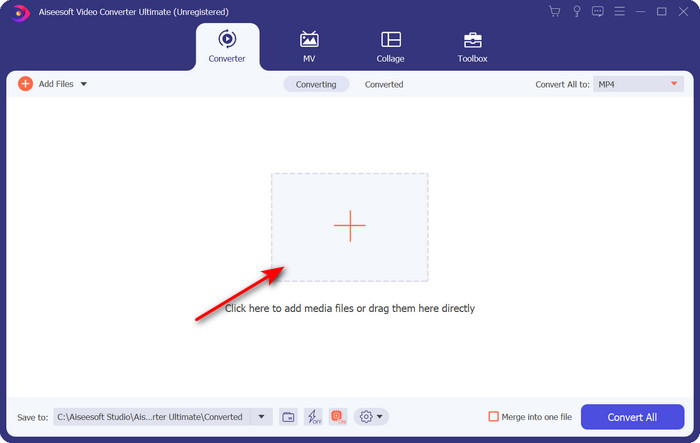
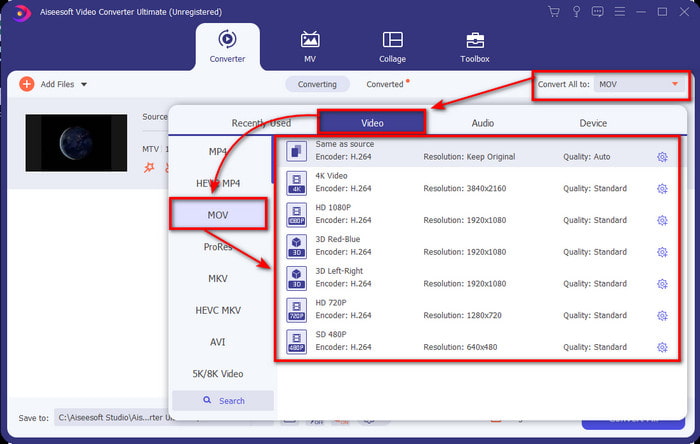
3. lépés. A Convert All to gombra kattintva megkeresheted a MOV formátumot a listában.
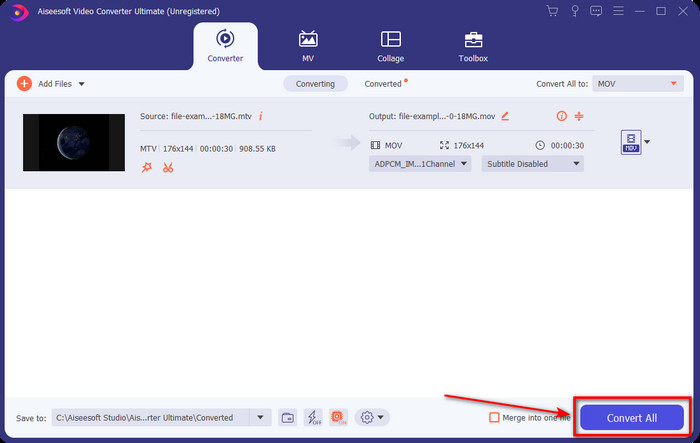
4. lépés. Kattints a Convert All gombra, hogy megkezdődjön az MTV‑fájlok MOV formátumba történő átalakítása.
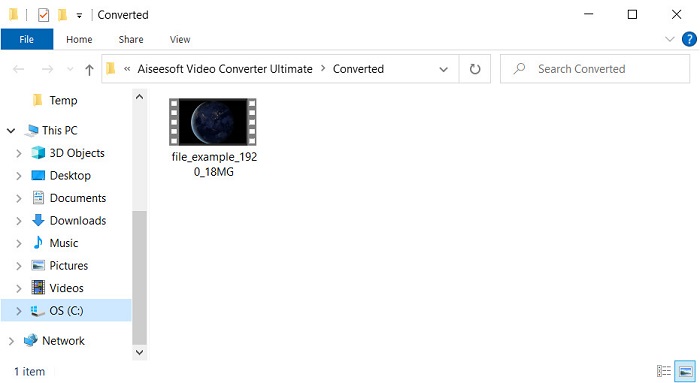
5. lépés. A fájlok konvertálása némi időt vesz igénybe; ha elkészült, egy mappa ugrik fel a képernyőn az újonnan átalakított .mov fájlokkal. Ha meg szeretnéd nézni a fájlt, kattints rá.
3. rész. Online és ingyenes mód az MTV MOV-vé konvertálására
Nem szeretnél MTV‑konvertert letölteni az eszközödre, mert inkább online szeretnéd megoldani a problémát? Ebben az esetben használd a FVC Free Video Converter Online eszközt. Az előbb említett szoftverrel ellentétben ezt az eszközt a kedvenc böngésződből érheted el, letöltés nélkül. Emellett korlátozás nélkül konvertálhatsz méret szempontjából, bármikor és a világ bármely pontjáról. Az eszköz egyik hátránya, hogy függ az internettől; ha nincs internetkapcsolatod, akkor használhatatlan. Ha azonban van internet a környékeden, és nincs időd letölteni a fenti szoftvert, akkor kövesd az alábbi lépéseket annak érdekében, hogy MKV fájlokat MOV‑vá alakíts.
1. lépés. Ha ezt a webes eszközt szeretnéd használni, kattints a megadott linkre.
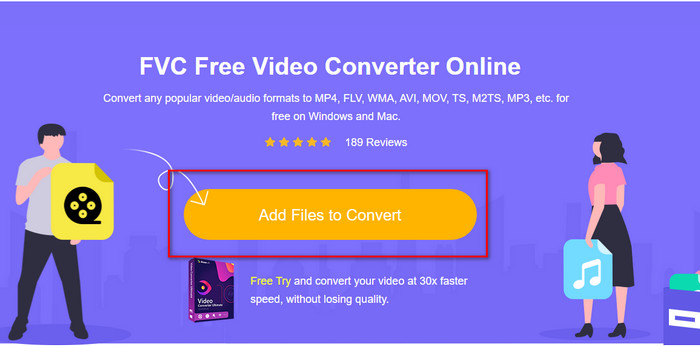
2. lépés. A linkre kattintás után megnyílik egy weboldal; kattints az Add Files to Convert gombra, ekkor egy fájlkezelő ablak jelenik meg a képernyőn. Keresd meg a fájlt a mappában, majd kattints az Open gombra a feltöltéshez.
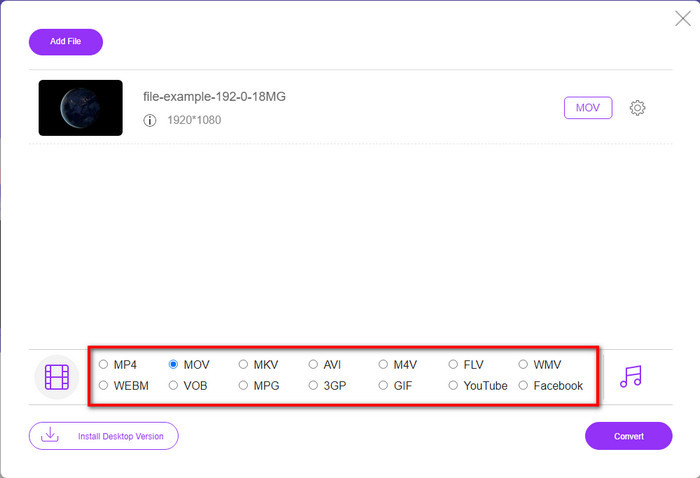
3. lépés. Miután a fájl feltöltődött, válaszd ki az alul található listából a MOV formátumot.
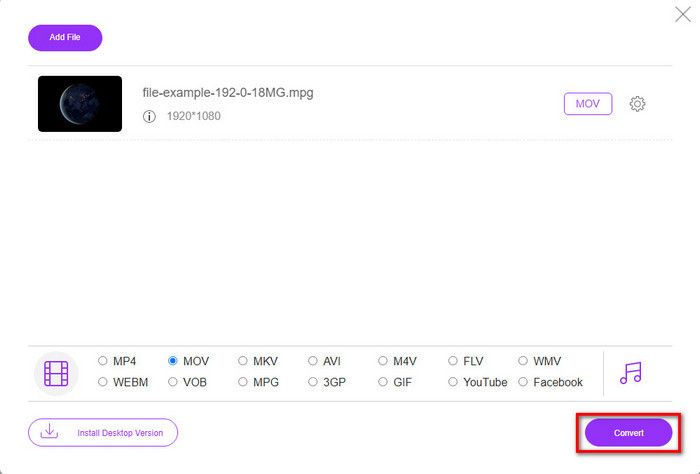
4. lépés. Nyomd meg a Convert gombot a folyamat elindításához.
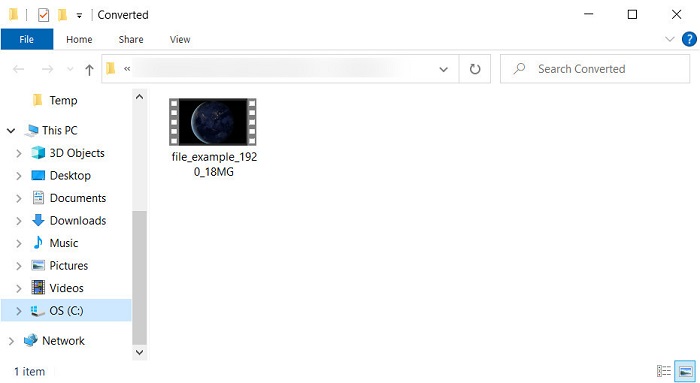
5. lépés. Megjelenik egy mappa, benne az ide mentett MOV fájllal.
Előnyök
- Minden böngészőben elérhető.
- Felhasználóbarát konverter és interfész.
- Nincsenek bosszantó hirdetések vagy bejelentkezés.
Hátrányok
- Internet kellett a használatához.
- Közepes méretű konverter kapható
4. rész. GYIK az MTV és MOV konvertálásról
Átalakíthatom az MTV fájlokat AVI formátumba?
Természetesen az MTV‑fájlokat AVI‑vá is konvertálhatod – szeretnéd tudni, hogyan? Ebben az esetben ismerd meg azt a három módszert, amellyel az MTV‑t AVI‑vá alakíthatod.
A Quicktime Player támogatja az .mtv fájlt?
A QuickTime az összes Apple‑eszköz beépített médialejátszója, de ez a lejátszó nem támogatja az .mtv fájlokat. Azonban elolvashatod ezt a cikket, és megismerheted azokat a QuickTime‑helyettesítő programokat, amelyekkel le tudod játszani az .mtv fájlokat.
Miért homályosak az MTV-videók?
Az egyik ok, amiért az ilyen formátumú videók elmosódnak, az az, hogy támogatja az alacsony felbontást. Helyet takaríthat meg, és sok médiafájlt tölthet fel a kínai hordozható MP4 lejátszókra, és csökkentheti a feldolgozás terheit.
Következtetés
Most, hogy már tudjuk, hogyan konvertáljuk az .mtv fájlokat, és hogyan küldjük át őket Apple‑eszközünkre, itt az idő választani. Bármelyik lehetőséget is választod, a legjobbak közé tartozik az online vagy offline fájlkonvertálás terén. Ha olyan professzionális konvertert szeretnél, amely kiemelkedő minőséget és maximális teljesítményt nyújt az átalakítás során, válaszd a FVC Video Converter Ultimate programot. Ha viszont nem szeretnél szoftvert telepíteni az eszközödre, de hatékony és eredményes online konvertert keresel, akkor a FVC Free Video Converter Online a megfelelő választás.
-
 [Online és ingyenes] 3 módszer az MTV problémamentes konvertálására AVI-vé
 Hallottál már olyan videóformátumról, mint az MTV? Mivel nem tud mindent erről a formátumról, és egy MTV-videót szeretne AVI-vé konvertálni, olvassa el figyelmesen ezt a cikket, hogy többet megtudjon erről a problémáról.
-
 A legjobb GIF konverter az animált GIF MOV formátumba konvertálásához [2025]
 Konvertálja a GIF-et MOV formátumba könnyedén, anélkül, hogy befolyásolná a videofájl minőségét. Lépcsőkkel és különböző eszközökkel is.
-
 Az AVI átalakítása MOV -ba az egyszerű lépések és eszközök segítségével
 Szeretné tudni, hogyan alakíthatja át az AVI-t játszható MOV-vé? Kövesse ezt a cikket, hogy megtudja, hogyan kell ezt megtenni, és tippeket talál a sikeres konverzióhoz.
