


 Video Converter Ultimate
 Screen Recorder
 Videó javítás
A legkényelmesebb módszerek az MP3 M4R formátumba konvertálására Apple eszközökhöz
Gondoltál már arra, hogy a kedvenc zenédből csengőhangot csinálj az iPhone-odra? Egyáltalán lehetséges ez? Természetesen igen. Mindössze át kell alakítanod a fájlt. Miért kell előbb konvertálni? Azért, hogy be tudd állítani csengőhangként. Ahhoz ugyanis, hogy egy adott zenefájlt csengőhangként használj, M4R formátumban kell lennie. Vagyis olyan MP3–M4R iTunes átalakítóra van szükséged, amely megfelel az igényeidnek. Ez a cikk több módszert is bemutat arra, hogyan tudod az MP3 fájlodat átkonvertálni, sőt hogyan tudsz kötegelt módon MP3-ból M4R-t konvertálni. Olvasd tovább az alábbi tartalmat.

1. rész. Az MP3 M4R formátumba konvertálásának legmegfelelőbb módja
A Video Converter Ultimate messze a legmeggyőzőbb eszköz, amellyel MP3-t M4R-re konvertálhat. Nem csak egyetlen fájl, hanem kötegelt konvertálásra is képes MP3-ról MP4-re. Ez egy konverter, amely HD videókat és veszteségmentes hangot tud készíteni. Valójában ideális és ajánlott a fájl konvertálása anélkül, hogy elveszítené eredeti minőségét. A sebesség 30-szor gyorsabb, mint a normál konverter. Ráadásul, ha egy lejátszási listát úgy alakít át, hogy elmentse a telefonját, ez az eszköz biztosan elvégzi a munkát Ön helyett. Könnyed és izzadságmentes. Mindeközben itt van néhány egyéb funkció, amelyet a hang konvertálásán kívül élvezhet is. Az alábbiakban egy lépésről lépésre szóló útmutatót is írtunk, amely segítségül szolgálhat, ha úgy dönt, hogy használja.
◆ Metaadatok szerkesztése.
◆ Nagy sebességű GPU-gyorsítás.
◆ Valós idejű technikai támogatás.
◆ A videó tömörítése támogatott.
1. lépés. A használatához töltsd le az alkalmazást az alábbi letöltés gombra kattintva. Miután az app letöltődött Windowsra vagy Macre, indítsd el.
Ingyenes letöltés Windows 7 vagy újabb rendszerre Biztonságos letöltés
Ingyenes letöltés macOS 10.7 vagy újabb rendszerre Biztonságos letöltés
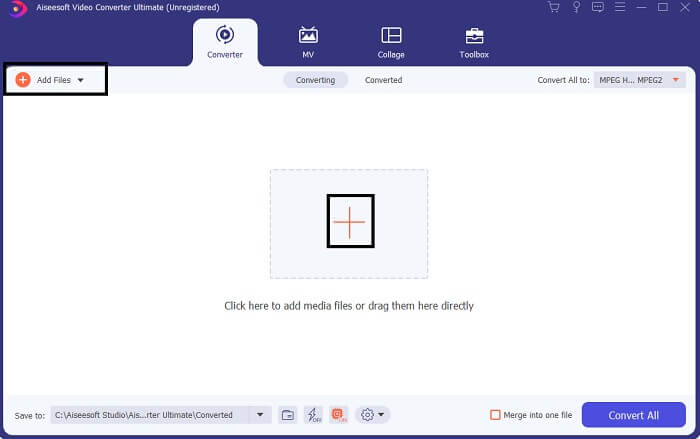
2. lépés. Az eszköz főfelületén két lehetőséget látsz a fájlok feltöltésére. Vagy a középen lévő Plusz jelre kattintasz, vagy a bal felső sarokban található Fájlok hozzáadása gombra. Válaszd ki a kívánt fájlt, majd töltsd fel.
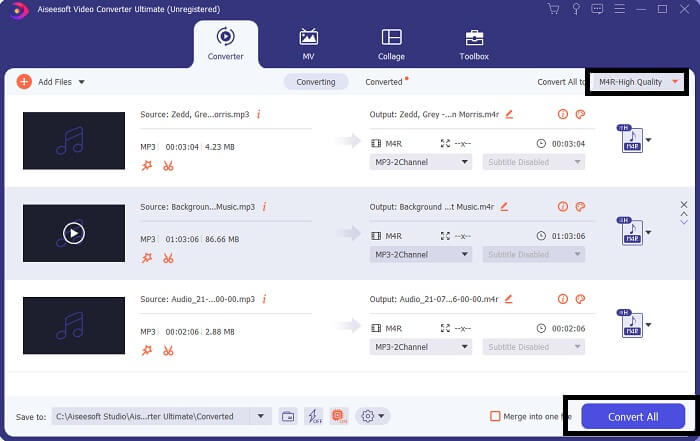
3. lépés. A kívánt kimenet eléréséhez módosítsd a formátumot a felület jobb felső részén található legördülő menüre kattintva.
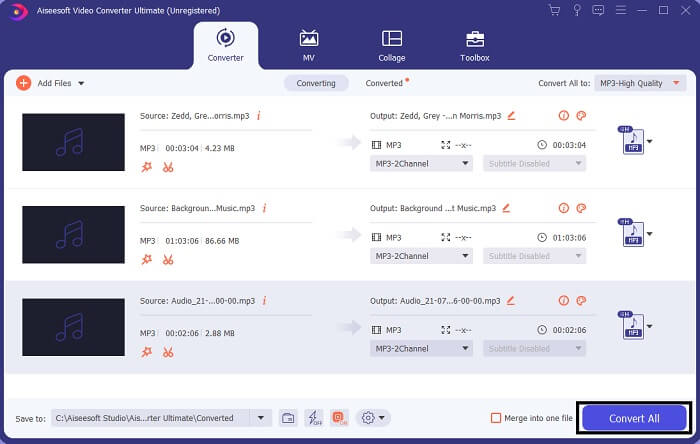
4. lépés. Végül kattints a főfelület jobb alsó sarkában lévő Összes konvertálása gombra. Ezután várd meg, amíg a fájl átalakul.
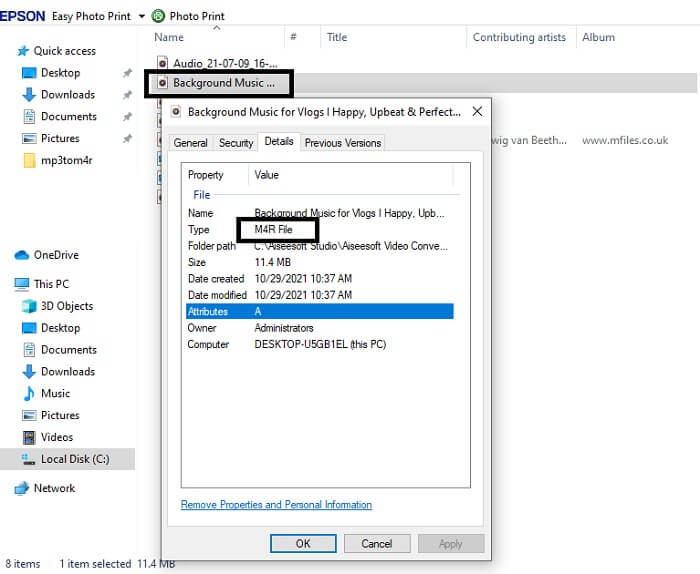
5. lépés. Nyisd meg azt a mappát, ahová a hangfájl mentésre került, és másold át az iPhone-odra. Ehhez használhatsz átviteli eszközt vagy alkalmazást is. Ajánlásokat könnyen találsz az interneten: csak rá kell keresned, és követni az iPhone csengőhang beállításának folyamatát.
2. rész: Néhány legjobb eszköz az MP3 online M4R formátumba konvertálásához
FVC ingyenes online audio konverter
Egy prémium átalakító eszköz jó dolog, de a gyakorlatias megoldások verhetetlenek. Az igényeidet szem előtt tartva a FVC létrehozta az eszköz ingyenes verzióját. A FVC Free Audio Converter bármikor, bárhonnan ingyenesen elérhető számodra. Mindössze működő internetkapcsolatra és kompatibilis böngészőre van szükséged. Ez az MP3–M4R iPhone csengőhang konverter képes magas minőségű, veszteségmentes hangot előállítani. Az eredmény kielégítő, ráadásul mindezt ingyen. Sőt, van még tovább: tudtad, hogy kötegelt átalakítást is támogat? Igen, tud! Íme még néhány figyelemre méltó funkció, amit használatával kapsz. Emellett egy útmutató is készült a könnyebb használat érdekében.
◆ A konvertált fájl minősége hasonló az eredetihez.
◆ 100% ingyenes és biztonságos a használata.
◆ Átalakításkor nincs méretkorlátozás.
◆ A kötegelt átalakítás támogatott.
1. lépés. Az eszköz eléréséhez látogasd meg a FVC Free Audio Converter hivatalos weboldalát.
2. lépés. Ott kattints az Fájlok hozzáadása a konvertáláshoz gombra. Első használatkor engedélyezned kell a hozzáférést az Open FVC Launcher gombra kattintva. Ezután megjelenik egy ablak, ahol megkeresheted a konvertálni kívánt fájlt.
Töltse le az asztali verziót a fájlok kötegelt konvertálásához.
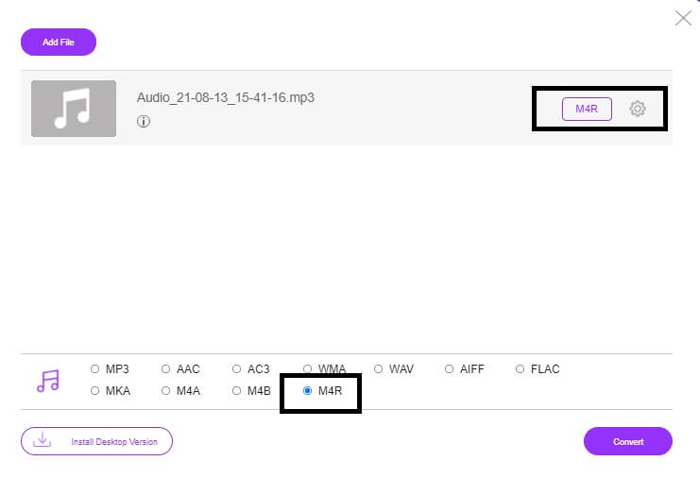
3. lépés. A fájl feltöltése után egy újabb ablak jelenik meg. Az alján módosítsd a kimeneti fájl formátumát úgy, hogy bejelölöd az M4R opciót.
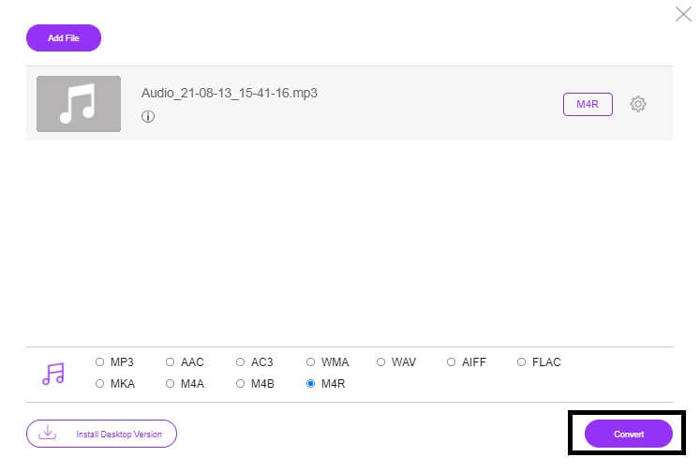
4. lépés. Ezután kattints a Konvertálás gombra az átalakítás elindításához.
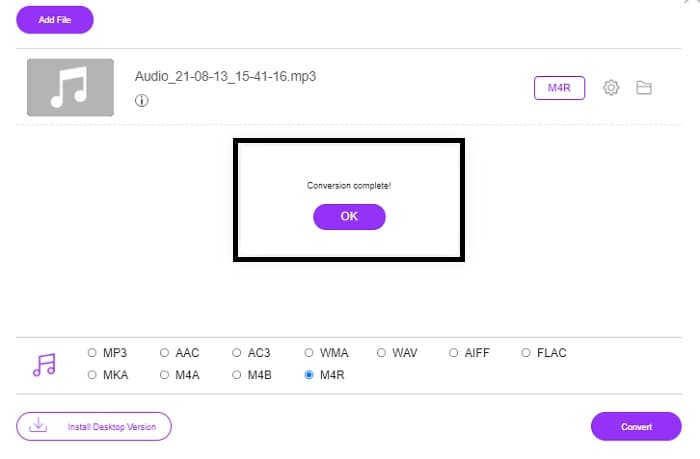
5. lépés. Végül válassz egy mappát, ahová a fájlt menteni szeretnéd, és az automatikusan elmentődik. Ezután másold át az iPhone-odra. Ne feledd, kötegelt átalakítást is végezhetsz, tehát ne korlátozd magad.
Összefüggő:
MP4 konvertálása WAV formátumba
WAV konvertálása MP3 formátumba
M4ROnline a File Converter segítségével
Egyszerű, mégis megbízható – így jellemzik felhasználói ezt az online eszközt. Alapértelmezés szerint kifejezetten MP3–M4R átalakításra készült. Ahogy a neve is mutatja, pontosan erre szolgál. Különböző böngészőkből működik, így nem kell letöltened vagy megvásárolnod. Ha felkeresed a weboldalt, azonnal feltűnik az eszköz egyszerű felülete. Nagyon egyértelmű a használata: csak a Browse gombra kell kattintanod a feltöltés és az átalakítás elindításához. Ha ki szeretnéd próbálni, érdemes ellátogatni a hivatalos oldalra és saját tapasztalatot szerezni. Ezért jó alternatívának számít. Az alábbi lépésekből azt is megtudhatod, pontosan hogyan kell használni az eszközt.
1. lépés. Először nyisd meg a M4R Online hivatalos oldalát, majd kattints a Browse gombra.
2. lépés. Válaszd ki a fájlt a mappádból, és kattints az Upload File gombra.
3. lépés. Amint megjelenik a befejezésről szóló üzenet, kattints a fájlra a letöltéshez.
Online-convert.com
Ez az eszköz már jó ideje nyújt szolgáltatást. Nyugodtan kijelenthető, hogy sokaknak bizonyult hasznosnak az online átalakítási igényeikhez – különben nem létezne mind a mai napig, ha nem vált volna be. A kezdőlapra érve az összes elérhető eszközt egyben láthatod: hangkonverter, videókonverter, képátalakító, dokumentumkonverter, e‑könyv konverter – mind egy helyen. Az eszközök összegyűjtése megkönnyíti a felhasználó számára, hogy gyorsan megtalálja, amire szüksége van. Így méltán került fel erre a listára, mint egy a sok MP3–M4R iTunes átalakító közül. Az alábbiakban pedig egy útmutatót találsz a használatához.
1. lépés. Látogasd meg az eszköz hivatalos oldalát, és válaszd az Audio Converter lehetőséget.
2. lépés. Kattints a Legördülő menüre, válaszd ki a kimeneti formátumot, majd kattints a GO gombra.
3. lépés. Ezután egy új ablak jelenik meg. Itt kattints a Choose Files gombra, és töltsd fel a fájlt. Az átalakítás megkezdéséhez kattints a Start Conversion gombra. Amint a fájl elkészült, automatikusan letöltődik a számítógépedre.
MP3 vs. M4R
Az MP3 formátumot 1993-ban adta ki a Moving Picture Experts Group (MPEG). Ez volt a zene tárolásának szabványa, mivel sokkal kisebb méretűre tudta tömöríteni a hangot, mint a többi tömörítetlen formátum. Manapság is széles körben használják, különösen hanganyagok online terjesztésére.
Egy M4R fájl az Apple iTunes alkalmazással létrehozott egyéni iPhone csengőhang mentésére szolgál. Általában ezt a formátumot láthatja, amikor csengőhangot visz át a számítógépről egy iOS-eszközre. Az iTunes-szal létrehozott M4R fájlok általában szerzői jogi védelmet tartalmaznak.
3. rész. GYIK az MP3 M4R formátumba konvertálásával kapcsolatban
Mi az az M4R?
Ez egy kifejezetten az Apple által létrehozott fájlkiterjesztés, amelyet szigorúan csengőhangként használnak iPhone-hoz és más Apple-eszközökhöz. A minőség szempontjából ez olyan jó, mint az M4A és az MP4.
Van MP3-M4R konverter az iTuneson kívül?
Biztosan vannak. Választhat a fenti eszközök közül, vagy fontolóra veheti a Windows Media Player bemásolással történő használatát. Ha nem szeretné végigmenni az összes folyamaton, egyszerűen használja az ingyenes online eszközöket. Közvetlenül konvertálják a hangot a kívánt formátumba, ahelyett, hogy a hosszadalmas rippelési folyamaton mennének keresztül.
Miért kell a fájlomat MP3-ból M4R-re konvertálnom, hogy csengőhangként használhassam?
Ez kell. Ahhoz, hogy a fájl csengőhangnak minősüljön, alapértelmezés szerint M4R formátumúnak kell lennie ahhoz, hogy csengőhangként lejátssza.
Következtetés
Mindezek mellett biztosan támaszkodhat a fent felsorolt eszközökre. Csak hozzá kell férnie, hogy melyik eszköz lehet hasznos az Ön igényeitől függően. Ha Ön diák és rendszeres állampolgár, aki konvertálni szeretne, és MP3-at szeretne M4R-re konvertálni Mac számítógépen ingyenesen vagy bármilyen eszközön, amelyet használ, tekintse meg az ingyenes eszközöket. Professzionális használatra javasolt a Video Converter Ultimate használata. Bármikor visszatérhet erre az oldalra, ha többet szeretne megtudni a konvertáláshoz szükséges további eszközökről.
-
 [Ingyenes és online] 3 módszer MP3-nak MP4-re konvertálására képpel
 Hogyan lehet MP3 minőségben konvertálni MP4 formátumba? Ez a bejegyzés 3 hatékony és ingyenes módszert mutat be az MP3 fájlokra váltására MP4 képpel Windows és Mac rendszeren.
-
 Tudja meg, hogyan lehet MP3 -t WAV formátumba konvertálni
 Szeretné tudni, hogyan lehet MP3-at WAV-ra konvertálni? Határozza meg, hogy az eszközök közül melyik produkálja a legjobb minőségű konverziót.
-
 Útmutató az M4A WAV formátumba konvertálásához [PC és Mac]
 Tudjon meg többet arról, hogyan konvertálhatja az M4A-t WAV-ba a részletes lépésekkel és a választható különféle eszközökkel.

