


 Video Converter Ultimate
 Screen Recorder
 Videó javítás
Egyszerűsített útmutató az MTV-fájlok WMV formátumba konvertálásához, részletes lépésekkel
Sok felhasználó kérdezi, hogyan tudja az MTV-fájljait Windows alatt lejátszható formátummá, például WMV-vé konvertálni. Ma szerencséje van, mert itt két, általunk talált legjobb konvertert mutatunk be. Ráadásul minden itt közölt részletes információ olyan tény, amelyre bátran támaszkodhat. Minden további késlekedés nélkül nézzük is meg az alábbi részleteket, hogy még több ötlete legyen, hogyan lehet MTV-t WMV-vé konvertálni.

1. rész. Alakítsa át az MTV-t WMV-vé a Video Converter Ultimate segítségével
A FVC Video Converter Ultimate hatékony konvertálási folyamatot és professzionális kimenetet biztosít, ha MTV-t WMV-vé vagy más formátummá alakít. Ez a konverter páratlan megoldást kínál az átalakításra, amellyel egyetlen másik sem tud versenyezni. Emellett olyan szerkesztőfunkciókat is tartalmaz, amelyeket imádni fog, és amelyek számos helyzetben a hasznára válnak. Szeretne még többet tudni az egyes részeiről? Ha igen, olvassa el az alábbi részleteket.

FVC Video Converter Ultimate
3 222 440+ letöltés- Konvertálja az MTV-t WMV, AVI, MKV, MOV, FLV formátumba vagy 200+ támogatott formátumba.
- Támogatja a hardveres gyorsítást és a szupergyors konverziót a gyors és hatékony átalakítási folyamat érdekében.
- A kezdők legjobb választása a konvertálás terén gond nélkül professzionális eredményt biztosít.
- Speciális szerkesztési funkciók állnak rendelkezésre, például vágás, vágás, egyesítés stb.
- Minden operációs rendszerben letölthető, például Windows és macOS.
Ingyenes letöltés Windows 7 vagy újabb rendszerre Biztonságos letöltés
Ingyenes letöltés macOS 10.7 vagy újabb rendszerre Biztonságos letöltés
Most, hogy kitaláltuk egyedi jellemzőit, ideje konvertálni MTV fájljait ennek a végső eszköznek a segítségével az alábbi lépések követésével.
1. lépés. Először is töltse le a szoftvert az asztali meghajtójára az alább található letöltés gombra kattintva. A letöltés befejeztével kövesse az azonnal megjelenő telepítési lépéseket, majd indítsa el a programot.
Ingyenes letöltés Windows 7 vagy újabb rendszerre Biztonságos letöltés
Ingyenes letöltés macOS 10.7 vagy újabb rendszerre Biztonságos letöltés
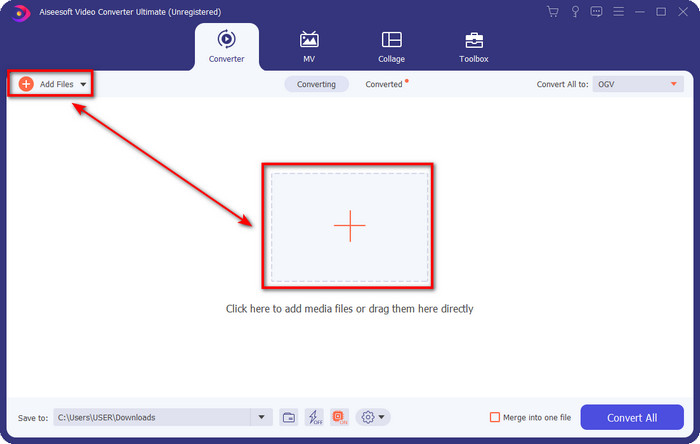
2. lépés. Töltse fel az MTV-fájlt úgy, hogy egyszerűen áthúzza és rádobja a felületre. Vagy kattintson az Add Files (Fájlok hozzáadása) gombra, majd keresse meg a mappában a fájlt, amely megjelenik a képernyőn, és nyomja meg az Open (Megnyitás) gombot.
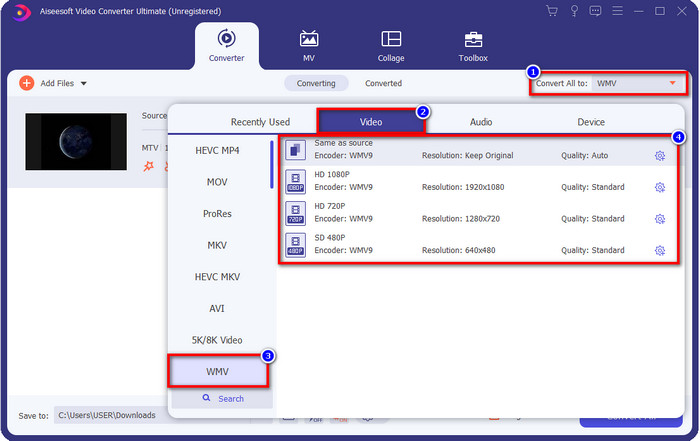
3. lépés. Miután hozzáadta az MTV-fájlt, kattintson a Convert All to (Mindet konvertálja erre) gombra, és válassza ki a WMV formátumot, vagy bármely más, a listában elérhető formátumot.
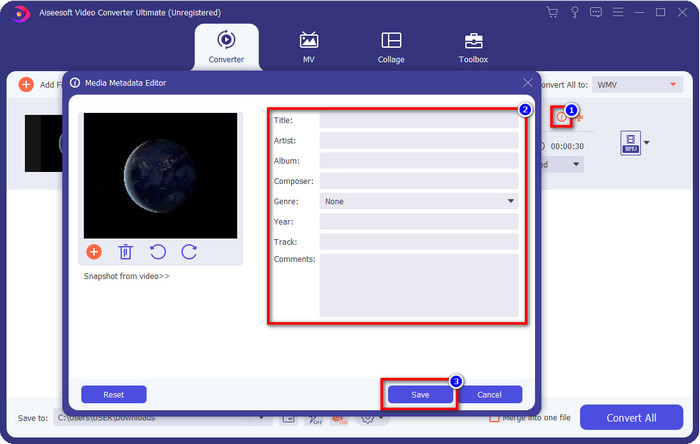
Opcionális. Szeretné szerkeszteni a metaadatokat? Ha igen, kattintson a metadata (metaadat) gombra, és adja hozzá a kívánt adatokat. Például töltse ki a Cím, Előadó, Zeneszerző, Album, Műfaj mezőket és még többet, majd a metaadatok mentéséhez kattintson a Save (Mentés) gombra.
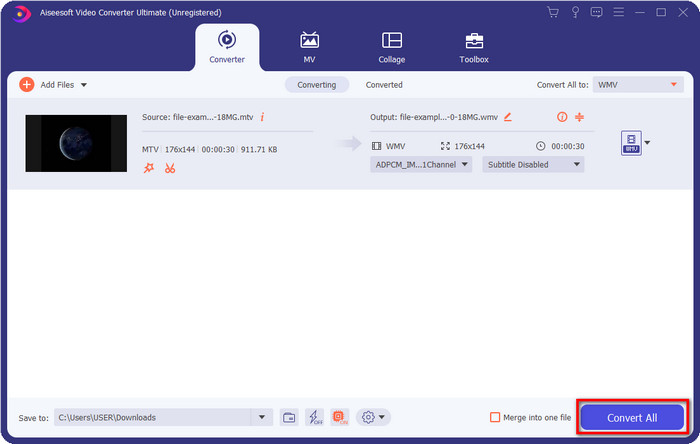
4. lépés. A Convert All (Mindet konvertálja) gombra kattintva a folyamat elindul. Amint befejeződik, egy új mappa jelenik meg a számítógépén, benne a WMV-fájllal.
2. rész. Az MTV konvertálása WMV Online formátumba
A FVC Free Video Converter Online olyan megfelelő konvertálási funkciókat kínál, amelyeket bárki elérhet internetkapcsolattal. Ez a webes konverter minden böngészőben elérhető és könnyen használható. Ellentétben az elsőként említett konverterrel, ez az eszköz most nem letölthető programként működik, de a használata előtt le kell tölteni egy telepítőt. Noha ez az eszköz helyet spórolhat a meghajtóján, mégsem olyan jó, mint az Ultimate verzió. Most pedig térjünk át a lépésekre, és tanuljuk meg, hogyan lehet online MTV-t WMV-vé konvertálni ezzel a webes konverterrel.
1. lépés. Kattintson erre a linkre, és a fő webes konverter új lapon fog megnyílni.
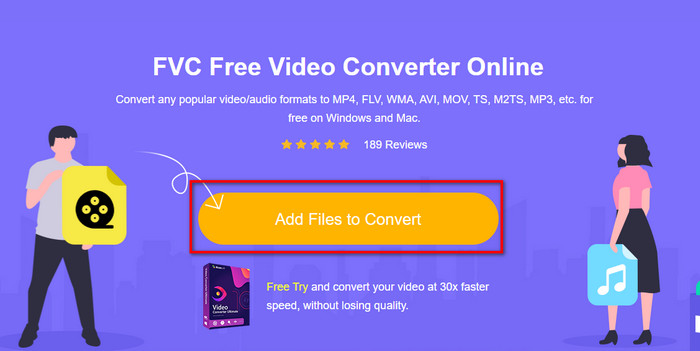
2. lépés. Kattintson az Add Files to Convert (Konvertálandó fájlok hozzáadása) gombra a telepítő letöltéséhez. Kattintson rá ismét; ekkor megnyílik egy mappa a számítógépéről – most tallózza be az MTV-fájlt, kattintson rá, majd nyomja meg az Open (Megnyitás) gombot.
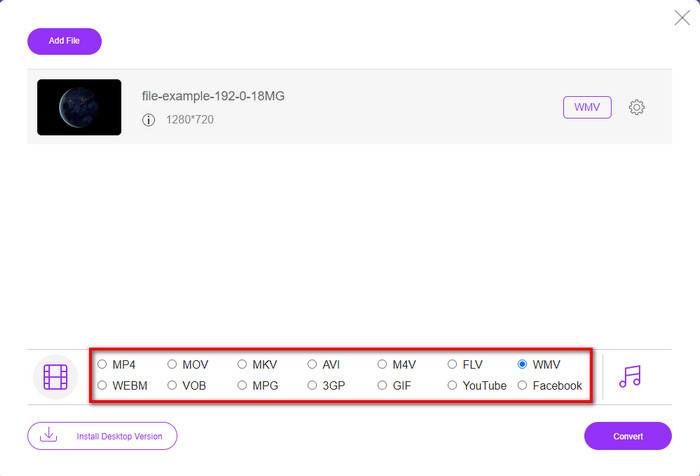
3. lépés. Miután feltöltötte az MTV-fájlt, kattintson a lenti WMV formátumra, vagy bármely más formátumra, amelyre konvertálni szeretné.
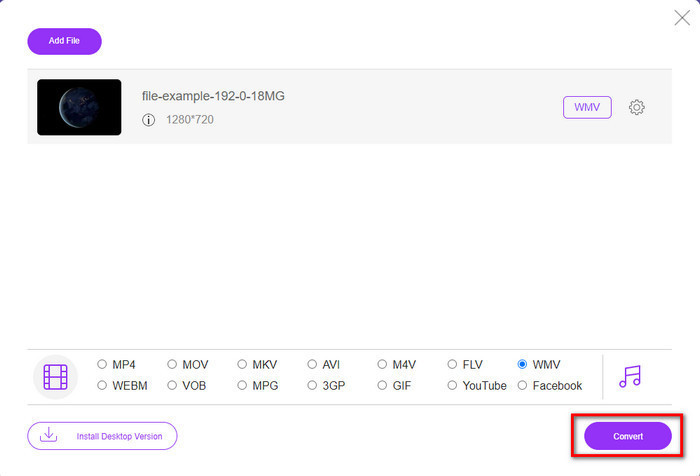
4. lépés. Ha készen áll a konvertálásra, kattintson a Convert (Konvertálás) gombra, és a folyamat elindul.
3. rész: Mi a különbség az MTV és a WMV között?
Az MTV és a WMV egyaránt video- és audiotartalom konténerei; azonban olyan egyedi képességekkel rendelkeznek, amelyeket a másik nem tud lemásolni. Szeretne többet tudni az MTV-ről és a WMV-ről? Ezután kezdjük el olvasni az alábbi részletes információkat.
Éppen ellenkezőleg, a WMV sokkal nagyobb felbontást biztosít az MTV-hez képest. Bár nagyobb a felbontása, tömörítő segítségével csökkenti a fájlméretet, de a minőség romlása nélkül. Ezenkívül ez a formátum jobban kompatibilis az összes Windows-on való lejátszással, mint az MTV-vel. Tehát, ha le szeretné játszani az MTV-fájlt, tudnia kell, hogyan konvertálhatja WMV-vé és játssza le Windows operációs rendszeren.
Végül az MTV-t WMV-vé kell konvertálnia a WMV által biztosított minőség és a kompatibilitási okok miatt. Tehát, ha hajlandó konvertálni az MTV fájlt, akkor az FVC terméket kell használnia a fantasztikus teljesítmény eléréséhez anélkül, hogy sok folyamaton kellene keresztülmennie.
4. rész. GYIK az MTV-ről WMV-vé konvertálásról
Miért alacsony az MTV videó felbontása?
Ha a médiafájl ebben a formátumban van, alacsony felbontásra számítson. Mert a fájl tömörítésekor a videó minősége áldozatot jelent a méret csökkentése érdekében. Ezenkívül ez a formátum csak egy képsorozatot tud lejátszani 465/555-ös formátumban kötőszóval, és a hang MP3 formátumú.
Milyen videolejátszóval játszhatok le .mtv fájlokat?
Az MTV-formátum lejátszásához használhatja a VLC médialejátszót, mivel ez különféle enkódereket és az Ön által használni kívánt formátumokat is támogatja. Ha tehát meg szeretné nézni az MTV-fájlokat, töltse le a VLC-t az eszközére, hogy működjön a lejátszás. Ha azonban egy még jobb médialejátszót szeretne a VLC-nél, akkor inkább a Blu-ray lejátszót használja, mert az szinte moziélményt nyújt az MTV-fájlok megtekintése közben.
A Quicktime támogatja az MTV formátumot?
Sajnos az MTV-formátum nem játszható le QuickTime-ban az enkódere miatt. Viszont rájöttünk, hogy a fájlt át lehet konvertálni MOV formátumba. Szeretne többet megtudni arról, hogyan lehet MTV-t MOV-vá konvertálni? Ha igen, szánjon 5 percet a cikk elolvasására, hogy jártas legyen a témában.
Következtetés
Végül megtaláltuk a két legjobb módot az MTV WMV-vé konvertálására, és így nemcsak kompatibilissé tesszük Windows alatt, hanem még többre is képes lesz, mint maga az MTV-formátum. Most, hogy tudja, mely konvertereket használhatja, itt az idő, hogy válasszon egyet. Bármelyiket is választja a kettő közül, a konvertálás biztosan sikeres lesz. Ha azonban professzionális és kiemelkedő minőségű kimenetre vágyik, használja a FVC Video Converter Ultimate programot. Szeretne még többet megtudni az Ultimate konverterről? Akkor töltse le most, és próbálja ki saját maga.
-
 [Online és ingyenes] 3 módszer az MTV problémamentes konvertálására AVI-vé
 Hallottál már olyan videóformátumról, mint az MTV? Mivel nem tud mindent erről a formátumról, és egy MTV-videót szeretne AVI-vé konvertálni, olvassa el figyelmesen ezt a cikket, hogy többet megtudjon erről a problémáról.
-
 Az FLV WMV-re konvertálásának három legjobb módja Windows és Mac rendszeren
 Az FLV WMV formátumba alakításának legjobb módját keresi a PC vagy Mac minőségének romlása nélkül? Szerencséd van, mivel itt három módszert osztunk meg a munka egyszerű elvégzésére.
-
 Egyszerű útmutató arról, hogyan lehet a GIF -et WMV -re fordítani Windows/Mac rendszeren
 Szeretné tudni, hogyan lehet GIF-et WMV formátumba konvertálni? Ezután kövesse ezt a cikket, amely különféle megoldásokat mutat be, amelyek közül választhat.
