


 Video Converter Ultimate
 Screen Recorder
 Videó javítás
 Biztonságos letöltés
Áttekintés a Pitch Changerről Windows, Mac, online és telefonokon
Gyakran egy hangmagasság‑váltóval gyorsan megemelhetjük vagy csökkenthetjük az eredeti hangmagasságot. A legtöbb producer hangmagasság‑modulálót használ dallamos effektek hozzáadására, hogy a dal még jobb legyen, mint a nyers verzió. Másrészt, egy pitch‑váltó eszközkészlet megvásárlása sok pénzbe kerül, és időbe telik megtanulni a használatát. Drága és nehezen érthető. Ahelyett, hogy olyan szettekre költenél, amelyeket ritkán használsz, miért nem próbálsz ki inkább olyan szoftvert, amely segít megváltoztatni a nálad lévő videó vagy hangfelvétel hangmagasságát?.
Ezzel az áttekintéssel összegyűjtöttük a négy legjobb alkalmazást és programot, amellyel óriási pénz kiadása nélkül módosíthatja a hangmagasságot. Olvassa tovább ezt a cikket, hogy tudja, miről beszélünk.

1. rész. A legjobb 4 hangmagasság-váltó asztali számítógépeken, online és mobileszközökön
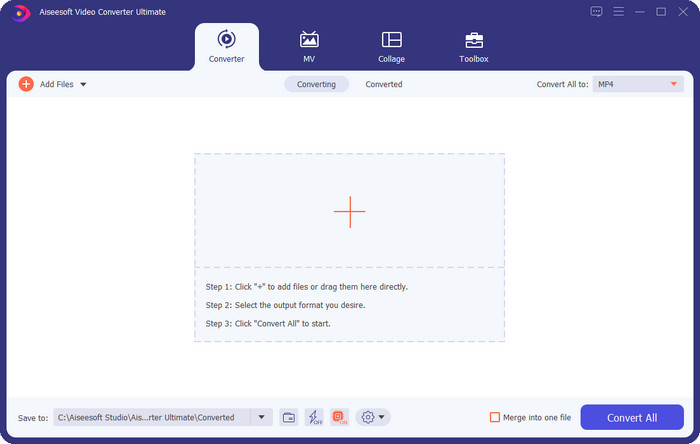
Video Converter Ultimate – A legjobb videó hangmagasság-váltó Windows és Mac rendszeren
Ingyenes letöltés Windows 7 vagy újabb rendszerre Biztonságos letöltés
Ingyenes letöltés macOS 10.7 vagy újabb rendszerre Biztonságos letöltés
Elérhető program: Windows és Mac
A listánk első helyezettje a legjobb videós hangmagasság‑váltó a Windows és Mac operációs rendszereden. A Video Converter Ultimate egy hatékony eszköz, amellyel a videó sebességének növelésével vagy csökkentésével manipulálhatod a hang anyag hangmagasságát. Ellentétben más, hasonló funkciójú asztali szoftverekkel, ez az eszköz nem rabol el sok időt a tanulásra, mert rendkívül egyszerűen kezelhető. Kevesebb mint egy perc alatt javíthatod a hangmagasságot, hogy a felvétel jobban szóljon, mint az eredeti verzió, amit rögzítettél.
A hangmagasság változtatása mellett a hangerőt a maximális lehetőségre növelheti az Eszköztár alatt található Volume Booster használatával. Ebben a funkcióban a csúszkák segítségével gyorsan növelheti vagy csökkentheti a videó hangjának amplitúdóját vagy erősítését. Annak ellenére, hogy Ön nem olyan gyártó, aki szeretne ilyen típusú dolgokat csinálni, ez mégis élvezetes és gyorsan elvégezhető a Windows és macOS rendszeren elérhető végső eszköz segítségével. Tehát, ha ezt a végső eszközt szeretné használni, a második részben bemutatjuk, hogyan kell használni ezt az eszközt, részletes lépésekkel, amelyeket követve kevesebb mint egy perc alatt befejezheti.
Vocal Remover.org
Elérhető program: Online
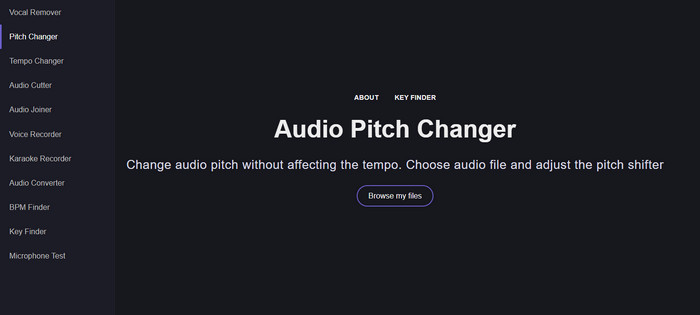
Ha online hangmagasság‑váltóra van szükséged, akkor kétségkívül a Vocal Remover.org az a segédeszköz, amellyel tökéletesen elvégezheted ezt a feladatot. Az első eszközzel ellentétben ez a program kifejezetten hangjavításra a leghatékonyabb. Ezzel az eszközzel könnyedén módosíthatod a hangfelvétel hangmagasságát, és megállapíthatod, milyen hangnemben van a dal. Van egy jelző is, amely segít kiválasztani a hanganyag félhangos eltolását. Eldöntheted, hogy manuálisan állítod, vagy lépésenként módosítod a csúszka húzásával. A legtöbb felhasználó, aki már kipróbálta, élvezi, és elégedett az elért hangmagasság‑változtatási eredménnyel.
Az eszköz jól működik ezen, de ide csak korlátozott hangformátumú fájlt tölthet fel, és a videoformátum nem támogatott. A fájl feltöltése kissé nehézkes lehet az eszköz számára, mivel csak néhány hangformátumot támogat. Bár ez mindenki számára problémát jelenthet, továbbra is ezt tekintjük az egyik legjobb online eszköznek, amelyet az interneten elérhet. A komplikációk és egyéb problémák elkerülése érdekében azonban győződjön meg arról, hogy a megfelelő webhelyet éri el. Ne felejtsen el stabil internetkapcsolatot is biztosítani, mert az eszköz akkor működik a legjobban, ha erős az internet.
Tempó emelése: hangmagasság, sebességváltó
Elérhető program: Android
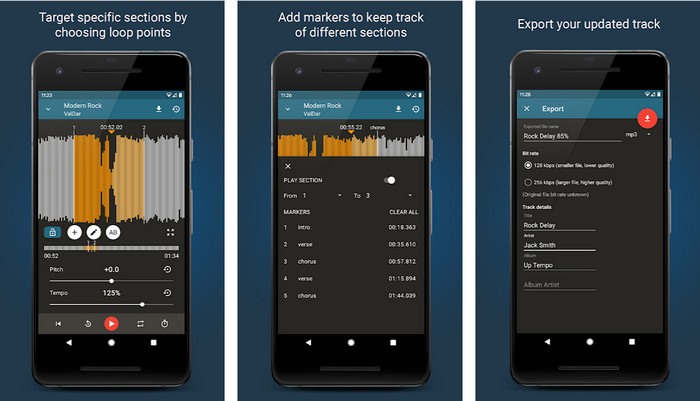
Letöltheted ezt a hangmagasság‑váltó alkalmazást Android‑felhasználóknak, így akkor is elvégezheted a feladatot, ha nincs kéznél számítógép. Az Up Tempo: Pitch, Speed Changer segítségével a lejátszási sebesség és a hangmagasság módosítása gyorssá és bárki számára kezelhetővé vált. A grafikus felülete hullámformát is megjelenít, ami segíthet eldönteni, mely részeket szeretnéd javítani vagy módosítani. Akárcsak az online eszköz, ez az app is remekül kezeli a zenéket, és mindig kéznél lehet, amikor szükséged van rá.
Bár az alkalmazás ingyenesen letölthető, néhány dolgot figyelembe kell vennie, ha használni szeretné ezt az alkalmazást. A legtöbb felhasználó azt tapasztalja, hogy az alkalmazás nem tudja észlelni a telefonjára letöltött új hangfájlokat. Ha ezt a problémát tapasztalja, előfordulhat, hogy az nem támogatja az alkalmazás hangfájlját, vagy hiba léphet fel. Mindazonáltal, ha Android-telefonja van a kezében, töltse le ezt az alkalmazást, és próbálja ki, hogy ez az alkalmazás-e a probléma megoldására.
TimePitch-Pitch, Speed Changer 4+
Elérhető program: iOS
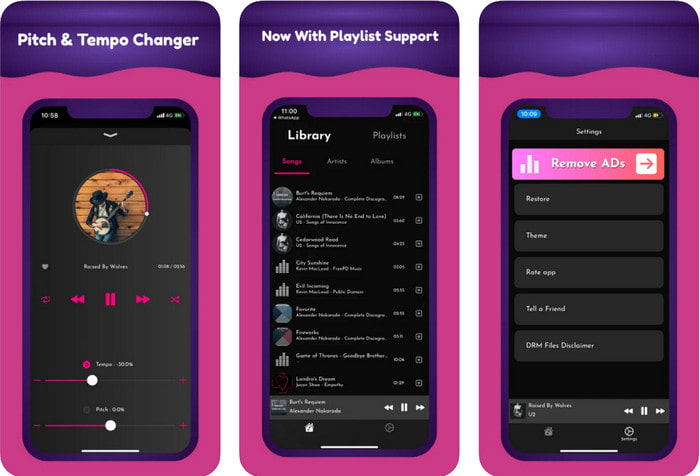
Ha iOS‑felhasználó vagy, akkor tudnod kell, hogy ez a hangmagasság‑váltó alkalmazás megoldást kínál a problémádra. A TimePitch‑Pitch, Speed Changer 4+ egy zenelejátszó, zenei könyvtár és hangmagasság‑váltó egyben, amelyet iOS‑eszközödön használhatsz, ha szükséged van rá. Ez az app másként működik, mint a többi, mivel valós időben tudod megváltoztatni a hallgatott hangfelvétel hangmagasságát, ami azt jelenti, hogy a módosítás nem kerül elmentésre. Ez azonban az alkalmazás egyik erőssége is lehet, hiszen nem kell megvárnod a feldolgozást; azonnal, a csúszkák állításával a tetszésed szerint változtathatod a hangmagasságot.
Ez azonban a gyengesége is lehet; ha más eszközökre viszi át a fájlt, az alkalmazással módosított hangmagasság nem vonatkozik a vevőre. Ezenkívül emlékeznie kell arra is, hogy ha az iTunes vagy az Apple Music szolgáltatásban vásárolja meg a zenét, nem tudja használni ezt az alkalmazást a hangmagasság megváltoztatására. Miért? Mivel a védett fájlok nem teszik lehetővé, hogy harmadik féltől származó alkalmazások hozzáférjenek a fájlhoz. Függetlenül attól, hogy feltöltötte-e a zenefájlt, továbbra is szerepel ez az alkalmazás ebben a cikkben, mert minden iOS-eszközön ez működik a legjobban.
2. rész: Videó hangmagasságának megváltoztatása az Ultimate Pitch Changer szoftverrel
Kövesse az alábbi lépéseket, hogy megtudja, hogyan használhatja ezt a zenei hangmagasság- és sebességváltót, amelyet asztali számítógépén használhat. Tehát olvassa el a következő részleteket, ha egyszerű, de hatékony oktatóanyagra van szüksége a tökéletes szoftver használatához.
1. lépés. Kattints a letöltés gombra, hogy a végső szoftvert telepítsd az asztali gépedre, és válaszd ki, hogy Windows vagy Mac rendszert használsz. Várd meg a letöltési folyamat végét, kattints a letöltött fájlra, majd telepítsd. Miután minden beállítás és telepítés elkészült, indítsd el a szoftvert, hogy használni kezdd ezt a nagyszerű eszközt.
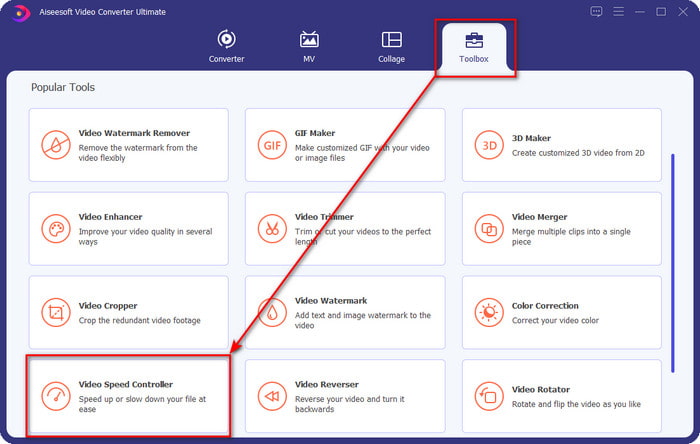
2. lépés. Nyisd meg a Toolbox menüt, és azon belül keresd meg a Video Speed Controller opciót, majd kattints rá a megnyitásához. Görgess le a lista aljához közeli funkciókig.
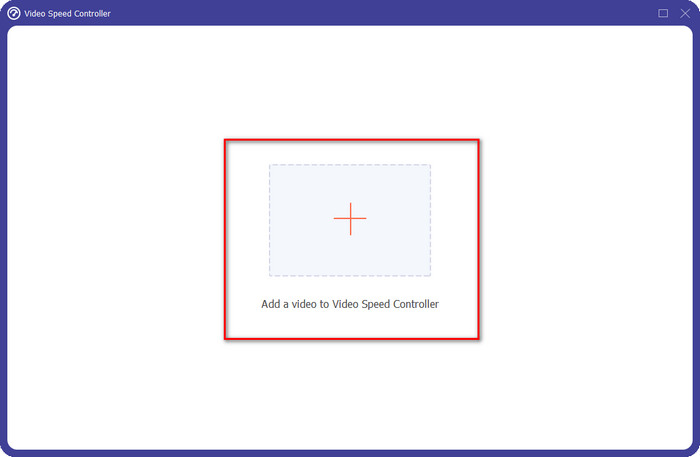
3. lépés. Egy új, kisméretű ablak jelenik meg a képernyőn; kattints a + gombra, keresd meg azt a videófájlt, amelynek a hangmagasságát módosítani szeretnéd, majd kattints az Open gombra a videó feltöltéséhez.
4. lépés. Ennél a résznél már módosíthatod a hang sebességét. Észre fogod venni, hogy a hangmagasság is változik a sebesség állításával. A változtatások hangját és képét automatikusan előnézetben láthatod a lejátszó ablakban.
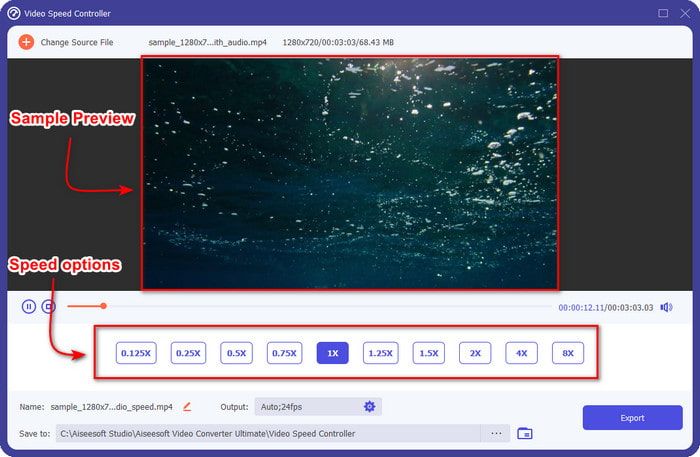
A videó előnézetét csak 2-szeres sebességgel tudja lejátszani; észre fogod venni, hogy a 4x és 8x nem teszi lehetővé a videó előnézetének megtekintését az ütközések elkerülése érdekében, de nem rontja a videó és a hang minőségét.
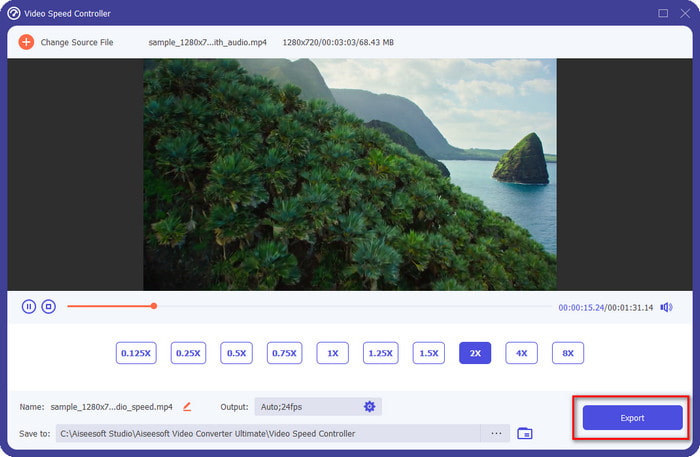
5. lépés. Ha elégedett vagy az elért hangmagassággal, kattints az Export gombra. Egyszerű, nem igaz? Egy ilyen szoftver segítségével néhány perc alatt könnyedén megoldhatsz különféle videós és hangproblémákat.
Összefüggő:
Hogyan gyorsíts fel videót online
Hogyan gyorsíts fel MP4 videókat
3. rész. GYIK a Pitch Changerről
Mi az a hangmagasság?
A hangminőséget úgy értékeli, hogy megméri azokat a tartományon belül, függetlenül attól, hogy magasabbak vagy alacsonyabbak. Ez egy hanghullám, amely a frekvenciához hasonlít, de nem ugyanaz.
Milyen magasra hall egy emberi hang?
Minél alacsonyabb a Hz, még mindig tudatosan hallja, de néhány ember csak akkor hallja, amikor a Hz magasra megy. A kutatók szerint mindenki tud 8000 Hz-et hallgatni, és ha 12 000 Hz-et hall, akkor a füle olyan jó, mint az 50 év alattiak. 40 alatt pedig még 15 000 Hz-et hall, de 30 év alattiak éves, 16.000 Hz, még mindig lehet hallgatni. Minden 25 évesnél fiatalabbnál még mindig 17 000 Hz, 20 év alattiaknál pedig 20 000 Hz. Minél idősebbek vagyunk, a hallott hangmagasság időről időre kevésbé hatékony. Tehát, ha nem hallja az általunk említett gyakoriságot, orvoshoz kell fordulnia, hogy ellenőrizze, van-e probléma.
Hogyan számíthatjuk ki a hangmagasság-tartományt?
A hangmagasság-tartomány oktávokat használ a számításhoz, ami lehetővé teszi az énekes és a hangszeres számára annak meghatározását, hogy ez a dal megfelelő hangmagassága. A rezgéssel észreveheti a hanghullámok magas és alacsony frekvenciáját.
Következtetés
A fenti videó‑ és hangmagasság‑váltó eszközökkel most már könnyedén beállíthatjuk a nálunk lévő hanganyag hangmagasságát. Ahelyett, hogy külön technológiát vásárolnál a feladat elvégzésére, használhatod a fenti szoftvereket. Bár funkcióik és szolgáltatásaik eltérnek, mégis jól látszik, miben jó mindegyik a maga módján. Ha azonban számítógépet használsz, mindenképpen töltsd le a Video Converter Ultimate programot az asztalodra, mert ez az eszköz nemcsak a hangmagasságot segít módosítani, hanem számos egyéb „varázslatos” dolgot is tud, amellyel a videóidat és hangfelvételeidet még jobbá teheted. Szeretnéd tudni, mik ezek a varázstrükkök? Akkor töltsd le most azonnal a fenti letöltés gombra kattintva.
-
 3 módszer a videó felgyorsítására iPhone-on [Bizonyított]
 Problémái vannak a videó lejátszási sebességének beállításával, mert iPhone-t használ? Ez egy kiváló cikk, amely segíthet a problémájában.
-
 Windows Media Player | Tanuld meg, hogyan lehet felgyorsítani a videókat [Bizonyított]
 Szeretné lelassítani a videoklipet a Windows Media Player használatával, de problémái vannak a végrehajtással? Ez a cikk ideális olvasáshoz, és megvilágítja az Ön nézőpontját arról, hogyan gyorsíthatja fel a videókat a Windows Media Player használatával.
-
 A lassított videó normál sebességre váltása [Egyszerű lépések]
 Szeretné tudni, hogyan lehet visszaállítani az internetről letöltött vagy véletlenül lassított felvételben rögzített lassított videót? Ismerje meg, hogyan konvertálhat lassított videót normál sebességre Mac, Windows, iOS és Android rendszeren.
