


 Video Converter Ultimate
 Screen Recorder
 Videó javítás
Egyszerűsített oktatóanyag az audió és videó szinkronizálásáról az Adobe Premiere Pro programban
Ha profi vagy, akkor már biztosan használtad az Adobe Premiere Pro videószerkesztőt, amely igazán jól teljesít. Rengeteg Adobe‑felhasználó imádja ezt a szoftvert, mert olyan kiváló minőségű kimenetet ad, amit örömmel illesztesz be a videódba. De tudtad, hogy ezzel az eszközzel a hangot is szinkronizálhatod a videóval? Ha fogalmad sincs, hogyan kell, akkor ez a szerencsenapod. Végig fogjuk venni, hogyan tudod könnyen szinkronizálni. Így most már nem kell kézikönyvet olvasnod, mert ez az útmutató egyszerűen, érthetően mutatja be, hogyan szinkronizálj hangot a Premiere-ben, és egy alternatív eszközt is kínál hozzá.

1. rész: Hang és videó szinkronizálása az Adobe Premiere Pro programban
Mielőtt elkezdenénk, nézzük meg röviden, mi is az Adobe Premiere Pro. Ahogy fentebb említettük, ezt az eszközt rengeteg profi vágó használja, akik látványos videókat szeretnek készíteni. Ugyanakkor az eszköz elsajátítása sok időt igényel, mert rengeteg olyan speciális funkciót kínál, amelyet a kezdők nem értenek meg azonnal. Habár a használatának megtanulása biztosan sok időt vesz igénybe, mégis megéri, ha van szabadidőd rá. Ráadásul az alább leírt lépések egyszerűek és könnyen követhetők, így megértheted, hogyan szinkronizáld a hangot és a videót a Premiere-ben, ha követed az útmutatást.
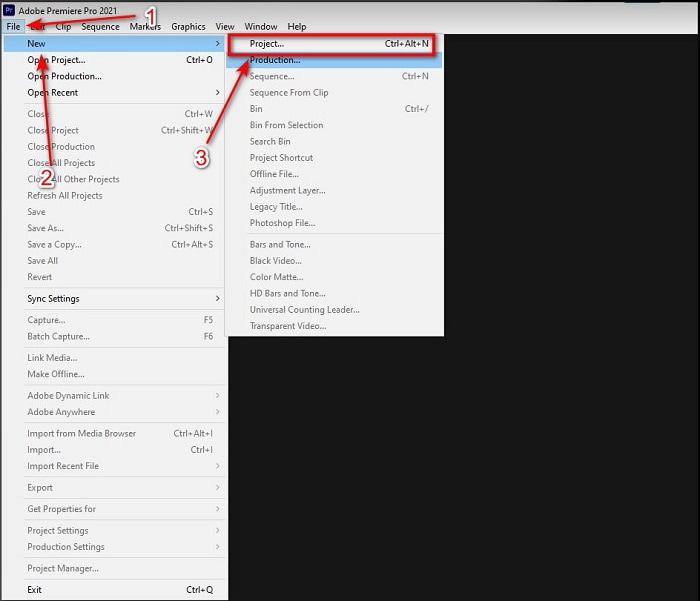
1. lépés. Először meg kell vásárolnod az eszközt, majd letölteni a számítógéped meghajtójára. A letöltés befejezése után indítsd el. Ezután kattints a File (Fájl) menüre, azon belül a New (Új) pontra, majd válaszd a Project (Projekt) lehetőséget a folytatáshoz, és nyomd meg az OK gombot a felugró új ablakban.
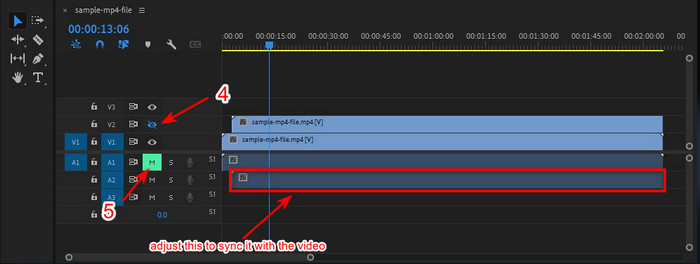
2. lépés. Add hozzá kétszer ugyanazt a videót és hangot a Timeline-hoz (idővonalhoz). Ezután kattints a második videósávnál a Toggle Track Output gombra, és némítsd le a másodikat a Mute Track gombbal. Állítsd be a hangsávot úgy, hogy biztosan szinkronban legyen a videóval.
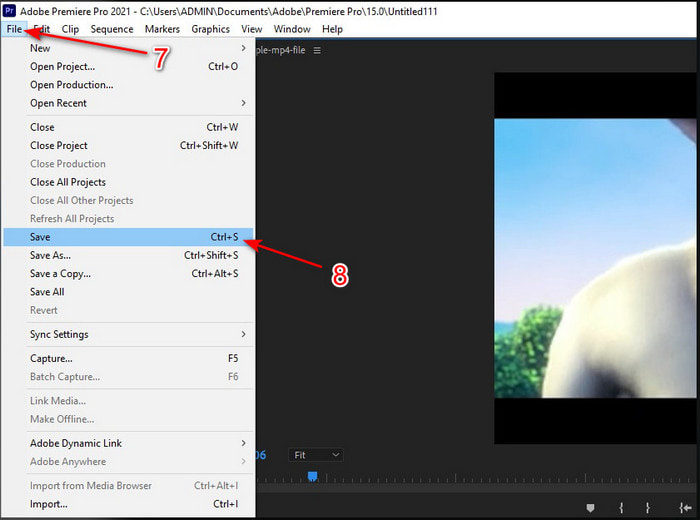
3. lépés. Ismét kattints fent a File (Fájl) menüre, majd keresd meg a Save (Mentés) opciót, hogy végül exportáld a médiafájlt a számítógéped meghajtójára.
Előnyök
- Ez az eszköz fejlett szerkesztési funkciót biztosít.
- A legmodernebb szerkesztő letölthető.
- A legjobb választás a professzionális teljesítményhez.
Hátrányok
- Nem a legjobb választás azoknak a kezdőknek, akiknek fogalma sincs a szerkesztésről.
- A szoftver teljesen drága a többi szerkesztőhöz képest, amelyek szinte ugyanazt a szolgáltatást nyújtják.
2. rész. A hangszinkronizálás legegyszerűbb módja kezdőknek és profiknak a Video Converter Ultimate segítségével
Akárcsak az Adobe Premiere Pro, ez a kiváló konverter is nagyfelbontású és fejlett szerkesztési funkciókat kínál, amelyeket örömmel fogsz használni. Viszont sokkal könnyebben kezelhető, mint a Premiere Pro. A Video Converter Ultimate a videókészítő, javító, erősítő, GIF‑készítő és sok egyéb feladatra vágyó szerkesztők legjobb barátja. Ez a szoftver szinte minden internetfelhasználói problémára megoldást nyújt, még a szinkronizálásra is. És mivel rendkívül könnyű használni, már több mint egymillió felhasználó töltötte le, és beleszeretett. Ha tehát egyszerűbbé szeretnéd tenni az életed, ahelyett hogy a Premiere Pro hangszinkron funkcióját használnád, miért nem próbálod ki ezt az eszközt? Kövesd az alábbi lépéseket.
Lépések a hang és videó szinkronizálásához a Video Converter Ultimate segítségével:
1. lépés. Töltsd le a szoftvert a számítógépedre, és válaszd ki, hogy PC‑re vagy Macre szeretnéd. Ezután telepítsd, végezd el a beállítást, majd kattints a Start Now (Indítás most) gombra a folytatáshoz.
Ingyenes letöltés Windows 7 vagy újabb rendszerre Biztonságos letöltés
Ingyenes letöltés macOS 10.7 vagy újabb rendszerre Biztonságos letöltés
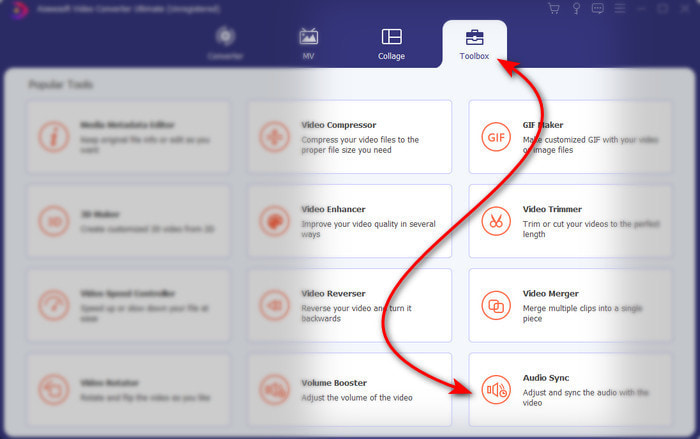
2. lépés. Indítsd el az eszközt az első lépés után, majd menj a Toolbox (Eszköztár) részhez, és kattints az alsó részen található Audio Sync (Hangszinkron) opcióra.
3. lépés. Nyomd meg a + gombot, hogy beimportáld a szinkronizálni kívánt videót és hangot. Miután megkerested a mappában, kattints az Open (Megnyitás) gombra a folytatáshoz.
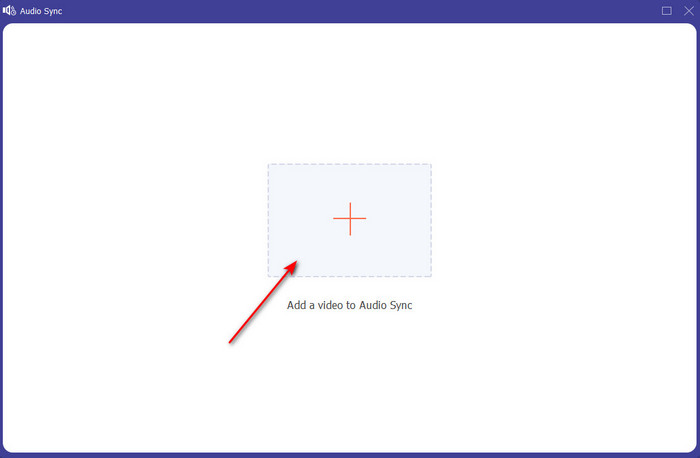
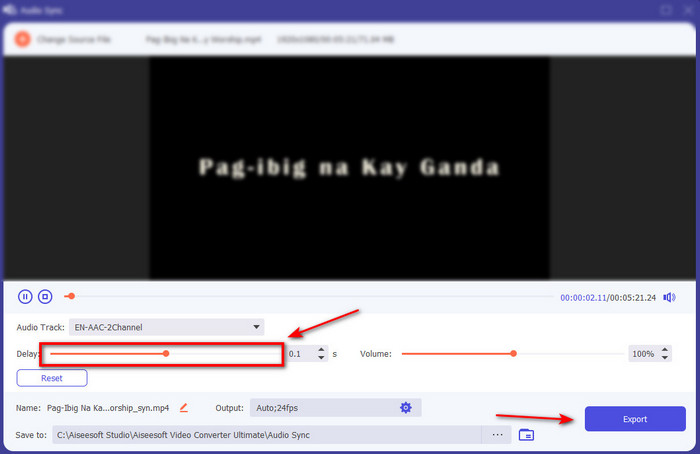
4. lépés. A hang szinkronizálásához állítsd a Delay slider (késleltetés csúszka) értékét úgy, hogy illeszkedjen a videóhoz. Emellett itt a hangerőt is növelheted a hangerőcsúszka állításával. Ha elkészültél, kattints az Export gombra a végső kimenet mentéséhez.
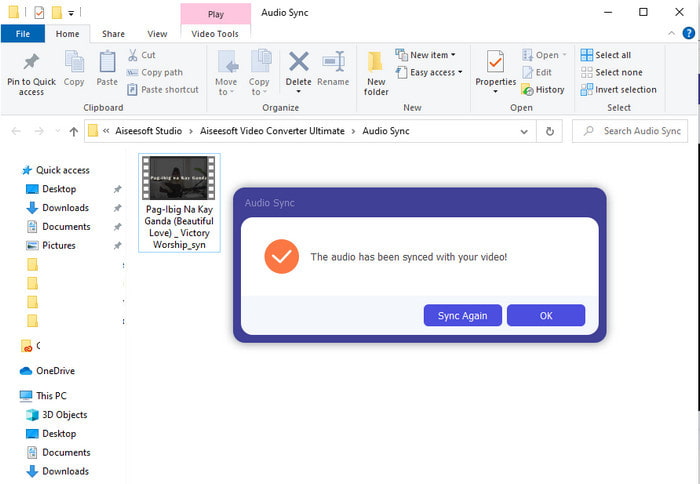
5. lépés. Miután ez megtörtént, egy mappa jelenik meg a képernyőn az általad készített, szinkronizált hanggal és videóval. Kattints a fájlra, hogy megnézd, lejátszd, és élvezd a tökéletesen szinkronban lévő hang‑ és képanyagot.
Előnyök
- A legjobb választás, hogy a videód fenomenálisan nézzen ki.
- Az eszköz használatának általános élménye szó szerint tökéletes, és mégis könnyen használható.
- Minden platformon elérhető, legyen az PC vagy Mac.
Hátrányok
- Csakúgy, mint a premiere pro, ez az eszköz is fizetős, de sokkal olcsóbb, mint a premiere pro.
- Mielőtt hozzáférhetne, először le kell töltenie a meghajtóra.
3. rész. GYIK a Premiere hang- és videószinkronizálásáról
Használhatom a Premieret képernyőrögzítőként?
Ha képernyőfelvételt szeretnél készíteni a Premiere Pro-ban, jobb, ha feladod, mert erre a program nem alkalmas. Viszont elárulhatunk egy titkos képernyőfelvevőt, amely közül választhatsz. Ha szeretnéd megtudni, melyek a Top 5 legjobb screencast eszközök, amelyeket PC‑n, Macen, online, iOS‑en és Androidon használhatsz.
Az Adobe Premiere Pro ingyenes?
Valójában igen, ingyenesen letöltheti ezt az eszközt, de csak 7 napig érheti el próbaverzióban. Tehát, ha a próbaidőszak véget ért, újra elő kell fizetnie az Adobe Premiere Pro szolgáltatásra, hogy élvezhesse a premiere pro által biztosított szerkesztési funkciók teljes kapacitását.
Használhatok másik webhelyet a premiere pro letöltéséhez?
Nem, mert illegális az összes alkalmazás letöltése a másik webhelyről. Továbbá, ha egy másik webhelyet használ a premiere pro letöltéséhez, akkor fennáll annak az esélye, hogy kémprogramokat, vírusokat vagy még ennél is rosszabbat fog tartalmazni. Tehát, ha meg akarja őrizni biztonságát, töltse le a szoftvert csak a hivatalos fő webhelyekről.
Vásárolhatok egy életre szóló hozzáférést az Adobe Premiere Pro alkalmazáshoz?
Noha vásárolhat egy havi hozzáférést az Adobe Premiere Pro-hoz, mégsem vásárolhat egész életen át tartó hozzáférést. De megvásárolhatja egy másik webhelyen, amely azonban illegális, és előfordulhat, hogy a letölteni kívánt fájl sérült, vírus van rajta vagy átverés. Tehát, ha szeretné használni és megvásárolni az Adobe Premiere Pro-t, javasoljuk, hogy mindenki vásárolja meg a fő webhelyén.
Következtetés
A cikk elolvasása után 5 perccel már tudjuk, hogyan kell az Adobe Premiere pro segítségével szinkronizálni a hangot a videóval. Van azonban egy egyszerűbb módja is a szinkronizálásnak a Video Converter Ultimate használatával. Mivel ez az eszköz sokkal gyorsabban állítja be a szinkronizálatlan videót és hangot, miközben a legjobb minőséget nyújtja. Tehát most, ha sok pénze van, válassza az Adobe Premiere Pro-t, de ha sokat szeretne megtakarítani, miközben ugyanazt a funkciót használja, akkor a Video Converter Ultimate-t kell választania.
-
 Videó lelassítása: Tökéletes tippek [asztali/mobiltelefon]
 Belefáradt abba, hogy a legjobb eszközöket keresse, amelyek lelassítják a videót online? Olvassa el ezt a cikket, hogy tájékozódjon az alábbiakban felsorolt információkról.
-
 Windows Media Player | Tanuld meg, hogyan lehet felgyorsítani a videókat [Bizonyított]
 Szeretné lelassítani a videoklipet a Windows Media Player használatával, de problémái vannak a végrehajtással? Ez a cikk ideális olvasáshoz, és megvilágítja a nézőpontját arról, hogyan gyorsíthatja fel a videókat a Windows Media Player használatával.
-
 A lassított videó normál sebességre váltása [Egyszerű lépések]
 Szeretné tudni, hogyan lehet visszaállítani az internetről letöltött vagy véletlenül lassított felvételben rögzített lassított videót? Ismerje meg, hogyan konvertálhat lassított videót normál sebességre Mac, Windows, iOS és Android rendszeren.
