


 Video Converter Ultimate
 Perekam Layar
 Perbaikan Video
 Unduhan Aman
Ulasan Komprehensif untuk iMyFone Free HEIC Converter dan Alternatif untuk Digunakan
Apple Inc. datang dengan ide untuk menggunakan HEIC advance lossy compression karena dapat menghemat ruang penyimpanan, tidak seperti format gambar biasa seperti JPEG. Dengan gaya reduksi modern, Apple mengadaptasinya ke iOS 11 dan macOS High Sierra atau versi yang diperbarui. Terlepas dari popularitasnya di setiap perangkat apel, dukungannya pada sistem operasi lain seperti Windows dan Android tidak begitu kompatibel dengan JPEG. Karena masalah kompatibilitas yang meningkat, banyak pengguna mencari konverter HEIC yang dapat digunakan untuk mengubah format menjadi JPEG atau JPG.
Salah satu konverter yang mungkin sudah pernah Anda lihat di pasaran adalah iMyFone Free HEIC Converter. Hari ini, kami akan melihat lebih dekat perangkat lunak tersebut dan alternatif lain yang bisa Anda gunakan untuk mengubah HEIC ke JPG hanya dalam beberapa detik.

Bagian 1. Apa itu Konverter HEIC Gratis iMyFone
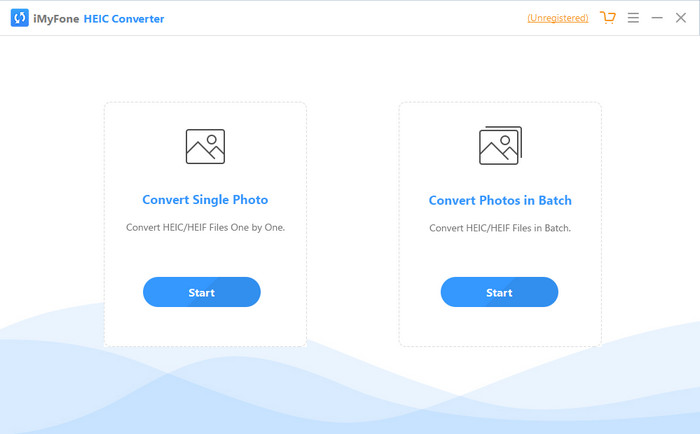
iMyFone HEIC Converter adalah konverter yang Anda perlukan untuk mengubah format HEIC ke format gambar yang Anda inginkan seperti JPEG. Tidak seperti konverter lainnya, alat ini dapat mengubah gambar HEIC menjadi JPEG tanpa memengaruhi kualitasnya. Anda memiliki kendali untuk menyesuaikan kualitas gambar sesuai spesifikasi Anda. Dengan perangkat lunak seperti ini, Anda tidak perlu khawatir lagi tentang masalah kompatibilitas pada file HEIC karena alat ini dapat membantu Anda dalam waktu kurang dari satu menit. Selain fungsi konversi, Anda juga bisa mengunduh perangkat lunak ini di kedua sistem desktop karena mendukung versi Windows dan Mac.
Meskipun mendukung sistem operasi yang berbeda, kita masih dapat melihat bahwa perangkat lunak melakukan tugas yang sama dengan sempurna pada kedua sistem. Tapi apa yang membuat konverter lebih baik daripada konverter lain yang dapat Anda unduh atau akses di web? Jika Anda ingin melihat perangkat lunaknya, Anda harus membaca bagian kedua untuk mengetahui fitur, kelebihan, kekurangan, dan cara menggunakannya.
Bagian 2. Tinjauan Konverter HEIC Gratis iMyFone | Fitur Utama, Pro, Kontra, & Cara Menggunakannya
Fitur utama Menggunakan iMyFone HEIC Converter di Windows & Mac:
Ini memiliki opsi untuk mengonversi file HEIC tunggal atau file HEIC batch.
Konversi file HEIC di sini tanpa menurunkan kualitas gambar, tetapi Anda juga dapat meningkatkan kualitasnya.
Mendukung konversi HEIC ke JPEG/JPG dalam waktu kurang dari satu menit.
Ini langsung menyimpan file HEIC yang dikonversi di drive lokal untuk menghindari pembusukan konten privasi.
Pro
- Itu melakukan pekerjaan mengubah format HEIC dengan mudah.
- GUI-nya mudah, sehingga Anda dapat langsung mempelajari cara menggunakannya.
- Ini juga mendukung konversi beberapa file HEIC sekaligus tanpa batasan.
Kontra
- Terkadang file HEIC tidak dapat dikenali di sini, dan hanya dapat mengonversi HEIC menjadi JPG.
- Anda tidak dapat mengonversi file HEIC jika tidak membeli versi premium, terutama setelah masa percobaan.
- Fitur seret dan lepas tidak dapat digunakan.
Cara Menggunakan iMyFone HEIC Converter di Windows dan Mac:
Langkah 1. Unduh iMyFone HEIC Converter di situs resmi, lalu pilih apakah untuk Windows atau Mac.
Langkah 2. Buka perangkat lunaknya, dan dua opsi akan muncul di layar Anda. Klik Start pada salah satunya untuk melanjutkan ke langkah berikutnya.
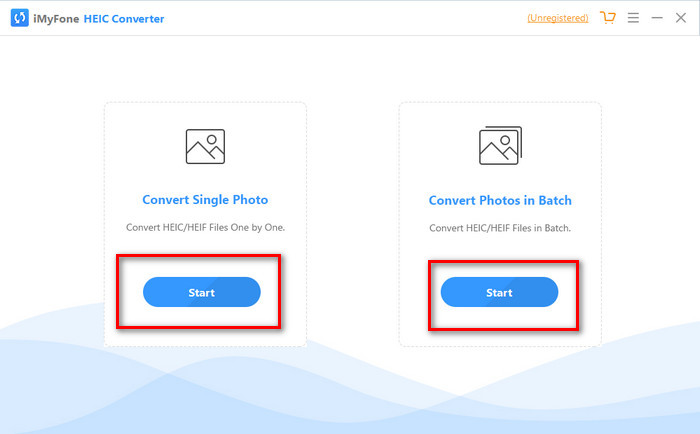
Anda dapat menggunakan Convert Single Photo atau Convert Photo in Batch; apa pun pilihan Anda, itu tidak berbeda satu sama lain.
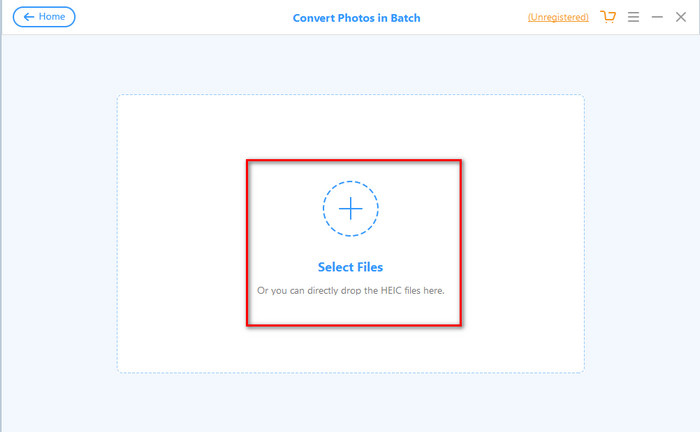
Langkah 3. Tambahkan file dengan menekan tombol + untuk mengunggah file HEIC yang Anda miliki di penyimpanan Anda.
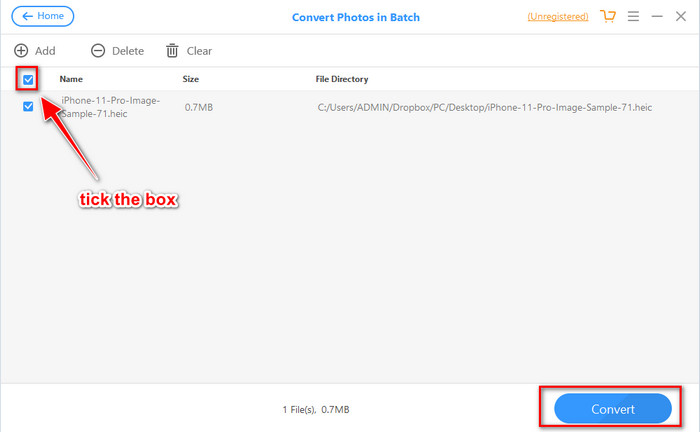
Langkah 4. Centang kotak, tekan Convert, sesuaikan kualitas jika Anda mau, lalu klik Convert lagi untuk mengubah formatnya.
Bagian 3. 3 Alternatif Teratas untuk iMyFone Free HEIC Converter Online & Offline
Konverter HEIC ke JPG FVC Gratis
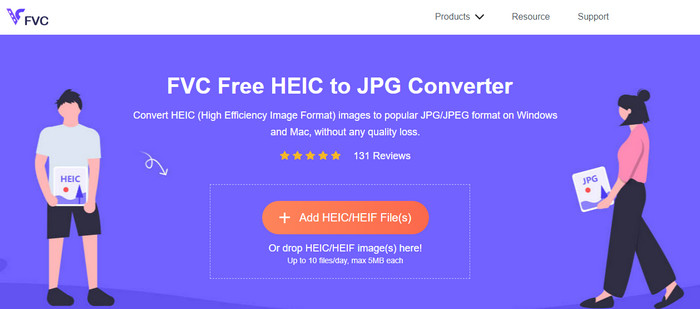
Jika Anda tidak ingin mengunduh iMyFone HEIC Converter dan ingin mengonversi HEIC ke JPG, kami menyarankan Anda menggunakan FVC Free HEIC to JPG Converter. Alat web ini dapat membantu Anda menyelesaikan tugas membuat file HEIC menjadi kompatibel dengan mengubahnya menjadi JPEG. Sama seperti konverter yang kami ulas, alat ini hanya dapat mengonversi gambar HEIC yang Anda miliki menjadi JPEG, dan tidak ada opsi lain untuk format keluarannya. Secara keseluruhan, alat web ini adalah konverter yang sangat baik yang dapat Anda akses di berbagai browser.
Meskipun alat web ini gratis dan tersedia online, ada beberapa batasan yang perlu Anda ingat. Pertama, ukuran file gambar; pastikan foto memiliki 5MB atau kurang karena Anda mungkin mengalami masalah saat mengunggahnya di sini. Berikutnya adalah konversi yang tersedia per hari; Anda hanya dapat menggunakan konverter ini untuk mengonversi HEIC sepuluh kali per hari. Meskipun ada keterbatasan saat menggunakan alat; masih bagus untuk menggunakannya untuk mengalami konversi gratis.
Konverter Aiseesoft HEIC
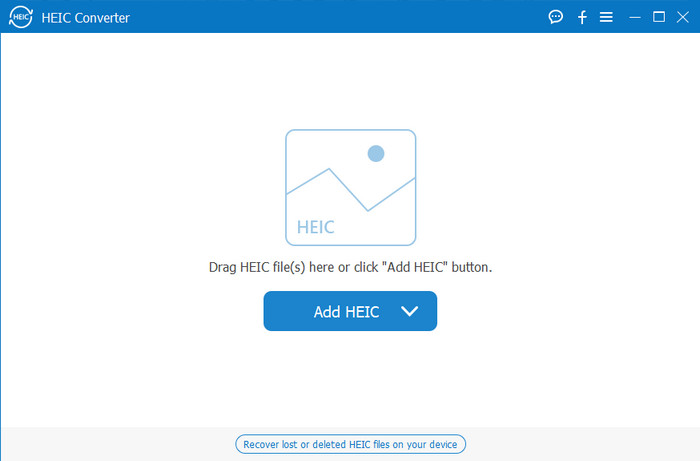
Aiseesoft HEIC Converter adalah alternatif terbaik untuk iMyFone HEIC Converter yang dapat Anda unduh di desktop. Ini adalah konverter HEIC yang sangat bertenaga dan wajib dimiliki jika Anda ingin mengonversi file HEIC yang Anda punya. Jika perangkat lunak yang kami ulas di atas dapat mengonversi dengan cepat, konverter ini dapat mengubah file HEIC Anda bahkan lebih cepat dari sekejap mata. Jadi, menunggu proses konversi menjadi tidak perlu karena konverter ini mendukung kecepatan konversi ultra-cepat, bahkan pada banyak file HEIC sekaligus. Selain kecepatannya, Anda juga dapat melakukan drag and drop file HEIC ke sini untuk cara unggah yang lebih mudah.
Apalagi? Jika perangkat lunak yang kami tinjau tidak mendukung format output lain, Anda dapat memilih JPEG atau PNG dengan alat ini. Selain itu, Anda dapat menyesuaikan kualitas gambar HEIC sesuai dengan spesifikasi Anda dengan menyeret bilah geser. Simpan file EXIF yang terikat ke file HEIC dan transfer ke format yang Anda pilih. Menakjubkan bukan? Alat ini jauh lebih baik daripada konverter lain yang dapat Anda temukan di pasar.
Terkait:
Mengonversi HEIC ke JPG di iPhone
Bagian 4. FAQ tentang iMyFone Free HEIC Converter
Apakah mengekspor file JPG di iMyFone HEIC Converter akan meninggalkan tanda air?
Tidak akan, jadi Anda dapat mengunggah file HEIC di sini, lalu mengonversinya, dan setelah selesai, Anda dapat mengunduh file tanpa tanda air.
Mengapa saya tidak dapat mengonversi file HEIC saya di iMyFone HEIC Converter?
Jika masa percobaan telah berakhir, Anda tidak dapat menggunakan alat ini lagi untuk mengonversi. Jadi jika Anda ingin menggunakannya, Anda perlu membeli atau mendaftarkan kode di sini dan kemudian mengonversi file HEIC yang Anda inginkan dengan bantuan konverter ini.
Apakah aman mengunduh iMyFone HEIC Converter?
Ya, konverter aman dan gratis untuk diunduh di perangkat desktop apa pun. Untuk mengunduh perangkat lunak dengan aman, Anda harus mengunjungi situs web resmi konverter. Di sana, Anda dapat mengklik tombol unduh untuk memiliki konverter HEIC di desktop Anda.
Kesimpulan
Setelah ulasan iMyFone Free HEIC Converter ini, sekarang Anda sudah memiliki pengetahuan yang luas tentang konverter tersebut. Kali ini, Anda harus memutuskan apakah ini adalah konverter HEIC terbaik yang harus Anda gunakan. Terlepas dari kekurangan dan minusnya, konverter ini tetap sangat baik digunakan di Windows dan Mac. Jadi, jika Anda memutuskan untuk memakainya, Anda bisa mengunjungi situs resmi mereka untuk mengunduh dan menginstalnya guna membantu Anda mengonversi file HEIC yang Anda miliki ke JPEG. Namun jika Anda ingin mengonversi file HEIC ke PNG, alat ini tidak dapat membantu. Sebagai gantinya, Anda harus mengunduh Aiseesoft HEIC Converter jika ingin mengonversi HEIC ke JPG atau PNG dengan mudah. Tekan tombol unduh di atas untuk segera mendapatkannya.
-
 Cara Efektif untuk Mengimpor HEIC ke Lightroom di Windows & Mac
 Apakah Anda ingin tahu cara mengimpor file HEIC di Lightroom di Windows dan Mac? Jadi, baca artikel ini dengan seksama untuk mengetahui cara melakukannya.
-
 Konverter Joyoshare HEIC | Ulasan & Fungsi Aplikasi yang Harus Anda Ketahui
 Ulasan terbaik Joyoshare HEIC Converter harus Anda ketahui, karena kami menyertakan detail dan fungsionalitas yang harus Anda ketahui sebelum Anda memilikinya.
-
 Cara Melihat dan Mengonversi File HEIC di Android [Gratis] Mudah]
 Apakah Anda ingin melihat atau mengonversi file HEIC di Android tanpa merusak kualitas gambar aslinya? Dalam skenario jenis ini, artikel ini akan membantu.
