


 Video Converter Ultimate
 Perekam Layar
 Perbaikan Video
 Unduhan Aman
Pelajari Cara Mengonversi HEIC ke GIF Dengan Pengonversi Terbaik dan Gratis
Ingin mengubah gambar HEIC Anda menjadi GIF bergerak? Kami punya solusinya untuk Anda. File HEIC adalah file gambar berkualitas tinggi yang tidak memakan banyak ruang penyimpanan. Namun, gambar HEIC hanyalah gambar statis. Jadi, agar Anda bisa menjadikan file gambar sebagai gambar animasi, Anda harus mengonversi file HEIC ke format file GIF. Format GIF bisa berupa gambar statis maupun animasi. Oleh karena itu, bacalah artikel ini untuk mengetahui HEIC ke GIF terbaik untuk mengonversi file Anda tanpa kehilangan kualitas.

Bagian 1. 4 Alat Terbaik untuk Mengonversi HEIC ke GIF
Dalam hal kenyamanan, pasti konverter online adalah yang terbaik karena Anda tidak perlu mengunduh apa pun. Dan jika Anda mencari pengonversi HEIC ke GIF online terbaik, kami mencoba beberapa pengonversi HEIC ke GIF terbaik yang tersedia di internet. Jadi di bagian ini, Anda akan mengetahui tiga konverter HEIC ke GIF online terbaik.
Pengonversi Gambar Gratis Aiseesoft Online
Jika Anda sedang mencari konverter HEIC ke GIF online yang paling bagus, alat ini adalah yang Anda cari. Aiseesoft Free Image Converter Online adalah alat daring gratis yang memungkinkan Anda mengonversi gambar HEIC ke format GIF, PNG, dan JPG. Alat ini dikenal sebagai konverter HEIC ke GIF online tercepat yang dapat ditemukan di internet. Selain itu, tidak seperti konverter online lainnya, alat ini bebas iklan dan memiliki proses pemuatan yang cepat.
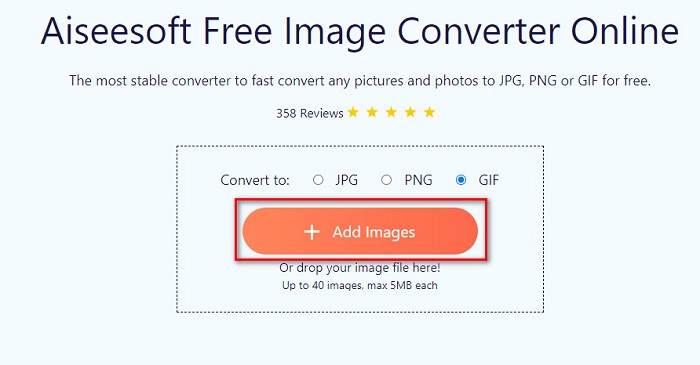
Langkah 1. Cari Aiseesoft Free Image Converter Online, atau klik tautan ini untuk langsung menuju halaman web mereka. Lalu, pada antarmuka pertama, klik tombol Add Images.
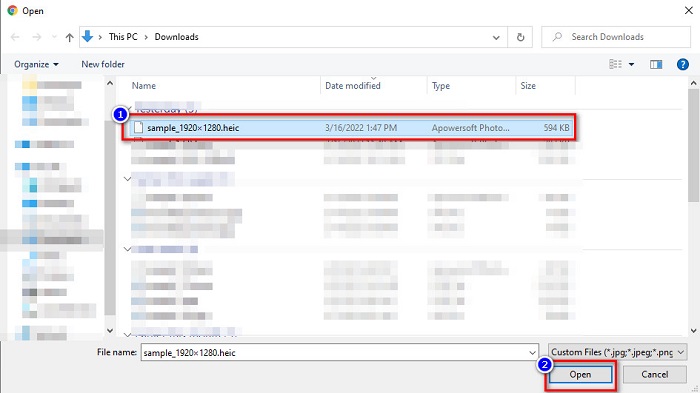
Langkah 2. Setelah itu, file di komputer Anda akan muncul, cari gambar HEIC Anda, lalu klik Open.
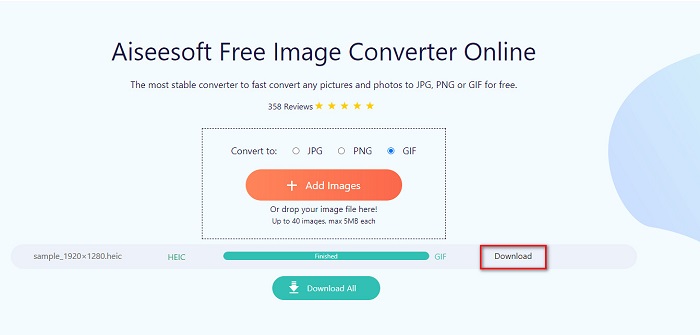
Langkah 3. Klik tombol Download untuk mengunduh gambar GIF Anda sebagai langkah terakhir.
Pro
- Ini memiliki proses konversi yang sangat cepat.
- Itu tidak mengandung iklan yang mengganggu.
- Itu dapat mengonversi file gambar apa pun ke PNG, JPG, dan GIF.
- Dapat diakses di semua browser web, termasuk Google, Firefox, dan Safari.
Kontra
- Anda mungkin mengalami proses konversi yang lambat ketika koneksi internet Anda lambat.
Konversi Awan
Salah satu konverter yang paling sering digunakan di internet adalah CloudConvert. Konverter ini dapat dengan mudah mengonversi file HEIC ke GIF karena antarmuka penggunanya yang sederhana. Selain itu, alat ini mendukung banyak format gambar, termasuk HEIC, GIF, BMP, JPG, ICO, dan lainnya. Anda juga dapat menyesuaikan resolusi, ukuran file, dan kualitas gambar Anda. Meskipun merupakan aplikasi berbasis web, alat ini bebas dari iklan.
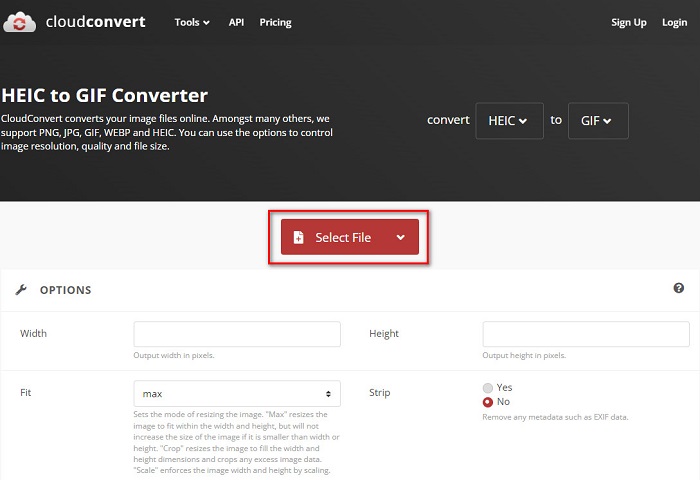
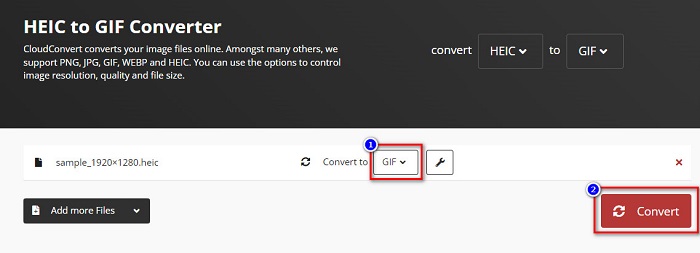
Langkah 1. Di browser Anda, cari CloudConvert HEIC to GIF converter. Lalu, pada antarmuka utama perangkat lunak, klik tombol Select. File di komputer Anda akan muncul, kemudian pilih file HEIC yang ingin Anda unggah.
Langkah 2. Selanjutnya, klik tombol drop-down di samping Convert to, lalu pilih format keluaran yang Anda inginkan. Setelah itu, klik tombol Convert untuk mulai mengonversi file HEIC Anda ke format GIF.
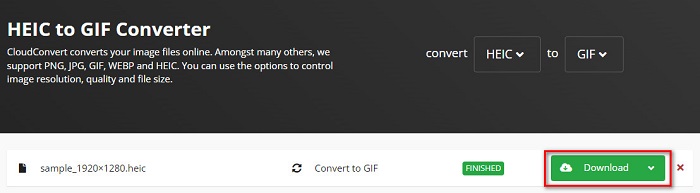
Langkah 3. Terakhir, klik tombol Download untuk mengunduh file GIF Anda ketika proses konversi telah selesai.
Pro
- Ini memiliki proses konversi yang cepat.
- Itu tidak mengandung iklan yang mengganggu.
- Ini mendukung berbagai format file, termasuk HEIC, GIF, JPG, PNG, dll.
- Dapat diakses di hampir semua mesin pencari seperti Google dan Safari.
Kontra
- Ketika koneksi internet lambat, Anda mungkin mengalami proses konversi yang lambat.
Konversi OnlineGratis
Konverter HEIC ke GIF online lain yang layak dicoba adalah OnlineConvertFree. Konverter ini memiliki antarmuka perangkat lunak yang mudah digunakan dan proses konversi yang cepat. Selain itu, jika Anda mencari konverter yang dapat mengompres dan mengubah ukuran file Anda, alat ini memiliki fitur tersebut.
Namun, berisi iklan yang mengganggu bagi banyak pengguna. Meskipun demikian, konverter ini masih dapat mengonversi HEIC ke GIF dengan nyaman.
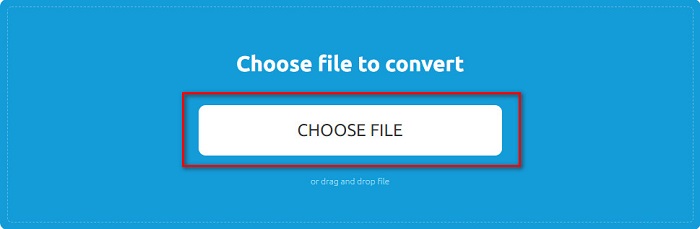
Langkah 1. Untuk langkah pertama, cari OnlineConvertFree di browser Anda. Lalu pada antarmuka utama perangkat lunak, klik Choose Files. Setelah itu, file di komputer Anda akan muncul, tempat Anda akan memilih file HEIC dan mengunggahnya.
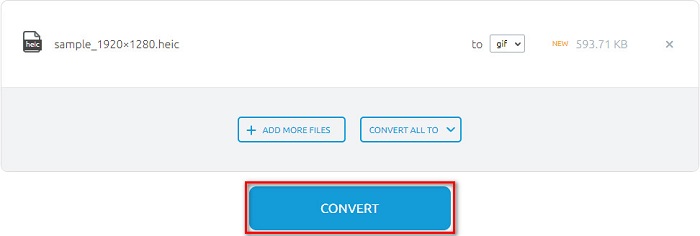
Langkah 2. Kedua, klik tombol Convert button untuk mengonversi file HEIC Anda ke file GIF. Kemudian sebuah antarmuka baru akan muncul.
Langkah 3. Terakhir, gulir ke bawah dan klik tombol Download untuk mengunduh file GIF Anda.

Pro
- Ini memiliki antarmuka pengguna yang sederhana.
- Ini aman untuk digunakan.
Kontra
- Ini berisi iklan.
CDKM
CDKM adalah alat online yang membantu Anda mengonversi file HEIC ke GIF. Konverter online ini adalah alat yang mudah digunakan yang menjadikannya alat yang ramah bagi pemula. Selain itu, ini mendukung format file standar seperti HEIC, GIF, PNG, JPG, dan SVG. Namun, konverter ini berisi iklan yang mungkin mengganggu Anda. Namun demikian, ini dapat mengonversi file Anda dengan cepat, jadi ini adalah konverter yang harus dicoba.
Langkah 1. Di browser Anda, cari CDKM dan buka halaman web mereka. Di antarmuka utama perangkat lunak, klik tombol Choose Files. Ketika folder komputer Anda muncul, pilih file HEIC Anda, lalu unggah ke antarmuka utama.
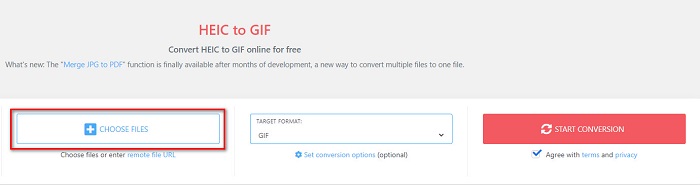
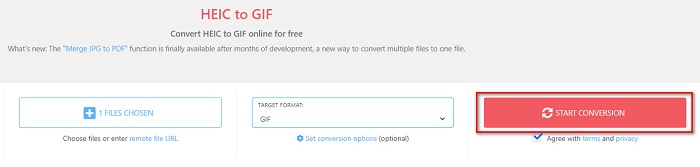
Langkah 2. Selanjutnya, klik tombol Start Conversion untuk mengonversi file HEIC Anda ke file GIF. Lalu lanjut ke langkah berikutnya.
Langkah 3. Setelah itu, unduh file GIF Anda dengan mengklik tombol Download di bawah.

Bagian 2. Bagan Perbandingan Antara HEIC dan GIF
HEIC adalah format file gambar yang dibuat oleh Apple. Saat Anda mengambil foto menggunakan perangkat Apple, Anda akan melihat ekstensi gambar foto tersebut adalah .heic. Selain itu, file gambar ini memiliki kualitas yang sangat baik dan ukuran file yang kecil, sehingga format ini menjadi populer. Namun, file HEIC tidak kompatibel dengan banyak perangkat. Membuka dan melihat file HEIC di perangkat Apple sangatlah mudah. Tetapi Anda perlu mengonversinya ke format lain jika ingin melihatnya di platform lain.
Di sisi lain, file GIF adalah format gambar lossless yang dianimasikan. Format gambar ini dapat berupa gambar animasi atau gambar statis. Selain itu, hampir semua platform media mendukung format GIF.
| HEIC | GIF | |
| Terkompresi/Tidak Terkompresi | Terkompresi | Terkompresi |
| Ketersediaan | Tersedia di perangkat Apple. | Tersedia di semua platform media |
| Tanpa rugi/Tidak | Lossless | Lossless |
| Kualitas gambar | Kualitas gambar tinggi | Memiliki kualitas yang lebih rendah dibandingkan dengan gambar HEIC |
| Paling baik digunakan untuk | Paling baik digunakan untuk mengambil foto | Paling baik digunakan untuk menganimasikan klip video pendek. |
Bagian 3. FAQ tentang Mengonversi HEIC ke GIF
Bisakah Anda memutar GIF animasi di perangkat Mac?
Ya. Perangkat Mac dapat memutar GIF animasi; namun, ada kalanya GIF tidak dapat diputar, sehingga Anda harus menggunakan penampil GIF online jika tidak bisa diputar.
Bisakah saya mengonversi gambar JPG ke GIF?
Ada banyak cara untuk mengonversi JPG ke GIF. Konverter online yang disebutkan di atas memungkinkan Anda mengonversi file gambar JPG menjadi GIF.
Bisakah Anda menyimpan GIF di iPhone Anda?
Untungnya, perangkat iPhone mendukung file GIF. Karena itu, Anda dapat menyimpan GIF di iPhone Anda. Tetapi jika Anda tidak dapat menyimpan file GIF, pastikan untuk memulai ulang iPhone Anda dan coba unduh lagi.
Kesimpulan
Seperti yang ditunjukkan di atas, ada banyak cara untuk mengonversi HEIC ke GIF. Namun, tidak semua konverter online menyediakan proses konversi yang sangat cepat. Jadi jika Anda mencari konverter HEIC ke GIF online terbaik, gunakan Aiseesoft Free Image Converter Online.
-
 Apa itu File VOB dan Cara Mengubah File VOB menjadi GIF Gratis
 Apakah Anda ingin tahu lebih banyak tentang file VOB dan cara membagikannya setelah di-rip? atau Mengapa Anda perlu mengonversi VOB ke GIF? Kemudian baca artikel ini dengan seksama.
-
 3 Konverter Teratas yang Tidak Boleh Anda Lewatkan untuk Mengonversi PNG ke GIF Animasi
 Apakah Anda ingin menghidupkan PNG? Kemudian cobalah untuk mengonversi format animasi PNG ke GIF dengan alat bantu yang tersedia dan langkah-langkah tentang cara melakukannya.
-
 5 Cara Terbaik Mengubah Gambar menjadi GIF Animasi [Diperbarui 2022]
 Butuh gambar konverter ke GIF? Artikel ini akan memberikan lima konverter terbaik yang dapat kita temukan di pasar. Jadi, mari cari tahu alat-alat ini dengan membaca artikel ini.
