


 Video Converter Ultimate
 Screen Recorder
 Riparazione video
Scopri cosa sono i metadati: tipi, esempio, importanza e come visualizzarli
I metadati sono essenziali per qualsiasi file perché spiegano molti aspetti del file multimediale. Ma le domande sono: che cosa sono i metadati? A cosa servono? Quali sono gli esempi di metadati? È necessario avere dei metadati? Troverai le risposte a tutte queste domande più avanti in questo articolo. Inoltre, ti forniremo anche un perfetto editor di metadati che puoi usare per aggiungere o modificare i metadati del tuo file multimediale. Leggi di seguito l'intero contenuto e scopri di più sui metadati.

Parte 1. Che cosa sono i metadati
Definizione
I metadati sono dati sui dati nascosti dal file multimediale. Cosa sono i metadati? Supponiamo di voler riconoscere il contenuto del file e altre caratteristiche, quindi i metadati sono un cheat code. Ogni file multimediale ha metadati e, se hai intenzione di avere un file multimediale organizzato, i metadati ti aiuteranno a organizzare il file se hai a che fare con librerie di file multimediali. Ora che abbiamo un'idea dei metadati, diamo un'occhiata ai tipi di metadati.
Quali sono i diversi tipi di metadati
Sapevi che i metadati hanno diversi tipi? In caso contrario, di seguito ti aiuterà a comprendere le altre sei strutture di metadati e il loro scopo nella memorizzazione dei dati. Quindi ora, per sapere quali sono gli esempi di metadati, leggi il grafico qui sotto.
| Tipi di metadati | Descrizione |
| Metadati descrittivi | Identifica le risorse di un particolare oggetto, inclusi diversi elementi come titolo, abstract, autore e parola chiave. |
| Metadati amministrativi | Viene utilizzato per gestire informazioni come il tipo di risorsa, la creazione o l'acquisizione di dati, l'autorizzazione e la disposizione. |
| Metadati di riferimento o metadati esplicativi | I dati interni descrivono il contenuto e la qualità dei dati statistici dal proprio punto di vista. |
| Metadati statistici | Descrive il processo dei dati statistici raccogliendoli, elaborandoli e producendoli. |
| Metadati legali | Le informazioni includono dati sul titolare del copyright, sulla licenza pubblica e sulla proprietà. |
| Metadati strutturali | I dati ne descrivono il tipo, la versione, le relazioni e altre caratteristiche del materiale digitale. |
Qual è l'importanza dei metadati?
Che cosa sono i metadati e i loro tipi sono già stati spiegati sopra; Ora, dobbiamo determinarne l'importanza. Con i metadati, puoi conoscere le altre informazioni sul file multimediale, come l'autore, la data e l'ora, materiale digitale diverso e molti altri. Inoltre, se vuoi proteggere il tuo file multimediale, questo è uno dei modi migliori per usarlo invece di usare una filigrana. Quindi, se il tuo file multimediale contiene metadati, puoi fare molte cose che non puoi credere di poter fare, come organizzarlo nella tua cartella o libreria.
Parte 2. Come visualizzare i metadati su piattaforme diverse
Sapevi che puoi controllare i tuoi metadati sul tuo file multimediale tramite i tuoi dispositivi senza installare uno strumento speciale? Vuoi sapere come farlo? In tal caso, è necessario leggere i seguenti dettagli per saperne di più sui metadati presenti nel file multimediale.
Per utenti Windows
Passaggio 1. Trova il file sul desktop e fai clic con il tasto destro del mouse.
Passaggio 2. Quindi fai clic su Proprietà e trova la scheda Dettagli; vedrai i metadati del tuo video al suo interno.
Per utenti Mac
Passaggio 1. Cerca il file multimediale nel Finder, fai clic con il tasto destro del mouse e fai clic su Strumenti.
Passaggio 2. Al suo interno, fai clic su Mostra inspector.
Passaggio 3. Si aprirà un'altra finestra, quindi tocca Esci e vedrai i metadati del tuo file.
Per gli utenti iPhone
Passaggio 1. Apri l'app Foto.
Passaggio 2. Fai clic sul video o sull'immagine di cui vuoi controllare i metadati.
Passaggio 3. Seleziona l'icona a forma di i e i metadati appariranno sullo schermo.
Per utenti Android
Passaggio 1. Avvia Google Foto sul tuo dispositivo: se non l'hai ancora scaricata sul telefono, devi prima scaricarla dal Play Store.
Passaggio 2. Apri il file e fai clic sull'icona a forma di i per verificare i metadati.
Parte 3. Come modificare o aggiungere metadati con il miglior editor di metadati sul desktop
Con il miglior editor di metadati puoi facilmente aggiungere metadati a un file multimediale che non ne ha oppure modificarli. FVC Video Converter Ultimate è lo strumento perfetto che dovresti usare per modificare o aggiungere metadati a qualsiasi file multimediale con facilità. Quindi, per sapere a cosa servono i metadati, puoi seguire i passaggi e imparare facilmente quali altre informazioni puoi aggiungere ai metadati.
Passaggio 1. Tocca il pulsante di download qui sotto per scaricare lo strumento su Windows o macOS, fai clic sul file scaricato, segui la procedura di installazione e aprilo.
Download gratuitoPer Windows 7 o versioni successiveDownload sicuro
Download gratuitoPer MacOS 10.7 o versioni successiveDownload sicuro
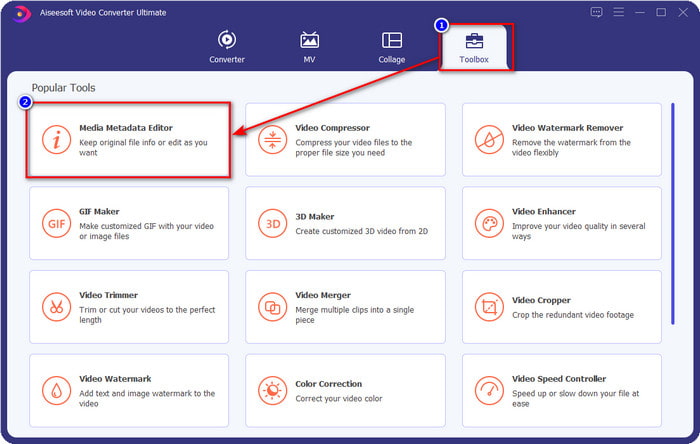
Passaggio 2. Vai alla sezione Toolbox e trova Media Metadata Editor; fai clic per aprirlo.
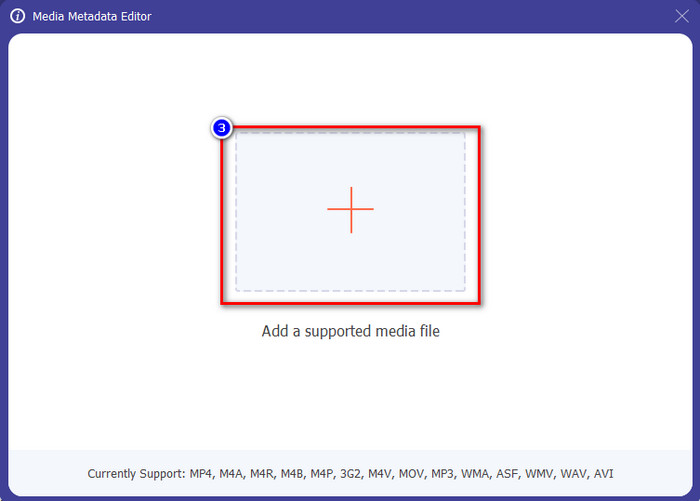
Passaggio 3. Si aprirà una nuova finestra sullo schermo; tocca il pulsante + per aggiungere il video di cui vuoi aggiungere o modificare i metadati. Individua il video nella cartella del tuo computer e fai clic su Apri per procedere.
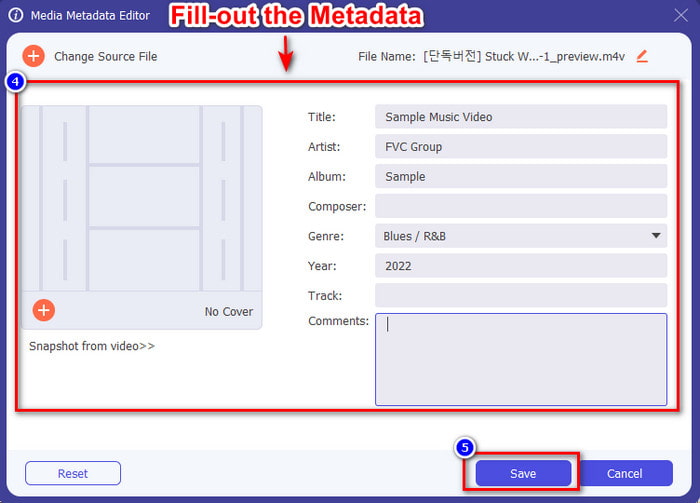
Passaggio 4. Attendi che lo strumento completi il caricamento e l'editor di metadati verrà visualizzato; qui puoi aggiungere i tuoi metadati personalizzati compilando le caselle di testo. Dopo aver aggiunto i dati essenziali, fai clic su Salva per scaricare il file multimediale con i metadati. Senza alcuna fatica, avrai aggiunto o modificato i metadati del tuo file.
Correlato:
Come aggiungere un'immagine a un video
Come aggiungere una filigrana in iMovie
Parte 4. Domande frequenti sui metadati
Perché la dimensione del file aumenta dopo aver aggiunto i metadati?
Non dovresti sorprenderti se la dimensione del file multimediale aumenta a causa dei metadati perché lo farà. Il motivo è che i metadati sono un elemento memorizzato su ogni file multimediale; i metadati contribuiscono alle dimensioni del video.
I metadati influiscono sulla qualità del video?
La qualità del video non cambierà anche se aggiungi, modifichi o scarichi un video con metadati.
Quali sono i metadati importanti da aggiungere?
Supponiamo di voler aggiungere metadati al file senza metainformazioni. Dovrai compilare le cose importanti: il nome dell'autore, il titolo, la data e l'ora. Tutte le cose sono importanti, ma queste sono la parte essenziale dei metadati.
Conclusione
Infine, ora abbiamo una vasta conoscenza sui metadati; tutte le domande che ti preoccupavano hanno già trovato risposta in questo post. Ora che conosci i metadati, devi aggiungerli ai tuoi file per aumentare il livello di protezione, con l'aiuto del miglior editor di metadati per desktop. Senza dubbio, FVC Video Converter Ultimate è lo strumento perfetto che tutti possono usare per applicare facilmente i metadati ai propri file o modificarli se sono già presenti. Con l'aiuto di questo software puoi fare molte cose: vuoi sapere quali sono? Ebbene, facendo clic sul pulsante di download scoprirai le altre straordinarie funzionalità che offre.
-
 3 modi efficaci per aggiungere video e immagini insieme su Tiktok
 Vuoi sapere come aggiungere immagini sui video di Tiktok? In tal caso, fai clic e leggi questo articolo per scoprire come aggiungere facilmente le immagini al tuo video Tiktok.
-
 Aggiungi testo al video con i 3 migliori editor video [senza sforzo]
 Aggiungere testo a un video è un compito facile con lo strumento giusto. Quindi, oggi ti presenteremo i diversi strumenti che puoi utilizzare per aggiungere testo al tuo video prima di condividerlo.
-
 Recensione Bona Fide su 6 app video di testo [2022]
 Vuoi sapere quali sono le app di video di testo che puoi utilizzare sulla piattaforma? Questo articolo fornirà una recensione in buona fede delle sei app di video di testo sul mercato.
