


 Video Converter Ultimate
 Screen Recorder
 Riparazione video
 Download sicuro
I modi migliori per rimuovere la filigrana di VideoShop su piattaforme diverse [gratuito]
Videoshop è un editor video di pacchetti all-in-one che puoi utilizzare sui tuoi dispositivi mobili e fino ad ora l'app ha ricevuto regolarmente un aggiornamento. Poiché l'app riceve un aggiornamento regolare e vengono aggiunte nuove funzionalità una volta ricevuto un aggiornamento, gli utenti mobili tendono a sceglierlo come editor video. Sebbene l'app offra funzionalità di editing video quasi complete, molti utenti riscontrano ancora degli inconvenienti, come l'interfaccia confusa che ha e la filigrana aggiunta al video esportato. Quindi, nell'articolo di oggi, ti spiegheremo i diversi approcci che puoi utilizzare per rimuovere la filigrana di Videoshop che puoi scaricare su iOS e Android, nonché il software definitivo che puoi utilizzare sul tuo desktop.

Parte 1. Come rimuovere la filigrana di VideoShop con gli strumenti più efficaci sulla tua piattaforma
FVC Video Converter Ultimate: la soluzione definitiva per rimuovere la filigrana su Windows e Mac
FVC Video Converter Ultimate è la nostra scelta nell’articolo di oggi per la sua efficienza nel rimuovere la filigrana indesiderata dal tuo video. Questo strumento è ricchissimo di funzionalità per eliminare le filigrane che potrai imparare a gestire facilmente già al primo tentativo. Non avrai difficoltà a rimuovere la filigrana se deciderai di usare questo software, grazie alla sua interfaccia intuitiva e alla sua leggerezza. Con questo strumento puoi anche fare molte altre operazioni interessanti, come aggiungere una filigrana, ridimensionare, comprimere, tagliare, rifilare e così via.
La soluzione definitiva alle filigrane è qui; se hai bisogno di un tutorial su come rimuovere le filigrane di Videoshop, segui i passaggi indicati di seguito e utilizza lo strumento definitivo per eliminare la filigrana.
Passaggio 1. Prima di tutto, devi scaricare lo strumento sul tuo desktop selezionando il tipo di versione del sistema operativo che utilizzi. Prosegui con il processo di installazione e avvia il software per iniziare a usarlo.
Download gratuitoPer Windows 7 o versioni successiveDownload sicuro
Download gratuitoPer MacOS 10.7 o versioni successiveDownload sicuro
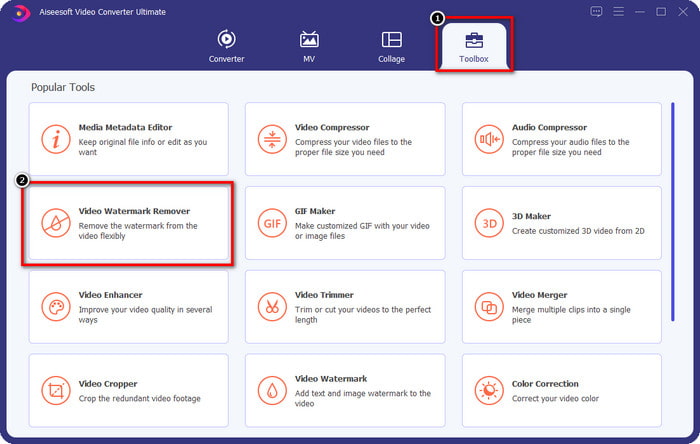
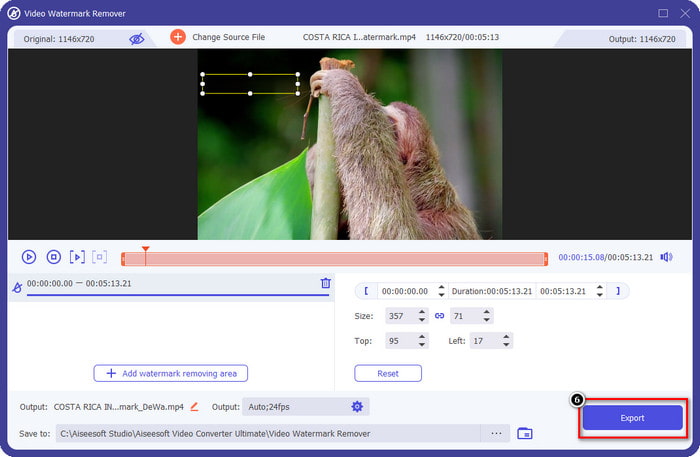
Passaggio 2. Apri la Casella degli strumenti cliccandoci sopra, quindi individua Video Watermark Remover nell’elenco delle funzioni che comparirà sullo schermo.
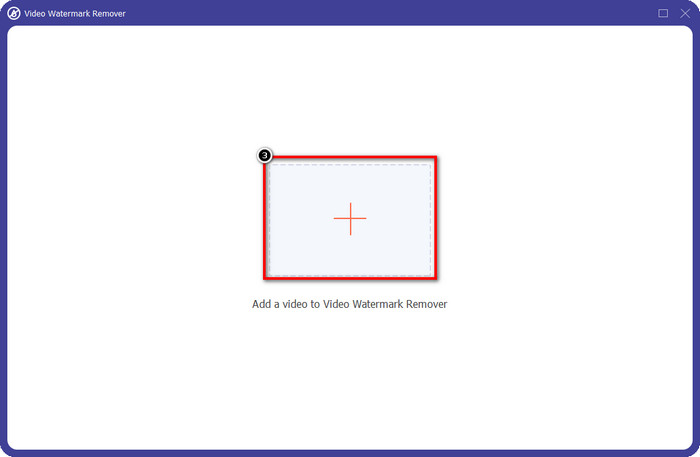
Passaggio 3. Poi fai clic su + per aggiungere il file video con la filigrana di Videoshop. Trova il file video nel file manager, cliccalo una volta e poi premi Apri per caricarlo.
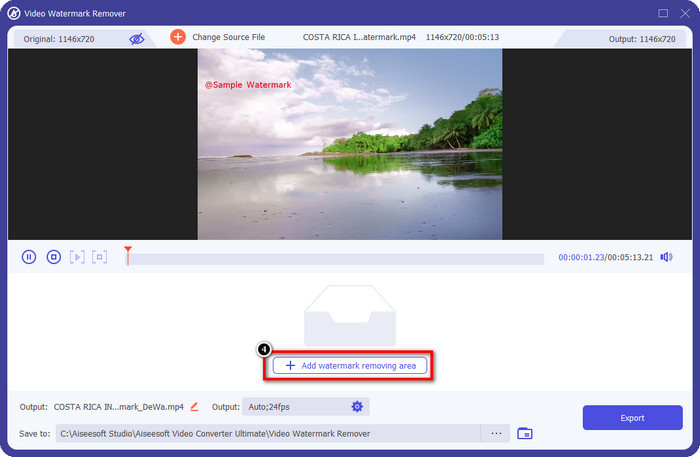
Passaggio 4. Clicca su Add Watermark Removing Area nella finestra successiva che apparirà dopo il caricamento del file.
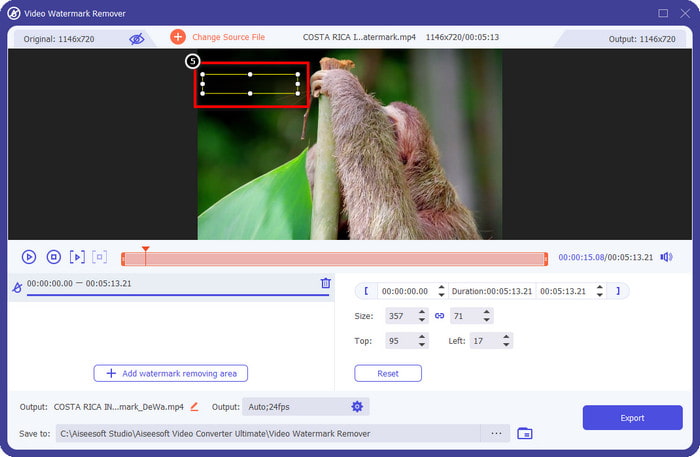
Passaggio 5. Posiziona il rettangolo sulla filigrana per coprirla. Assicurati che il rettangolo nell’anteprima copra completamente la filigrana nel tuo video, così che, quando scaricherai il file, non ci sarà più alcuna filigrana.
Passaggio 6. Premi Export per salvare sul desktop il video di Videoshop modificato senza filigrana; potrai controllare il file nella cartella che si aprirà automaticamente al termine del processo di esportazione.
Correlato:
Fotoritocco [iOS] - Il miglior strumento di rimozione di filigrane su dispositivi iOS
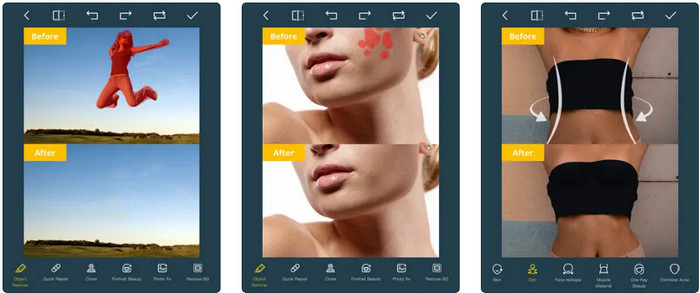
Photo Retouch è un’app per iOS che permette di rimuovere la filigrana dal tuo video senza lasciare residui una volta esportato. Questa app è gratuita da scaricare sull’App Store. Puoi darle un’occhiata. Anche se il nome dello strumento fa riferimento alle foto, puoi sfruttarlo per rimuovere la filigrana dai video ed eliminare qualsiasi oggetto indesiderato dal tuo filmato. Se vuoi provare questa app, puoi seguire il tutorial qui sotto su come eliminare la filigrana di Videoshop.
Passaggio 1. Scarica l’app dall’App Store cercandola e cliccando su Ottieni.
Passaggio 2. Dopo di che, apri l’app, clicca sull’icona + e seleziona Video Eraser. Scegli il file video che contiene una filigrana.
Passaggio 3. Traccia la filigrana sul tuo video utilizzando gli strumenti in basso; puoi usare la forma di marcatura supportata dallo strumento per evidenziare la filigrana nel tuo video.
Passaggio 4. Il processo di esportazione inizierà automaticamente dopo che avrai evidenziato la filigrana nel video; non spegnere il tuo dispositivo iOS per evitare interruzioni e attendi il completamento al 100%.
Rimuovi e aggiungi filigrana [Android] - Il miglior strumento di rimozione di filigrane per dispositivi Android
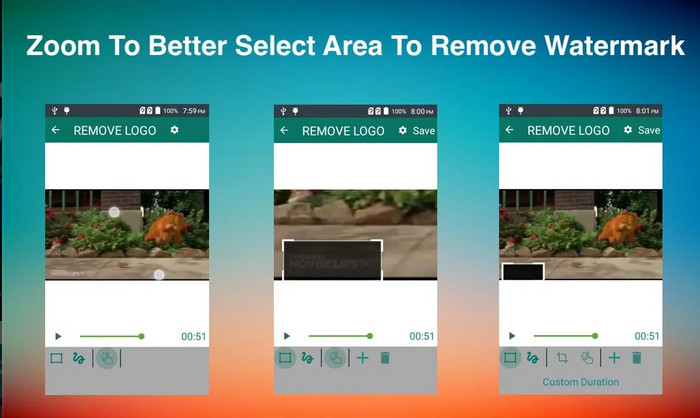
Come rimuovere la filigrana di Videoshop su Android? Utenti Android, non c'è bisogno di preoccuparsi perché puoi scaricare Rimuovi e Aggiungi filigrana sul tuo dispositivo. Questa app è scaricabile gratuitamente; puoi andare al Playstore più tardi se vuoi scaricare l'app sul tuo dispositivo. Cosa rende speciale questa app da includere? È a causa delle efficaci funzionalità di rimozione della filigrana che fornisce su immagini e video. Con questa app, puoi anche aggiungere la tua filigrana personalizzata sul supporto visivo che hai, se lo desideri. Segui la guida di seguito se desideri utilizzare questa app per rimuovere la filigrana che il Videoshop lascia sul tuo video.
Passaggio 1. Per accedere all’app, devi prima scaricarla dal Play Store cercandone il nome nella barra di ricerca.
Passaggio 2. Apri l’app, clicca su Select Video e tra le due opzioni disponibili scegli Remove Watermark. Carica il video desiderato che si trova nella tua galleria.
Passaggio 3. Usa un’area di selezione rettangolare o il lazo per evidenziare la filigrana nel tuo video.
Passaggio 4. Clicca su Save per scaricare il video che hai caricato qui senza alcuna filigrana.
Parte 2. Domande frequenti su come rimuovere la filigrana di Videoshop
Quanto costa Videoshop?
Il prezzo della versione Videoshop Pro è $2.99. Con questo prezzo basso, puoi avere uno dei migliori editor video sul tuo dispositivo con Videoshop.
Videoshop è disponibile per il download su Android e iOS?
Sì, Videoshop può essere scaricato su Android e iOS. Quindi, non devi preoccuparti degli utenti multipiattaforma perché questo editor video è disponibile su due diversi sistemi operativi con le stesse caratteristiche e funzioni.
Come posso pagare sull'app Videoshop?
Per gli utenti iOS, puoi caricare il tuo account iTunes per una transazione più semplice, addebiterà automaticamente il tuo account a seconda del piano di abbonamento che scegli, ma ci sarà un giorno prima. Per gli utenti Android, puoi utilizzare il tuo Google Pay per usufruire della sua versione pro.
Conclusione
Questo articolo è pensato per gli utenti che cercano un tutorial sulla rimozione efficace della filigrana di Videoshop su piattaforme diverse. Con le app che includiamo qui, è possibile rimuovere la filigrana senza lasciare tracce seguendo i passaggi che abbiamo incluso in questo articolo. Non c'è bisogno di preoccuparsi di usarli perché li abbiamo provati prima e siamo soddisfatti del risultato che abbiamo ricevuto, quindi li condividiamo oggi. Anche se non hai familiarità con la rimozione della filigrana, puoi comunque provare con il dispositivo di rimozione della filigrana che includiamo. Speriamo di averti aiutato con questo articolo; puoi leggere altri articoli utili qui sotto, se lo desideri.
-
 Come rimuovere facilmente la filigrana da Wondershare DVD Creator
 Questo articolo contiene informazioni su come rimuovere la filigrana da Wondershare DVD Creator. Per ottenere tutte le informazioni di cui hai bisogno è d'obbligo leggere questo.
-
 Rimuovi facilmente la filigrana dal PDF con semplici passaggi
 Rimuovi la filigrana dal PDF seguendo questi semplici passaggi. Scopri come rimuovere facilmente le filigrane dal tuo file PDF utilizzando questi fantastici strumenti.
-
 Come rimuovere la filigrana Coub con semplici passaggi
 Scopri come rimuovere la filigrana di coub sui tuoi video utilizzando questi famosi dispositivi di rimozione di filigrane. Leggi questo articolo per conoscere questi fantastici strumenti e come usarli.
