


 Video Converter Ultimate
 Screen Recorder
 Riparazione video
Scopri le 7 migliori app per aumentare il volume che puoi utilizzare sul desktop e sui telefoni
Non è forse irritante quando il volume di un video è così basso che, anche se porti il volume del dispositivo al massimo, non cambia nulla? Ci sono diversi motivi per cui il volume dell’audio può risultare basso. Invece di innervosirti per il video, perché non provi a usare un booster per rendere l’audio più forte e più chiaro? Oggi è il tuo giorno fortunato, perché ti presentiamo diversi amplificatori di volume tra cui puoi scegliere. Tutti gli strumenti presentati qui sono stati utilizzati dall’autore di questo articolo, per riportare fatti concreti sugli strumenti a seconda della piattaforma che stai usando. Dunque iniziamo la nostra panoramica dei diversi sound booster che puoi utilizzare su Windows, Mac, iPhone e Android.

Parte 1. 4 dei migliori booster di volume per PC Windows, Mac e online
1. Convertitore video definitivo
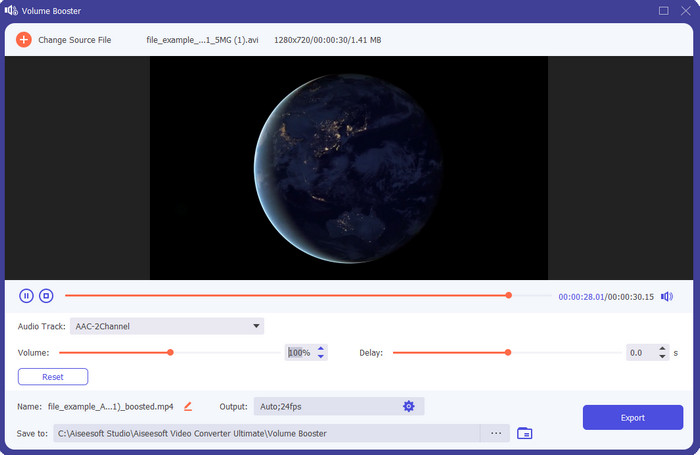
Se stai cercando la migliore app per aumentare il volume, allora Video Converter Ultimate fa al caso tuo. Questo strumento può migliorare la qualità del tuo audio senza danneggiare gli altoparlanti. Quindi, se regoli il volume con questo tool, non aspettarti fastidiosi crepitii dagli speaker. Inoltre, se hai problemi di bassa qualità audio, puoi usare questo programma per migliorarla. Anche se non sei un professionista, puoi comunque gestire facilmente il potenziamento dell’audio con questo strumento. E non solo: questo software offre molte altre funzioni che potresti trovare utili una volta scaricato. A differenza di altri amplificatori audio dell’elenco, questo tool mette a disposizione numerosi enhancer per rendere il suono ancora migliore. Inoltre, se hai problemi di ritardo audio, puoi usarlo anche per quello. È, a dire il vero, lo strumento più eccezionale di questa lista se dovessimo confrontare tutti i programmi. Quindi, se vuoi provare un audio 8D o 16D al massimo della resa, scarica subito questo software.
Download gratuitoPer Windows 7 o versioni successiveDownload sicuro
Download gratuitoPer MacOS 10.7 o versioni successiveDownload sicuro
Professionisti
- Esegui automaticamente la regolazione di equalizzatori e preset per rendere il tuo lavoro più semplice e migliore.
- L'output finale dell'audio è diventato molto migliore di prima e senza distruggere l'udito e nemmeno gli altoparlanti.
- È molto intuitivo che anche gli utenti che non hanno esperienza nel potenziamento possano farlo.
Contro
- È disponibile solo su desktop e nessuna versione per telefono.
- Acquista prima di potervi accedere ma non è così costoso.
2. Lettore multimediale VLC
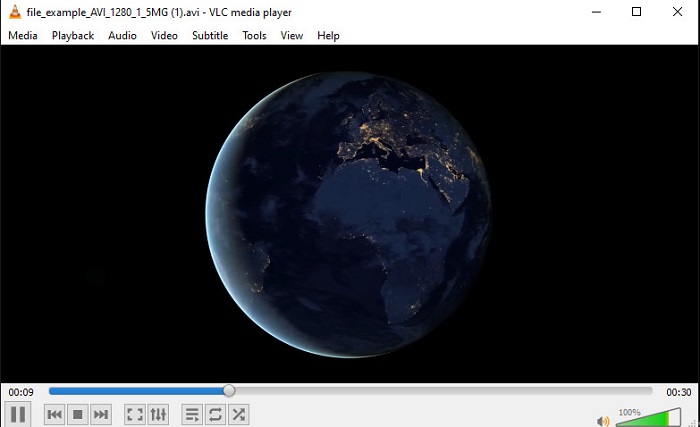
VLC Media Player è uno dei migliori media player che puoi scaricare dal web. Questo strumento integra già un amplificatore di volume gratuito nella sua interfaccia e l’audio può arrivare fino al 125% per cento, se lo desideri. Tuttavia, questo programma desktop non controlla quanto possa reggere il tuo altoparlante, il che significa che, se esageri portando il volume sempre al massimo, nel lungo periodo c’è il rischio che gli speaker inizino a emettere leggeri crepitii, soprattutto quelli integrati. Ma questo tool è l’unica app qui presentata che unisce in uno solo un booster e un player. Quindi, se vuoi guardare i video e al tempo stesso aumentare il volume, prova a usare questo programma. Anche se aumenta il volume, però, non può garantirti una qualità audio eccellente, perché interviene solo sull’amplificazione.
Professionisti
- Amplificatore audio integrato.
- Potenzia il tuo audio fino a 125% per renderlo più forte.
- Scaricabile gratuitamente su PC o Mac.
Contro
- Lo strumento non ha equalizzatore integrato per migliorare la qualità dell'audio.
- Non controlla quanto dovrebbe essere alto il tuo audio.
Correlato:
Come risolvere il problema “VLC non riproduce i file MKV”
Come risolvere VLC che non riproduce DVD
3. Boom 3D
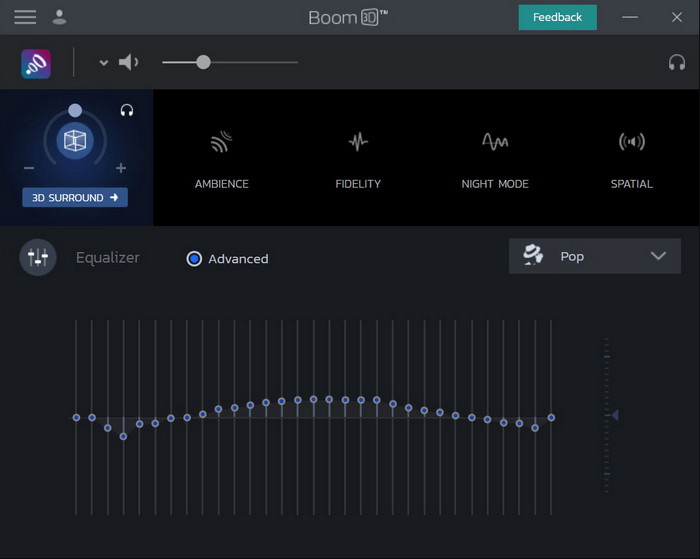
Boom 3D è il più avanzato nel campo del miglioramento audio. Questo amplificatore di volume per Windows 10 e Mac offre numerosi enhancer che puoi utilizzare. Inoltre, puoi regolare manualmente equalizzatori e preset, mentre in Video Converter Ultimate questo viene fatto automaticamente. Anche se lo strumento è molto interessante, ci sono comunque degli svantaggi se decidi di usarlo. Soprattutto se sei un principiante, ha bisogno di una configurazione iniziale e, in altre parole, può risultare un po’ impegnativo da gestire all’inizio. Tuttavia, studiare come usarlo richiederà tempo, ma ne varrà la pena.
Professionisti
- Sovrascrivi manualmente l'equalizzatore e il preset.
- Nessuna connessione Internet necessaria per accedere allo strumento.
- È fantastico essere utilizzato dal professionista che desidera avere un audio di buona qualità.
Contro
- Non è la scelta migliore per i principianti che non hanno idea di cosa siano equalizzatori e preset.
- Hai bisogno di molto tempo per studiare come utilizzare questo strumento.
4. Aumento del volume
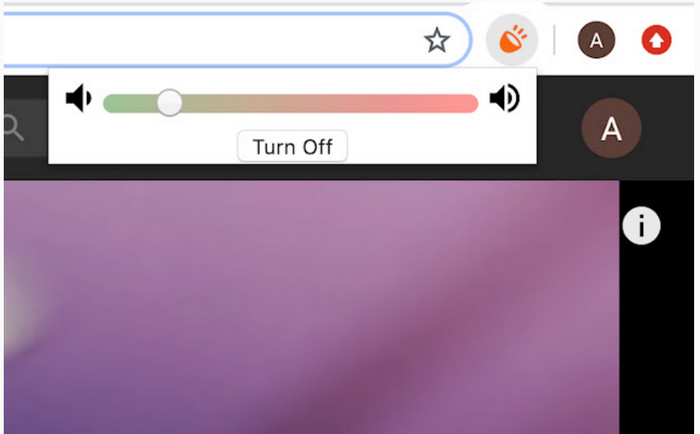
Volume Booster è un’estensione volume booster per Chrome a cui puoi accedere facilmente se hai una connessione Internet. Questo strumento è gratuito e sicuro, perché proviene dal Chrome Web Store. Se lo utilizzi, puoi aspettarti un notevole incremento del volume dell’audio che stai per ascoltare. Tuttavia, non puoi usare questa estensione al di fuori di Chrome. Quindi, se vuoi ascoltare un file audio salvato sul tuo disco, non potrai usare questa estensione per migliorarne il suono. Inoltre, quando abbiamo portato il volume al massimo, abbiamo avvertito alcuni crepitii; per evitarlo, è meglio mantenerlo appena sotto il livello massimo.
Professionisti
- Lo strumento è sicuro perché è un'estensione di Chrome.
- Facile da usare.
Contro
- Non può essere utilizzato al di fuori del cromo.
- Se lo giri al massimo, si sentirà un crepitio dell'audio.
- Non supporta equalizzatori.
Parte 2. Le 3 migliori app per aumentare il volume per iPhone e Android
1. Volume Booster – Equalizzatore FX
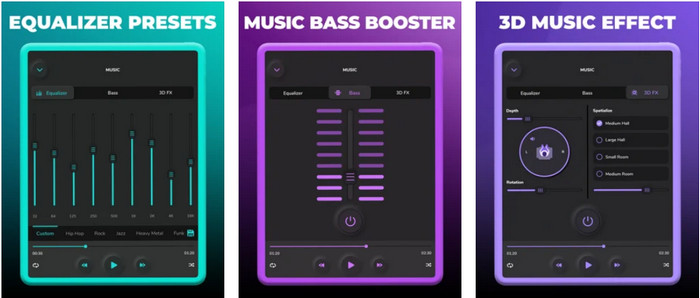
Volume Booster – Equalizer FX spinge al massimo il limite dell’audio del tuo iPhone per renderlo più forte e migliore. Questo volume booster per iPhone è stato usato da molti utenti iOS per creare il proprio equalizzatore personalizzato. L’app ha ricevuto una valutazione discreta di 3,9 stelle: non è né pessima né eccellente. Inoltre, non può potenziare l’audio durante lo streaming online e la pubblicità risulta davvero invasiva. Inoltre, si verificano ancora crash, bug e altri problemi. Tuttavia, se vuoi un potenziamento dei bassi su iPhone, vale comunque la pena provarla.
Professionisti
- È un buon booster per gli utenti di iPhone.
- È possibile eseguire l'equalizzazione di base e la regolazione dell'audio.
Contro
- Il più delle volte lo strumento si arresta in modo anomalo.
- Ha una limitazione su dove è possibile utilizzare l'aumento dell'audio.
2.AmpMe: sincronizzazione di altoparlanti e musica
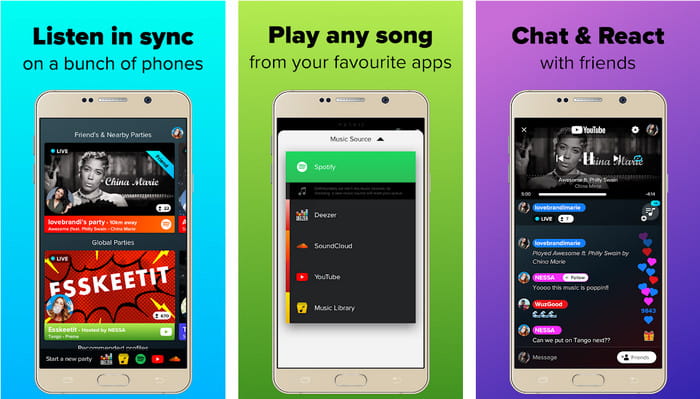
AmpMe - Speaker & Music Sync è un’ottima app scaricabile come amplificatore di volume per dispositivi Android. Non è solo un booster, perché puoi diventare host e riprodurre la tua playlist oppure unirti a una festa live tramite l’app. In pratica, con questa app puoi interagire con gli altri ascoltando musica e chattando allo stesso tempo. Sebbene lo strumento sia molto interessante, potresti comunque incontrare alcuni bug e crash durante l’uso. Inoltre, alcuni utenti trovano difficile aggiungere brani alla propria playlist, cosa piuttosto fastidiosa. E l’app può risultare un po’ complicata da gestire, soprattutto se non ne conosci bene le funzioni. Nel complesso, però, è un’ottima soluzione per gli utenti Android.
Professionisti
- Puoi essere il tuo DJ con AmpMe e condividerlo con le altre persone nelle vicinanze con la stessa app.
- Ascolta e chatta allo stesso tempo.
- Produce un audio di alta qualità.
Contro
- La quota di abbonamento è troppo per essere pagata se vuoi andare più economico.
- È difficile annullare l'abbonamento anche dopo aver eliminato l'account.
- A volte, quando ti unisci a una festa dal vivo, l'app viene automaticamente disconnessa.
3. Booster di volume GOODEV
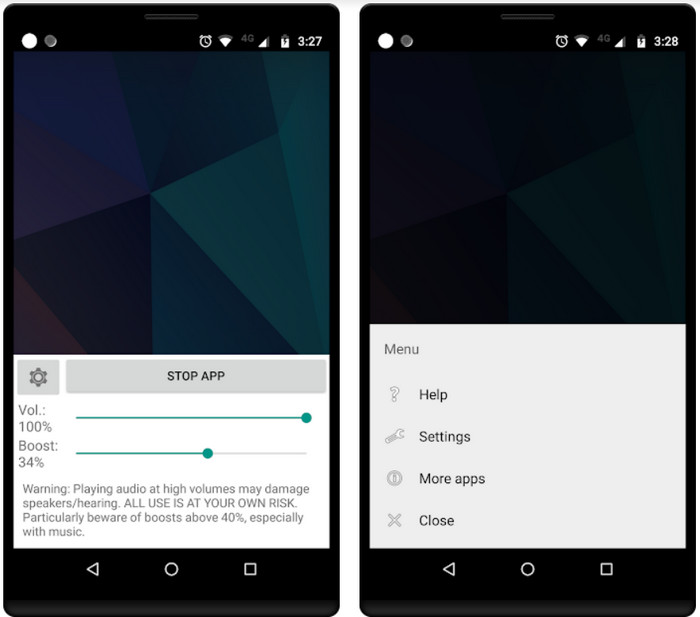
Volume Booster GOODEV ha un’interfaccia semplice e facile da usare. Questo volume booster ha già ricevuto un’ottima valutazione di 4,4 stelle dai suoi utenti. Molte recensioni affermano che questo strumento è il migliore nel suo campo. Tuttavia, ora si verificano alcuni crash durante l’utilizzo e, nella maggior parte dei casi, l’app non aumenta più il volume dell’audio anche quando la avvii. Per riattivarla devi riavviare il telefono o riaprire l’app, in modo da risolvere il problema.
Professionisti
- Booster audio di facile comprensione che può essere scaricato facilmente sul tuo cellulare Android.
- Facile da usare.
Contro
- Gli annunci vengono visualizzati dal nulla.
- La maggior parte delle volte l'app si arresta in modo anomalo da sola senza una ragione sconosciuta.
- La vecchia versione di questa app è molto migliore della versione aggiornata.
Parte 3. Qual è il miglior amplificatore di volume
Ecco un grafico di confronto presentato per confrontare quali sono le funzionalità dello strumento che puoi utilizzare con lo strumento che l'altro strumento non ha.
| Strumento Caratteristica/i | Video Converter Ultimate | VLC Media Player | boom 3D | Amplificatore di volume | Volume Booster – Effetti equalizzatore | AmpMe: sincronizzazione di altoparlanti e musica | Potenziatore di volume GOODEV |
| Amplificatori audio |  | | | | | | |
| Miglioratore audio | |  | | | | | |
| Funzione di sincronizzazione audio e video | | | | | | | |
| Facile da usare | | | | | | | |
| Piattaforme supportate | Strumento basato sul desktop | Strumento basato sul desktop | Strumento basato sul desktop | Strumento di estensione di Chrome | Strumento basato su iOS scaricabile | Strumento basato su Android scaricabile | Strumento basato su Android scaricabile |
| Fascia di prezzo | 1 mese: $25.00 Licenza a vita:$55.20 Licenza multiutente a vita/5 PC: $119.00 | Scaricabile gratuitamente | $11.99 e $23.99 | Gratuito | da 3 a 20 $ | $0.99 – $99.99 per articolo | Gratuito |
Parte 4. Domande frequenti su Volume Booster
L'aumento del volume dell'audio danneggia l'udito?
Attualmente si. Soprattutto se stai utilizzando auricolari o cuffie e metti il volume dell'audio al massimo, quindi aggiungi un amplificatore di volume. Quindi aspettati che a lungo termine il tuo udito si distrugga lentamente a lungo termine. Quindi, per evitarlo puoi. Il nostro suggerimento è di limitarlo a medio o basso e non puntare al massimo.
Quali sono gli altri svantaggi dell'amplificazione audio sugli altoparlanti?
Usiamo un amplificatore audio per ascoltare l'audio molto meglio se i suoni sono bassi. Ma non sapevi che anche gli altoparlanti hanno un limite di Hertz di cui sono capaci. Più alto è l'hertz, più forte puoi essere, ma su alcuni altoparlanti integrati non possono gestire un suono molto forte. Quindi, ci sono possibilità che l'altoparlante crepiti, il che significa che l'audio non può essere gestito dall'altoparlante.
Quali sono le differenze tra bassi e alti degli altoparlanti?
Questi due sono gli altoparlanti integrati più conosciuti ma hanno il loro scopo perché sono negli altoparlanti. Per i bassi, può gestire una bassa frequenza dell'audio e non può gestire l'alta frequenza, inoltre è specializzato nel farci sentire il boom della musica. Mentre gli alti si concentrano sulle frequenze acute che i bassi non possono gestire.
Conclusione
In conclusione, non sei costretto ad ascoltare un audio di scarsa qualità se lo potenzi con l’aiuto di un amplificatore di volume su PC, Mac, online e sui dispositivi mobili. Gli strumenti qui presentati sono perfetti per chiunque voglia vivere la musica a un nuovo livello. Ma esiste un programma che aiuta i suoi utenti a rendere il potenziamento dell’audio più semplice ed efficace. Così, invece di imparare a regolare equalizzatore e preset, Video Converter Ultimate lo fa già automaticamente per te. E per renderti conto di quanto sia valido questo strumento, provalo tu stesso e scaricalo sul tuo dispositivo.
-
 Come aggiungere gratuitamente audio e musica al video sul tuo computer / telefono
 Questo articolo mostra 4 semplici modi per aggiungere gratuitamente l'audio al video. Indipendentemente dalla traccia audio che desideri aggiungere al tuo video, puoi ottenere risultati soddisfacenti qui.
-
 Il registratore audio di revisione Cinch imparziale e la migliore alternativa
 Cinch Audio Recorder è il modo migliore per scaricare musica da siti di streaming. Scopri di più sulla recensione imparziale e sulla migliore alternativa dall'articolo.
-
 Modi fattibili su come registrare audio con VLC Player
 Scopri i modi migliori per registrare l'audio con il lettore VLC e altri strumenti pratici, leggendo l'articolo.
