


 ビデオコンバーター究極
 スクリーンレコーダー
 ビデオ修復
ビデオ修復
 安全なダウンロード
逆GIF: 簡単で完全なチュートリアルとツールの概要
GIF をもっと面白くしたいですか?逆にします。したがって、楽しいGIFやループGIFを作成したり、GIFビデオにスパイスを加えたり、クリエイティブな雰囲気を加えたりするための優れた創造的な方法を探している場合は、GIFを反転してみてください。簡単なアプリの概要とステップバイステップのプロセスを含む徹底したガイドを使用して、さまざまなプラットフォームと GIF ファイルを編集および反転する効率的な方法を見つけてください。

ここでは、各ツールとソフトウェアの短所と長所の概要を簡単に説明します。
| アプリ | 長所 | 短所 |
| キャップカット | ◆Androidでも簡単にアクセス可能。 ◆豊富な機能、テンプレート、ステッカー、フィルターから選択できます。 | ◆ 最初にダウンロードする必要があります。 ◆かなり複雑なリバースプロセス |
| GIF メーカー – ビデオを GIF に変換 | ◆ 便利なツールを提供します。 ◆ Android ユーザーは無料でアクセスできます。 | ◆ ポップアップ広告が少しあります。 ◆ 反転する GIF フレームを手動で選択する必要があります。 |
| ビデオコンバーター究極 | ◆効率的かつ迅速なプロセス。 ◆WindowsとMacに対応。 ◆透かしはありません。 ◆ 高品質の出力。 | ◆ツールや機能にアクセスするには、まずダウンロードする必要があります。 |
| 簡単GIFアニメーター | ◆ 素早く簡単な反転プロセス。 ◆簡単にナビゲートできます。 | ◆Windows専用 ◆最初の20回のみアクセス可能です。 ◆ 古いクラシックなインターフェイスを備えています。 |
| オンラインGIFツール | ◆ アップロード後に GIF を自動的に反転します。 ◆ GIF を強化するための貴重なツールを提供します。 | ◆複数のツールを同時に使用することはできません。 |
| EZGIF | ◆ 迅速かつ簡単なプロセス ◆ GIF を編集するための無料のオンライン プラットフォーム。 | ◆特に編集に慣れていない人にとっては、いくつかのツールを明確にする必要があるかもしれません。 |
| GIFGIF | ◆GIFを素早く反転。 ◆ 多くの便利な機能を備えた効率的なツール。 ◆ ビデオ出力をあらゆるソーシャル メディア プラットフォームで共有できます。 | ◆複数のツールを同時に使用することはできません。 |
パート 1. デスクトップ上で GIF を反転する方法
1.ビデオコンバーターアルティメット
「Video Converter Ultimate」を使って、逆再生GIFを作成しましょう。これは、高度な機能とツールを多数備えたオールインワンの動画変換・編集ソフトで、動画編集の作業を素早くストレスなく行えます。以下は、Video Converter Ultimate を使って GIF を逆再生にする方法です。
ステップ1.Video Converter Ultimate をダウンロード&インストール
下の無料ダウンロードボタンをクリックして Video Converter Ultimate をダウンロードし、インストーラーを実行します。
無料ダウンロードWindows 7 以降対応安全なダウンロード
無料ダウンロードMacOS 10.7 以降対応安全なダウンロード
ステップ2.動画逆再生ツールを開く
Video Converter Ultimate を起動し、ツールボックスを探してクリックします。検索ボックスで動画逆再生を検索して選択します。
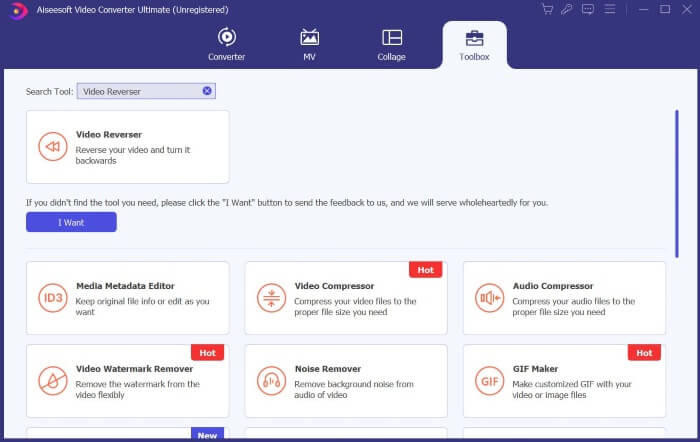
ステップ3.動画を逆再生にする
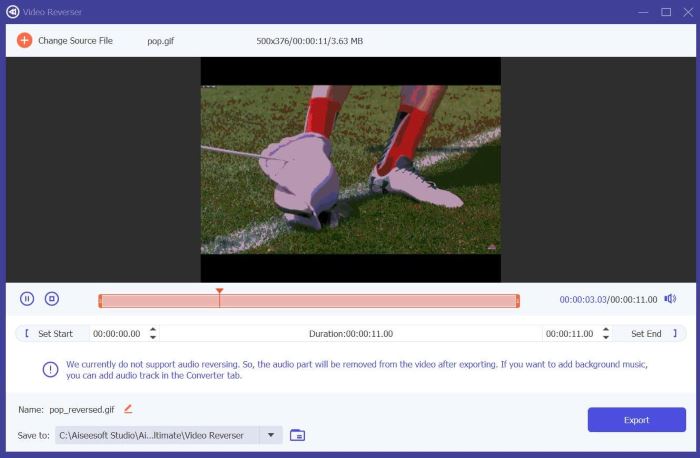
+アイコンをクリックして、逆再生にしたいファイルを選択し、読み込みます。
ステップ4.逆再生GIFを書き出す
ファイルの読み込みが完了したら、書き出しをクリックします。Video Converter Ultimate が逆再生GIFをデフォルトフォルダーに保存します。
2. 簡単GIFアニメーター
Easy GIF Animator は、GIF を作成および編集できる使いやすいツールです。ユーザーが GIF ビデオを向上させるための高度なツールと効率的な機能を提供します。その 1 つは、GIF のアニメーションを反転できることです。 Easy GIF Animator を使用して GIF を反転する方法は次のとおりです。
ステップ1. お好みのブラウザでEasy GIF Animatorを検索し、検索結果の一番上のリンクをクリックします。トップページで[Download]を探してクリックし、インストーラーを実行してソフトをインストールします。
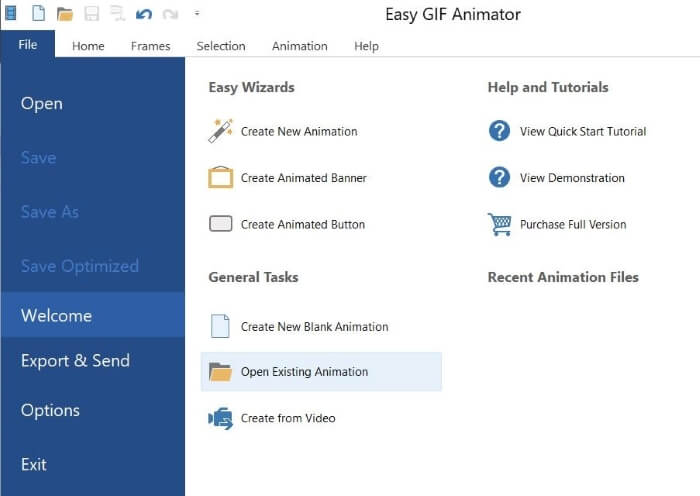
ステップ2. Easy GIF Animator を起動し、File メニューからOpen Existing Animationをクリックして、逆再生にしたいGIFファイルを選択します。
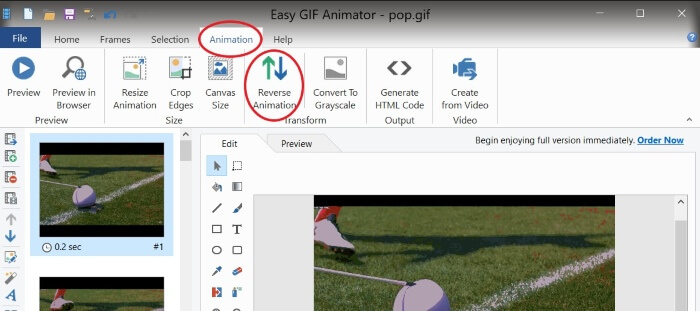
ステップ3. ファイルが読み込まれたら、Animationsを開き、Reverse Animationをクリックします。
ステップ4. 逆再生GIFを保存するには、FileメニューからSave Asをクリックします。
パート 2. Android で GIF を反転する方法
1. キャップカット
Capcut は、Android ユーザーに人気があり、愛されているビデオ編集プラットフォームです。ビデオエフェクトからステッカーやテンプレートに至るまで、Capcut にはビデオをアップグレードして強化するためのさまざまなツールが用意されています。その 1 つは、GIF などのビデオ ファイルを反転することです。 Capcut で GIF を反転する方法は次のとおりです。
ステップ1. Google Play ストアからスマートフォンに Capcut をダウンロードします。
ステップ2. スマートフォンで Capcut を開き、新しいプロジェクトをタップします。ギャラリーからGIFファイルを選択します(GIFファイルは写真カテゴリに表示されます)。そのままではGIFを逆再生できないため、いったん書き出しを行います。
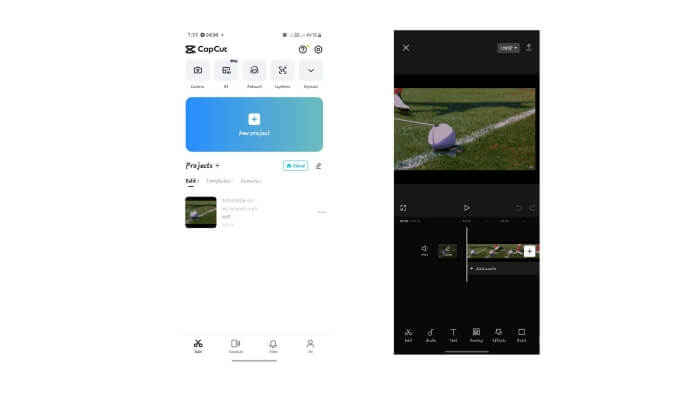
ステップ3. 改めて新しいプロジェクトを作成し、先ほど書き出したファイルを選択します。動画クリップをタップして編集ツールを表示し、逆再生を選択したあと、再度書き出しします。
ステップ4. 動画をGIFに変換するツールを使って、書き出したファイルを再びGIF形式に変換します。
2. GIF メーカー - ビデオを GIF に変換
GIF Maker - Video To GIF は、GIF エクスペリエンスを向上させるステッカー、フィルター、編集ツールを使用して、GIF をキュートでトレンディで楽しい GIF ビデオに変換する多用途のモバイル アプリです。さらに、GIF を反転するために使用することもできます。その方法は次のとおりです。
ステップ1. スマートフォンの Google Play ストアで「GIF Maker - Video to GIF」を検索してダウンロードします。
ステップ2. スマートフォンで GIF Maker を開き、Edit GIFをタップします。ギャラリーから逆再生にしたいGIFを選択します。
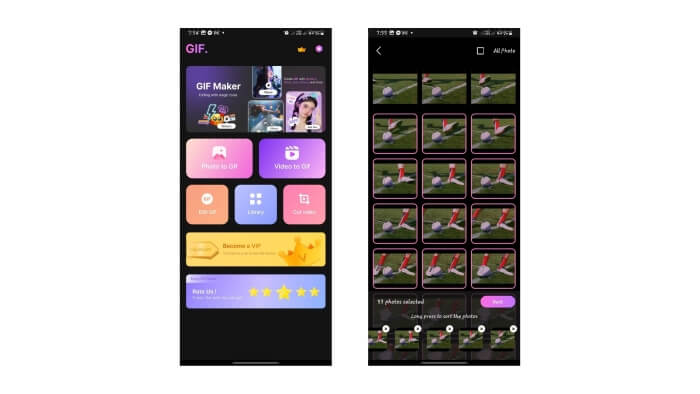
ステップ4. GIFのプレビューを確認し、逆再生になっていることをチェックします。問題なければ、NextとSaveをクリックします。
パート 3. オンラインで GIF を反転する方法
1.オンラインGIFツール
オンライン GIF ツールは、GIF 編集用のユーティリティのコレクションを提供するプラットフォームであり、それらのツールの 1 つはアニメーション GIF の反転です。上記のツールを使用するためのガイドラインをいくつか示します。
ステップ1. お好みのブラウザでOnline GIF Toolsを検索し、検索結果の一番上のリンクを選択します。
ステップ2. Online GIF Tools のホームページで、Reverse a GIF Animationをメニューからまたは検索ボックスで探し、クリックします。
ステップ3. ファイルをアップロードすると、Online GIF Tools が自動的にGIFを逆再生にしてくれます。
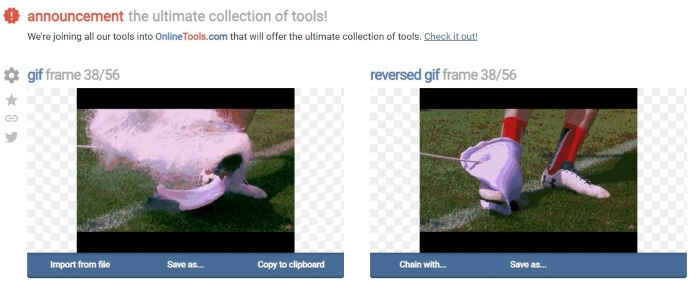
ステップ4. 逆再生GIFを保存するには、[Save As]と[Download]をクリックします。
2.EZGIF
EZGIF を使用してオンラインで逆GIF! EZGIF は、GIF を編集および最適化するための優れたプラットフォームです。 GIF の編集とカスタマイズに役立つ機能が多数あります。 EZGIF を使用して GIF を反転する方法は次のとおりです。
ステップ1. お好みのブラウザでEZGIFを検索し、検索結果の一番上のリンクを選びます。
ステップ2. メニューパネルでEffectsをクリックし、Reverse GIFを探してクリックします。
ステップ3. Choose Filesを押してGIFファイルを選択し、Uploadをクリックします。ページを下にスクロールし、Reverseのチェックボックスにチェックを入れてからSubmitをクリックします。
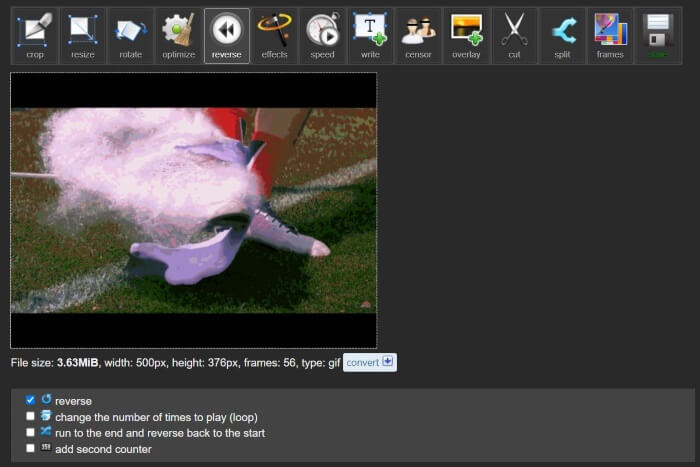
ステップ4. 下にスクロールして逆再生GIFのプレビューを確認し、仕上がりに満足したらSaveをクリックしてファイルをダウンロードします。
3.GIFGIF
GIFGIFを使用してGIFを反転させます。無料のGIFアニメーションと編集ツールを提供するプラットフォームです。 GIF を反転する迅速かつ直接的な方法を探している場合は、GIFGIF が最適なツールです。数回クリックするだけでGIFを反転する方法は次のとおりです。
ステップ1. お好みのブラウザでGIFGIFsを検索し、検索結果の一番上のリンクを選択します。
ステップ2. ツール一覧の中からGIF Reverserを探してクリックします。
ステップ3. Uploadを押してGIFファイルを読み込みます。必要に応じて、GIFを水平方向または垂直方向に反転させることもできます。
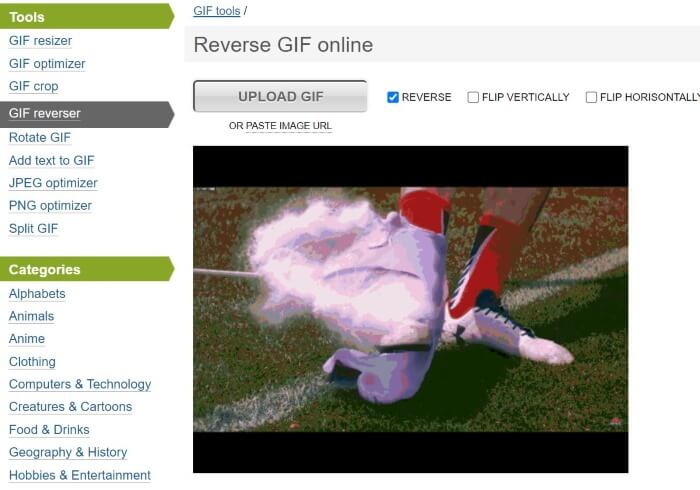
ステップ4. 下へスクロールしてReverseをクリックします。逆再生GIFのプレビューの下にあるDownload the Resultを押して、逆再生GIFをパソコンに保存します。
さらに詳しく読む:
パート 4. GIF の反転に関する FAQ
iPhone はデフォルトのアプリを使用して GIF を反転できますか?
通常、GIF を反転するには、GIF の編集機能と反転機能を備えたアプリとサードパーティのプラットフォームが必要です。
After Effects で GIF を反転できますか?
はい、After Effects でアニメーションを反転できます
GIF を反転すると品質に影響しますか?
最初は、GIF 反転プラットフォームを使用し、出力のビデオ品質を向上させることを選択した場合、GIF の反転はその品質に影響します。
GIF の反転はどのように機能しますか?
GIF を反転すると、そのフレームが逆の順序で再配置され、アニメーションが逆方向に進んでいるように見えます。
反転GIFの速度を制御できますか?
はい、多くの GIF 編集ソフトウェアとプラットフォームでは、GIF の速度を編集できます。
結論
まとめると、逆再生GIFはアニメーションGIFに遊び心と印象的なアクセントを加えてくれますし、GIFを逆再生するのを素早く手助けしてくれるユニークなツールも数多くあります。これらのツールを使えば、オンラインでも、デスクトップでも、スマートフォンでも、時間効率が良く手間のかからないGIF編集と逆再生が可能です。自分の好みや環境に最も合った方法を選びましょう。
-
 デスクトップおよびオンライン ユーザー向けのベスト 10 GIF コンプレッサー
 この記事では、大きな GIF ファイルの問題を解決するのに役立つ最高の GIF コンプレッサーについて学びます。それらをチェックして、最良の洞察を得ることができます。
-
 デスクトップ、オンライン、モバイルを楽しむためのトップツールを発表
 GIF エディターが提供するものを発見し、オンラインにアップロードできる印象的で創造的な GIF を作成するために使用できる最高のツールについて学びます。
-
 GIFをAPNGに変換: GIFをAPNG形式に変換する効率的なツール
 GIFをAPNGに変換する方法をお探しですか?私たちはあなたをサポートします!わかりやすいガイドで、GIF を APNG に変換するさまざまな方法を発見してください。
