


 ビデオコンバーター究極
 スクリーンレコーダー
 ビデオ修復
ビデオ修復MTSをMKVに無料ですばやく変換する方法
要するに、MPEGトランスポートシステムでは、MTS ファイルは 720p と 1080i の動画に対応した標準的なファイル形式です。しかし、この形式は出力ファイルサイズが非常に大きくなる場合があります。したがって、より広く対応していて、なおかつファイルサイズを小さくできる MKV 形式などに変換する必要があります。本記事では、MTS を無料で MKV に変換するための最適な方法をご紹介します。

パート1。MTSをMKVに変換する2つの最高の無料オンラインツール
FVC無料ビデオコンバーターオンライン
近年では、ソフトウェアをインストールするよりも、オンラインコンバーターを利用する人の方が多くなっています。FVC Free Online Video Converter は、MTS を MKV、MP4、WMV、AVI、FLV などに変換できるオンラインコンバーターです。無料のオンラインコンバーターでありながら、変換中にファイルの品質が落ちる心配はほとんどありません。さらに、解像度や動画・音声ビットレートを編集できる機能も備えています。
この無料のオンラインツールを使用してファイルMTSをMKVに変換する方法の手順は次のとおりです。
ステップ 1. このコンバーターを使用するには、このリンクをクリックして公式ページへアクセスします。
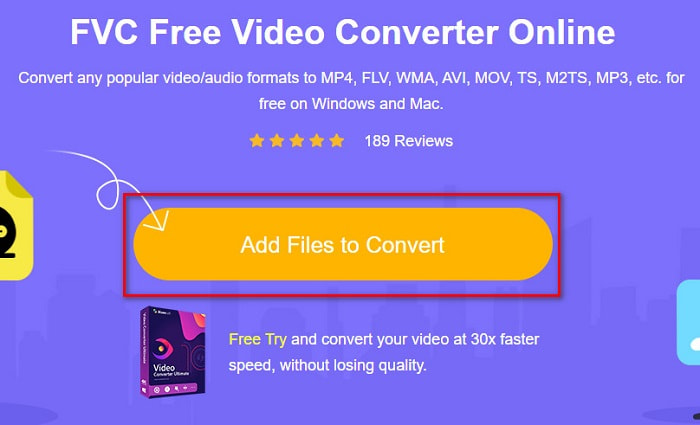
ステップ 2. 次に、Add Files to Convert ボタンをクリックしてランチャーをダウンロードします。ランチャーのダウンロードが完了すると、パソコン内のファイル一覧が表示されるので、アップロードしたい MTS ファイルを選択します。
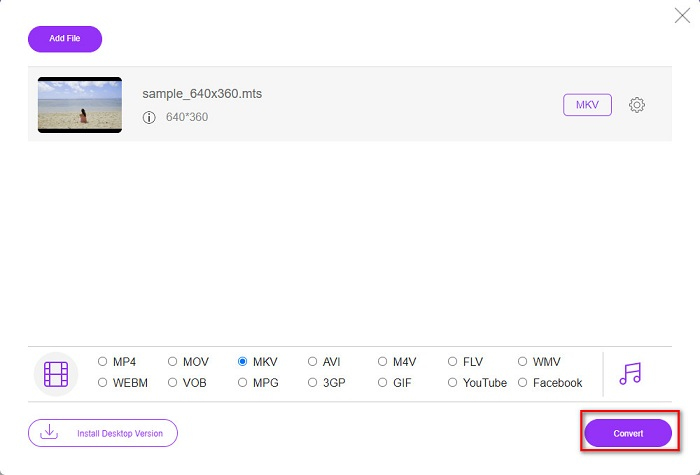
ステップ 3. MTS ファイルを選択したら、ソフトのインターフェース下部にある MKV をクリックします。
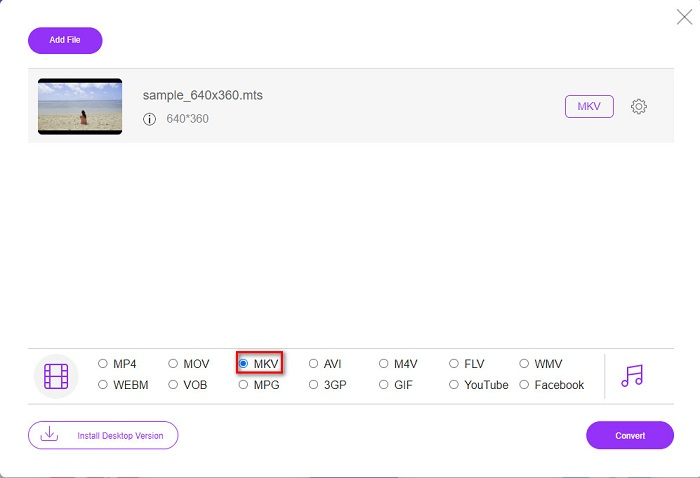
ステップ 4. 最後に、Convert ボタンをクリックして MTS ファイルを MKV ファイルに変換します。あとは変換が完了するまで待つだけです。
これらの簡単な手順に従うことで、MTSをMKVに無料でオンラインで変換できます。
AnyConv
もう一つ、画質を落とさずにファイルを変換したいときに使えるオンラインコンバーターとして、AnyConv File Converter があります。このコンバーターも MTS から MKV、AVI、MP4、MOV、MPEG など、数多くの形式に対応しています。ただし、機能はやや限定的で、ファイルの解像度を編集・変更することはできません。また、Web ベースのサービスのため、変換速度が遅く感じられる場合もあります。それでも、手軽に使えることから多くのユーザーに利用されています。
AnyConvファイルコンバータを使用する方法の手順:
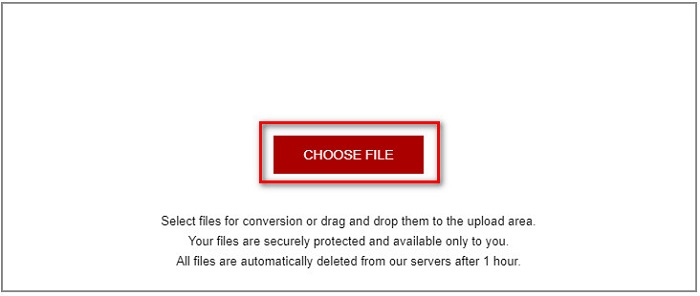
ステップ 1. ブラウザで AnyConv File Converter を検索します。公式サイトにアクセスしたら、Choose Files ボタンをクリックして、パソコン内から MTS ファイルを選択します。
ステップ 2. MTS ファイルを選択したら、drop-down ボタンをクリックし、MKV 形式を選びます。
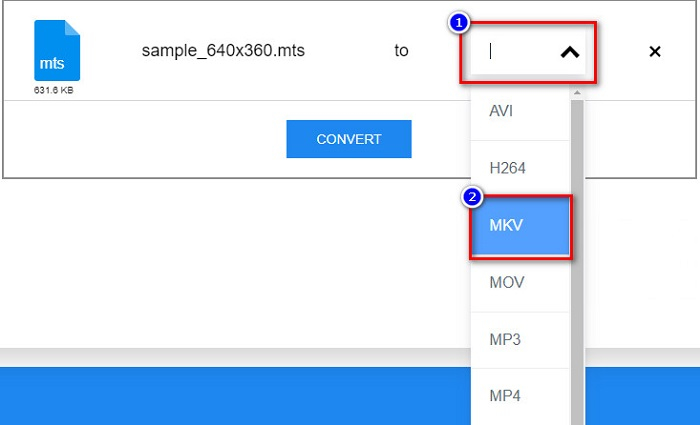
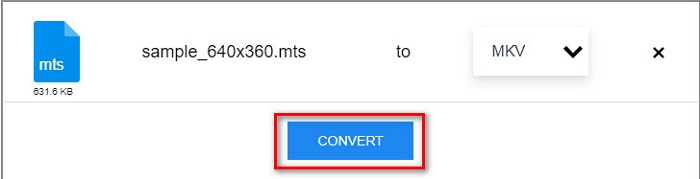
ステップ 3. 最後に、Convert ボタンをクリックして、MTS から MKV への変換を開始します。
パート2。Windows10/11でMTSをMKVにロスレスで変換する
Windows 10/11用のコンバーターをお探しの場合は、FVC VideoConverterUltimateが最適なツールです。さまざまなファイル形式をサポートし、MTSをMKV、MP4、WebM、VOB、MPG、AVIなどに変換できます。さらに、このコンバーターには、GIFを作成したり、3Dビデオを作成したりできる機能があります。また、ファイルの品質を損なうことなく、MTSをMKVにすばやく簡単に変換できます。

FVCビデオコンバーターアルティメット
5,689,200以上のダウンロード- このコンバーターを使用してファイルをバッチ変換できます。
- MTS、MKV、MP4、WMVなどのさまざまなファイル形式を変換できます。
- 超高速変換を可能にする機能があります。
無料ダウンロードWindows 7 以降に対応安全なダウンロード
無料ダウンロードMacOS 10.7 以降に対応安全なダウンロード
FVC VideoConverterUltimateを次の簡単な手順で使用する方法は次のとおりです。
ステップ 1. まず、Windows 用の Download ボタンをクリックしてアプリをダウンロードします。その後、ソフトウェアを起動して次のステップに進みます。
無料ダウンロードWindows 7 以降に対応安全なダウンロード
無料ダウンロードMacOS 10.7 以降に対応安全なダウンロード
ステップ 2. コンバーターを開いたら、Add Files ボタンをクリックするか、+ アイコンの上にファイルをドラッグ&ドロップして、MTS ファイルをアップロードします。選択したファイルは一覧に追加されます。
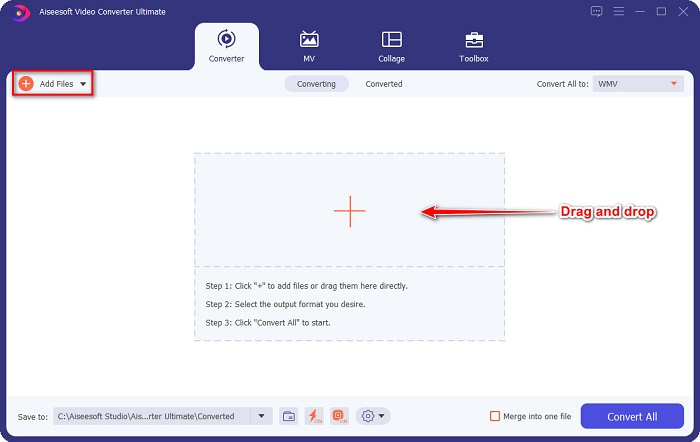
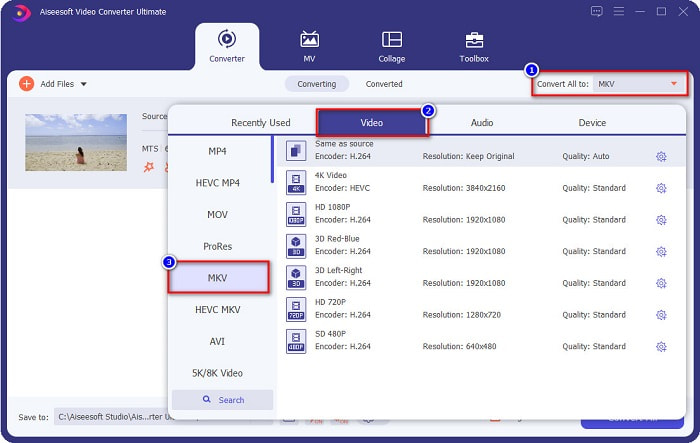
ステップ 3. MTS ファイルをどの形式に変換するか選択するには、Convert All to ボタンをクリックし、MKV を選びます。
ステップ 4. 最後に、Convert All ボタンをクリックして、MTS ファイルを MKV ファイルに一括変換します。数秒待てば、変換済みファイルの準備が完了します。
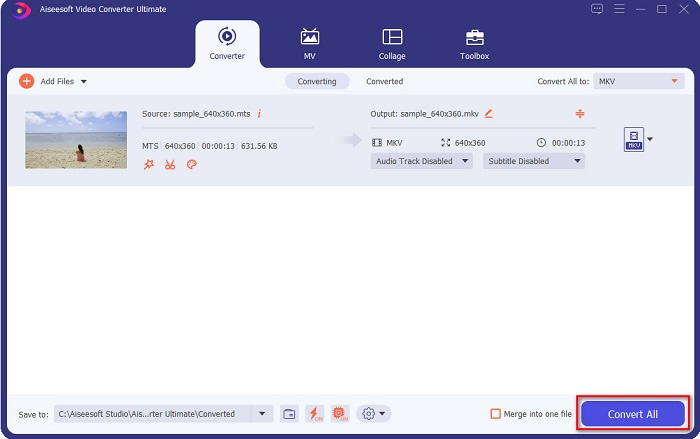
これらの簡単な手順に従うことで、MTSをMKVに1-2-3の速さで変換できます。
パート3。MTSファイルをMKVファイル形式に変換する理由
MTSファイル(MPEG Transport Systemの略)は、主にソニーとパナソニックのHDビデオカメラで使用される標準のファイル形式です。 MPEG4/H.264ビデオ圧縮を使用したファイルです。さらに、他のファイル形式ではサポートされていない720pおよび1080iビデオをサポートします。パナソニックとソニーがこのファイルを開発したため、AVCHDファイル形式に関連するAdvanced AudioCodingFileを使用しています。一方、MKVファイルまたはMatroskaは、多くのオーディオおよびビデオコーデックをサポートする標準のファイル形式です。通常、短いビデオクリップやムービーを保存するために使用されます。
さらに、字幕トラックもサポートしています。そのため、多くのファンサブの人々がこのファイル形式を使用しています。では、なぜMTSをMKVに変換するのでしょうか。 MKVのファイルサイズがMTSファイル形式に含まれているサイズよりも小さいという理由だけで。
パート4。オンラインとオフラインのコンバーターに関する比較チャート
| 特徴 | FVC無料オンラインコンバーター | AnyConvファイルコンバータ | FVCビデオコンバーターアルティメット |
| 変換速度 | 正常 | 正常 | とても早い |
| 変換するファイル形式 | MKV、MP4、MTS、MPG、MOV、AVI、WMV、FLV、およびその他のファイル形式 | MTS、MKV、AVI、MOV、MP4、MPEG、およびその他の形式 | 1000以上のファイル形式をサポート |
| 編集機能 | – | – |  |
| バッチ変換 | – | – | |
| インターネット接続 | 必要 | 必要 | 必要ありません |
パート5。MTSからMKVへの変換に関するFAQ
MTSファイルのファイルサイズを小さくできますか?
はい。Free Video Compressor のような、オンライン/オフライン対応の圧縮ツールを使えば、MTS ファイルのサイズを小さくすることができます。
MKVファイル形式はどこで再生できますか?
Windows Media Player で MKV ファイルを再生できるほか、VLC Media Player、DivX Player、MX Player などでも再生可能です。また、メディアコーデックを利用して、メディアファイルのエンコード・デコードを行うこともできます。あるいは、MKV ファイルを汎用性の高い MP4 形式に変換する方法もあります。
HandbrakeでMTSをMKVに変換できますか?
はい。このコンバーターを使用すると、MTSファイルをMKVファイル形式に変換することもできます。ただし、複数のファイルをサポートしておらず、それらを1つに結合することはできません。
結論
現在、オンライン・オフラインともに数多くのコンバーターが市場に出回っています。本記事で紹介したコンバーターはいずれも多くのユーザーに利用され、その性能が実証されている優秀なツールです。さらに、それぞれ異なる機能や特徴を持ち、MTS を無料で MKV にオンライン変換することができます。中でも、利便性と効率性を重視するなら、FVC Video Converter Ultimate の利用をおすすめします。この超高速コンバーターなら、期待を裏切ることはないでしょう。さあ、ファイル変換の準備ができたら、今すぐダウンロードして試してみてください!
-
 [無料&オンライン]高品質でMTSをMP4に変換する6つの方法
 MTSファイルをMP4に変換する方法がわかりませんか?このガイドでは、品質を損なうことなく、WindowsまたはMacでMTS形式をMP4に変更する6つの無料で簡単な方法を紹介します。
-
 品質を損なうことなくMTSをWMVに変換する方法
 メディアプレーヤーがMTSビデオ形式をサポートしていないため、お気に入りの番組を見るのに苦労していますか?この記事にあるこれらの新しくて最高のコンバーターを使用して、WMVに変換してみてください。
-
 品質を損なうことなくMTSをMP3に変換する方法(AVCHDからMP3)
 MTSファイルからMP3オーディオを抽出する必要がありますが、方法がわかりませんか?最高のMTSからMP3へのコンバーターは何ですか?この投稿では、MTS / M2TSを高音質のMP3に変換するのに役立つ2つの簡単な方法を共有しています。
