


 ビデオコンバーター究極
 スクリーンレコーダー
 ビデオ修復
ビデオ修復最高のコンバーターを使用してRMVBをMKVに簡単に変換する方法
If you are one of the people who is looking for a way to convert your RMVB file to MKV, then you might want to read this article until the end. This article will show you how to convert your RMVB file to MKV using the best and free converters that are easy to use. Please sit back and relax as we present you the best ways to convert RMVB to MKV online and offline.

パート1。RMVBおよびMKVファイルとは
RealMedia Variable Bitrate(RMVB)は、RealMediaビデオファイル形式です。このタイプのファイルは、ビットレートを使用して圧縮されます。これらのタイプのファイルは、RealMediaによって作成されたメディアプレーヤー用に作成されます。さらに、この形式は、他のファイル形式よりもファイルサイズが小さいため、アニメ映画やアジア映画で人気があります。また、ビットレートが低く、オーディオに転送されるデータの量に影響します。一方、MKVまたはMatroskaファイルは、オーディオ、ビデオ、および字幕トラックを保存できます。このファイルコンテナは将来も利用できるため、将来的に古くなることのないように設計されています。
パート2。FVCビデオコンバーターアルティメットを使用してRMVBをMKVに変換する方法
FVC Video Converter Ultimateは、RMVBからMKV、WMV、MP4、AVI、FLV、M4VなどのWebで利用可能な1000以上のファイル形式を変換できるオフラインコンバーターです。このコンバーターは、電光石火の速度で変換することもできます。それはあなたがあなたのファイルを編集することを可能にするユニークな機能を持っています、そして複数のファイルを1つにバッチ変換することさえできます。さらに、GIFを作成したり、ビデオファイルを3Dファイルにしたりする機能があります。
長所
- 複数のファイルを1つにマージするバッチ変換を提供します。
- ユーザーフレンドリーなGUIを備えており、使いにくいことはありません。
- GIFや3Dビデオを作成できる機能があります。
- WindowsとMacで無料で利用できます。
短所
- その特別な機能を使用するには、アプリを購入する必要があります。
したがって、このコンバーターの機能に満足している場合は、手順に従ってRMVBをMKVファイルに簡単に変換してください。
Step 1. To use FVC Video Converter Ultimate, click the Download button below. Follow the installation process, then open the application.
無料ダウンロードWindows 7 以降に対応安全なダウンロード
無料ダウンロードMacOS 10.7 以降に対応安全なダウンロード
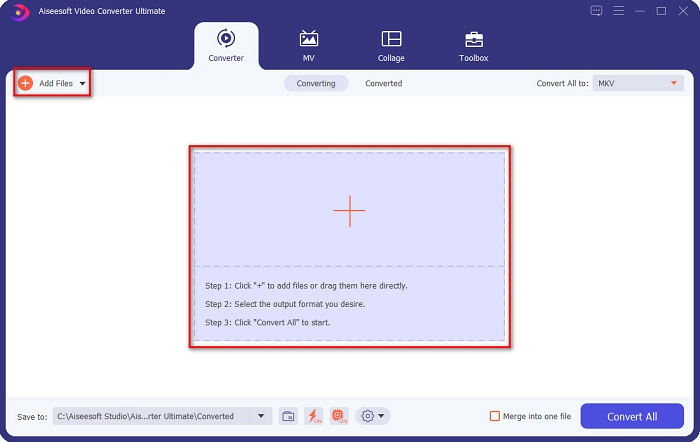
Step 2. And then, click the Add Files button or the + sign button to upload your file on the first interface of the software. Your computer files will appear where you will choose your RMVB file. And then, it will be uploaded to the queue.
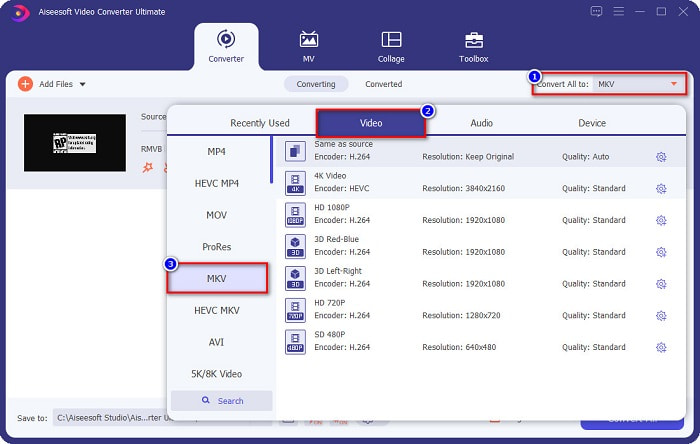
Step 3. After uploading your RMVB file, click the Convert All to button to select your file output. In your case, select MKV file.
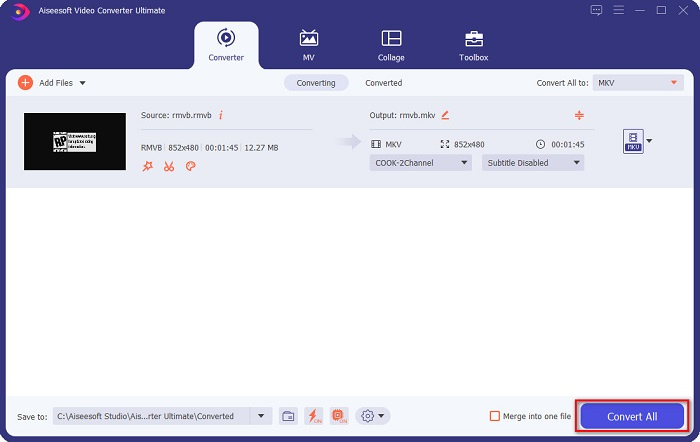
Step 4. And lastly, click the Convert All button at the bottom right corner of the software’s interface. Your RMVB to MKV file will start to upload. Just wait for a few seconds, and that is it!
簡単ですね。これらの簡単な手順に従うだけで、RMVBをMKVファイルに簡単に変換できます。
パート3。2オンラインで最高のRMVBからMKVへのコンバーターを試す必要があります
オンラインコンバーターの利便性は、オフラインコンバーターよりも確かに優れています。また、便利なコンバーターが必要な場合は、RMVBファイルを無料でオンラインでMKVに変換する方法について以下の手順をお読みください。
FVC無料オンラインビデオコンバーター
FVC Free Online Video Converter is an online converter with an easy-to-use GUI, which is beneficial to beginners because they will not have a hard time understanding the software's interface. This converter also supports numerous file formats, including RMVB to MKV, MOV, MP4, WMV, AVI, and more. However, since this converter is web-based, you may experience having a slow conversion. Nonetheless, many people used this converter to be one of the best RMVB to MKV converters.
FVC Free Online Converterを使用してRMVBファイルをMKVファイルに変換する方法の手順:
Step 1. First, search on your browser FVC Free Online Converter or click this link. When you are already on their webpage, launch the application.
Step 2. Next, click the Add Files to Convert. Then your computer files will appear where you will select your RMVB file, to upload it.
ファイルを一括変換するには、デスクトップ版をダウンロードしてください。
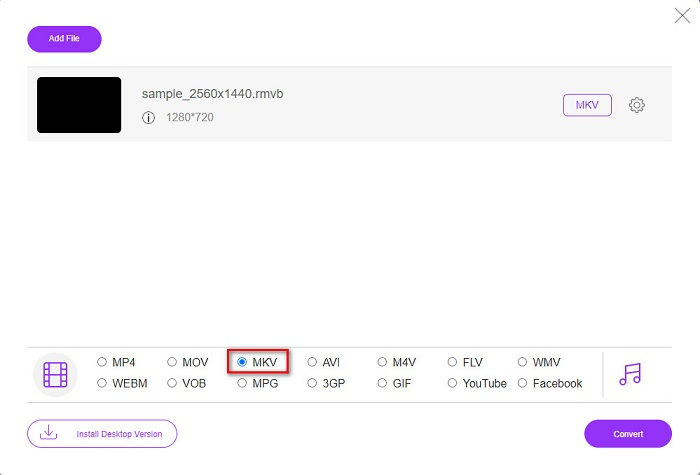
Step 3. After you select your RMVB file, choose your desired file format, from the bottom part of the software's interface, then click MKV file.
Step 4. Lastly, if you are ready to convert your RMVB file to MKV, click the Convert button and the transcoding will begin.
![[変換]をクリックします](/images/2022/02/clicking-convert.jpg)
ビデオコンバーター
ビデオコンバーターは、RMVBをMKVに無料でオンラインで変換できるもう1つのコンバーターです。このオンラインコンバーターは、ファイル形式を簡単に変更できます。また、多くのファイル形式をサポートし、使いやすいです。ただし、気が散る可能性のある不快な広告が多数含まれています。それでもなお、このツールは便利であるため、試す価値があります。
Step 1. Search Video Converter in your browser, then click the Open File button. Then your computer files will appear. Choose your RMVB file, then wait for it to be uploaded.
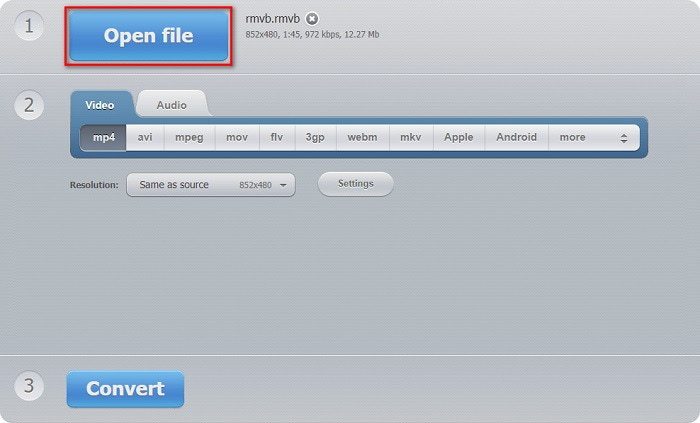
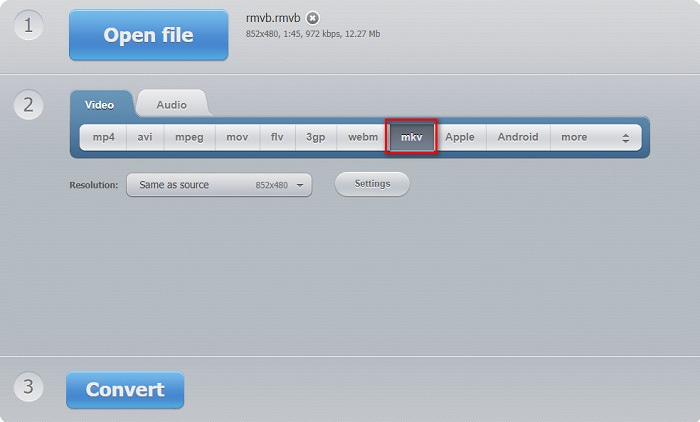
Step 2. After, located still on the software's main interface, select the output file format that you want. Click MKV, then proceed to the next step.
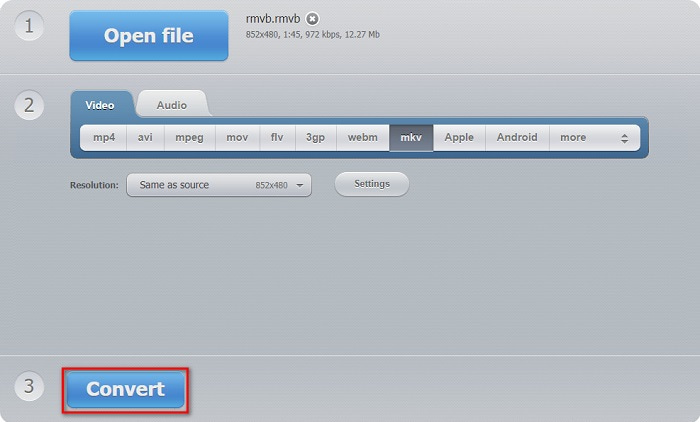
Step 3. For the last step, click the Convert button below the software's interface. Then your RMVB to MKV file will start to convert.
コンバーター365
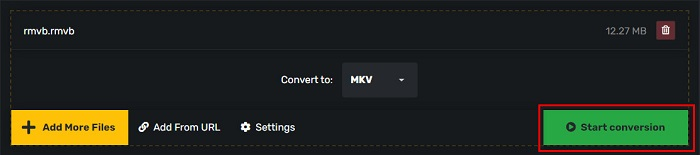
Converter 365 is a free online converter that allows you to convert your RMVB file to MKV easily. It is also simple to use because it has an easy-to-use GUI. However, your file may be corrupted when your internet connection is interrupted.
Step 1. Click the Add Files button to upload your RMVB file.

Step 2. Then click the drop-down button beside Convert to, to select your desired output format.
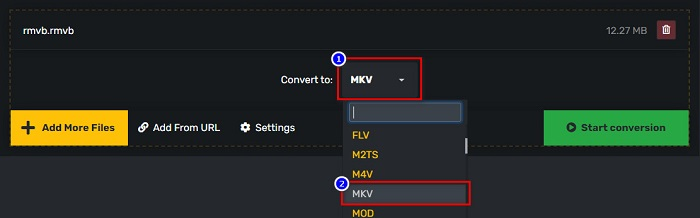
Step 3. And finally, click the Start Conversion button, to start your conversion.
RMVBとMKV
標準のRealMedia(.RM)形式の新しいバリエーションであるRMVBは、可変ビットレートを使用して圧縮されたRealMediaビデオファイル形式です。これは、アジアの映画やアニメで人気のある形式です。 RMVBファイルはサイズが小さく、ビットレートは低くなりますが、品質は向上します。
2002年にリリースされたMatroskaマルチメディアコンテナ形式は、多数のビデオ、オーディオ、画像、および字幕トラックを含めることができるオープンソース形式です。そのため、短いビデオクリップ、テレビ番組、および映画を簡単に保存するために使用できます。アニメファンサブで大人気。
パート4。RMVBからMKVへの変換に関するFAQ
RMVBをAVIに変換できますか?
Certainly, you can convert RMVB files to AVI files by using a converter. FVC Video Converter Ultimate supports RMVB to AVI file conversion. Moreover, if you want to know more about how to convert RMVB to AVI, click this link.
MacはRMVBファイルを再生できますか?
No. Mac does not support RMVB files. However, you can use a third-party tool to play this file in mac. You can also convert RMVB to files that mac supports, which is MOV. To have more knowledge about converting RMVB to MOV, read this article Converting RMVB to MOV: Simple Steps for Offline and Online.
どのメディアプレーヤーがRMVBファイルを再生できますか?
多くのメディアプレーヤーがこのタイプのファイルをサポートしていないため、RMVBファイルはそれほど人気がありません。それでも、RealNetworks Real Player(Windows)、VLC Media Player、Aiseesoft Blu-rayプレーヤーなど、一部のメディアプレーヤーはこのタイプのファイルを再生できます。
結論
To sum it all up, all the offline and online RMVB to MKV converters shown above are all easy-to-use and worth trying. You may find similar converters that are available on the web as well. However, if you want a free converter with a distinct feature and can convert for over 1000+ file formats, FVC Video Converter Ultimate might be a suitable tool for you. Still not convinced yet? Try it now and download it for free.
-
 Windows / MacでRMVBをMP4に変換する方法に関するガイド(3つの無料の方法)
 コンピューターや携帯電話で簡単に再生できるようにRMVBをMP4に変換したいですか?このガイドでは、RMVBファイルをMP4に変換する簡単な方法を紹介しています。
-
 デスクトップまたはオンラインのトップ4無料RMVBからFLVへのコンバーターアプリ
 この記事では、RMVB(RealMedia Variable Bitrate)ファイルをFLVビデオに変換できる最高のRMVBからFLVへのコンバーターソフトウェアとWebアプリについて説明します。
-
 RMVBをWMVに変換するためのオンラインおよびオフラインの上位2つのコンバーター
 RMVBファイルをWMVに変換する最も速くて簡単な方法をお探しですか?この記事を読んで、変換に関する完全な詳細情報を学びます。

