


 ビデオコンバーター究極
 スクリーンレコーダー
 ビデオ修復
ビデオ修復Windows、Mac、オンライン、および電話を介してファイルからメタデータを削除する方法
すべてのメディアファイルには、そのファイルに関連付けられたメタデータが含まれています。動画、画像、音声など、種類は問いません。オンラインにメディアファイルを投稿したとします。その投稿を通じて、誰かがあなたの位置情報の座標、時間、日付、メーカー、デバイスの機種名など、さまざまな情報を取得できてしまいます。これは EXIF データとして知られています。投稿に含まれるメタデータを通じて誰かに情報を取られてしまうと考えると、ぞっとしませんか?幸いなことに、この記事では、Windows・Mac・オンライン・スマートフォンのいずれでも、投稿前にメディアファイルのメタデータを削除する方法を解説します。

パート1。Windowsの任意のファイルのメタデータを削除するための最良の方法
この記事で紹介する方法は、Windowsで使用できる組み込みのデータリムーバーと、メタデータを簡単に消去するために使用できるサードパーティのツールです。したがって、ファイルのメタデータをワイプする方法についてさらにアイデアを得るには、以下の詳細を読み、手順に従って正常にワイプすることができます。
Windowsでプロパティを使用する
Windowsでは、必要に応じてビデオからメタデータを簡単に削除できます。以下の手順に従うことで、ファイルをオンラインで投稿する前に、ファイルに関する情報を削除できます。
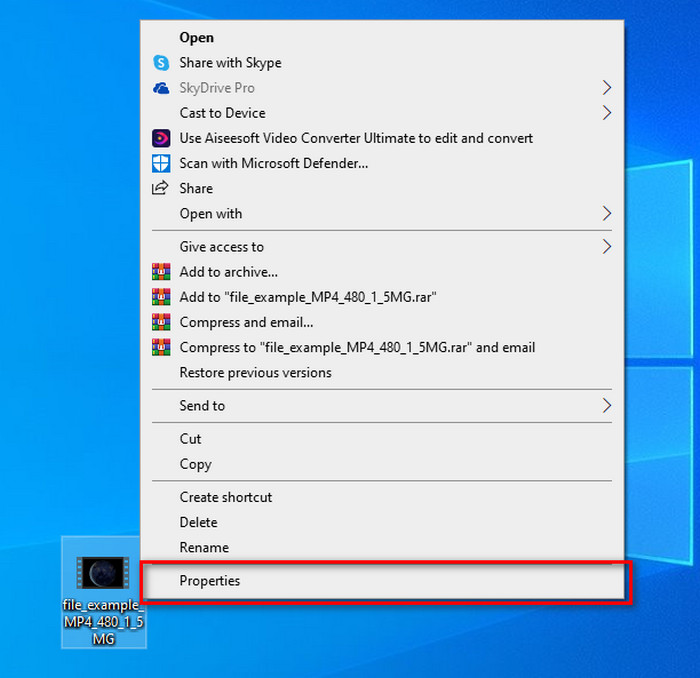
ステップ1. デスクトップ上でファイルを探し、マウスで右クリックします。表示されたメニューの中からプロパティを選択してクリックします。
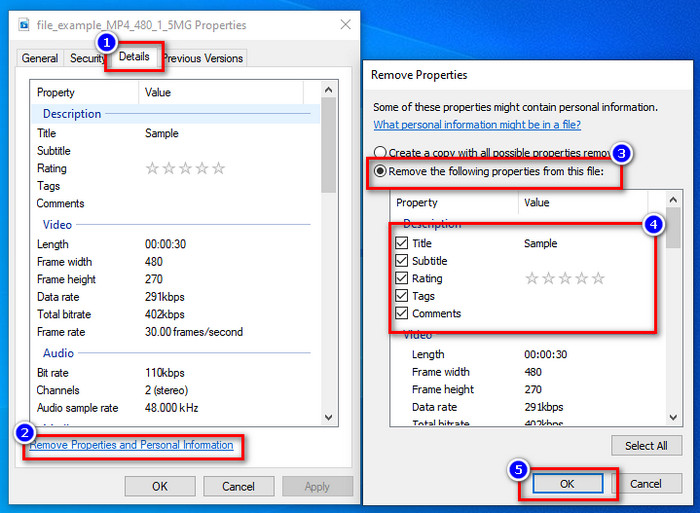
ステップ2. 詳細タブを開き、その中にあるプロパティと個人情報を削除をクリックします。
ステップ3. 投稿前にメディアファイルに含めたくないメタデータのチェックボックスにチェックを入れてください。設定が終わったらOKを押します。メタデータが削除されたコピーが新たに作成されます。
WindowsとmacOSで最高のメタデータ除去ツールを使用する
最適なメタデータ削除ツールをお探しなら、FVC Video Converter Ultimateこそが求めていたツールです。これは、ユーザーがファイルをオンラインに投稿する前にメディアファイルのメタデータを削除するための、専門家向けツールです。プロ向けのツールではありますが、ファイルのデータを削除する作業にそれほど手間をかけずに、誰でも簡単に使うことができます。また、この記事で紹介したテクニックだけではファイルのメタデータを完全に削除できなかった場合の、サードパーティ製の選択肢にもなります。以下の手順に従えば、削除したいデータをファイルからきれいに消去できますので、指示に沿って操作してください。
ステップ1. メタデータを削除する前に、まずは下のダウンロードボタンをクリックしてツールをダウンロードします。使用している OS に応じて、Windows か Mac を選択し、すぐにインストールします。その後、Start Now をクリックしてツールを起動します。
無料ダウンロードWindows 7 以降に対応安全なダウンロード
無料ダウンロードMacOS 10.7 以降に対応安全なダウンロード
スムーズな航海プロセスを実現するには、次のステップに進む前に、ツールのUIに精通している必要があります。
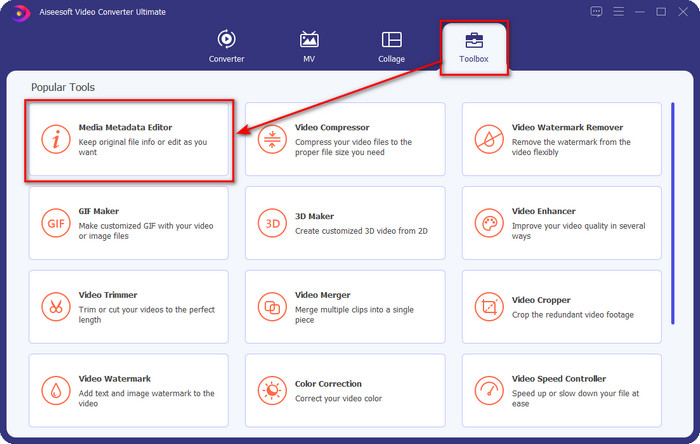
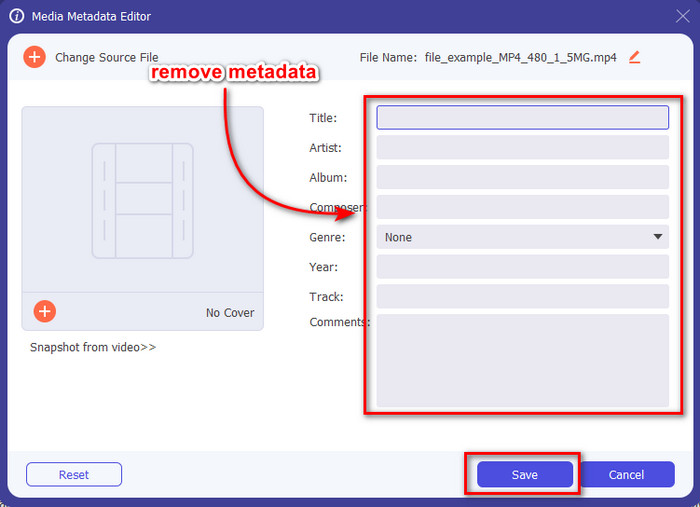
ステップ2. ツールボックスセクションを開いたら、その中のメディアメタデータエディターをクリックします。
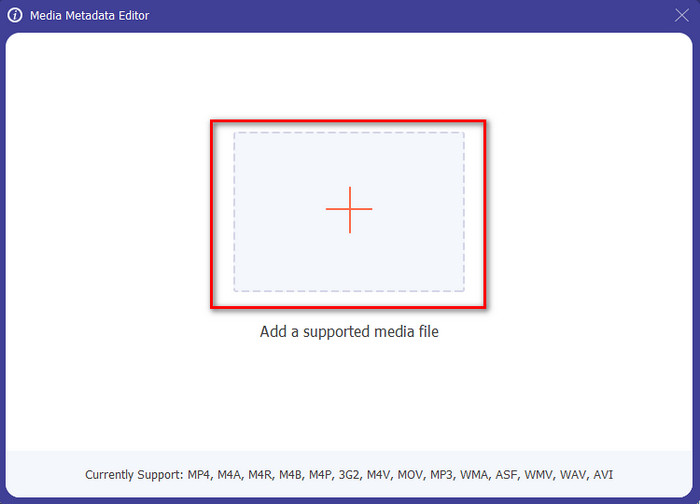
ステップ3. 新しいウィンドウが画面に表示されます。+ボタンをクリックしてメタデータを削除したいメディアファイルを追加し、開くをクリックしてアップロードします。
ステップ4. 削除したい各メタデータのテキストボックスをクリックし、キーボードのDelete キーを押します。ファイルを保存するには[保存]をクリックします。これにより、メタデータなしで上書き保存され、コピーは作成されません。簡単でしょう?メタデータを削除したファイルのコピーを作らないため、デスクトップ上の容量節約にもなります。
パート2。Mac上のファイルからメタデータをワイプするための最良の方法
Macでは、写真に関する情報を簡単に削除できます。ただし、削除できるのは位置データのみです。したがって、場所よりもMac上のファイルからメタデータを削除する方法を学びたい場合は、上記のツールを使用する必要があります。
ステップ1. プレビューを開き、対象のファイルを開きます。
ステップ2. ツールをクリックし、続けてインスペクタを表示を選択し、「i」アイコンをクリックして位置情報データを表示します。
ステップ3. GPS タブで位置情報を削除をクリックすると、メディアファイルに関する位置情報が自動的に削除されます。
パート3。AndroidおよびiOSデバイスでメタデータを削除する方法
Exiftoolを使用–写真とビデオのメタデータを表示、編集(Android)

Exiftool – view, edit metadata of photo and video は、Android でツールをダウンロードすることで動画のメタデータを削除するのに役立ちます。このツールを使えば、動画や写真の EXIF データを無料で追加・削除・更新できます。このアプリを使ってみたい場合は、以下の手順に従ってください。
ステップ1. Playストアからアプリをダウンロードし、[インストール]をタップします。
ステップ2. アプリを開き、メタデータを削除したいファイルを選択します。
ステップ3. オプションを押し、Wipe Quicktime Groupをタップすると、メタデータが自動的に削除されます。
Photo&Videoメタデータリムーバーを使用する(iOS)
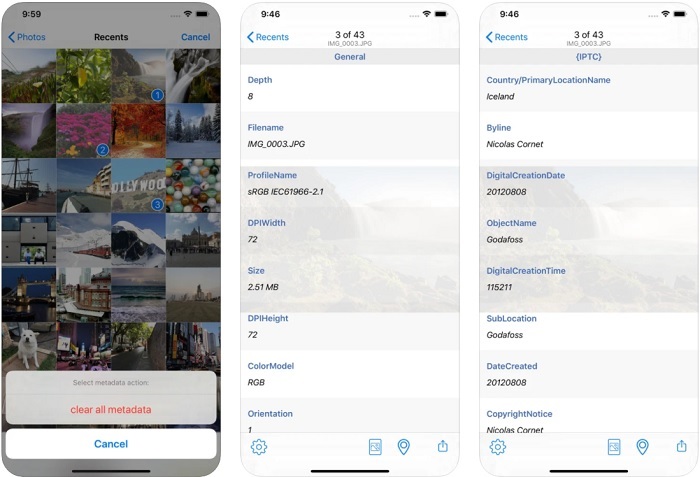
iOSユーザーの場合は、Photo&Video Metadata Removerを使用して、iOSデバイスでメタデータをクリアする方法を学ぶことができます。このアプリは、Appleデバイス上のすべてのネイティブメディア形式をサポートしており、メタデータリムーバーとしての役割を正確に果たします。 iOSデバイスをお持ちの場合は、以下の手順をコピーできます。
ステップ1. アプリをダウンロードするには、App Store を開いて検索し、インストールします。
ステップ2. ツールを開き、写真へのアクセスを許可します。その後、メタデータを削除したい動画または写真を選択します。
ステップ3. 歯車アイコンをタップし、すべてのメタデータを消去をクリックすると、メタデータを含まないファイルのコピーが作成されます。
パート4。無料でWebツールを使用してメタデータを削除する方法
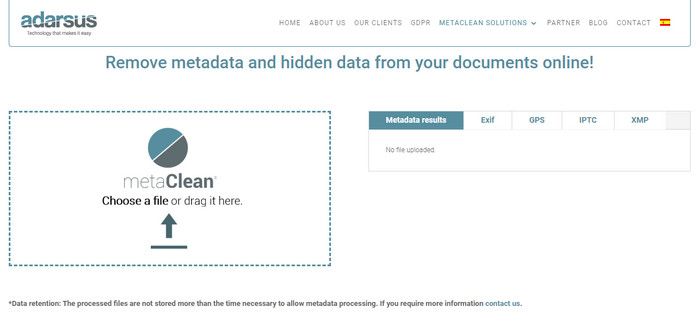
Adarsus – Remove Metadata は、オンラインでメタデータを削除できる無料ツールです。上で紹介した他のコンバーターとは異なり、これはウェブツールなので、デスクトップにダウンロードする必要がありません。利用するにはインターネット接続が必要です。無料でメタデータ削除を試してみたい場合は、以下の手順に従ってください。
ステップ1. ウェブブラウザを開き、ツール名で検索します。
ステップ2. ツールの公式サイトでアップロードボタンをクリックし、メタデータを削除したいファイルを選択します。
ステップ3. Get my File Cleanをクリックすると、メタデータを含まないコピーが作成されます。
パート5。Windows、Mac、オンライン、Android、およびiOSのメタデータリムーバーに関する比較チャート
| 特徴 | FVCビデオコンバーターアルティメット | Windowsのプロパティ | Macでプレビュー | Exiftool –写真とビデオのメタデータを表示、編集(Android) | Photo&Videoメタデータリムーバー | Adarsus –メタデータを削除 |
| 安全に使用できます |  | | | | | |
| 使いやすい | | | | | | |
| メタデータ全体をクリア | | |  | | | |
| メタデータの編集 | | | | | | |
| ファイルを複製します | | | | | | |
| 制限/秒 | モバイルデバイスやオンラインでは利用できません | データが完全に削除されない場合があります。 | 場所以外のメタデータは削除されません。 | 究極のツールほど効果的ではありません。 | ほとんどの場合、メタデータの削除に失敗します | ファイルサイズには5MBの制限があります。 |
パート6。メタデータの削除に関するFAQ
メタデータを削除するとファイルサイズが小さくなりますか?
はい、メタデータがその情報とともにメディアファイルにサイズを追加するためです。削除することで節約できるスペースが少なくなり、以前よりも小さくなります。ただし、ファイルにある情報は削除されます。
メタデータを削除した後、品質はそれに影響しますか?
いいえ、そうではありません。メディアファイルのメタデータを変更または削除しても、品質は影響を受けません。したがって、メタデータがなくても、メタデータがある場合でも、同じ品質が維持されるため、心配する必要はありません。
すべてのファイル形式にメタデータがありますか?
ほとんどのメディア形式にはそれぞれ異なるメタデータ構造がありますが、すべてのメディア形式にメタデータが含まれているわけではありません。形式によっては、その構造や設計、その他さまざまな要因により、メタデータを持つことができない場合もあります。
結論
ここまでで、ファイルのメタデータを削除してプライバシーを保護する方法を学んできました。この記事で紹介したツールを使えば、ウェブに投稿する前にメタデータを削除することが可能になります。5つのツールを紹介しましたが、その中でもFVC Video Converter Ultimateの実力は疑う余地がありません。このツールなら、ファイル内のすべてのデータ、あるいは一部のデータだけを、1-2-3 のステップで素早く削除できます。このレビューが気になる場合は、実際にツールをパソコンにダウンロードして試してみて、本当に使えるかどうかを確認してみてください。
-
 Mac、Windows、オンラインでWMVをMKVにロスレスで変換する4つの方法
 MacとWindowsでWMVをMKVに変換したいですか?この記事では、WMVをMKVにすばやく変換するための最良の方法を紹介します。
-
 オンラインおよびオフラインで最高のメタデータビューアの4つ[2022年更新]
 ファイルのメタデータを確認できますか?はい、できます。この投稿を利用して、使用できるさまざまなメタデータビューアを紹介します。
-
 すばやく変換するために使用する必要がある最高のWebMからMKVへのコンバーター
 WebMをMKVファイルに変換する方法をお探しですか?この記事では、試してみるのに最適なWebMからMKVへのコンバーターを紹介します。
