


 ビデオコンバーター究極
 スクリーンレコーダー
 ビデオ修復
ビデオ修復無料のUltimateConvertersを使用してMPEGを3GPに変換する
Can't play your MPEG video on your third-generation mobile phone? In that case, you need to convert your MPEG file to a file format that your third-generation mobile phone supports, which is 3GP. If you want to convert your MPEG file to 3GP, read this article until the end to know how to convert MPEG to 3GP files easily on Windows 10/11.

パート1。ライトニングボルトコンバーターを使用してMPEGを3GPに無料で変換
If you are looking for a free offline converter that can convert your MPEG file to an MKV file quickly, then you might want to use FVC Video Converter Ultimate. This converter supports numerous file formats including MPEG, 3GP, MOV, AVI, MKV, MP4, M4V, and 1000+ more. Moreover, if you are looking for a converter that can add subtitles to your video, this converter has that feature. If you are interested in this MPEG to 3GP converter, follow the steps below.
Step 1. Download FVC Video Converter Ultimate by clicking the Download button for Windows below. After downloading, open the application.
無料ダウンロードWindows 7 以降に対応安全なダウンロード
無料ダウンロードMacOS 10.7 以降に対応安全なダウンロード
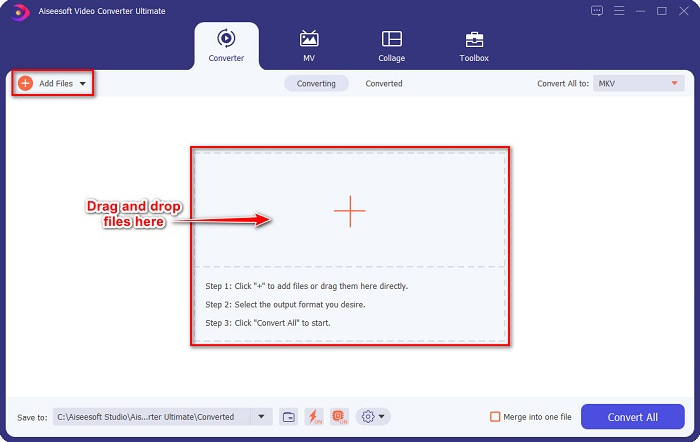
Step 2. On the software's main interface, click the Add Files button, or drag and drop your MPEG file on the + sign button.
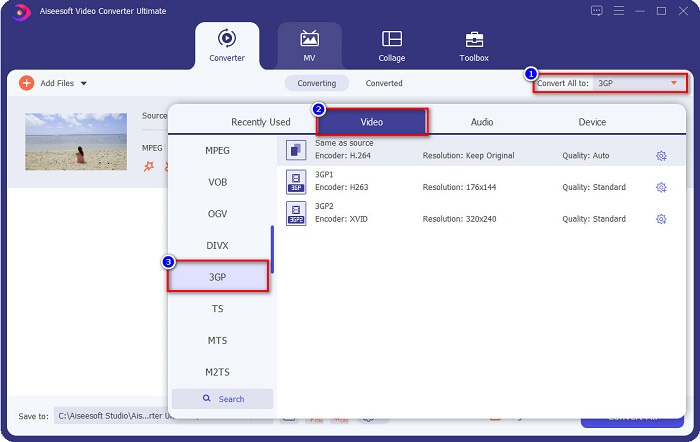
Step 3. After, click the Convert All to button to choose your desired output format. Click 3GP file format, then proceed to the next step.
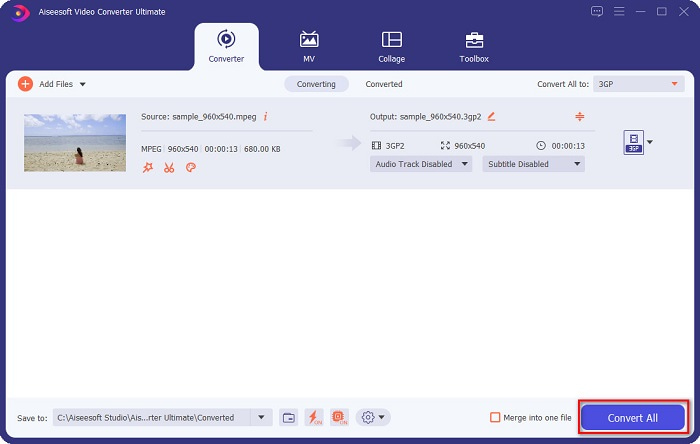
Step 4. Lastly, click the Convert All button to convert your MPEG to a 3GP file. In just a few seconds, your file will finish converting.
これらの手順に従うことで、MPEGを3GPに無料で変換できます。
長所
- ファイルを編集、拡張、および圧縮できます。
- 複数のファイルを1つにマージできる機能があります。
- あなたはできる 動画から透かしを削除する.
- WindowsやMacなどのほぼすべてのクロスメディアプラットフォームにダウンロードできます。
短所
- すべての特別な機能を使用するには、アプリを購入する必要があります。
パート2。最高のオンラインツールを使用してMPEGを3GPに無料で変換
オンラインコンバーターは確かに便利さを提供することができます。何もダウンロードせずにファイルを変換できます。ただし、オンラインコンバーターを使用する場合、インターネットに依存しているため、ファイル変換が遅くなることがあります。それでもなお、MPEGをオンラインで無料で簡単に3GPに変換できます。さらに面倒なことはせずに、試してみるのに最適な2つのオンラインコンバーターを紹介します。
FVC Free VideoConverterOnlineを使用する
FVC Free Video Converter Online is a free online converter that supports various file formats. It is also easy to use, so you will not have difficulty using it. Moreover, you can customize your video and audio quality with this converter by editing your file's video bitrate, framerate, and resolution. Follow the steps below to use FVC Free Video Converter Online.
Step 1. Search FVC Free Video Converter Online on your browser, or click this link to go directly to their website
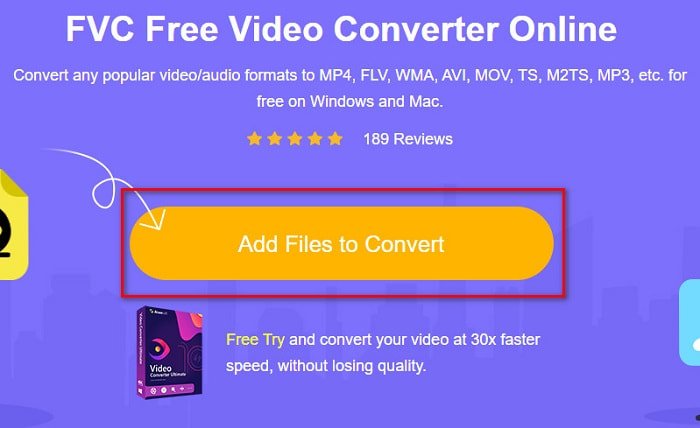
Step 2. Click the Add Files to Convert button and upload your MPEG file to the software’s main interface.
Step 3. And then, below the software’s second interface, click the 3GP file as your file output.
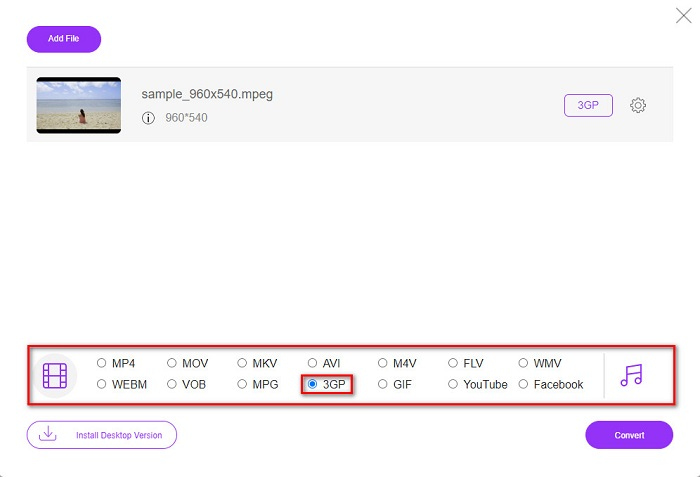
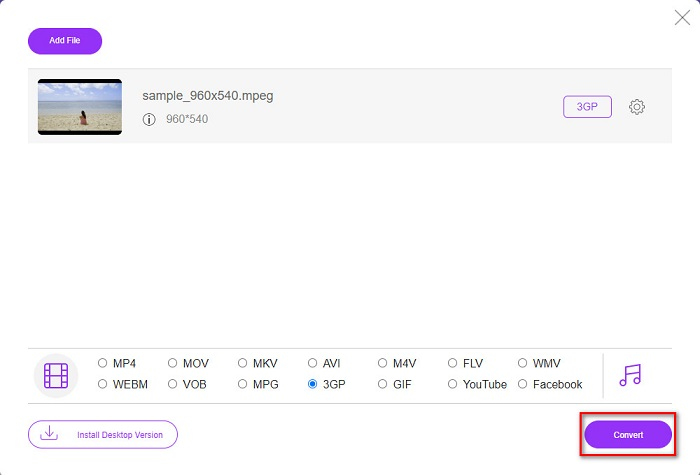
Step 4. Lastly, click the Convert button to convert your MPEG to 3GP online.
OnlineConvertFree.comを使用する
OnlineConvertFreeは、MPEGを3GPに簡単に変換できるオンラインファイルコンバータです。このオンラインコンバーターは、変換する多くのファイル形式を提供します。さらに、使用するのは簡単です。ただし、変換中にインターネット接続が失われると、ファイルが破損する可能性があります。また、邪魔になる可能性のある広告も含まれています。それにもかかわらず、このオンラインコンバーターは非常に便利で、試す価値があります。
Step 1. Search OnlineConvertFree in your browser. Then press the Choose File button to upload your MPEG file.

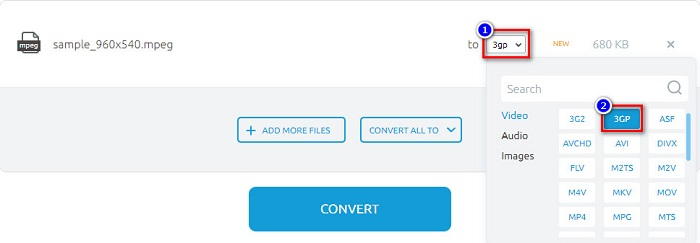
Step 2. After choosing your MPEG file, click the drop-down button and select 3GP.
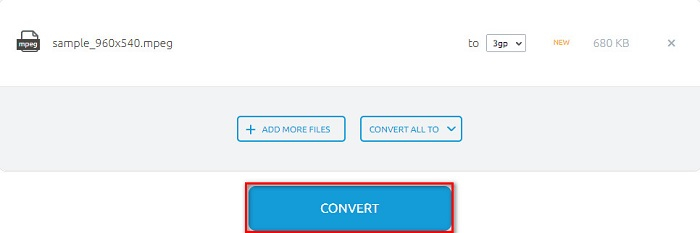
Step 3. Then click the Convert button to start converting your files.
そして、これらの手順に従うことで、MPEGをオンラインで無料で3GPに変換できます。
パート3。MPEGを3GPに変換する際に使用するコンバーター
最適なコンバーターを選択する際には、それがサポートする速度、機能、およびファイルを常に考慮する必要があります。 Web上にはオンラインとオフラインのコンバーターがたくさんあります。また、使用するコンバーターを選択するのは困難です。ただし、複数のファイルを1つにバッチ変換するなどの独自の機能を備えたコンバーターをお探しの場合は、FVC VideoConverterUltimateがお探しの可能性があります。フィルタを追加したり、字幕を追加したり、透かしを追加したり、ファイルに効果を追加したりすることもできます。
| 特徴 | FVCビデオコンバーターアルティメット | FVC無料ビデオコンバーターオンライン | ONLINECONVERTFREE.COM |
| 使いやすい |  | | |
| インターネットが必要 |  | | |
| 超高速変換 | | インターネットに依存 | インターネットに依存 |
| バッチ変換 | | | |
| サポートされているフォーマット | 1000以上のファイル形式をサポート | MPG、3GP、MP4、MKV、MOV、AVI、FLV、WMV、MP3など。 | 3G2、3GP、AVI、MP4、MKV、MOV、MPG、およびその他の標準形式。 |
パート4。MPEG対3GP
MPEGファイルは、Moving Pictures Experts Group(MPEG)によって開発された標準化されたビデオファイル形式です。このタイプのファイルは、インターネットで共有されているビデオに一般的に使用されます。このタイプのファイルには、圧縮されたオーディオとビデオも含まれています。さらに、このタイプのファイルは、Webで使用される最も一般的なファイル形式の1つです。一方、3GPファイルは第3世代パートナーシッププロジェクトによって作成されます。これは、第3世代の携帯電話でサポートされているファイル形式です。このタイプのファイルは、3Gデバイスのビデオを共有するために作成されているため、最小のファイルサイズです。
パート5。MPEGファイルの3GPへの変換に関するFAQ
コンピューターで3GPファイルを再生できますか?
他のファイル形式と同様に、いくつかの制限がある場合がありますが、コンピュータで3GPファイルを再生できます。 Mac用のQuickTimeプレーヤーとWindows用のVLCMediaPlayerを使用できます。
MPEGを3GPに変換すると、ファイルサイズは小さくなりますか?
はい。 3GPは圧縮ファイルであるため、3Gメディアデバイスのファイル共有に使用されます。
3GPファイルをより一般的なファイル形式に変換できますか?
Yes. One file format that is common nowadays and in which you can convert your 3GP file is AVI. And if you want to know more about how to convert 3GP to AVI, read this article Top 4 Most Effective Ways on How to Convert 3GP to AVI Format.
結論
これで記事の終わりに到達し、MPEGファイルを3GPファイルに変換する方法を理解しました。上記のすべてのオフラインおよびオンラインコンバーターには、使用できる最も印象的な標準があります。ただし、超高速で変換できるコンバーターをお探しの場合は、FVC VideoConverterUltimateをダウンロードしてください。このツールは、MPEGを3GPファイルに変換するための最良のツールであることが証明されています。確信が持てたら、今すぐダウンロードして、その優れた機能を試してみてください。
-
 3GPからFLVへの変換に使用するのに最適な3GPからFLVへのコンバーター[2022]
 3GPをFLVに変換しようとしたことがありますが、どの種類のコンバーターを使用するかわかりませんか?この記事を読んで、3GPからFLVへの変換に関するすべての詳細を確認してください。
-
 サポートされていない3GPをDivXに変換するための2つの最良の方法[2022]
 多くのユーザーが3GPをDivXに変換する方法を尋ねます。そのため、.3gpファイルを手間をかけずに変換するのに役立つ記事を提供します。
-
 WindowsとMacで3GPをWMVに変換するための2つのエキスパートのヒント[2022]
 専門的な方法で3GPをWMVに変換する方法を知りたいですか?その場合は、以下を読むと、使用できる3GPコンバーターを判別するのに役立ちます。
