


 ビデオコンバーター究極
 スクリーンレコーダー
 ビデオ修復
ビデオ修復最高のMP3タグエディタでMP3タグを編集する方法[簡単で効果的]
MP3 タグの編集のような作業に直面したとき、内蔵の音楽タグエディターを使えば楽曲情報を簡単に編集できますが、提供できる機能には限界があります。複数の MP3 や音声ファイルを扱う場合も同様で、内蔵機能を選ぶことが必ずしも最良の選択とは限りません。このようなケースでは、ダウンロードまたは Web 上で利用できる専用のオーディオタグエディターを使って問題を解決する必要があります。Web で探す時間を節約し、より生産的な一日を過ごせるよう、現在市場で利用できる信頼性の高い MP3 タグエディター を以下に厳選して紹介します。

パート1。MP3タグを簡単かつ簡単に編集するための最高のMP3タグエディタ[強くお勧めします]
Video Converter Ultimate は、Windows と Mac に対応した多機能な MP3 メタデータエディターです。ユーザー側がほとんど手間をかけずに、こうした問題に対処できます。効率的ですよね? それこそが、市場で最高クラスのタグエディターを使う利点です。このツールを使えば、さまざまな音声・動画形式を読み込み、必要に応じてそれぞれのメタデータを編集できます。
Webでダウンロードまたは使用できる他のタグエディタとは異なり、このツールはビデオとオーディオのさまざまな問題を処理できます。オーディオの音が少し低い、ビデオと同期する、低品質のオーディオとビデオ、または再生できない形式で問題が発生していませんか?驚くべきことに、すべての問題はこのオールインワンツールの助けを借りて解決されます。最高のMP3タグエディタの使い方を知りたいですか?その場合は、以下の手順に従って、数分で成功を収めてください。
- 1.これは、世界中の数百万人以上のユーザーにその価値が証明されている、使用できる最も信頼性の高いメタデータエディターです。
- 2.ビデオの高速化、反転、強調、色補正など、Toolboxにある複数の高度な機能を備えています。
- 3.これは、前述のタスクに関する初心者や専門家にとって最適な選択です。
- 4. WindowsとMacの両方のオペレーティングシステムで動作し、同じ機能と高度な機能を備えています。
ステップ 1. ダウンロードボタンをクリックしてソフトをダウンロードし、環境に合ったボタンを選択します。インストール手順に従い、完了後に[今すぐ開始]をクリックして MP3 タグの編集を始めます。
無料ダウンロードWindows 7 以降に対応安全なダウンロード
無料ダウンロードMacOS 10.7 以降に対応安全なダウンロード
ステップ 2. ツールボックス を開き、用意されている編集機能の一覧から メディアメタデータエディター を見つけます。この機能はすでにツールに組み込まれているため、追加のリソースを用意する必要はありません。
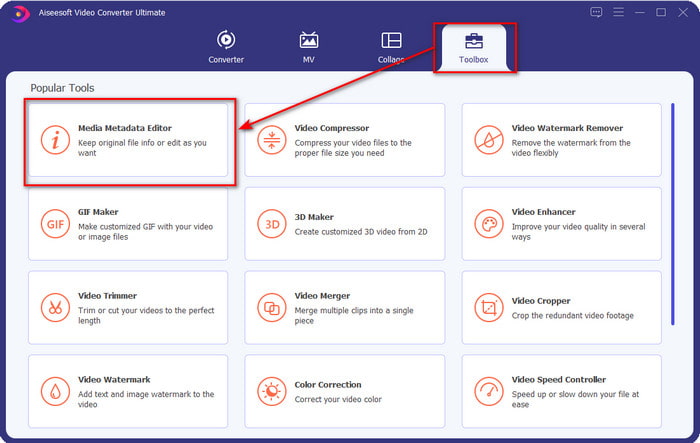
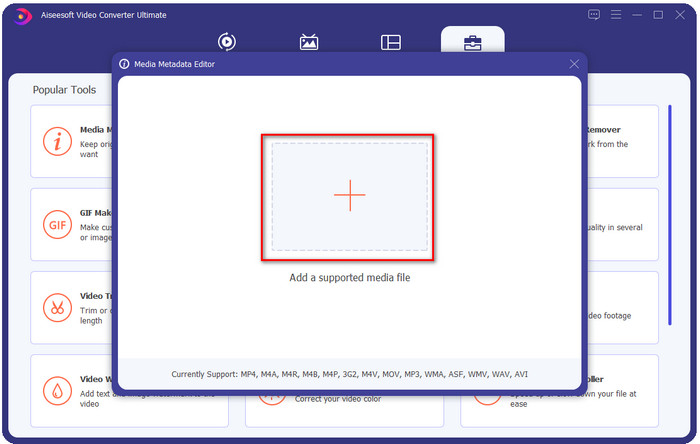
ステップ 3. + をクリックし、表示されたフォルダーから MP3 音声ファイルを探して選択し、開く をクリックして進みます。
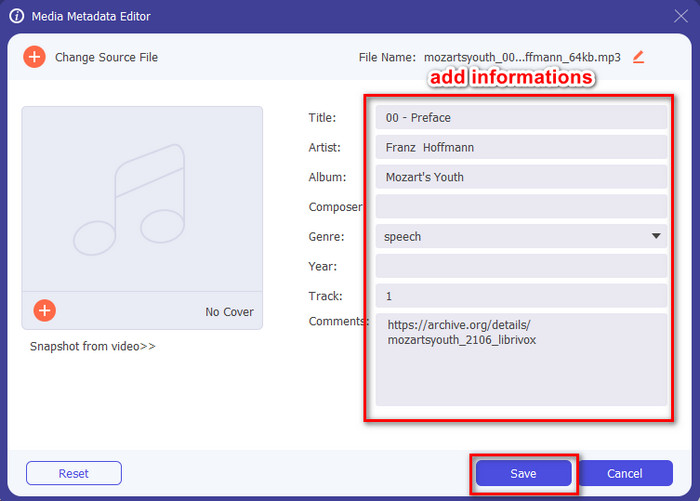
ステップ 4. その後、表示された テキストボックス でファイルのタグを変更または削除します。タグ内容に満足したら、最後に 保存 をクリックします。このツールはメタデータ付きの MP3 ファイルを複製するのではなく、元のファイル自体にメタデータを適用します。
関連記事:
パート2.4Windows、Mac、およびオンラインで利用できる、知っておくべきオプションのMP3タグエディタ
TagMP3
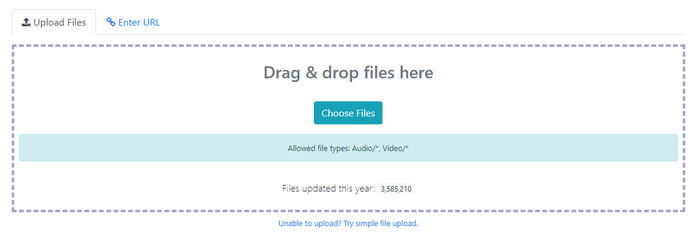
TagMP3 は、いつでも Web 上から無料で利用できるオンライン MP3 タグエディターとして知られています。このオンラインツールは Web ベースなので、利用のために追加のソフトをダウンロードする必要はありません。また、MP3 の id3v1 と id3v2 を検出し、たとえ id3v1 が古い形式でも id3v2 で情報を更新できます。優れた機能を持つ一方で、一部のユーザーの間では音声ファイルと無関係な情報が追加されることがあるため信頼性に欠ける、という噂もあります。しかし、多くのユーザーはこのツールの機能に満足しており、安全で使いやすいと評価しています。
ステップ 1. ブラウザーで TagMP3 を検索し、サイトを開きます。
ステップ 2. Choose Now! をクリックして MP# ファイルをアップロードします。
ステップ 3. 必要な情報を入力し、Done! Generate New Files をクリックします。
MetaBliss
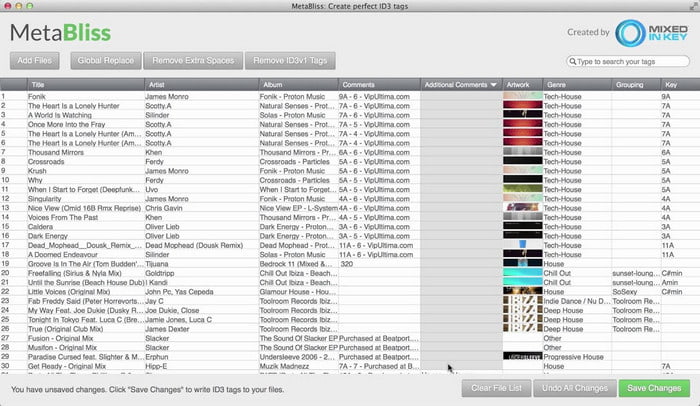
MetaBliss は、スプレッドシートのようなインターフェースを持つ Mac 向けの MP3 タグエディターです。このツールは、どれだけ多くのファイルを読み込んでも、日常的なタグ編集作業を難なくこなせます。複数の MP3 ファイルを一括選択してタグを削除・編集できるため、大幅な時間短縮が可能です。一括編集に対応している一方で、インターフェースはやや古く、想像しているほどモダンな GUI ではありません。しかし、それさえ気にならなければ、スプレッドシート風の画面でも十分実用的に利用できます。
ステップ 1. Mac にタグエディターをダウンロードして起動します。
ステップ 2. Add Files をクリックして MP3 ファイルを探します。
ステップ 3. 各列ごとに情報を置き換え、Save Changes をクリックしてタグを保存します。
MetaTOGGer
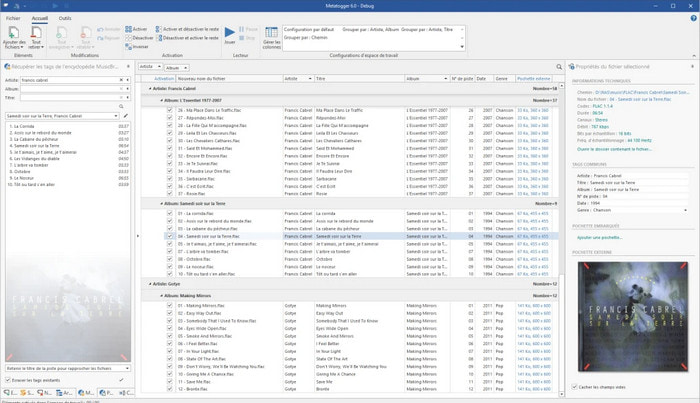
MetaTOGGer は、Speex/OGG/FLAC/MP3 に対応した Windows 10 用タグエディターです。このツールを使うと、オンラインデータベースを基にメタデータを自動で付与できるほか、手動で編集することも可能です。操作画面は Microsoft Office に似た雰囲気になっています。ただし、見た目こそ Office に近いものの、使いこなすまでにはやや時間がかかり、加えて Microsoft .NET 3.5 Framework などの追加コンポーネントをインストールする必要があります。
ステップ 1. Framework のインストールが終わったら、次にツール本体をダウンロードします。
ステップ 2. ツール上にファイルをドラッグ&ドロップし、一覧に表示されたタグを編集します。
ステップ 3. ファイル メニューを開き、保存 をクリックします。
Kid3
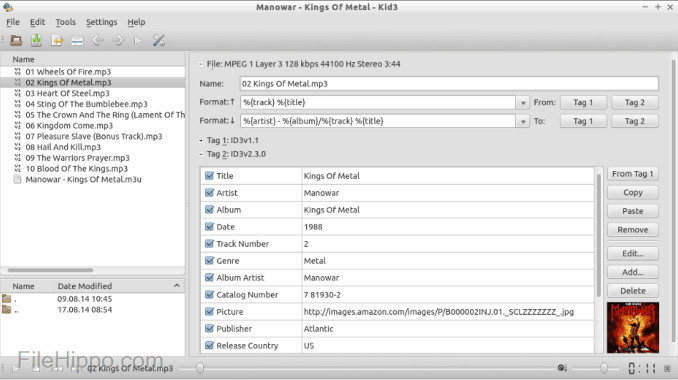
Linux やその他のデバイスで MP3 メタデータを編集したい場合、最後に紹介するのが Kid3 です。このツールを使えば、さまざまなメディアファイルのタグを簡単に操作できます。MetaBliss と同様に一括タグ編集に対応しており、複数のファイルを同時に読み込んで編集することが可能です。このツールはタグ編集には十分な性能を発揮しますが、対応している他の OS よりも、特に Linux 上で最も安定して動作します。また、ファイルのメタデータを変更・編集するまでに、いくつかの機能メニューをたどる必要があります。
ステップ 1. パソコンにソフトをダウンロードし、Add Files をクリックします。
ステップ 2. 追加した MP3 ファイルをクリックし、Edit をクリックして音声ファイルのメタデータを変更します。
ステップ 3. Save を押して、メタデータを反映させたファイルを保存します。
パート3。MP3メタデータエディタに関するFAQ
MP3メタデータエディタをダウンロードしても安全ですか?
ソフトウェアが提供されたWebサイトに安全にアクセスできることを確認してください。ウェブブラウザの鍵のアイコンをクリックすると、そのウェブサイトに関する情報を確認できます。このようにして、ネットワークが安全であるかどうか、およびデータがハッカーから遠く離れているかどうかを確認できます。ソフトウェアについて不明な点がある場合は、デバイスへの想像を絶する損傷を避けるために、すぐに終了し、そのWebサイト上の何かをクリックしないようにする必要があります。
MP3でタグを編集する目的は何ですか?
このように置きます。適切なタグがあれば、MP3ファイルにバインドされているタグに従ってライブラリにファイルを配置することを心配する必要はありません。整理されたライブラリを持つことは、タグを編集する必要がある理由の1つです。もう1つは、オーディオ情報が更新された可能性があるため、更新する必要があります。
MP3にタグがないのはなぜですか?
オーディオファイルにタグがない理由はたくさんあります。 Webにダウンロードする場合は、プライバシー上の理由から作成者が削除することを期待してください。メタデータを使用すると、作成者である場合に自分に関する情報を利用できるため、メタデータを削除することは優れたオプションです。まだ多くの理由がありますが、MP3を整理するためにタグが必要です。
結論
実際、これらの最高のMP3タグエディタを使用すると、市場の他のエディタでは提供できないMP3ファイルのタグを簡単かつ効果的に調整できます。また、各ツールの手順により、タスクを可能な限り迅速に実行できるようになります。ただし、それぞれを比較すると、リストにあるツールよりも、究極のツールの方がはるかに信頼性が高く、優れていることがわかります。理由もなく、あまりお勧めできません。したがって、ツールを使用する場合は、それに応じた手順に従い、注意深く読み、瞬く間にタスクを完了する必要があります。
-
 オンラインおよびオフラインで利用可能な上位5つのメタデータエクストラクタ[2022]
 市場には複数のメタデータエクストラクタがありますが、今日では、対象者に応じて最も厳選された5つのタグエクストラクタのみを選択しています。
-
 2022年のトップ5ビデオメタデータエディター[偏りのないレビュー]
 ビデオメタデータを表示しますか?その場合は、以下の詳細を読んでトピックを完全に把握し、どのツールが最適かを確認してください。
-
 Windows、Mac、およびモバイルデバイスで人気のある7つの音楽タグエディタ
 音楽タグは、内部のデータに従ってライブラリ内の音楽を配置するために使用するのが一般的です。変更したい場合はどうしますか?詳細については、以下の詳細をお読みください。
