


 ビデオコンバーター究極
 スクリーンレコーダー
 ビデオ修復
ビデオ修復
 安全なダウンロード
品質を損なうことなく、AVIファイルを圧縮してファイルサイズを小さくする
AVIファイルを電子メールで送信したり、AVIファイルをWebサイトにアップロードしたりする場合でも、AVIを圧縮することが非常に重要です。 AVIファイルを縮小できるビデオエディタやコンプレッサーはたくさんあります。具体的には、ビデオ形式を変換したり、不要なビデオクリップをカットしたり、パラメータをリセットしてAVIビデオを小さくしたりできます。 AVIビデオの形式とコンテンツを保持したい場合は、ビデオコンプレッサーを使用してビデオ設定をリセットできます。品質を損なうことなくAVIファイルを圧縮する3つの無料の方法があります。読んでフォローするだけです。

パート1:無料でオンラインでAVIファイルを圧縮する方法
市場には非常に多くのオンラインビデオコンプレッサーがありますが、どれがオンラインで最高のAVIコンプレッサーになることができますか?ほとんどのユーザーにとって、考慮する必要のある重要な要素がいくつかあります。
無料ダウンロードWindows 7 以降に対応安全なダウンロード
無料ダウンロードMacOS 10.7 以降に対応安全なダウンロード
1.完全に無料で安全に使用できます。
2.最大ファイルサイズの制限はありません。
3.AVIファイルをバッチ圧縮します。
4.GBを超える大きなAVIビデオを非常に小さなファイルサイズに圧縮します。
5. AVIビデオの形式、解像度、ビットレートを変更して、ビデオサイズを縮小します。
幸運なことに、これらすべての機能はFVC Free Video Compressorで利用できます。WindowsやMacのパソコン上で、大容量のAVIファイルを無料でオンライン圧縮できます。サブスクリプションや登録は不要です。30倍の高速処理により、他社製品よりもはるかに素早くAVIを圧縮できます。では、オンラインでAVI動画のサイズを圧縮する方法を見ていきましょう。
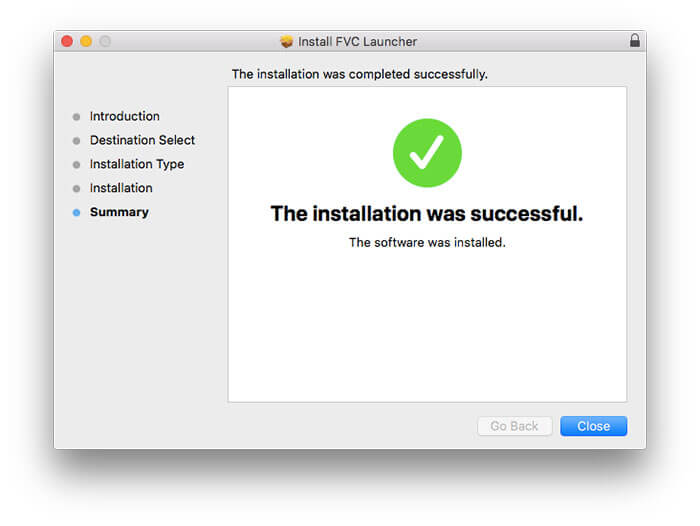
ステップ 1: この無料オンライン動画コンプレッサーを開きます。Add Files to Compressをクリックしてランチャーをインストールします。
ステップ 2: AVI動画を参照して追加します。今後のAVI圧縮のための、シンプルで直感的なインターフェースが表示されます。
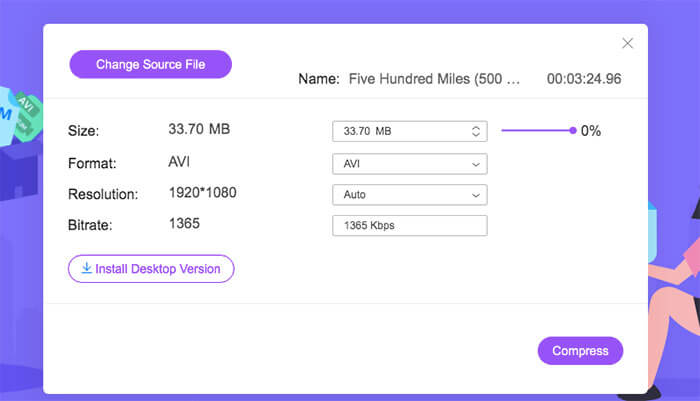
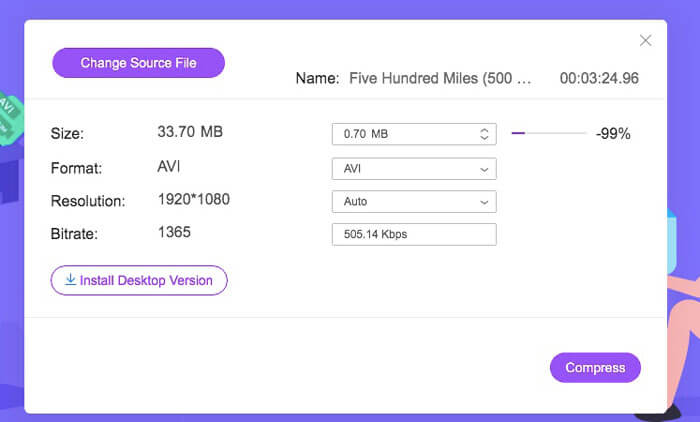
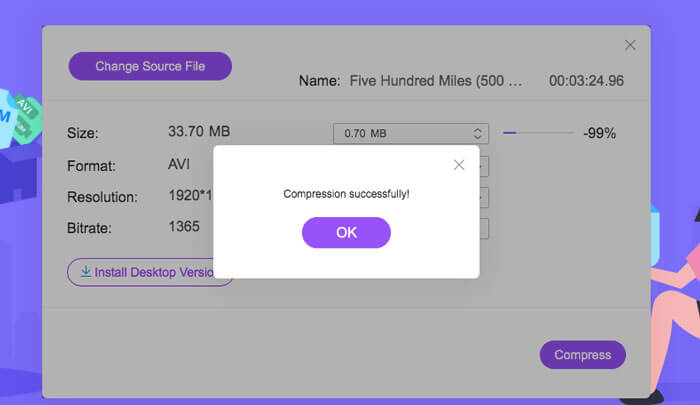
ステップ 3: Sizeセクションで、横のスライダーを動かしてAVI動画サイズを縮小できます。または、UpsideとDownsideの矢印で圧縮後のAVI動画サイズを指定することもできます。
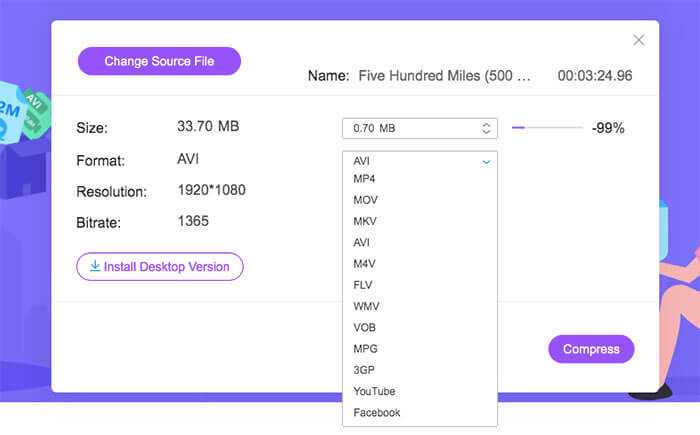
ステップ 4: Formatリストを展開します。AVIをMP4やMOV、さらにはYouTubeやFacebook用フォーマットに圧縮することができます。その後、Resolutionプロファイルの中から1つ選択して、AVIファイルのサイズを小さくします。
ステップ 5: Compressをクリックして出力フォルダーを設定します。Compression successfullyと表示される通知がポップアップしたら、圧縮されたAVI動画を取得できます。
パート2:WindowsでAVIビデオを圧縮する方法
Windows 10/8/7でAVIビデオを無料で圧縮するには、別の選択肢があります。 Windows10以前のバージョンでAVIファイルを圧縮できるのはWindowsムービーメーカーです。次の段落が示すように行ってください。
ステップ 1: Windows Movie Makerを開きます。Capture Videoの下にあるImport VideoをクリックしてAVI動画を追加します。
ステップ 2: 取り込んだAVI動画を選択します。続いて、それを下部のTimelineにドラッグ&ドロップします。
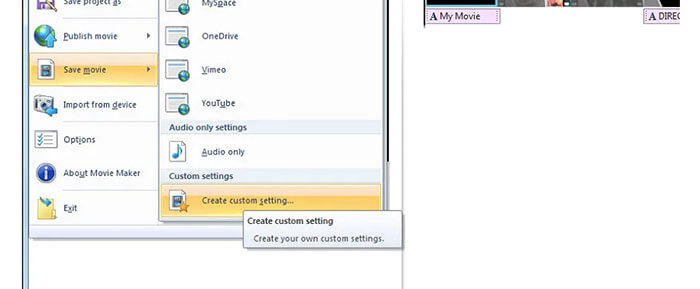
ステップ 3: FileリストからSave Movie Fileとcreate custom settingsをクリックします。
ステップ 4: Video settingsで、動画の幅・高さ・ビットレート・フレームレートを調整して、このAVI動画をより小さくできます。
ステップ 5: Saveをクリックして、Windows上のAVI動画を小さいファイルサイズに圧縮します。
パート3:MacでAVIビデオファイルを圧縮する方法
iMovieは、無料のAVIビデオコンプレッサソフトウェアにすることもできます。 iMovieを使用して、Macで.aviビデオを無料で圧縮できます。さらに、黒いエッジや不要な部分をトリミングして、iMovie内のビデオサイズを縮小することもできます。 iMovieには便利なビデオ編集および圧縮ツールがたくさんあります。
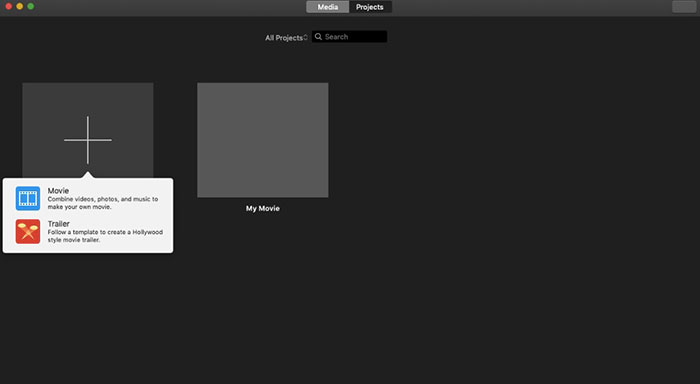
ステップ 1: iMovieを起動します。FileドロップダウンリストからNew Movieを選択します。
ステップ 2: 圧縮するAVI動画ファイル用の新しいプロジェクトを作成します。
ステップ 3: 上部のImportをクリックします。サイズの大きいAVI動画を選択してiMovieに追加します。
ステップ 4: Fileリストを展開し、Share、続いてFile…を選択します。右上のExportアイコンをクリックし、Fileを選択します。
ステップ 5: AVI動画のサイズを小さくするには、動画の解像度と画質プロファイルを下げる必要があります。Nextをクリックし、続いてSaveをクリックして、圧縮されたAVIファイルを取得します。
パート4:AVIの圧縮に関するFAQ
なぜAVIはそんなに大きいのですか?
.avi形式のファイルは他のファイルよりも大きくなる傾向があることがわかります。 AVIは、ビデオおよびオーディオデータの保存に使用する圧縮を少なくします。または、AVIをロスレスビデオ形式と見なすことができます。したがって、AVIファイルは常に大きなファイルサイズになります。
After EffectsでAVIを圧縮する方法は?
AVI動画をAfter Effectsに追加します。Compositionリストに移動し、Add to Adobe Media Encoder Queueを選択します。Media Encoder内で、レンダリングエンジン内のプロジェクトファイルを探します。右側のパネルでVideoまたはAudioリストに切り替えます。動画/音声の品質、ビットレート、その他の詳細を変更します。実際には、右下で推定ファイルサイズを確認することができます。OKをクリックして変更を保存し、画質を維持したままAfter EffectsでAVIファイルサイズを縮小します。
AVIをMP4形式に圧縮することはできますか?
はい。AVIをMP4に変換・圧縮することで、動画サイズを大幅に減らすことができます。AVIはロスレス動画フォーマットであるのに対し、MP4は非可逆圧縮(ロッシー)の動画フォーマットです。さらに、動画設定を調整することで、AVIファイルの圧縮を完了させることができます。
上記のツールを使用して、AVIをオンラインおよびオフラインで無料で圧縮できます。ビデオの長さやファイルサイズの制限はありません。ビデオサイズを縮小し、電子メール、Twitter、FacebookなどのAVIを直接圧縮できます。ちなみに、AVIファイルをバッチ圧縮する必要がある場合は、FVC Free VideoCompressorを使用するのが最速のソリューションです。大きなAVIファイルをオンラインでバッチで30倍高速で無料で圧縮できます。 100%は無料で、すべてのユーザーが安全に使用できます。
-
 MKVとMP4–MKVとMP4の比較
 MKVとMP4のどちらを選択するのですか?ビデオ品質に適したフォーマットはどれですか?この記事では、MKVとMP4を詳細に比較して、選択に役立てます。
-
 MP4ビデオをより小さなサイズに圧縮する方法
 MP4ビデオはアップロードするには大きすぎますか?ビデオサイズを縮小したいですか? MP4ファイルを無制限に小さいサイズに圧縮する3つの効率的な方法を次に示します。
-
 MP3 VS MP4:MP3とMP4の違いは何ですか
 MP3またはMP4、どちらが良いですか? MP3とMP4の違いは何ですか?この記事では、イメージできるすべての側面からMP3とMP4を比較します。
