


 ビデオコンバーター究極
 スクリーンレコーダー
 ビデオ修復
ビデオ修復
 安全なダウンロード
デスクトップの StarUML 透かしを効率的に削除する方法 [無料版と有料版]
未登録版の StarUML を使ってモデルを作成しエクスポートすると、製品のウォーターマークが入ってしまいます。多くのユーザーにとってこれは厄介な問題であり、その対処に手間がかかることもあります。一般的に、未登録版の StarUML が残す製品ウォーターマークを消す方法は多くありません。そこで、StarUML のウォーターマークを削除する方法を知りたい場合は、本記事で紹介する各種の方法に関する詳しい情報をお読みください。

パート 1. 最高の AI 透かしリムーバーで StarUML 透かしを削除する方法
作成したモデルをプロフェッショナルに見せるには、FVC Free Watermark Remover Online を使って、StarUML の未登録版ウォーターマークを削除する方法を知っておく必要があります。このオンラインツールは AI 技術を搭載しており、JPEG/JPG や PNG 画像上のウォーターマークを自動検出して手軽に処理できます。「手軽さ」という点では、画像からのウォーターマーク削除が初めての方にも適しており、操作が簡単なので最初の利用で十分に使いこなせるでしょう。しかも、このソフトはデバイスにダウンロードして使うタイプではないため、特別な動作環境を気にする必要もありません。このツールの使い方を知りたいですか?以下の手順を確認して、このツールの AI 技術がどのように動作するか見てみましょう。
FVC Free Watermark Removerをオンラインで使用する方法の手順:
ステップ1. ツールをダウンロードする必要はないので、こちらのリンクをクリックして、ここで紹介するオンラインウォーターマークリムーバーの公式サイトにアクセスします。
ステップ2. StarUML で作成したダイアグラムは JPEG/JPG もしくは PNG 形式になっています。ウォーターマーク付きのダイアグラムをアップロードするには、Upload Image をクリックします。画面に表示されるフォルダから該当する画像ファイルを選択してください。
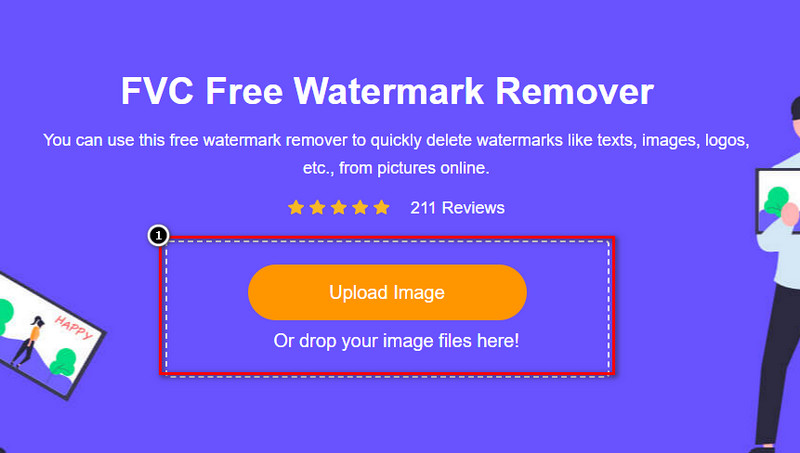
ステップ3. アップロード処理が完了するまで待ちます。アップロード後、画像内のウォーターマーク部分を指定するための各種ツールが表示されます。いずれかのツールをクリックし、ウォーターマーク部分をなぞるようにして選択します。
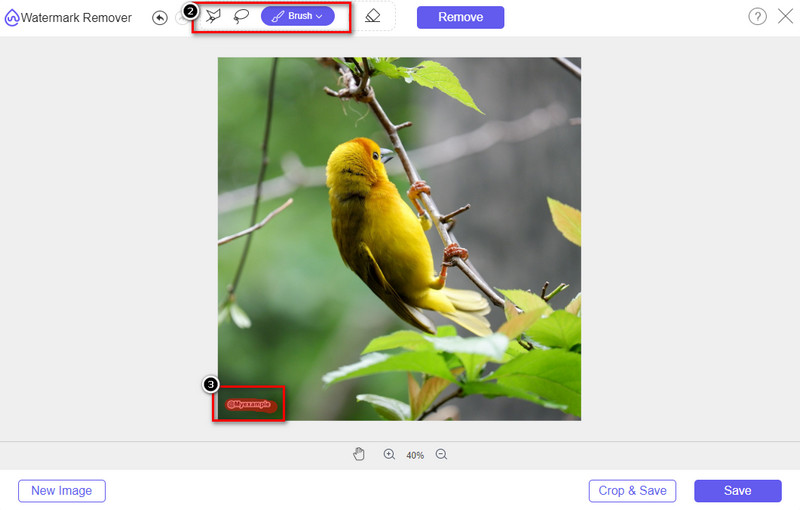
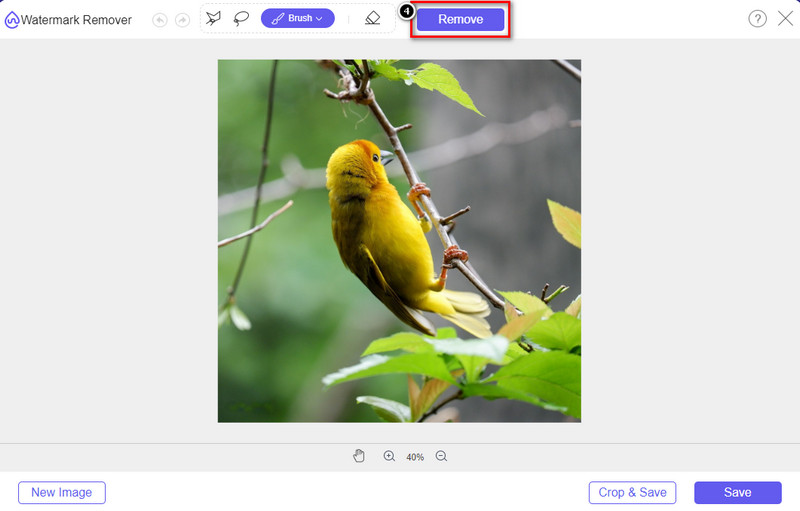
ステップ4. 画像ファイルを書き出す前に、Remove をクリックしてウォーターマークを取り除き、仕上がりがどうなるか確認します。
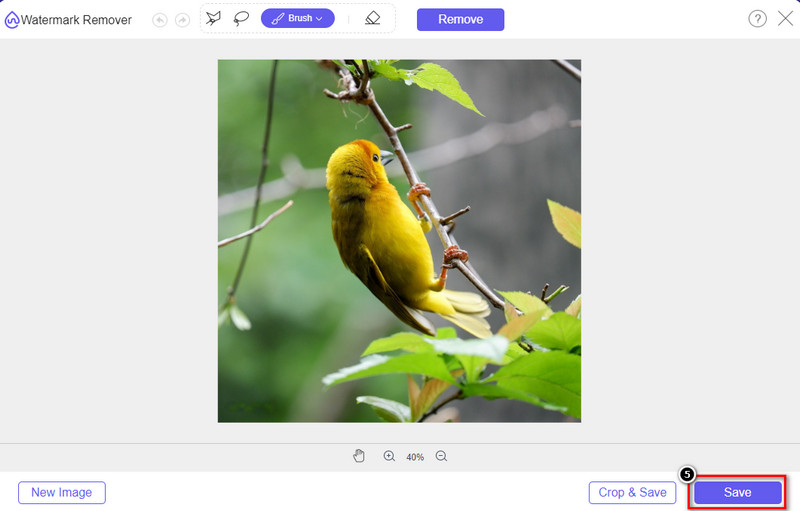
ステップ5. StarUML のウォーターマークが消えたダイアグラムをダウンロードするには、Save をクリックします。
FVC Free Watermark Remover Online を使用する利点:
◆ JPEG/JPG、PNG、BMP などのさまざまな画像フォーマットをサポートしています。
◆ このツールで消せない透かしはありません。
◆ダウンロード不要で簡単に使えます。
◆ ウェブ上で無制限にアクセスできる効果的な透かし除去。
◆ 直感的なインターフェースで、このツールを 1 分で使いこなすことができます。
パート 2. ライセンスを購入して StarUML の未登録の透かしを削除する方法
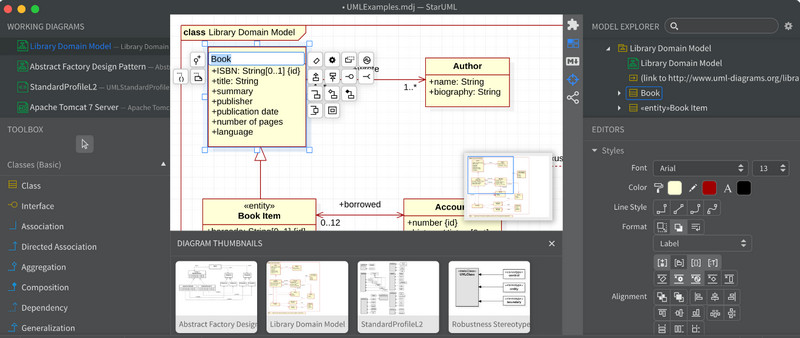
StarUML の公式バージョンを購入すると、最終製品の透かしが削除されるとは言えません。しかし、それは購入する価値がありますか?ツールと以下に追加する手順を購入する前に、このツールがサポートするプランを知る必要があります。それを知る最も簡単な方法は、以下に追加したチャートを読んで、どれがあなたに最も適しているかを確認することです!あとは指示に従って、Starumlに透かしを消す方法を追加していきます。
StarUMLで利用可能な個人および企業プランのチャート:
| StarUMLで利用できるプランと機能 | StarUML V5 パーソナル | StarUML V5 コマーシャル | StarUML V5 サイト |
| 利用できるユーザー数 | 個人用 | 最大 1000 ユーザー 要件によって異なります | 大企業の場合、最大 5000 人以上のユーザー。 |
| アップデートは無料 |  | | |
| 技術サポート | | | |
| 永久プランをサポート | | | |
| 商用利用 | | | |
| 価格帯 | 1 つのアカウントで $99 | $129 から始まり、さらにユーザーを追加すると上がる可能性があります。 | $9,900 から始まり、要件や使用しようとしているメンバーに応じて、さらに高くなる可能性があります。 |
StarUMLで利用可能な学生および教育機関向けプランのチャート:
| StarUMLで利用できるプランと機能 | StarUML V5 教育 | StarUML V5 教育 | StarUML V5 教育 |
| 利用できるユーザー数 | シングルユーザーのみ | 1000 人未満のユーザー | 無制限のユーザー |
| アップデートは無料 | | | |
| 技術サポート | | | |
| 永久プランをサポート | | | |
| 商用利用 |  | | |
| 価格帯 | $ 69 | $69と上がるのはユーザー数次第。 | $4,900固定 |
StarUML でライセンス キーを購入する手順:
ステップ1. Web ブラウザで StarUML を開きます。
ステップ2. 利用可能なプランを確認するために、BUY をクリックします。
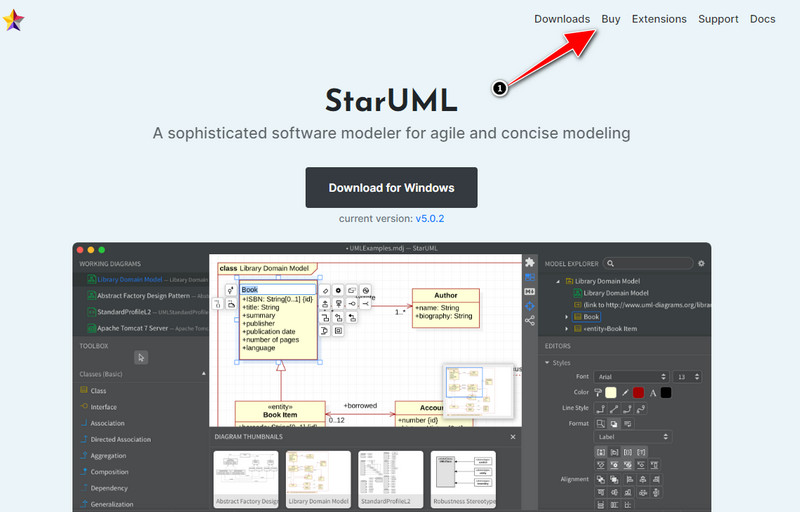
ステップ3. 購入したいプランを選択し、Buy Now をクリックします。
![StarUML で [今すぐ購入] をクリックします。](/images/2022/07/click-buy-now-on-staruml.jpg)
ステップ4. 情報と請求先を入力し、CheckOut を押します。
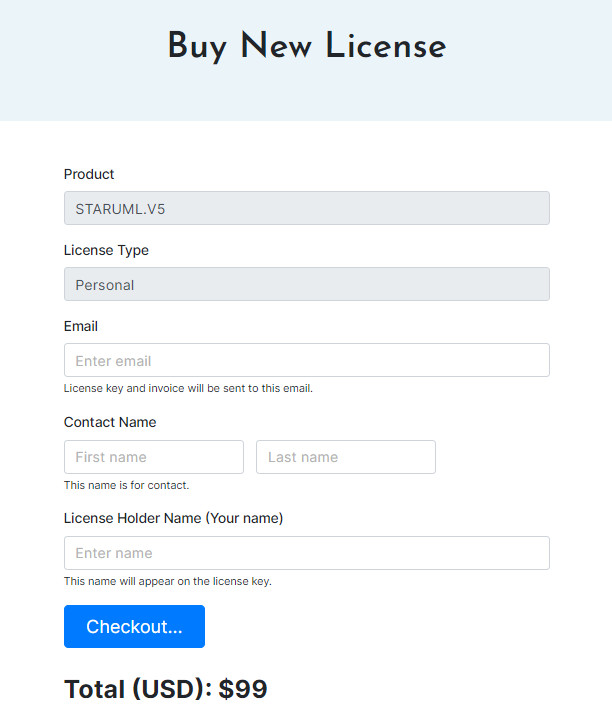
ステップ5. 注文内容と利用する支払い方法を入力し、Next をクリックします。
ステップ6. 支払いを行うため、カード情報を入力し、Complete Order を押します。
さらに詳しく読む:
パート 3. StarUML 透かしを削除する方法に関する FAQ
StarUML はどのプラットフォームをサポートしていますか?
StarUML は、Windows、Mac、および Ubuntu または Fedora で利用できます。そのため、上記のオペレーティング システムをお持ちの場合は、デスクトップにバージョンをダウンロードできます。ただし、デスクトップが標準に達しているかどうかを確認するには、そのシステム要件を探す必要があります。
StarUML で何ができますか?
詳細なモデリングを作成する方法を探しているなら、間違いなく StarUML を選択してください。新しいモデル/メタモデルの作成に役立つ、高速で信頼性が高く、機能豊富なソフトウェアとしても知られています。
StarUML は使いやすいですか?
UML でモデルを作成できる他のソフトウェアと比較してみましょう。このツールははるかに使いやすく、さらに多くの機能を提供します。過去のユーザーのレビューを見ると、このツールの使いやすさと効率性について話していることがわかります。
結論
実際、Staruml から透かしを削除するには、ソフトウェアを購入するか、このソフトウェアでエクスポートした画像の透かしを削除するツールを使用できます。追加する手順により、透かしのない最終製品がすぐに得られることを保証できます。でも、どの方法が自分に一番合っていると思いますか?ツールを購入または使用していますか?すべての人が StarUML のプレミアム バージョンを購入できるわけではないことはわかっています。そのため、追加した無料の透かしリムーバーを使用する必要があります。この記事はすでに役に立ちました。以下で 5 つ星の評価を付けて恩返しをしてください。
-
 Dreamstimeウォーターマークを削除するための4つの効果的なウォーターマークリムーバー
 動画や画像のDreamstime透かしを削除する必要がありますか?この記事を読むことによって、あなたはそれに対処する方法のアイデアを得るでしょう。
-
 PicsartFilterの透かしを簡単に削除するためのヒントとコツ
 Picsartフィルタの透かしを削除するには、ツールが必要です。透かし除去を達成するためにこの記事を読み続けてください。
-
 低解像度の画像をオンラインで高解像度に変換する方法
 低解像度の画像をオンラインで高解像度の画像に変換する方法を学びたい場合は、この記事が最適です。方法を学ぶために完全に読んでください。
