


 ビデオコンバーター究極
 スクリーンレコーダー
 ビデオ修復
ビデオ修復
 安全なダウンロード
ビデオの Powtoon 透かしを効果的に削除するためのヒントとコツ
完璧なアニメーションを作成したのに、書き出したらPowtoonの透かしが入ってしまったことはありませんか? このような事例は、アプリの無料版を利用しているとよく起こります。せっかくの動画が透かしで台無しになってしまったのでしょうか? もう心配はいりません! ここでは、さまざまな方法を使ってPowtoonの透かしを削除する方法を学ぶことができます。

パート 1. サブスクリプションなしで Powtoon 透かしを削除する方法 [編集者の選択]
FVC Video Converter Ultimateは、WindowsやMacにダウンロードして使える、Powtoonの透かしを削除するための、非常に完成度の高い総合ソリューションです。動画から透かしを消した経験がない方でも、このソフトなら問題なく作業できます。便利で高速――それが、このソフトを通じてFVCがユーザーに提供したい体験であり、それは十分に実現されています。透かしの消し方を実際に体験してみたい場合は、以下の手順に従って操作してください。
FVC Video Converter Ultimateを使ってPowtoonの透かしを削除する手順:
手順1. 以下のダウンロードボタンをクリックして、WindowsまたはMacに高機能な動画編集ソフトを入手します。その後、ソフトをインストールし、簡単なセットアップを済ませてから起動します。
無料ダウンロードWindows 7 以降に対応安全なダウンロード
無料ダウンロードMacOS 10.7 以降に対応安全なダウンロード
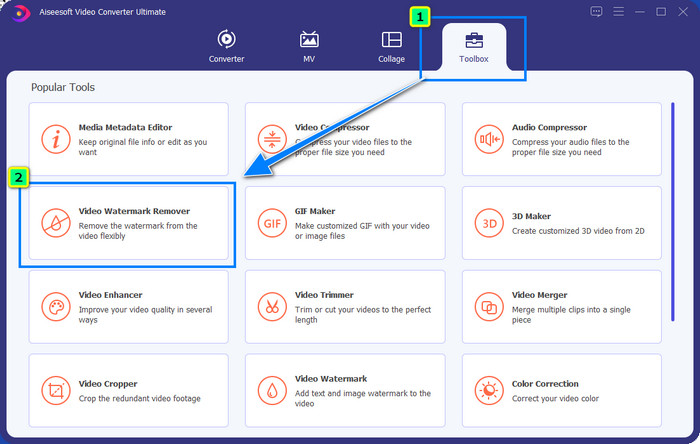
手順2. ツールボックス内の動画透かし削除をクリックし、編集した動画にPowtoonが追加した透かしを取り除きます。
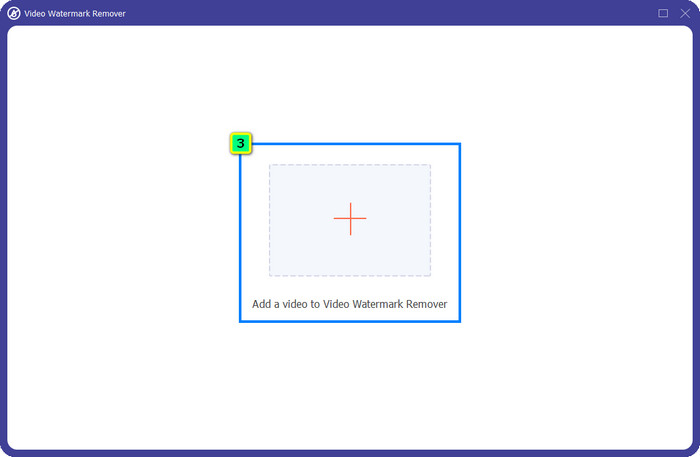
手順3. 次に、+アイコンを押して編集したい動画を読み込みます。表示されたフォルダから動画ファイルを選択し、開くをクリックします。
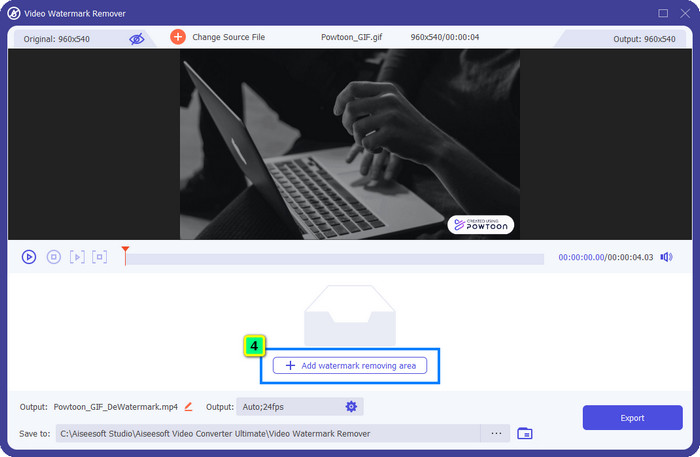
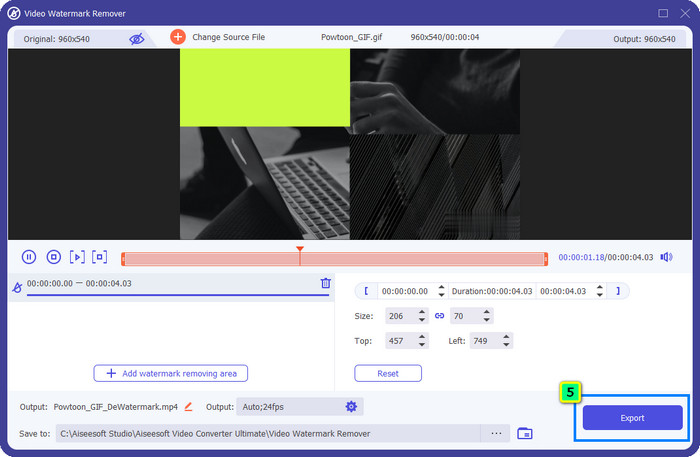
手順4. 透かし削除エリアを追加をクリックし、表示された選択ボックスを透かしの位置に合わせて配置します。必要に応じてサイズや位置を調整してください。
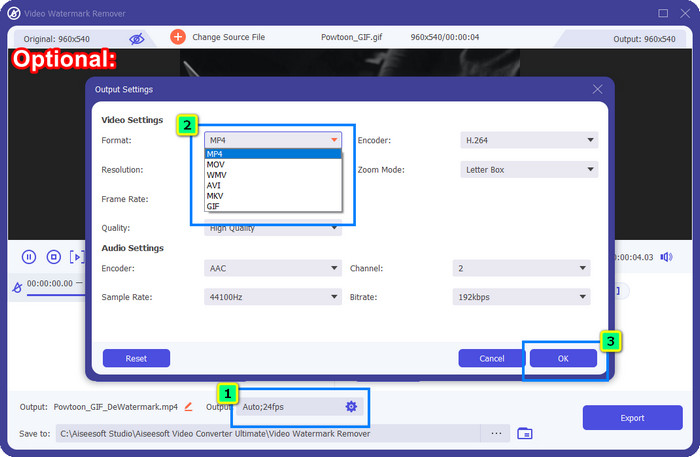
オプション: 最終的な書き出し動画を別の形式で保存したい場合は、出力の形式をクリックし、希望する新しい動画フォーマットを選びます。その他の動画および音声設定も調整してから、OKをクリックして変更を保存します。
手順5. 書き出しボタンを押して、透かしを削除した動画をダウンロードします。
パート2.サブスクリプションでPowtoon透かしを削除する方法[プランベース]
Powtoon に透かしはありますか?はい、無料版を使用すると透かしが追加されます。ただし、Pro または Pro+ を購入した場合は、透かしなしで最終出力をエクスポートできます。したがって、ウォーターマークなしで編集したビデオを楽しむためのソフトウェアの購入方法を知りたい場合は、次の手順に従ってください。
Powtoon Pro および Pro+ プランの購入手順:
手順1. Powtoonの公式サイトを開き、Pricing(料金)をクリックして有料版の料金プランを確認します。
手順2. 好みのプラン(ProまたはPro+)を選び、Get Planをクリックします。
手順3. 必要な請求情報を入力し、支払い方法の入力へ進んでからMake Secure Paymentをクリックします。
パート 3. オンラインで Powtoon 透かしを無料で削除する方法 [Web サービス]
1. Media.io - Watermark Remover
Media.io - Watermark Removerは、Powtoonの透かしを無料で削除できるオンラインツールです。任意のウェブブラウザから利用できるため、アプリをダウンロードする必要はありません。ただし、透かし削除機能自体は無料ですが、安定した高速インターネット接続が必須です。アップロードとダウンロードには、ここで紹介した最初の透かし削除ソフトと比べると時間がかかります。それでも、このソフトは優れた選択肢のひとつです。使い方を知りたい場合は、以下の手順に従ってください。
Media.ioを使ってPowtoonの透かしを削除する手順:
手順1. Webページを開き、Choose Fileをクリックして、透かしを削除したい動画を追加します。インターネット環境によっては処理に時間がかかるので、読み込みが完了するまで待ちます。
手順2. Add Areaを押し、透かしが表示されている箇所に透かし削除エリアを配置します。
手順3. Exportを押せば、編集したPowtoon動画がローカルドライブに保存されます。操作はこれだけです。
2. Kapwing
Kapwingは、動画をトリミングすることで透かしを削除できる、もうひとつの特化型ウェブサービスです。Powtoonに近いレベルの優れた動画を作るための追加編集機能も備わっています。ただし、ここで紹介した他の透かし対策ツールとは異なり、このソフトは透かし部分を切り抜く都合上、動画の画面サイズ(アスペクト比や画角)が変わってしまいます。多少画面が小さくなっても構わない方は、以下の手順に従ってPowtoonの透かしを取り除いてみてください。
Kapwingを使ってPowtoonの透かし部分をトリミングする手順:
手順1. お使いのブラウザでKapwingを検索し、サイトを開きます。
手順2. Add Mediaをクリックして、ここでトリミングしたい動画をインポートします。
手順3. クリップを配置したら、Cropをクリックし、好みのサイズになるよう比率を調整します。
手順4. 最終的な動画を保存したい場合は、Done Croppingをクリックします。
パート 4. Powtoon の透かしを削除する方法に関する FAQ
Powtoon でビデオ解像度を上げるのに最適なプラットフォームは何ですか?
Powtoon動画の解像度を上げる方法は無数にあります。しかし、なかには期待どおりの効果が得られないものも多く存在します。そこで、手当たり次第に試して時間を浪費する代わりに、手間のかかる比較検証は私たちに任せてください。この記事を数分読むだけで十分です。あとは、ご自身のニーズに最も合う8種類の動画解像度変換ソフトの中から選ぶだけです。
ビデオに透かしを追加する方法は?
動画に透かしを入れる最も確実な方法は、専用ソフトを使うことです。テキスト、ロゴ、スタンプ、日付や時刻など、どのような透かしであっても同じです。もし時間に余裕があれば、さまざまなプラットフォームで簡単に透かしを追加する方法についても読んで理解してみてください。
Powtoon はなぜ高価なのですか?
Powtoon は、オンラインであろうとオフラインであろうと、他のビデオ エディターではほとんどできないアニメーション編集を提供するため、高価になりました。また、外出先でも使用できるため、使用を開始するためにランチャーをインストールする必要はありません。しかし、その価格は多くの人にとって手の届かないものです。 Powtoon の無料版を使用して透かしを入れる代わりに、最高のビデオ エディターの代替である FVC Video Converter Ultimate を使用してみてください。使っていて楽しいと思える機能や機能が盛りだくさんです。
結論
有料プランを購入すれば、編集した動画をPowtoonの透かしなしで保存することができます。ただし、そのためにはプランを契約する必要があります。プランを購入するのは気が進まない、という場合は、ここで紹介したオンラインの透かし削除ツールを試してみてください。インターネット回線が遅いとお悩みなら、動画の透かしを素早く、かつプロ品質で削除できるFVC Video Converter Ultimateの利用をおすすめします。数あるソフトの中でも、FVC Video Editorは動画から不要な要素を取り除くうえで、非常に優れた総合的ソリューションを提供しています。このソフトが備える多彩な機能を使って、動画を細かく調整することも可能です。
-
 簡単な手順でPDFから透かしを簡単に削除
 これらの簡単な手順に従って、PDFから透かしを削除します。これらのすばらしいツールを使用して、PDFファイルから透かしを簡単に削除する方法を学びます。
-
 卒業写真から透かしを削除する簡単な方法
 卒業写真から透かしを削除するための最良の方法を知りたいですか?この記事を読むことで、卒業生の写真の透かしを簡単に削除する方法を知ることができます。
-
 Final Cut Proを使用してビデオから透かしを削除する方法[完全ガイド]
 ビデオの透かしに問題がありますか? FinalCutProを使用してビデオから透かしを削除する方法についてのチュートリアルを提供したためです。
