


 ビデオコンバーター究極
 スクリーンレコーダー
 ビデオ修復
ビデオ修復
 安全なダウンロード
PNGから透かしを削除するチュートリアル(無料/オンライン/登録不要)
現在では、PNG(Portable Network Graphics)は、私たちが日常的に使う画像形式の中でも最も一般的なもののひとつです。とはいえ、どの画像形式を使おうと、ウォーターマーク(透かし)が至るところに存在するという事実は無視できません。PNG画像やJPG画像など、さまざまな画像でウォーターマークに出会うことがあります。そのような状況であれば、私たちがご紹介する最適な解決策が役立ちます。本記事では、PNG画像からウォーターマークを削除するためのさまざまな方法を紹介します。この記事をしっかり読み、情報を吸収し、ご自身で実践してみてください。

パート1. PNGから透かしをオンラインで無料で削除する方法
PNGファイル形式に対応しているため、PNG画像からウォーターマークを削除するには、FVC Free Watermark Removerを利用できます。PNG写真から不要な要素を取り除くのは簡単です。このツールは、Google Chrome、Microsoft Edge、Mozilla Firefox など、ほぼすべてのブラウザからアクセスできます。さらに、このウォーターマークリムーバーには、ウォーターマークを消去するための各種ツールが搭載されています。削除したいウォーターマーク部分を囲む際には、ブラシツール、なげなわツール、ポリゴンツールを使用できます。また、ウォーターマークが小さい場合は、拡大・縮小機能を使って画像をズームイン/アウトし、ウォーターマークをよりはっきり確認することができます。FVC Free Watermark Remover はインターフェースもわかりやすく、誰でも効率的に操作できます。さらに、このオンラインツールは PNG 画像のウォーターマークを削除するための、2つの簡単な方法を提供しています。ウォーターマークが画像の中央付近にある場合は、ウォーターマーク除去ツールを使うとよいでしょう。一方、ウォーターマークが画像の端や角にある場合は、トリミングツールを使って削除できます。このように、FVC Free Watermark Remover はあらゆるユーザーにとって便利なツールです。
機能
◆ 写真から透かしやその他の不要なオブジェクトを削除するための透かし除去ツールを提供します。
◆トリミングツール機能を搭載。
◆ 写真のオリジナルの品質をエクスポートできます。
長所
- 専門家ではないユーザーに適しています。
- ソフトウェアは 100% フリーです。
- 透かしを削除する 2 つの方法を提供します。
- PNG、JPG、BMP などの一般的な画像ファイル形式をサポートします。
- インストールもアカウントも必要ありません。
- 複数の透かしを削除できます。
短所
- ソフトウェアを操作するには、インターネット接続が必要です。
FVC Free Watermark Remover を使用する場合は、以下の簡単な手順に従って、PNG 画像から透かしを削除してください。
透かしが写真の中央部分にある場合は、このツールを使用してください。
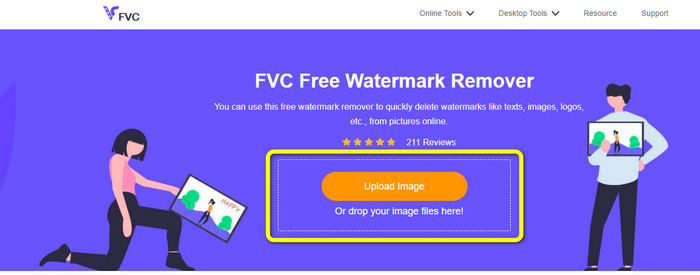
ステップ1: ウォーターマーク付きの PNG 画像を読み込みたい場合は、Upload Image ボタンをクリックします。画面にフォルダが表示されるので、対象の PNG 画像を選択します。
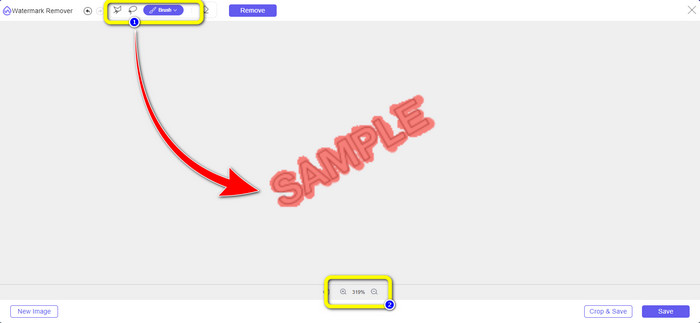
ステップ2: ウォーターマーク付きの PNG 画像を追加したら、なげなわ、ポリゴン、ブラシの3種類のツールから任意のものを使用できます。ブラシツールを使う場合は、ブラシサイズを調整可能です。また、インターフェース下部にある + と - のボタンを利用して、画像を拡大・縮小できます。
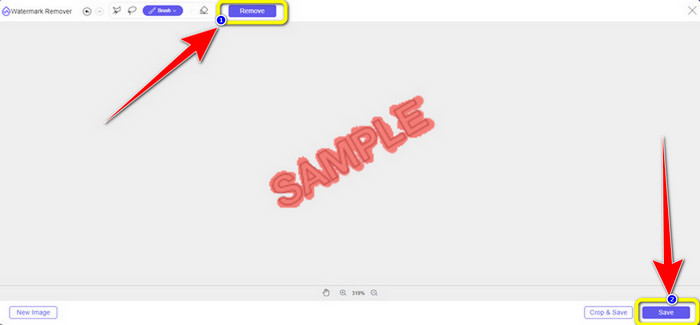
ステップ3: ブラシツールなどでウォーターマーク部分の指定が完了したら、Remove ボタンをクリックしてウォーターマークを削除します。クリック後、数秒ほど処理を待ち、その後 Save をクリックして保存します。
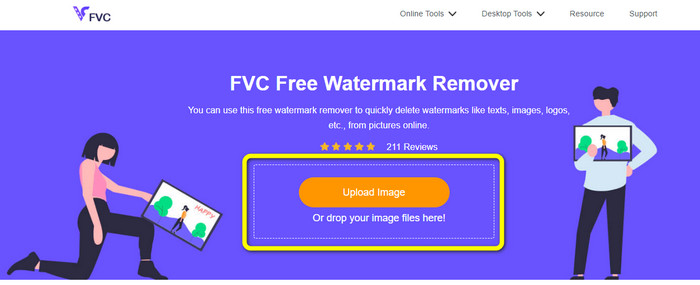
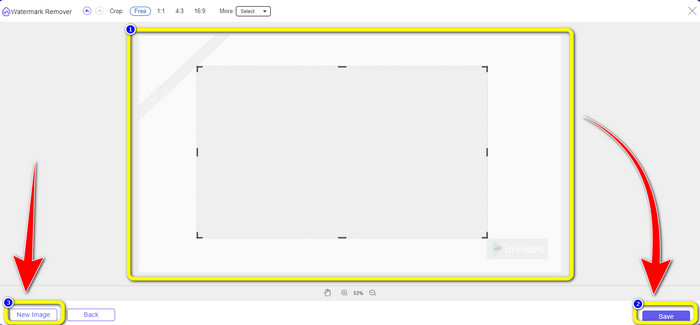
ステップ4: トリミングしてウォーターマークを除去したい場合は、Upload Image ボタンをクリックして、切り抜きたい画像をアップロードします。画像ファイルを黄色い枠内にドラッグ&ドロップすることもできます。
ステップ5: PNG 画像のアップロードが完了したら、Crop ボタンをクリックします。その後、ウォーターマークのある部分を含むように写真をトリミングできます。
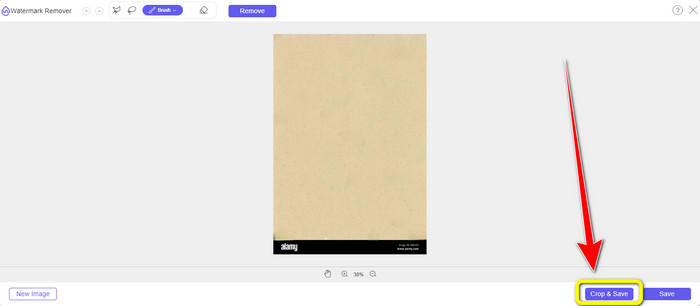
ステップ6: トリミング後、Save ボタンを選択して、編集済みの写真をパソコンにダウンロードします。さらに別の画像をトリミングしたい場合は、New image ボタンをクリックします。また、このツールを使ってJPG 画像のウォーターマークを削除することも可能です。
パート2. Watermarkremover.ioでPNGからオンラインで透かしを削除する
Watermark Remover.io は、写真からウォーターマークを削除できるオンラインツールです。PNG 画像ファイル形式にも対応しているため、PNG 画像のウォーターマークを数秒で取り除くことができます。また、ウォーターマークの削除手順は 2 ステップのみなので、複雑な操作に悩まされることもありません。ただし、Watermark Remover.io の無料版では機能が制限されます。1か月にアップロードできる画像は 50 枚までで、10k 回分の基本変換と 25GB のストレージしか利用できず、多くのユーザーには物足りないかもしれません。50枚以上の画像アップロードや、より多くの基本変換機能を利用するには、サブスクリプションの購入が必要です。
機能
◆ 透かし、ロゴ、テキスト、ステッカーなどの不要なオブジェクトを写真から削除します。
長所
- シンプルなステップで、初心者にも最適です。
- PNG、JPG、WEBPなど、さまざまな画像ファイル形式をサポートしています。
短所
- サブスクリプションを購入して、より優れた機能を体験してください。
- 高速インターネット接続を強くお勧めします。
ステップ1: Watermark Remover.io の公式サイトにアクセスします。次に、Upload Image ボタンをクリックして、ウォーターマーク付きの PNG 画像を追加します。URL ボタンをクリックして、画像リンクを貼り付けることも可能です。
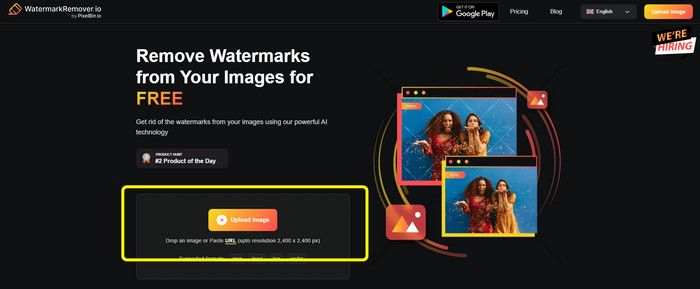
ステップ2: ファイルを追加すると、ソフトウェアが自動的にウォーターマークを削除します。処理が完了したら、Download Image ボタンをクリックして、ウォーターマークのない画像を保存できます。

パート3. Inpaintを使ってPNGから透かしをオンラインで簡単に削除する
PNG 画像から透かしを削除するために使用できる別のオンライン ツールは、Inpaint です。この透かしリムーバーの助けを借りて、写真を簡単にきれいにして改善することができます。また、使用できる 3 つの便利な透かし除去ツールも提供しています。これらのツールは、マーカー、なげなわ、多角形です。これらのツールを使用すると、厄介な透かしを強調表示して消去できます。さらに、古い写真を復元して新しくすることもできます。このオンライン ソフトウェアを使用しようとすると、多くのことができます。ただし、オンラインでの Inpaint の使用には多くの制限があります。最大ファイル サイズが 10 Mb の画像のみをアップロードできます。また、最大解像度は 4.2 メガピクセルです。より高い解像度と無制限のファイル サイズが必要な場合は、ダウンロード可能な Inpaint バージョンを使用する必要があります。
機能
◆ 透かし、ロゴ、テキストなどの不要な要素を写真から削除します。
長所
- WEBP、PNG、JPG に対応しています。
- 初心者に最適です。
短所
- 無料版には多くの制限があります。
- Inpaint デスクトップ バージョンをダウンロードして、より多くの機能を体験してください。
- インターネット接続なしでは動作しません。
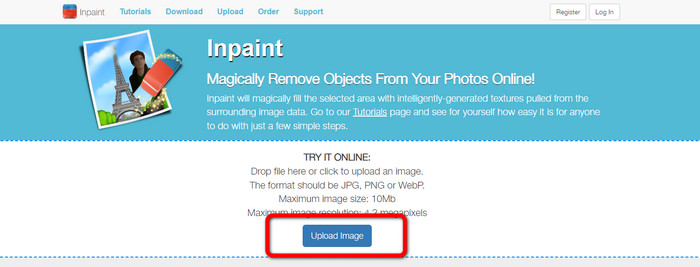
ステップ1: Inpaint のウェブサイトにアクセスします。その後、Upload Image ボタンをクリックして、ウォーターマーク入りの PNG 画像をインポートします。
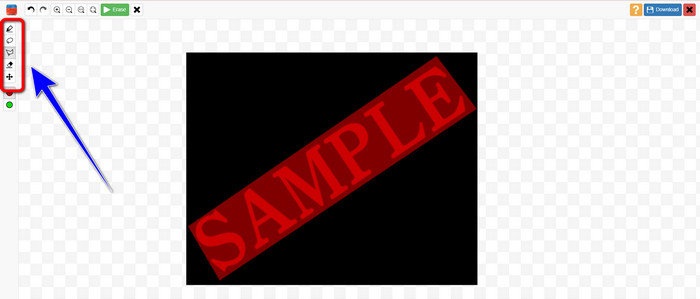
ステップ2: 画面左側のツールバーから、ポリゴン、マーカー、なげなわツールなどのウォーターマーク削除ツールを選択し、ウォーターマーク部分を指定します。
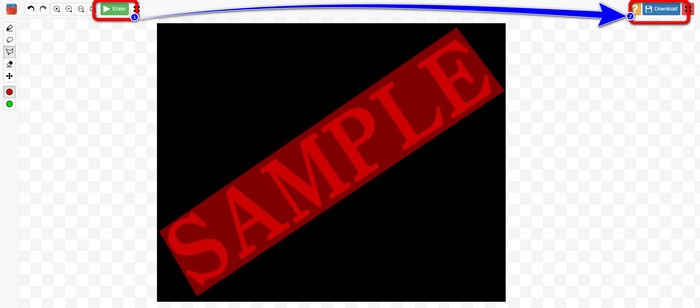
ステップ3: すべてのウォーターマーク部分を選択し終えたら、左上にある Erase button をクリックします。削除処理が完了するまで待ち、画面右上の Download ボタンをクリックして画像を保存します。
パート4. PhotoshopでPNGから透かしを削除する方法
上記のオンラインで透かしを削除する方法を学んだ後、画像編集に特化したPhotoshopの使用も検討してみてください。透かしの消去には最適な選択肢です。このツールは高価ですが、ペンツールを使えば、削除したい透かしを正確に見つけることができます。
機能
• レイヤー、マスク、フィルター、ブレンドモード、非破壊編集をサポートします。
• ロゴ、ポスター、Web グラフィック、UI モックアップなどを作成します。
• 修復ブラシ、クローンスタンプ、コンテンツに応じた塗りつぶしなどのツール。
• 自動オブジェクト選択、空の置き換え、ニューラル フィルターが含まれます。
長所
- プロフェッショナルな画像編集の業界標準
- 非常に強力で多用途
- 新機能の定期的なアップデート
- 幅広いチュートリアルとコミュニティサポート
- 他の Adobe アプリ (Illustrator、Lightroom、Premiere Pro など) とのシームレスな統合
短所
- 高額なサブスクリプションベースの価格設定
- 初心者にとって学習曲線が急峻
- 古いコンピュータではリソースを大量に消費する可能性がある
Photoshop を使用して透かしを削除する方法は次のとおりです。
ステップ1: 左側のメニューから Remove Tool を選択します。
ステップ2: ブラシサイズを調整し、消したいウォーターマーク部分をなぞります。
ステップ3: 処理後、ウォーターマークがきれいに削除されていることが確認できます。
パート5. PNGから透かしを削除する方法に関するよくある質問
PNG 画像から透かしを削除する最も簡単な方法は何ですか?
最もおすすめなのは、FVC Free Watermark Remover を使う方法です。操作手順が複雑ではないため、PNG 画像からあらゆるウォーターマークを手軽に削除できます。
PNG 透かしを削除するのは違法ですか?
商用利用やその他の公共利用の場合は、答えは「はい」です。ただし、画像の所有者でない場合、または許可を得ていない場合、透かしを削除することは通常違法であり、著作権を侵害します。透かしを削除できるのは、ご自身の画像、またはライセンスで許可されている場合のみです。
ぼやけることなく PNG から透かしを削除する最適な方法は何ですか?
PNGファイルから透かしをぼかさずに削除する最良の方法は、Photoshopの「コンテンツに応じた塗りつぶし」や「クローンスタンプ」などのツールを使用することです。これらのツールは、透かし領域を周囲のピクセルと滑らかにブレンドします。FVC Free Watermark RemoverなどのAIベースのオンラインツールも、高速でクリーンな結果をもたらします。
結論
PNG 画像からウォーターマークを削除する作業は難しく感じることもありますが、本記事で紹介した 4 つの簡単な方法を使えば、誰でも実行可能です。Photoshop のようなプロフェッショナルなソフトを使う場合でも、高性能で信頼性の高い無料ツールである FVC Image Upscaler を使う場合でも、満足のいく仕上がりが期待できます。これらの中では、とくに FVC Free Watermark Remover をおすすめします。より手軽にアクセスでき、初心者にも扱いやすいからです。
-
 iFunny 透かしを簡単に削除するための完全なガイド
 最も優れた iFunny ウォーターマーク リムーバーを見つけてください。また、写真から iFunny 透かしを削除する簡単な方法を学びましょう
-
 Alamy透かしを削除する方法に関するオンラインおよびオフラインの方法
 優れた Alamy 透かしリムーバーを見つけたい場合は、この投稿を読んで、Alamy 透かしを消去する 3 つの効率的な方法について学ぶことができます。
-
 Inpaint Watermark Removerおよび代替の正直なレビュー
 Inpaint を使用して透かしを削除する方法を知りたいですか?この記事を読むことは正しい選択です。また、使用できる最良の代替手段についても学びます。
