


 ビデオコンバーター究極
 スクリーンレコーダー
 ビデオ修復
ビデオ修復
 安全なダウンロード
DIVX を MP4 に変換する方法の詳細な方法
DIVX は人気のある動画形式のひとつですが、残念ながら Windows Media Player や Apple QuickTime Player など、ほかの一般的なプログラムではこの形式がサポートされていません。DIVX 動画ファイルを確実に再生する最もよい方法は、ほとんどすべてのプログラムで対応している MP4 などの形式に変換することです。ですから、もし DIVX を MP4 形式に変換したい場合は、本記事を参考にしてください。ファイル変換は難しく感じられますが、ここでは DIVX ファイルを MP4 形式に変換するために試せる、最も簡単な方法をご紹介します。

パート 1: Mac で DIVX を MP4 に変換する最良の方法
Mac で DIVX を MP4 に変換する最も効果的な方法は、Video Converter Ultimate を使うことです。このアプリケーションは、多彩な機能を備えているため、利用する価値があります。バッチ変換機能を搭載しているので、多数のファイルを一度に、連続して素早く変換できます。また、直感的なインターフェースと基本的な操作手順のおかげで、DIVX から MP4 への変換はまるで子どもの遊びのように簡単です。さらに、対応している動画形式は豊富で、AVI、FLV、MOV、AVI、M4V、MKV、WMV、VOB など 100 種類以上の形式に対応しています。加えて、Video Converter Ultimate は、ほかのコンバーターよりも最大 30 倍高速な変換スピードを提供します。これほど高速な変換プロセスにより、多数のファイルを変換する場合でも、短時間で完了できることが期待できます。
さらに、このコンバーターはユーザーの観点から偏っていません。上級者から初心者まで、どなたでも操作できます。さらに、このアプリケーションには、ビデオ エンハンサー、クロッパー、色補正などの多くのビデオ編集ツールがあるため、DIVX ビデオを改善できます。また、画像と動画を組み合わせて素敵なミュージックビデオを作りたいという方も是非。このミュージック ビデオ メーカーは、Happy、Neat、Romantic、Snow Night、Stripes and Waves、Wedding、Sports、old times など、使用できる多数のテーマを提供します。
機能
◆ ビデオを MP4、DIVX、M4V、AVI、MOV、FLV、MKV、VOB などのさまざまなファイルに変換します。
◆一括変換が可能です。
◆ ビデオ エンハンサー、コンプレッサー、ウォーターマーク リムーバー、トリマー、クロッパーなどを使用してビデオを編集します。
◆ BMP、JPG、PNG、TIF などの画像形式を変換します。
以下の簡単な手順に従って、FVC Video Converter Ultimate を使用して Mac で DIVX を MP4 に変換します。
ステップ1: 下のダウンロードボタンをクリックして、Mac に FVC Video Converter Ultimate をダウンロードします。その後、インストールが完了したらアプリケーションを起動します。
無料ダウンロードWindows 7 以降に対応安全なダウンロード
無料ダウンロードMacOS 10.7 以降に対応安全なダウンロード
ステップ2: アプリケーションを起動すると、メインインターフェースが画面に表示されます。変換パネルに進み、プラス アイコンまたは ファイルを追加 ボタンをクリックして、DIVX 動画ファイルを読み込みます。ファイルをボックス内にドラッグ&ドロップすることもできます。
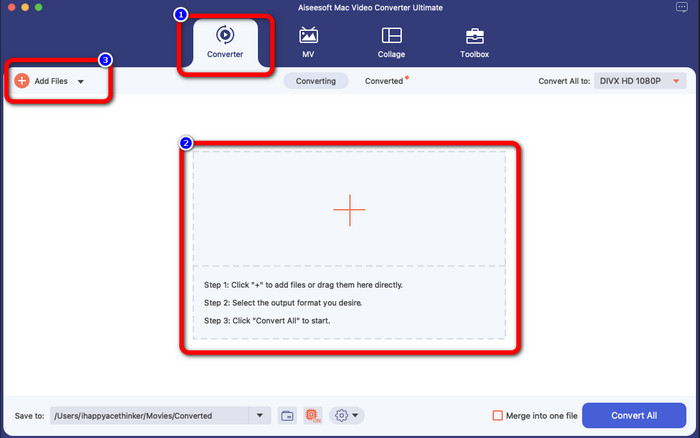
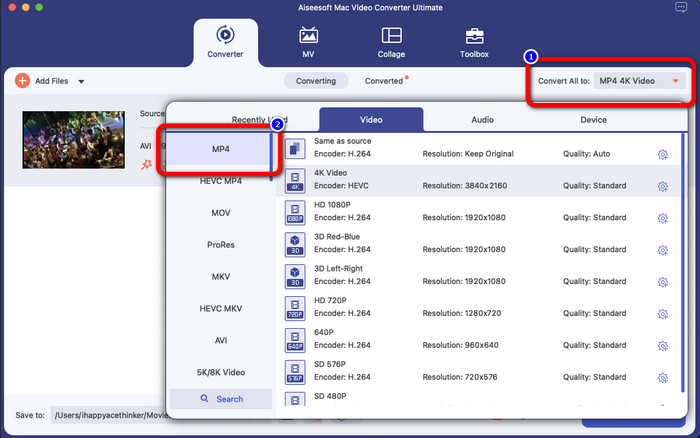
ステップ3: 次に出力形式を変更し、すべて変換 ボタンをクリックします。画面に形式オプションが表示されるので、MP4 ファイル形式を選択します。最大 4K 動画まで、お好みの解像度を選ぶことができます。
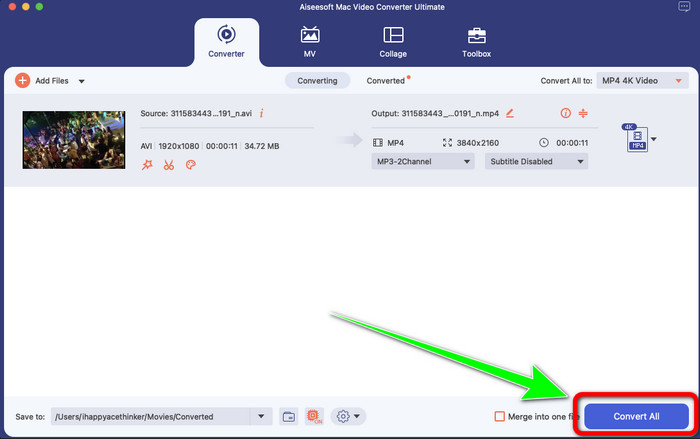
ステップ4: 出力形式を変更したら、[すべて変換]ボタンをクリックして開始します。すると変換プロセスが始まります。変換が完了すると、動画は DIVX ファイルから MP4 形式へと変換されています。
パート 2: ハンドブレーキで DIVX を MP4 に変換する簡単な方法
Handbrake を使用して DIVX を MP4 に変換しますか?その後、もう心配する必要はありません。このパートでは、Handbrake をコンピューターのコンバーターとして使用してファイルを変換する方法を説明します。このツールは、多くのファイルを M4V、MP4、MKV、WEBM などの他の形式に変換する際に信頼性があります。ただし、このツールの使用については明確にする必要があります。これは、インターフェースで見つけることができる多くのオプションがあるためです。この場合、このコンバーターは初心者には適していないと言えます。また、ファイルをMP4に変換したい場合でも、ビデオをM4Vファイルとして保存する場合があります。何らかの理由でグリッチしている可能性があります。それでも、Handbrake を使用して DIVX を MP4 に変換するには、以下の簡単な手順に従ってください。
ステップ1: パソコンに Handbrake アプリケーションをダウンロードします。インストールが完了したら、アプリケーションを起動します。
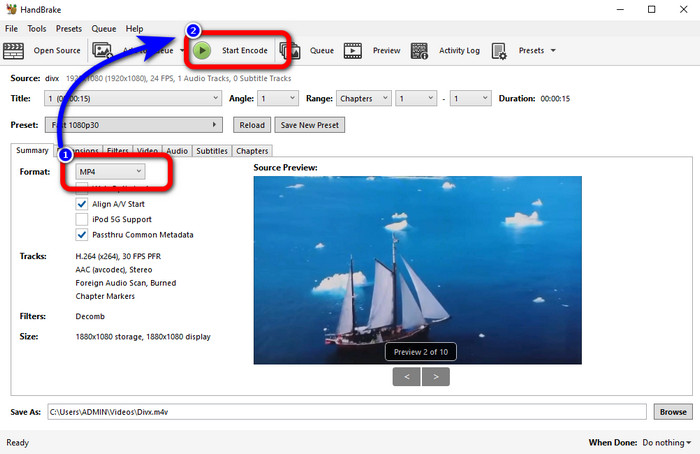
ステップ2: ファイル オプションをクリックして、DIVX 動画ファイルを追加します。
ステップ3: フォーマット オプションを選択し、MP4 形式を選びます。その後、エンコード開始 ボタンをクリックして変換プロセスを進めます。これで、MP4 ファイル形式で動画を再生できるようになります。このソフトウェアを使えば、DIVX を 3GP に変換 することも可能です。
パート 3: VLC 経由で DIVX を MP4 に変換する簡単な手順
使用できる別のオフライン コンバーターは、VLC Media Player です。このアプリケーションは、DIVX を MP4 に簡単に変換できます。これは動画の再生だけでなく、変換にも適しています。このオフライン ツールを使用すると、ファイルを MPEG、AVI、ASF、WMV などの他のファイル形式に変換できます。ただし、このコンバーターはファイルの変換手順が複雑なため、初心者には不向きです。また、アプリケーションをダウンロードするのは難しく、時間がかかります。以下の手順に従って、VLC を使用して DIVX を MP4 に変換します。
ステップ1: パソコンに VLC をダウンロードしてインストールします。
ステップ2: メディア メニューに進み、変換/保存 ボタンを選択して、変換したい DIVX 動画ファイルを追加します。
ステップ3: 画面下部にある 変換/保存 ボタンを、再度クリックします。
ステップ4: プロファイルのオプションに進み、MP4 ファイル形式を選択します。また、出力ファイル ボタンをクリックして、保存したい場所を設定します。最後に 開始 ボタンをクリックして、DIVX ファイルを MP4 形式に変換します。このツールを使えば、MP4 を DIVX に変換 することもできます。
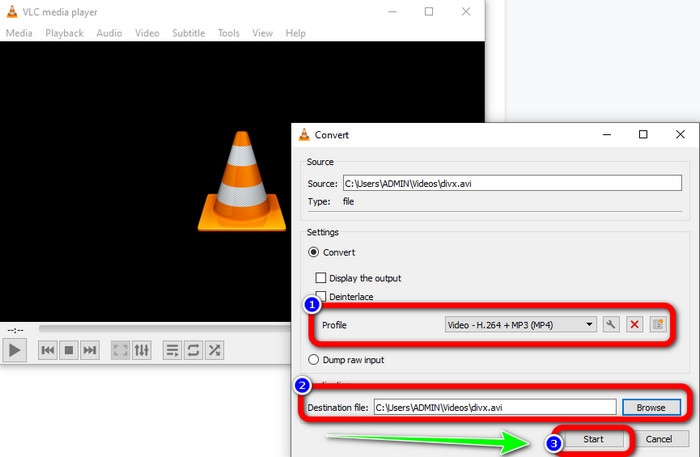
パート 4: オンラインで DIVX を MP4 に変換する効果的な方法
オフラインで使えるコンバーターを確認したところで、このパートではオンラインで使える、最も優れた DIVX から MP4 へのコンバーターをご紹介します。この優れたコンバーターが、FVC Free Video Converter Online です。シンプルなインターフェースと簡単な手順により、DIVX ファイルを MP4 形式に簡単に変換できます。このツールは FLV、WMA、AVI、MOV など、さまざまな動画形式をサポートしています。また、動画の画質を落とさずに DIVX ファイルを変換できるため、ユーザーにとって非常に魅力的です。以下の詳しいガイドに従って、FVC Free Video Converter Online を使い、シンプルな手順でファイルを変換してみましょう。
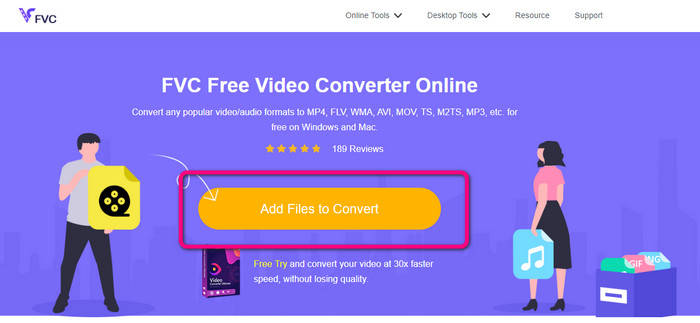
ステップ1: ブラウザにアクセスして、 FVC無料ビデオコンバーターオンライン Webサイト。次に、 変換するファイルを追加 ボタンをクリックして DIVX ファイルをアップロードします。
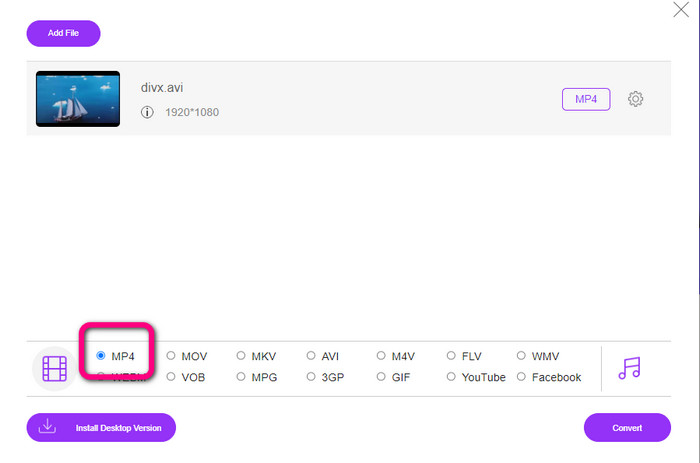
ステップ2: インターフェース下部にある形式オプションから、MP4 ファイル形式を選択します。
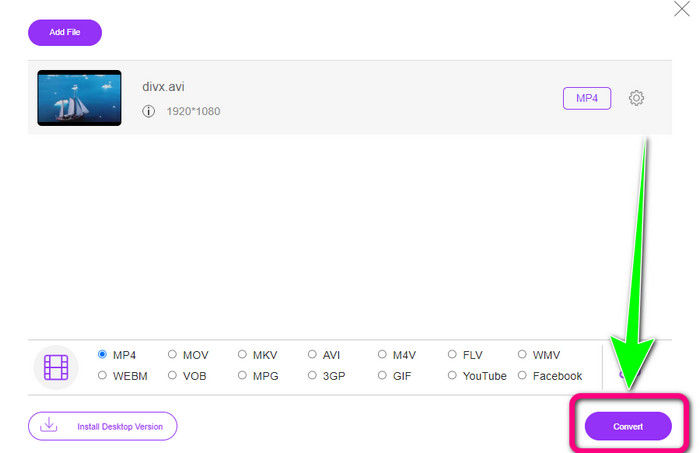
ステップ3: 最後のステップとして、変換 ボタンをクリックして変換プロセスを開始します。その後、MP4 動画をデバイスに保存します。
パート 5: DIVX 対 MP4
| DIVX | MP4 | |
| ファイル拡張子 | .divx/.avi | .mp4 |
| 説明 | DivX, LLC は、DIVX ビデオ コーデックを開発しました。このコーデックは、Windows プログラムと互換性があります。ゲーム機やカーステレオなどにも使用できます。また、3 つの DIVX コーデック、HEVC Ultra HD、H.264/MPEG-4 AVC DivX Plus High Definition Video コーデック、および MPEG-4 Part 2 があります。 | QuickTime MOV に基づくビデオ コンテナです。しかし、MP4 は MPEG 機能をサポートしています。また、MP4 はオーディオ、ビデオ、および字幕をサポートします。これらのコーデックの組み合わせにより、MP4 は柔軟になります。 |
| によって開発された | 株式会社DivXネットワーク | 国際標準化機構 |
| MIME タイプ | ビデオ/divx | ビデオ/mp4 |
| 関連プログラム | Xボックス360 カーステレオ DVD/BLU-rayプレーヤー 目覚まし時計 | VLCメディアプレーヤー Apple QuickTime プレーヤー 5KPlayer ウィンドウズメディアプレイヤー |
パート 6: DIVX から MP4 への変換に関する FAQ
1. DIVX を使用しているのは誰ですか?
DIVX を使用しているのは、ポータブル ビデオ プレーヤー、DVD、Blu-ray プレーヤーなど、DIVX 認定の家電製品です。
2. MP4 は DIVX より優れていますか?
はい。 DIVX は、MP4 である現在人気のあるファイルと比較して、既に時代遅れです。 MP4 形式は最も一般的に使用される形式の 1 つであるため、MP4 形式を使用することを強くお勧めします。
3. MP4 が人気の理由は?
MP4 形式は、Mac、Linux、Windows、およびさまざまなモバイル デバイスなど、ほぼすべてのデバイスでサポートされているため、人気があります。このようにして、すべてのユーザーがビデオを MP4 形式に変換し、すべての人がビデオにアクセスして利用できるようにします。
結論
この記事を読むことで、DIVX を MP4 に変換するための重要なポイントを理解できたはずです。試せるコンバーターは 4 つありますが、その中には操作が複雑で、初心者にはあまり向かないものもあります。ですので、より簡単にファイルを変換したい場合は、FVC Video Converter Online と Video Converter Ultimate の 2 つのコンバーターを使うことをおすすめします。
-
 MPGをMP4にすばやく変換する3つの最良の方法
 MPGをMP4ファイル形式に変換したいですか?この記事では、あなたに最適で最速のMPGコンバーターをリストアップします!
-
 AMVコンバーター– Win / MacでMP4をAMVに変換する3つの最良の方法
 ビデオをAmineミュージックビデオに変換するのに最適なMP4からAMVへのコンバーターは何ですか。記事から、目的のビデオを簡単に取得するための3つの最も効率的な方法について詳しく学ぶことができます。
-
 WebMからMP4へ| WebMをMP4に無料で変換(オンラインおよびデスクトップ)
 WebブラウザなしでWebMファイルを見る方法は? WebM を MP4 に変換する必要があります。オンラインおよびMacおよびWindowsコンピューターでWebMをMP4に変換する無料のWebMからMP4へのコンバーターのトップ10を次に示します
