


 ビデオコンバーター究極
 スクリーンレコーダー
 ビデオ修復
ビデオ修復
 安全なダウンロード
Android のテキスト メッセージ用にビデオを圧縮しますか?徹底したソリューションがここにあります
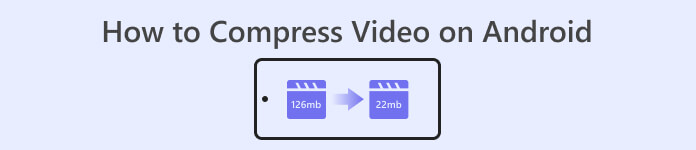
動画を頻繁に撮影するAndroidユーザーであれば、これらの動画が端末のストレージをかなり占有してしまうことに気付いているかもしれません。これにより保存できるコンテンツ量が制限されてしまうため、ストレスを感じることもあるでしょう。それだけでなく、複数の動画をAndroidに保存しておくと、端末のパフォーマンスに悪影響を及ぼし、動作が重くなって快適に使えなくなる場合があります。幸いなことに、画質を損なうことなくAndroidで動画を圧縮する方法はいくつか存在します。本記事では、そのいくつかの解決策をご紹介します。以下の内容を読み、各ツールの特徴を確認してみてください。
パート 1. Android でビデオを圧縮する方法
1.ビデオサイズを圧縮するコンプレッサー
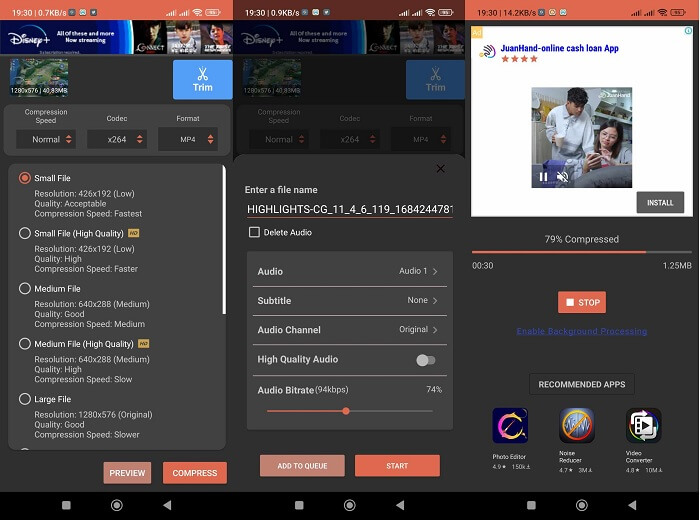
Android デバイスでよく使われるビデオ コンプレッサーをお探しですか? Compress Video Size Compressor は、間違いなくあなたの心に鐘を鳴らすツールです。その名前からわかるように、このビデオ ユーティリティは、Android デバイスに適したビデオ サイズを圧縮できます。ユーザーは、互換性のあるさまざまなビデオ コンテナを自分のビデオで使用できます。 MP4、MKV、3GP、MTS、MPG、WMV、M4V、VOB、FLV、MOV、MPEG、AVI などを使用できます。このツールは、ユーザーがビデオに必要なファイル サイズの正確な数を入力することでビデオを手動で圧縮できるため、ビデオ圧縮ツールとしてはユニークです。この機能は、Android にビデオを保存するときに正確な数のビデオ ファイル サイズが必要なユーザーにとって有利です。本アプリの操作方法は以下に記載の方法をご確認ください。
主な機能
◆一括圧縮処理付きです。
◆ ユーザーはビデオのカスタム解像度を選択できます。
◆ Android デバイスまたはギャラリー アプリにビデオを直接保存できます。
ユーザーガイド:
ステップ1 Playストアを開き、検索バーで「Compress Video Size Compressor」を検索してアクセスします。端末にインストールするにはインストールアイコンをタップします。
ステップ2 Android端末でアプリを起動し、圧縮したい動画を追加するためにImport(インポート)ボタンをタップします。
ステップ3 動画を選択すると、ツールが解析を行い、いくつかの圧縮動画オプションを提示します。画質を許容できる範囲で、できるだけファイルサイズの小さいものを選びましょう。
ステップ4 compress(圧縮)をタップし、圧縮した動画ファイルを端末に保存します。元の大きなファイルを削除するオプションを選択することも可能です。
長所
- このアプリでは高品質と低品質の圧縮が可能です。
- 圧縮ビデオを再生するためのビデオプレーヤーが内蔵されています。
- ユーザーはこのアプリでビデオを直接共有できます。
- HEVC コーデックが付属しています。
- このツールには、ビデオ圧縮設定が事前定義されています。
- ユーザーは圧縮されたビデオを元のファイルと比較できます。
短所
- インターフェース上の広告が多すぎます。
- 高度な圧縮機能を利用するには、プレミアム プランを利用する必要があります。
2. FVC無料ビデオコンプレッサー
Android端末の動画を圧縮するための信頼できるツールをお探しですか?その場合は、FVC Free Video Compressorを試してみる価値があります。このWebベースのアプリケーションは、Androidで動画を圧縮するためにアプリをインストールしたくないユーザーにとって柔軟に利用できるツールです。PCのWebブラウザー上で動作するため、端末に専用アプリをインストールせずに利用できます。このツールでは、ビットレート、サンプルレート、フレームレート、音量、解像度などを調整してファイルサイズを削減・圧縮できます。MP4、MKV、AVI、MOVなど、さまざまな動画コンテナ形式にも対応しています。APIに制限はなく、無料で利用可能です。類似ツールと比べた際の大きな特長は、出力ファイルに透かし(ウォーターマーク)が入らない点です。そのため、Android向けの他の動画圧縮アプリに代わる手段として、このツールを利用することができます。
主な機能
◆ Chrome、Firefox、Mozilla、Opera Mini、その他の Web ブラウザで動作します。
◆動画ファイルを手動で縮小できるスライダーが付いています。
◆一括圧縮機能を搭載しています。
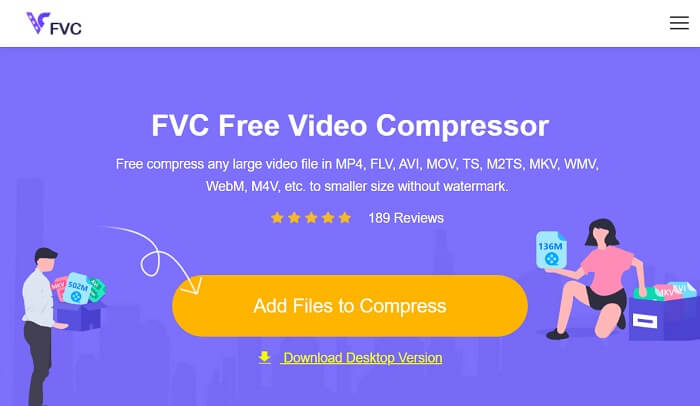
ステップ1.オンラインツールにアクセス
Android デバイスから取得したビデオ ファイルを圧縮するための最初のステップは、FVC Free Video Compressor にアクセスすることです。 Chrome、Firefox、Opera Mini、または組み込みブラウザを使用してアプリを検索できます。検索結果からアプリのメイン ページを見つけて、そのメイン ページにアクセスします。
ステップ2. 動画のインポート
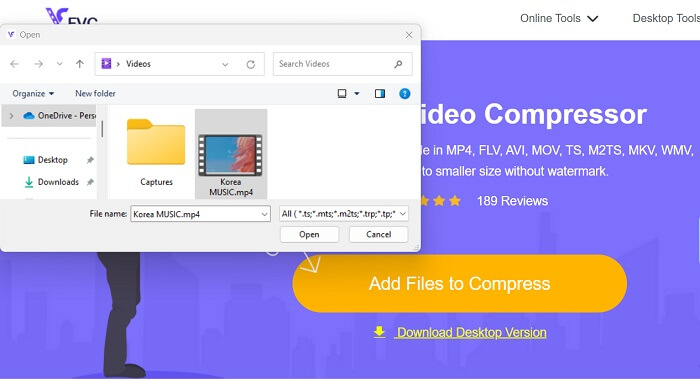
圧縮したい動画ファイルを取り込むには、Add Files to Convertをクリックして、デバイスのフォルダーを開きます。圧縮したい動画ファイルを選択し、[開く(Open)]をクリックしてファイルをインポートします。
ステップ3:動画ファイルを圧縮
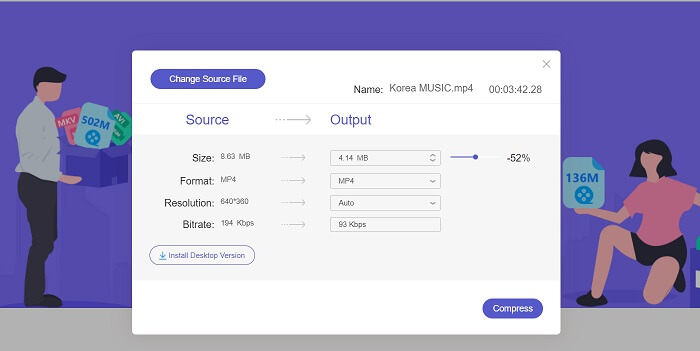
すると、画面上にダイアログボックスが表示されます。スライダーを動かして、ファイルサイズをどの程度削減するかパーセンテージで調整します。サイズを小さくするにはCompressボタンをクリックします。出力ファイルはPC上で確認でき、ファイルをダブルクリックすれば、圧縮後の動画を再生・プレビューできます。
長所
- 4Kビデオを圧縮できます。
- ユーザーは 3D ビデオのファイル サイズを削減することもできます。
- このアプリはビデオ ファイルのプライバシーを保護します。
- 出力ビデオにウォーターマークを付けずにビデオを圧縮できます。
- 30倍の圧縮速度を備えています。
- アプリを終了せずにソースファイルを簡単に変更できます。
短所
- インターネットの速度に依存します。
パート 2. コンピュータ上で Android ビデオを圧縮する
端末上の動画ファイルを効率よく圧縮できるツールをお探しですか?その場合は、Video Converter Ultimateを使えば、PC上で動画ファイルのサイズを削減・調整できます。このアプリケーションはMacとWindowsの両方に対応しており、どちらのデバイスでも利用可能です。さらに、MP4、MOV、MKV、WebM、AVIなど、幅広い動画形式をサポートしています。スライダー機能が搭載されており、動画の長さをカットすることなく、ファイルサイズを任意の割合で圧縮できます。また、このアプリは4K動画の処理も難なくこなします。高度な技術を用いて動画を処理・圧縮しているため、制限や大きな制約なくファイルサイズを縮小できる点が、コンプレッサーとしての大きな魅力です。以下の詳細な手順を確認しながら使い方をチェックしてみてください。
ステップ1:アプリをインストール
まずユーザーが行うべきなのは、パソコンまたはノートPCにVideo Converter Ultimateをダウンロードすることです。簡単にインストールするには、下に表示されている無料ダウンロード(Free Download)アイコンをクリックします。
無料ダウンロードWindows 7 以降対応安全なダウンロード
無料ダウンロードMacOS 10.7 以降対応安全なダウンロード
ステップ2:動画ファイルをインポート
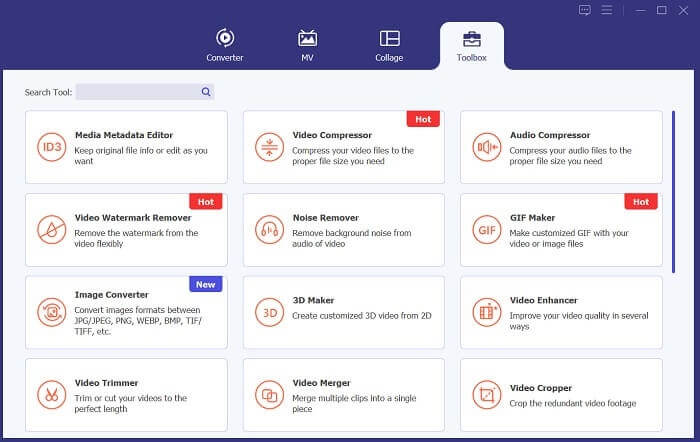
次のステップは、アプリのインターフェースに動画を取り込むことです。ツールのインターフェースを開き、ツールボックス(Toolbox)オプションをクリックします。一覧からVideo Compressor機能を選び、+アイコンをクリックします。
ステップ3:動画を圧縮
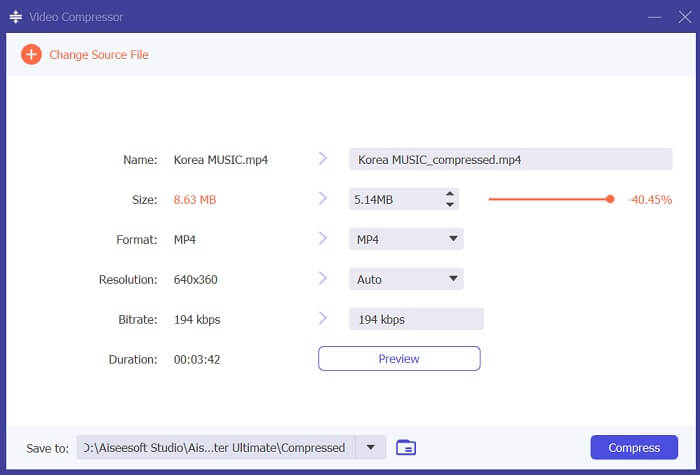
その後、PC内のフォルダーが表示されます。圧縮したい動画を選択し、[Open(開く)]をクリックしてインポートします。新しい画面が表示され、そこでファイルサイズを縮小できます。スライダーを動かすか、解像度・形式・ビットレートなどの動画パラメーターを変更してください。Compressオプションをクリックすると、圧縮処理が開始されます。
さらに詳しく読む:
Twitter向けに動画を圧縮する方法:信頼できる4つの手段
パート 3. Android のビデオ圧縮に関する FAQ
Samsung スマートフォンでビデオを圧縮するにはどうすればよいですか?
Samsung スマートフォンでビデオを圧縮するには、ファイルの圧縮をサポートするファイル マネージャー アプリを使用できます。まず、携帯電話のストレージに圧縮するビデオ ファイルを見つけます。次に、ファイルを選択し、圧縮または zip を選択してください。圧縮形式と圧縮レベルを選択することもできます。ビデオ ファイルを圧縮すると、ファイル サイズを小さくして共有したり、携帯電話のストレージに保存したりできます。
サイズの大きなビデオを電子メールで送信できないのはなぜですか?
いくつかの理由により、大きなビデオを電子メールで送信できない場合があります。まず、電子メール プロバイダーは、電子メールに添付されるファイルのサイズ制限を設けていることがよくあります。この機能により、サーバーの過負荷が防止され、電子メールが迅速かつ効率的に配信されます。さらに、一部の電子メール クライアントでは、特定の形式のビデオなど、添付できるビデオ ファイルの種類が制限されている場合があります。このような場合は、ファイル共有サービスにアップロードして受信者にリンクを送信するなど、別の方法を使用してビデオを共有する必要がある場合があります。
Android でビデオを圧縮すると品質が低下しますか?
Android でビデオを圧縮すると、特に高い圧縮レベルを選択した場合、品質が低下する可能性があります。ただし、正しい圧縮設定を選択したり、高品質の圧縮アプリを使用したりするなど、品質の低下を最小限に抑える方法があります。
結論
まとめると、Androidで動画を頻繁に撮影する場合、動画が端末のストレージを大きく消費してしまうことに気付いているはずです。このような状況は、保存できるコンテンツ量を制限し、端末の動作を遅くしてしまう要因にもなるため、非常に厄介です。Androidで動画を圧縮する方法を理解しておけば、ストレージ容量を節約しつつ、モバイル端末のパフォーマンスを向上させることができます。本記事で紹介したような適切なツールやテクニックを用いれば、動画の画質を犠牲にすることなく、圧縮処理を行うことが可能です。
-
 Android デバイスで動画を高速化する最も簡単な方法 [2023]
 Androidでビデオを高速化できることをご存知ですか?したがって、Androidスマートフォンでビデオを高速化する方法を知りたい場合は、この記事を読んでください。
-
 Android で動画をトリミングして動画コンテンツを改良する方法
 特大のビデオで速度を落とさないようにしてください!ステップバイステップのチュートリアルガイドで、Android で動画のサイズを変更する方法を学びましょう。
-
 Android携帯で再生されていないビデオを修復する方法に関するガイド
 Android デバイスでビデオを再生できない理由を知りたいですか?その場合は、自分で問題を解決するために、読み続けてさらに詳しく知ることができます。
