


 ビデオコンバーター究極
 スクリーンレコーダー
 ビデオ修復
ビデオ修復
 安全なダウンロード
iPadでMKVファイルを再生する2つの簡単な方法
iPadでMKVファイルを再生できますか?
iPad Pro、iPad Air、iPad mini、iPad 2/4/6/8のいずれを使用している場合でも、iPadでMKVを直接再生することはできません。MKVは一般的なマルチメディアコンテナ形式の一種ですが、iPad、iPhone、iPod、Macを含むすべてのApple製品でサポートされているわけではありません。では、どうやってiPadでMKVを再生すればよいのでしょうか。

サードパーティのアプリを使ってiPadでMKVファイルを再生することができます。また、MKVをMP4やMOVといったiPad対応形式に変換する方法もあります。この記事では、iPad Pro、Air、miniなど各種モデルでMKVファイルを再生するための、効果的な2つの方法をご紹介します。
パート1。VLCを使用してiPadでMKVファイルを直接再生する方法
前述のとおり、iPad Pro、Air、miniやiPad 8/6/4/2ではMKVファイルを直接再生することはできません。しかし、App StoreにはiPad、iPhone、iPod touchでMKVを再生できるサードパーティ製のMKVプレーヤーアプリがいくつか提供されています。なかでも人気のメディアプレーヤーであるVLCを利用すれば、MKVファイルを含むさまざまな動画をiOSデバイスで再生できます。
VLC Media Playerは、MKV、MOV、MP4、AVI、FLVなど、よく使われるあらゆる動画形式に対応した非常に人気の高いメディア再生ツールです。Windows、Mac、Linuxの各コンピューターでメディアファイルを再生できます。さらに、VLCはiOSアプリも提供しており、これを使ってiPadやiPhoneでMKVファイルを再生することが可能です。
ステップ1. iPadでApp Storeを開き、VLCと検索します。最初に表示される検索結果がVLC for Mobileです。それをタップし、続いて入手をタップしてiPadに無料インストールします。このVLCアプリは、iPad、iPhone、iPod touch、Apple TVに対応しています。
ステップ2. VLCのアイコンをタップして起動します。ここから、iTunes、Wi-Fi共有、クラウドサービスを使ってMKVファイルを同期できます。同期後、ビデオ内でそれらを確認できます。また、ファイルアプリ内でMKVファイルを確認することもできます。iPadで再生したいMKVファイルを選択し、共有ボタンをタップします。
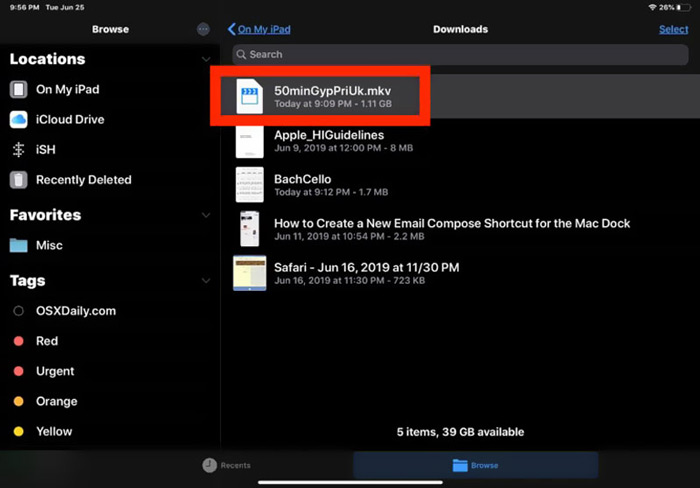
ステップ3. ドロップダウンリストからVLCで開くまたはVLCにコピーを選択します。これで、このVLCアプリを使ってiPad上でMKVを再生できるようになります。
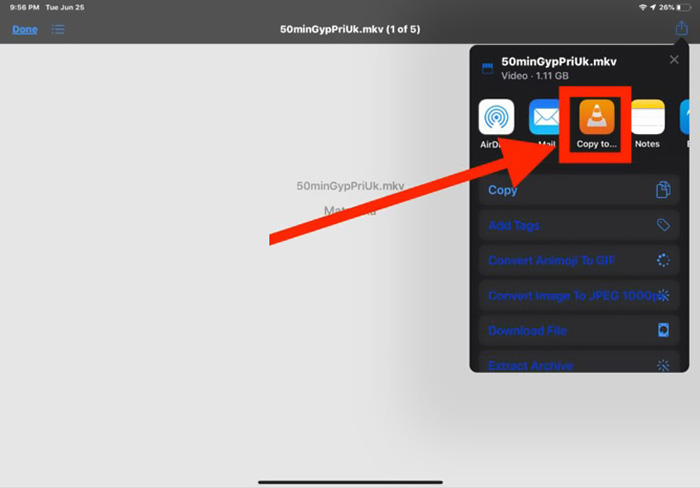
MKVファイル以外にも、VLCを使えば他のメディアファイルも簡単に再生できます。また、KMPlayerなど、iPadでMKVファイルを視聴するのに役立つMKVプレーヤーは他にも存在します。
パート2。iPadで再生するためにMKVをMP4に変換する方法
iPadでMKVファイルを再生したい場合、MKVをMP4やMOVなどiPad対応の動画形式に変換するという方法もあります。その際は、プロ仕様のMKV変換ソフトであるFree Online Video Converterを利用できます。
このMKVからiPadへのコンバーターは、頻繁に使用されるビデオおよびオーディオ形式を高度にサポートします。これにより、品質を損なうことなく、MKVをMOVやMP4などのiPadでサポートされている形式に変換できます。次のガイドでは、MKVをiPadに変換するためにそれを使用する方法を示します。
ステップ1. Chrome、IE、Firefox、Safariなどお使いのブラウザを開き、このFree Online Video Converterのサイトにアクセスします。ページが開いたら、Add Files to Convertをクリックし、続いてdownloadボタンをクリックして、MKV変換用の小容量のFVC Launcherを素早くインストールします。

ステップ2. 画面にファイルを開く(Open File)というポップアップウィンドウが表示され、そこでMKVファイルを参照して読み込みます。その後、メインの変換ウィンドウが表示されます。MP4、MKV、MOV、AVI、FLV、WMV、VOB、WEBMなど、多くの一般的な動画形式が一覧表示されます。ここでは出力形式としてMP4またはMOVを選択してください。
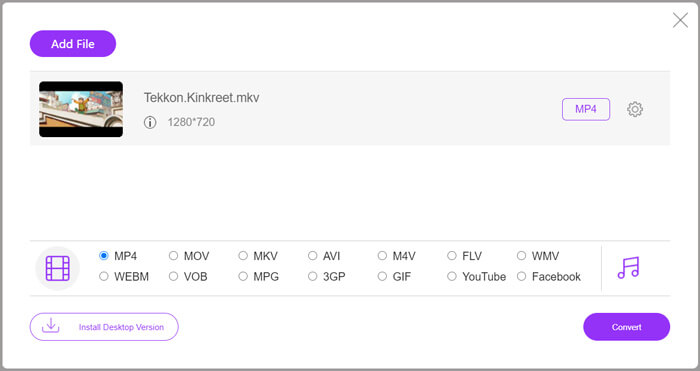
ステップ3. 変換前に、出力形式の横にあるSettingsアイコンをクリックして、各種ビデオ・オーディオ設定をカスタマイズできます。ここでは、動画の解像度、エンコーダー、フレームレート、ビットレート、オーディオチャンネル、サンプリングレートなどを調整可能です。設定が終わったらOKボタンをクリックして変更内容を保存します。
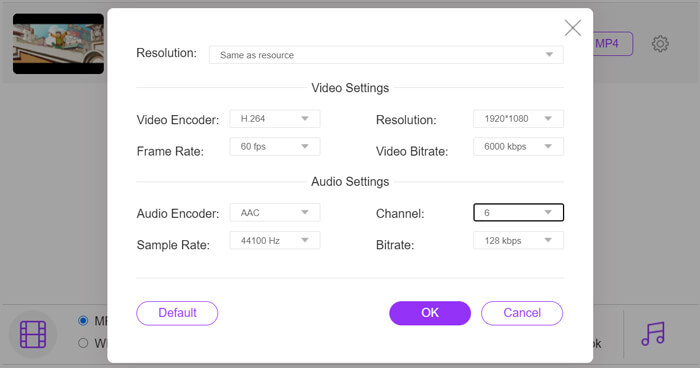
ステップ4. すべての操作が完了したら、ConvertボタンをクリックしてMKVをMP4に変換し始めます。出力ファイルは元の映像と音声の品質をそのまま維持します。その後、変換したファイルをiPadに転送すれば再生できます。
パート3。iPadでMKVファイルを再生する際のFAQ
質問1.iMovieはMKVファイルを編集できますか?
いいえ。前述のとおり、すべてのAppleデバイスおよび関連ソフトウェアがMKV形式をサポートできるわけではありません。 iPad、iPhone、Macのデフォルトのエディタとして、iMovieはMKVファイルを開いて編集することはできません。
質問2.VLCはMKVをMP4に変換できますか?
はい。 VLC Media Playerには、MKVファイルを変換する機能があります。 VLCを開き、[メディア]メニューをクリックして、変換/保存機能を使用できます。 Open Mediaウィンドウで、AddボタンをクリックしてMKVファイルをロードできます。 [変換]ボタンをクリックして、ターゲット形式としてMP4を選択します。その後、適切な宛先フォルダーを選択し、出力ファイルの名前を変更できます。次に、[スタート]ボタンをクリックして、VLCでMKVからMP4へのビデオ変換を行うことができます。
質問3.Windows 10はMKVファイルを再生できますか?
Windows 10PCでMKVファイルを再生するためにデフォルトのプレーヤーであるWindowsMediaPlayerに依存することはできません。 MKVファイルを開きたい場合は、VLC、PotPlayerなどのサードパーティのメディアプレーヤーに依存する必要があります。
結論
この記事を読めば、iPadでMKVファイルを再生するための2つの便利な方法が分かります。iPadでMKVを直接視聴したい場合でも、MKVをiPad対応形式に変換したい場合でも、目的に合ったツールを見つけることができるでしょう。iPadでのMKV再生についてさらに質問があれば、メッセージをお寄せください。
-
 M2TS to iPad –iPadでM2TSビデオファイルを無料で再生する方法
 M2TSをiPadに変換するための最良の方法を読んで入手してください。 iPadM2TS再生用のオンラインおよびオフラインのM2TSファイルコンバーターです。読んで、好きなソリューションを選択してください。
-
 MKVからMOVへ-MKVをMOVに変換する方法
 MacでMKVをMOVに変換するにはどうすればよいですか? iMovieはMKVを読み取ることができますか? MOV形式とはどういう意味ですか?この投稿では、無料のオンラインおよびプロのビデオコンバーターを使用してMKVをMOVに変換するのに役立つ2つの簡単な方法を説明しています。
-
 チュートリアル–iPhone上のビデオを新しいものにマージする4つの無料の方法
 iPhoneでビデオをマージする4つの簡単な方法を読んで入手してください。すべてのiPhoneモデルとiOSバージョンがサポートされています。 iPhoneの2つ以上のビデオをすばやく新しいビデオに組み合わせることができます。
