


 ビデオコンバーター究極
 スクリーンレコーダー
 ビデオ修復
ビデオ修復
 安全なダウンロード
曲をトリミングしてオーディオクリップを組み合わせるための4つのオンラインミュージックカッターと合併
TiktokやYouTubeのバックグラウンドミュージックを作成したい場合、オンラインで曲をカットしてマージするにはどうすればよいですか?自分の声をお気に入りの音楽と組み合わせたり、ビデオの目的の部分をトリミングしたりする場合、特にオーディオファイルがさまざまな形式である場合は、4つの最高のオンラインミュージックカッターと合併について詳しく知ることができます。機能の詳細を学び、要件に応じて目的の機能を選択してください。

パート1:オンラインで曲をカットしてマージするための4つの最良の方法
方法1:クリデオ
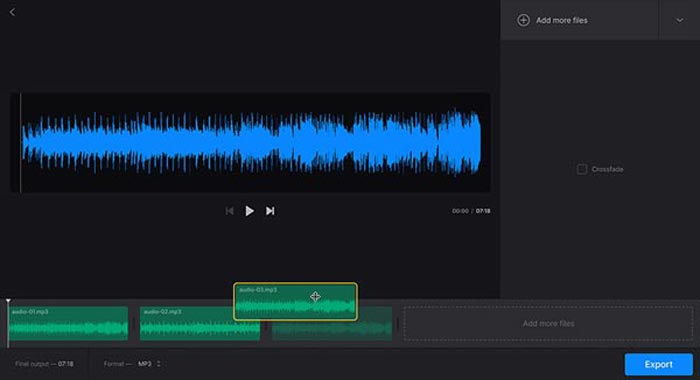
Clideo is one of the most popular methods to cut and merge songs online for MP3, WMV, and more other audio formats. It enables you to upload the audio files from your hard drive, Google Drive, Dropbox, and even URL. Moreover, you can apply crossfade effects for merging the music files.
Step 1: To cut and merge songs online, you can go to the audio joiner or audio cutter and select the audio files from different channels. Moreover, you can also select your file or paste it into the URL.
Step 2: Once you have uploaded the song, you can type in the period to crop the audio, or add more tracks to merge. Then, you can select the desired part to be combined or deleted.
Step 3: Just listen to the songs you have merged or trimmed, you can click the Download button to download the music to your computer or a cloud storage account.
方法2:サウンドトラップ
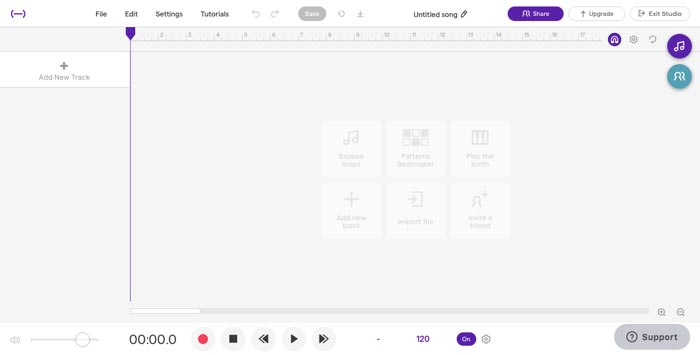
When you need to make stunning music files as a profession, Soundtrap is an excellent online cutter and merger to add voice, microphone, piano, keyboard, guitar, bass, drum, and more others. You can edit music online, in real-time, with your musician friends around the world.
Step 1: Once you have entered the Studio of Soundtrap, you can create a new project and click the Music button to import different audio clips to cut and merge songs online.
Step 2: Select the Edit menu and choose the Split region option, or the Merge region option to edit the music files. Moreover, it enables you to a mute region or an auto-tune the audio files.
Step 3: When you are satisfied with the audio file, you can adjust the audio quality and tweak MIDI settings. Preview the music file online before clicking the Save button to export the file.
方法3:Audiotool
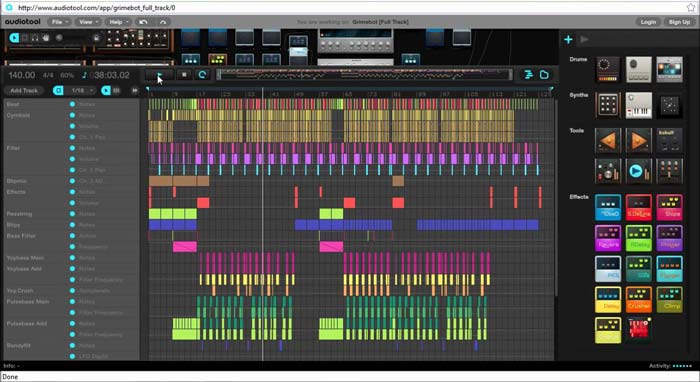
Audiotool has a unique and visually appealing user interface that enables you to cut and merge songs online. The collaborative online music production studio can spice up your music, combine songs, and even import the files right in your browser.
Step 1: When you import the audio files into the online music editor, you can go to the Project menu to create a new file by clicking the New button. After that, you can preview the audio within the program.
Step 2: Then you can choose the desired effects, select the suitable tool, add notes to the files, and more. After that, you can select the desired audio clip to trim and merge the songs online.
Step 3: Once you get the desired files, you can click the Publish option to export the songs to your computer, or share them to social media websites according to your requirements.
方法4:TwistedWave
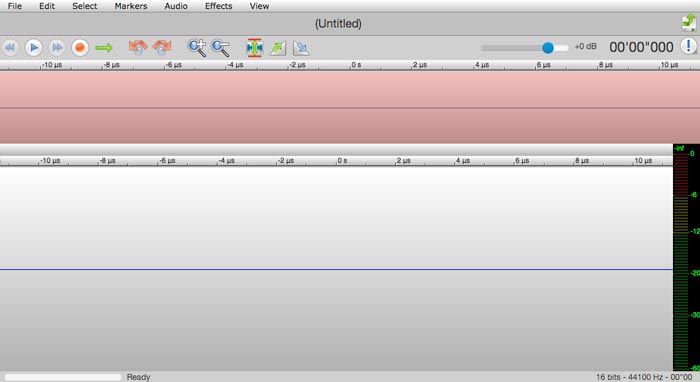
TwistedWave is a web-based audio editor, which not only enables you to cut and merge songs online but also records the audio file from YouTube. It has dozens of effects, such as VST effects, amplify, fade-in, fade-out, remove DC offset, or reverse the audio files.
Step 1: Go to the online music editor, you can import the audio files from Google Drive and more other cloud services. Then you can preview the audio files online directly.
Step 2: When you want to cut the desired part, you can grab and drag two arrows to move the audio in or out of the cut. Moreover, the two arrows are visible on each side of the cut.
Step 3: As for merging audio files online, by using the option or shift-option key combinations while double-clicking, you can add or remove whole channels from the current selection.
パート2:最高のオンラインミュージックカッターと合併の代替案
What should you do if you combine the audio from a video? How to combine the different audio files with the best quality? If you want to cut and merge songs online with the best effect, FVC Online Video Converter is the desired audio converter. It enables you to convert the audio and video files, customize the video bitrate, sample, frame rate, as well as resolution.
- 1.ビデオとオーディオファイルを同じオーディオ形式に変換します。
- 2.オーディオのビットレート、サンプルレート、解像度、音量などを調整します。
- 3.選択する複数の出力オーディオおよびビデオ形式を提供します。
- 4.変換プロセス中にデータが失われることはありません。
無料ダウンロードWindows 7 以降に対応安全なダウンロード
無料ダウンロードMacOS 10.7 以降に対応安全なダウンロード
パート3:オンラインで曲をカットしてマージする方法に関するFAQ
1.ビデオから音楽をカットしてマージすることは可能ですか?
はい。ビデオフォーマットに互換性がある場合は、ビデオをオンラインミュージックカッターにインポートしてマージするだけで、オーディオファイルを抽出できます。もちろん、事前にビデオファイルをオーディオ形式に変換することもできます。
2.いつオンラインで曲をカットしてマージしますか?
Adobe PremiereProやFinalCut Proなどのプロの音楽エディタとは異なり、オンラインで曲を簡単にカットしてマージできます。しっかりしたインターネット接続があれば、いつでもプログラムを使用できます。
3.音楽をカットしてマージするのにiOS / Androidで最適なアプリは何ですか?
iPhoneまたはAndroidスマートフォン内で音楽をカットしてマージするには、TonePad、Medly、GarageBand、Music MakerJamなどの一部のアプリを直接使用することもできます。スキルレベルに関係なく、いつでも便利に音楽を編集および作成できます。
結論
オンラインで曲をカットしてマージすることで素晴らしい曲を作成したい場合は、記事から5つの最良の方法について詳しく知ることができます。音楽を職業として編集したい場合は、FVC Free Audio Convertが、ビデオのビットレート、サンプル、フレームレート、解像度などのパラメーターを変換、調整するのに最適なコンパニオンです。
-
 MP3 VS MP4:MP3とMP4の違いは何ですか
 MP3またはMP4、どちらが良いですか? MP3とMP4の違いは何ですか?この記事では、イメージできるすべての側面からMP3とMP4を比較します。
-
 コンピュータ/電話で無料でビデオにオーディオと音楽を追加する方法
 この記事では、ビデオにオーディオを無料で追加する4つの簡単な方法を紹介します。ビデオに追加するオーディオトラックに関係なく、ここで満足のいく結果を得ることができます。
-
 具体的なチュートリアル–Audacityで2つのオーディオトラックをマージする方法
 Audacityは、オーディオの編集で評判を楽しんでいます。 Audacityをダウンロードしましたが、Audacityでオーディオトラックをマージする方法がわかりませんか?この投稿では、Audacityでトラックをマージする方法を説明します。
