


 ビデオコンバーター究極
 スクリーンレコーダー
 ビデオ修復
ビデオ修復
 安全なダウンロード
MKVファイルはPS3で再生できますか? PS3でMKVファイルを再生するための最良の方法は次のとおりです
PlayStation 3は単なるビデオゲーム機ではなく、USBドライブからソニーPS3上で動画ファイルを視聴できるメディアプレーヤーとしても利用できます。たくさんのMKV映画を集めていて、それらをPS3で再生したい場合は、この記事を読んでPS3でMKVファイルを再生する方法を学んでください。

パート1。PS3でMKVファイルを変換して再生する方法
PS3はMKV形式をサポートしていないため、PS3で自由にMKVを再生したいなら、MKVをPS3互換の形式に変換する必要があります。MKV動画をPS3対応の動画ファイルに変換するには、Video Converter Ultimateの利用を強くおすすめします。これは、MKVからMP4、MOVからMP4、WMVからPS3など、さまざまな動画・音声形式の相互変換用に設計されたプロフェッショナルな動画変換ソフトです。PS3向けに最適化された動画プロファイルも用意されており、数回のクリックだけで任意の動画形式をPS3対応形式に変換できます。
それとは別に、このプログラムはビデオ編集機能も備えており、フレームサイズのトリミング、透かしの追加、ビデオエフェクトの適用、字幕の読み込み、複数のビデオの1つのファイルへのマージ、ビデオの不要な部分のトリミングなどを行うことができます。ソフトウェアをダウンロードしてコンピュータにインストールし、試してみてください。
無料ダウンロードWindows 7 以降に対応安全なダウンロード
無料ダウンロードMacOS 10.7 以降に対応安全なダウンロード
ステップ1.MKVファイルを追加します
MKVからPS3へのコンバーターをインストールして起動し、[ファイルの追加]ボタンをクリックして、コンピューターから.mkvファイルをロードします。時間を節約するために、一度に複数のMKVファイルを追加し、それらを同時に変換することができます。

ステップ2.出力フォーマットとしてPS3を選択します
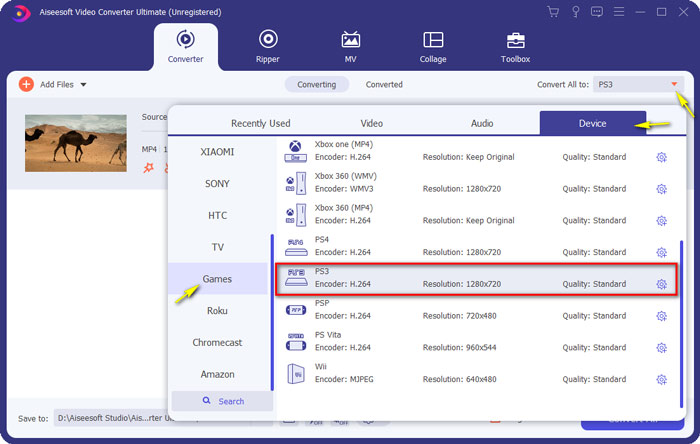
MKVファイルを読み込んだら、一括変換先メニューを開き、デバイスカテゴリを選択してスクロールし、ゲームタブ内からPS3の出力形式を見つけて選びます。
ステップ3.MKVからPS3への変換を開始します
次に、保存先フィールドで変換後のファイルを保存するフォルダーを指定します。最後に、すべて変換ボタンをクリックして、MKVファイルをPS3形式へ変換し始めます。

ステップ4.PS3で変換されたMKVファイルを再生します
変換が完了したら、変換後の動画をVIDEOフォルダーに入れ、それをUSBドライブにコピーします。その後、USBドライブをPS3に接続し、ビデオに移動してデバイスを探します。すべてのコンテンツを表示するには△(トライアングル)ボタンを押します。再生したい動画ファイルを選択して×ボタンを押せば、視聴を開始できます。これで、お気に入りのMKVファイルをPS3でいつでもどこでも楽しめます。
パート2。PS3AlternativeでMKVビデオを再生する
パソコンでMKVファイルを無料かつ直接再生できる方法をお探しなら、FVC Free Video Playerをお試しください。これはWebベースのソリューションなので、コンピューターにソフトウェアをダウンロードすることなく、MKVファイルをスムーズに再生できます。
FVC Free Video Playerの主な機能
1.すべてのフォーマットの4K、HD、SDビデオの再生サポート。
2. MP3、AACなどのオーディオファイルもロスレス品質で再生します。
3.完全に無料で使用でき、登録やダウンロードは必要ありません。
4.クリーンで直感的なインターフェース。
5.任意のブラウザでアクセス可能なWebベースのサービス。

パート3。PS3でMKVファイルを再生するためのFAQ
PS3で再生できるビデオファイルは何ですか?
PS3でサポートされているファイルタイプは、MPEG、MP4、AVI、AVCHD、DivXなどです。
変換せずにPS3でMKVをプレイできますか?
MKVには多くの規格があり、PS3でサポートできるのはH.264 / MPEG-4AVCのみです。 MKVファイルが他の形式で提供されている場合は、簡単に再生できるように、PS3でサポートされている形式に変換する必要があります。
USBからPlayStation3でMKVファイルを再生するにはどうすればよいですか?
PS3はMKVファイルを直接デコードできないため、MKVをPS3がサポートするビデオファイルに変換する必要があります。変換されたファイルを取得したら、USBフラッシュドライブをPlayStation 3の前面にある2つのUSBポートのいずれかに接続します。PS3の電源を入れ、ビデオに移動して、USBドライブを選択します。次に、三角形のボタンを押して、[すべて表示]を選択します。これで、再生または表示するビデオを選択できます。最後に、Xボタンを押します。
結論
まとめると、この記事を読んだあと、すべてのPS3ユーザーがPS3でMKV動画を再生する方法を無事に理解していただければ幸いです。PS3以外にも、Windows Media PlayerでMKVファイルを再生したり、FVC Free Video Playerやその他のMKV対応メディアプレーヤーを利用したりすることもできます。
-
 VLCプレーヤーがMKVを再生しない、修正方法
 VLCプレーヤーはMKVファイルをサポートしていますか? VLCがMKVを再生しないのはなぜですか?この投稿では、VLCプレーヤーがMKVファイルを再生しない問題を修正するための4つの便利なヒントを共有しています。
-
 iPad2021でMKVファイルを再生する方法
 iPad 2でMKVファイルを再生する方法は? iPad Pro / Air / 2で再生するためにMKVをMP4に変換できますか?この投稿では、iPadでMKVをプレイする2つの簡単な方法を共有しています。
-
 MKVからMOVへ–MKVをMOVに変換する方法
 MacでMKVをMOVに変換するにはどうすればよいですか? iMovieはMKVを読み取ることができますか? MOV形式とはどういう意味ですか?この投稿では、無料のオンラインおよびプロのビデオコンバーターを使用してMKVをMOVに変換するのに役立つ2つの簡単な方法を説明しています。
