


 ビデオコンバーター究極
 スクリーンレコーダー
 ビデオ修復
ビデオ修復Topaz Video Enhance AI を使用するための包括的なガイド
デバイスに保存されている古い動画を見つけて、「もっと高解像度にできたら」と思ったことはありませんか? そんなあなたにぴったりの情報です。本記事では、Topaz Video Enhance AI の驚くべき機能に焦点を当て、そのパワーを活用して動画の画質を向上させるための包括的なガイドをお届けします。コンテンツクリエイターや映画制作者はもちろん、大切な映像に新たな命を吹き込みたい方にとっても、このAI動画強化ツールは、解像度を高めて映像クオリティを引き出すための、使いやすいソリューションとなります。それでは、このツールを価値ある存在にしている機能やテクニックを一緒に見ていきましょう。
パート 1. Topaz Video AI とは何ですか?
Topaz Video Enhance AI は、Topaz Labs によって開発されたソフトウェアで、人工知能テクノロジーを採用してビデオ品質を向上させます。ビデオのアップスケーリング、強化、安定化、全体的な改善などの機能を提供します。このソフトウェアは、アップスケーリング、強化、安定化などのタスク用に特別にトレーニングされた 24 の時間認識 AI モデルを利用し、映画グレードの結果をもたらします。
主な特徴
◆ モーションアーチファクトを最小限に抑えます。
◆ ビデオの詳細を復元します。
◆ ビデオの解像度を向上させます。
◆8Kへのアップスケーリングが可能。
◆ビデオを自動的に安定させます。
長所
- ビデオ強化のための高度な AI モデルに無制限にアクセスできます。
- 低品質またはノイズの多いビデオに効率的に対処します。
- インターレース映像を滑らかにして、より鮮明に表示します。
- 古いビデオコンテンツを復元して強化します。
- シームレスな 60 FPS 再生または映画のようなスローモーション用に新しいフレームを生成します。
- 既存のハードウェアを直接ビデオ処理に利用します。
短所
- 強力な GPU がないとレンダリングに時間がかかる場合があります。
- 特定の種類のビデオ、特に動きの速いシーンや複雑なテクスチャを特徴とするビデオでは、問題が発生する可能性があります。
- 強化されたビデオは、特定の場合に、ちらつき効果やちらつき効果などの歪みを引き起こす可能性があります。
- 強化されたビデオをカスタマイズする編集機能はありません。
- 高価な。
料金プラン
Topaz Video AI の 1 回限りの価格は $299 です。
Topaz Video AI を使用できる人
Topaz Video AI は、プロの映画制作者、ビデオ編集者、コンテンツ クリエーター、ビデオの品質を向上させたいと考えている愛好家など、幅広いユーザーが使用できます。ソフトウェアのインターフェイスは操作が簡単で、さまざまなビデオ編集要件に対応するさまざまなツールと機能が装備されています。個人的なプロジェクトに取り組んでいる場合でも、単にソーシャル メディア プラットフォームで共有するためにビデオを改善したい場合でも、Topaz Video AI は間違いなくビデオ強化のための頼りになるツールです。
推奨スペック
| ウィンドウズ | macOS インテル | macOS シリコン | |||
| システムメモリRAM | 32GB以上 | システムメモリRAM | 32GB | システムメモリRAM | 32GB |
| グラフィックス カード (NVIDIA) | NVIDIA RTX 3000 以降、8GB VRAM | オペレーティング·システム | モントレーまたはベンチュラ | オペレーティング·システム | 最新のOS |
| グラフィックス カード (AMD) | AMD Radeon 400以上、8GB VRAM | ビデオRAM | 8GB | CPUとグラフィックカード | アップル M1/M2 |
パート 2. Topaz Video AI でできること?
Topaz Video Enhancement AI は、ビデオの品質を強化および改善するために設計された包括的な一連の機能を提供します。 Topaz Video AI ができることの概要は次のとおりです。
動画のアップスケーリング: Topaz Video Enhance AI は高度な人工知能モデルを用いて動画をアップスケーリングし、動画の解像度を向上させ、全体的な品質を高めます。これにより細部がよりシャープになり、視覚的な明瞭さが向上し、最大8K解像度までのアップスケーリングが可能です。
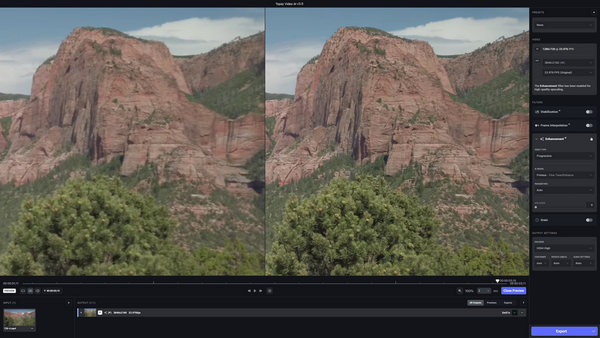
ディテールの強調: 本ソフトウェアはAIアルゴリズムを用いて動画内の細かなディテールを強調し、より洗練された、見栄えの良い出力を実現します。これには、被写体や質感の鮮明さ、そして全体的な画質の向上が含まれます。
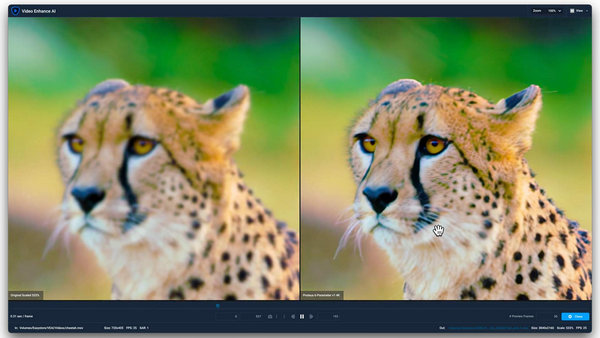
ノイズ除去: Topaz Video Enhance AI は、動画内のノイズと重要なディテールを賢く見分けます。その結果、不要なノイズを効果的に低減し、よりクリーンで滑らかな映像を実現します。
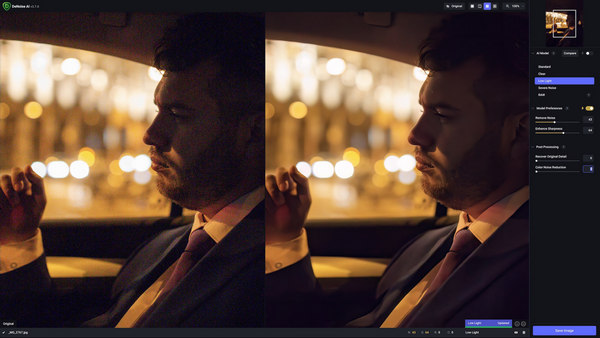
動画の手ぶれ補正: 安定した映像がいかに重要かを踏まえ、Topaz Video Enhance AI には動画の手ぶれ補正機能が搭載されています。これによりカメラの揺れやモーションブラーの影響を軽減し、より滑らかでプロフェッショナルな印象の映像づくりに貢献します。
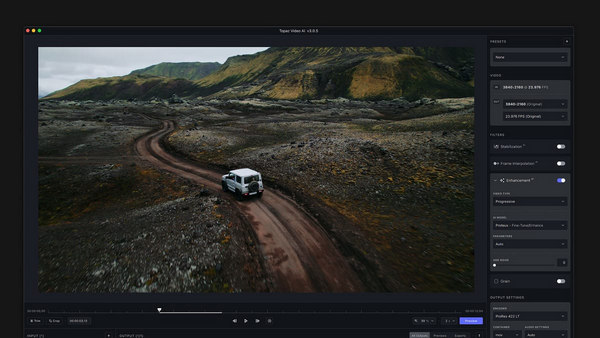
カラーグレーディング: 本ソフトウェアにはカラーグレーディング用のツールが用意されており、動画の色調を最適化・強調することができます。この機能を使うことで、望むビジュアルトーンや雰囲気を自在に表現できます。
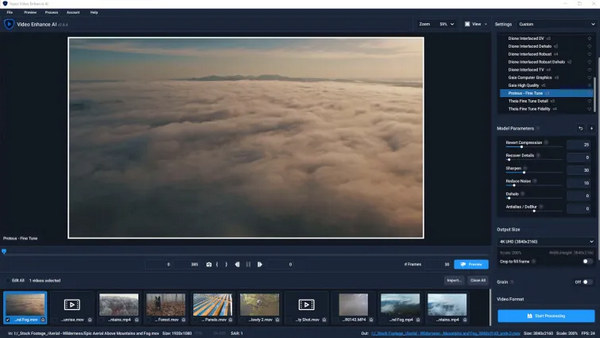
マルチスレッドによるプレビューと書き出し: マルチスレッド対応のプレビューおよび書き出し機能の追加により、ワークフローの効率が向上します。これによりプレビューとエクスポート処理が高速化され、ユーザー体験が改善されます。
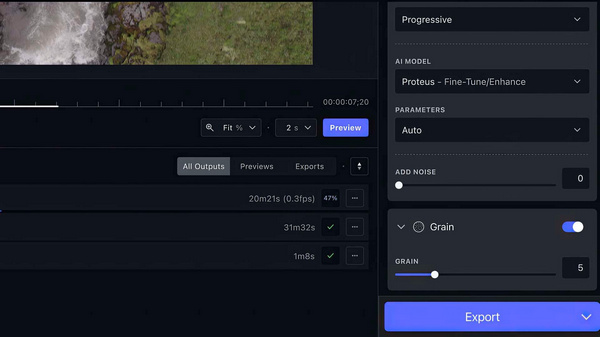
Topaz Video Enhancement AI は、細部を鮮明にし、ノイズを低減し、全体的な品質を向上させることで、ビデオの見栄えを良くするツールです。ただし、これを使用するには強力なコンピューターが必要な場合があり、その動作方法については少し学習が必要になる場合があります。あなたがプロであっても、単にビデオを作るのが好きなだけであっても、Topaz Video AI はビデオを素晴らしく見せるためのツールをたくさん提供します。
パート 3. Topaz Video AI をビデオ強化に使用する方法?
Topaz Video AI を使用してビデオを強化する方法は次のとおりです。
ステップ1. ツールをダウンロードしてパソコンにインストールします。
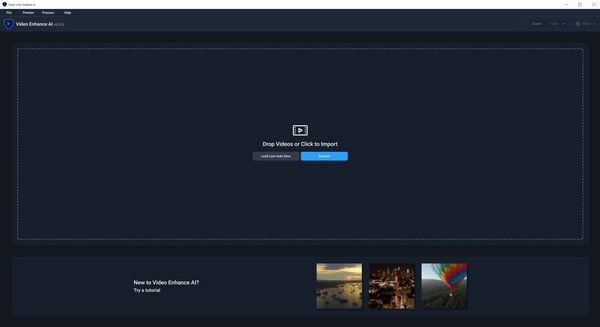
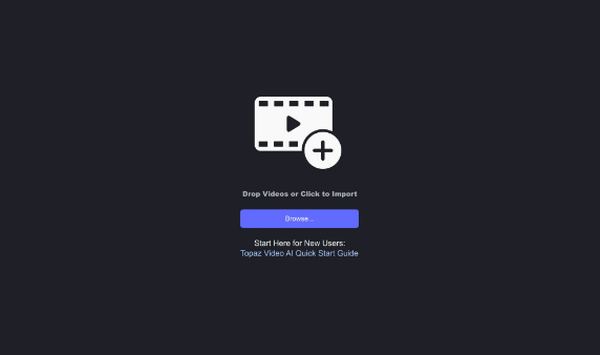
ステップ2. Browse ボタンをクリックして、動画ファイルを読み込みます。
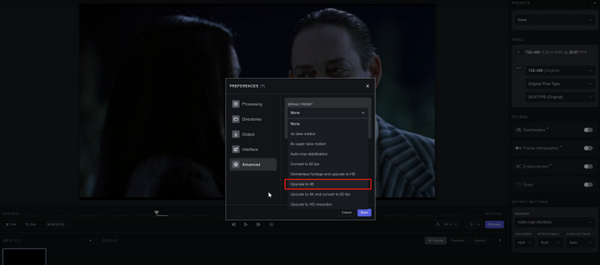
ステップ3. 右上にある Presets メニューを見つけます。動画を4K解像度へアップグレードする目的に合った設定を選択します。
ステップ4. 動画に適したAIモデルを選択し、そのほかの設定を手動で微調整します。
ステップ5. プレビューするには、Preview ボタンをクリックします。ズームツールを使って仕上がりを確認しましょう。
ステップ6. 強化された動画に満足したら、目的に合った出力形式を選びます。Export をクリックしてファイルを書き出すと、元の動画と同じフォルダーに自動保存されます。
Topaz Video AI を使用してビデオを強化する場合は、望ましい結果を達成するために設定を探索して微調整することを忘れないでください。エクスポートする前にプレビュー機能を使用して満足度を確認し、ビデオ品質を 4K 解像度にアップグレードするシームレスなプロセスをお楽しみください。
パート 4. Topaz Video AI の 3 つの代替案
Topaz Video AI は高価であり、ユーザーが使用しているデバイスに特定の要件を必要とするため、一部のユーザーでは機能しない可能性があります。これらの要素の一部が期待を満たさない場合、Topaz Video AI には他の代替手段があります。そのため、Topaz Video AI が好みに合わない場合に探すべきツールは次のとおりです。
FVC Video Converter Ultimate - ビデオエンハンサー
FVC Video Converter Ultimate は、単なる動画変換ツールにとどまりません。このソフトには高度な「Video Enhancer」機能が搭載されており、動画解像度を手軽にアップスケーリングできます。ユーザーはビットレート、サンプルレート、フレームレート、解像度などの重要な動画パラメーターを好みに合わせて細かく調整可能です。さらに、このソフトはAIアルゴリズムを用いた全自動の動画強化機能を備えており、効果的なアップスケーリングを実現します。加えて、明るさやコントラストの調整、動画ノイズの除去、映像の揺れの軽減といったオプションも提供します。
このツールを使用するには、次の手順に従います。
ステップ1. FVC Video Converter Ultimate をデスクトップにダウンロードし、インストールします。
無料ダウンロードWindows 7 以降対応安全なダウンロード
無料ダウンロードMacOS 10.7 以降対応安全なダウンロード
ステップ2. 画面上部に4つのタブが表示されます。右側にある Toolbox タブをクリックします。
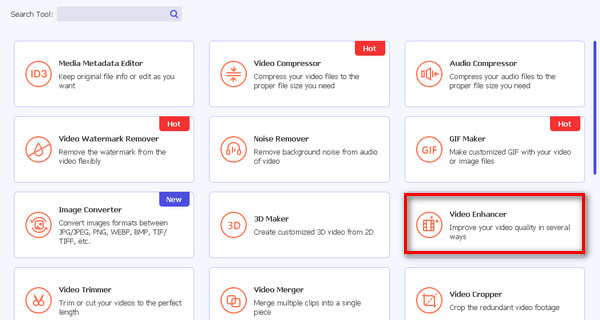
ステップ3. Video Enhancer を選択します。
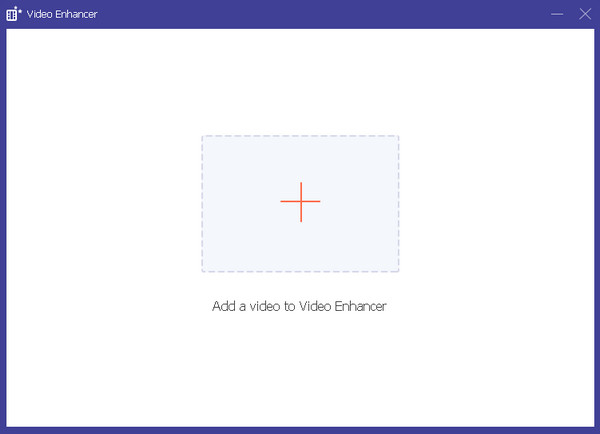
ステップ4. 赤いプラスボタンをクリックして、アップスケーリングしたい動画を追加します。
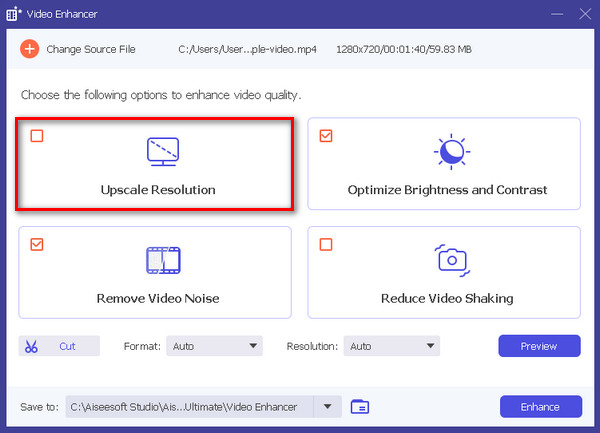
ステップ5. 次に、解像度をアップスケールを選択し、強化ボタンをクリックします。
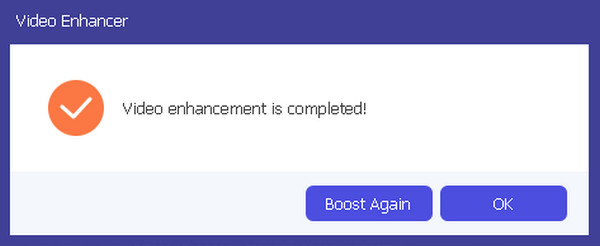
ステップ6. 完了すると、さらに強化するか、このままでよいかを尋ねるメッセージが表示されます。
このユーザーフレンドリーなツールは、ビデオの変換とそのビジュアル品質の向上という 2 つの目的を真に果たします。
DVDFab ビデオ エンハンサー AI
DVDFab Video Enhancer AI は、高度な人工知能を使用してビデオ品質を向上させ、解像度を高めるために作成されたソフトウェアです。このツールは、ニューラル ネットワークでトレーニングされた高度な AI モデルと超解像度テクノロジーを組み合わせて利用し、平均以下の画質と低解像度のビデオや映画の視覚的な魅力を自動的に向上させます。
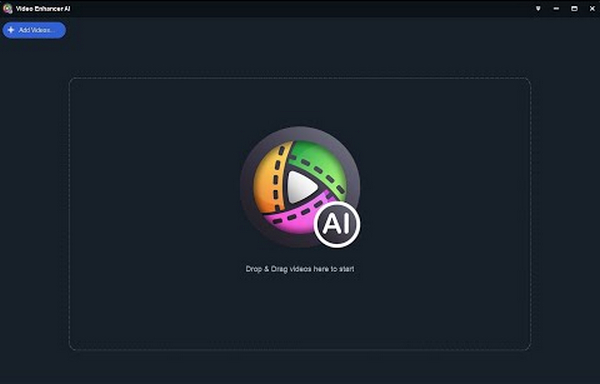
このツールを使用するためのクイックガイドは次のとおりです。
ステップ1. ツールをダウンロードしてインストールします。
ステップ2. アップスケーリングしたい動画ファイルをクリックまたはドラッグして追加します。もしAIツールで画像から動画を作成したい場合は、ここに画像をアップロードできます。
ステップ3. 処理を開始するには、Start ボタンをクリックします。
ステップ4. 最後に、書き出しボタンをタップしてアップスケール後の動画を保存します。
DVDFab Video Enhancer AI は、高度な人工知能を使用してビデオの品質と解像度を向上させるように設計された強力なツールです。ユーザーフレンドリーなインターフェイスにより、低解像度のビデオの視覚的魅力を高めるための簡単で高品質なソリューションが保証されます。
AVCLabs ビデオ エンハンサー AI
AVCLabs Video Enhance AI は、AVCLabs Inc. によって開発されたソフトウェア ソリューションです。高度な AI テクノロジーを使用してビデオ品質を向上させ、ビデオをアップスケールするように完全に作られています。ビデオの鮮明度を高め、ノイズを低減し、鮮やかな色を追加し、解像度を高める機能があります。このソフトウェアは、古い映像や低品質の映像を修正するのに特に便利で、スムーズなスローモーション効果の作成やビデオをより高いフレームレートに変換することも容易にします。
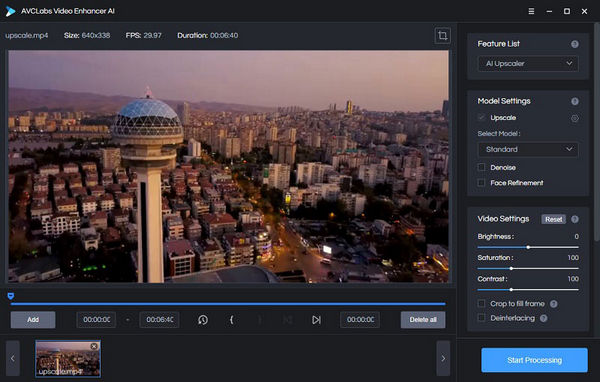
AVCLabs Video Enhancer AI の使用方法に関するクイック ガイド:
ステップ1. AVCLabs Video Enhancer AIの公式サイトにアクセスします。
ステップ2. アップスケールしたいファイルを追加するには、参照ボタンをクリックします。
ステップ3. ソースファイルを追加し、「Model Settings」でAIモデルと解像度を選択します。
ステップ4. 動画は自動的に30秒間プレビュー再生されます。動画をクリックすると視聴できます。
ステップ5. すべてのパラメーターを設定し終えたら、Start Processing ボタンをクリックしてレンダリングを開始します。
ステップ6. 仕上がりに問題がなければ、Export ボタンをクリックしてファイルを保存します。
AVCLabs Video Enhance AI を使用する場合は、最適な結果が得られるように設定を調整することを検討してください。ノイズの低減、色の強調、解像度のアップスケーリング機能があり、古いビデオや低品質のビデオを調整するのに最適な選択肢となることに留意してください。
パート 5. Topaz Video AI に関するよくある質問
Topaz Video AI にはどのようなハードウェアが必要ですか?
Topaz Video Enhancer AI は、強力な GPU (グラフィックス プロセッシング ユニット) によってよりスムーズに動作します。最適なパフォーマンスを得るために、コンピューターに有能な GPU が搭載されていることを確認してください。
Topaz Video AI は使いやすいですか?
Topaz Video Enhance AI はユーザーフレンドリーなインターフェイスを提供しますが、学習曲線が必要になる場合があります。初心者、特にテクノロジーの知識がほとんどない人は、機能や機能に慣れるまでに時間がかかる場合があります。ビデオチュートリアルを利用できると、学習プロセスが容易になります。
Topaz AI には価値がありますか?
Topaz Video Enhance AI の価値は、個人のニーズと好みによって異なります。これはビデオ強化のための強力なツールと考えられており、アップスケーリング、ノイズ低減、安定化などの機能を提供します。ただし、潜在的なユーザーは、その機能を自分の特定の要件と比較して、それが自分の目標に合致しており、投資する価値があるかどうかを判断する必要があります。
Topaz Video AI はどのようなビデオ形式でも使用できますか?
Topaz Video Enhance AI には、特定のビデオ形式との互換性制限がある場合があります。ユーザーは、ソフトウェアの仕様を確認して、最適な結果を得るために好みのビデオ形式がサポートされていることを確認することをお勧めします。
Topaz Video AI は大きなビデオ ファイルをどのように処理しますか?
Topaz Video Enhance AI は大きなビデオ ファイルを処理できるように設計されていますが、処理時間はフッテージのサイズや複雑さなどの特定の要因によって異なる場合があります。大きなビデオ ファイルを扱うユーザーは、処理時間が長くなる可能性があることに留意し、ハードウェアが効率的なパフォーマンスのためのシステム要件を満たしていることを確認する必要があります。
結論
確かに、Topaz Video Enhance AI は非常に優れたツールです。その充実した機能により、動画の修復・強化・アップスケーリングをしっかりとサポートしてくれます。有料ではありますが、動画のクオリティ向上にもたらす価値を考えると、投資するに値するソフトだと言えるでしょう。ただし、要件をすべて満たさない場合でも、代替となる3つのツールがあり、それぞれが独自の機能を備え、さまざまな動画強化ニーズに応えます。これらの代替ツールもチェックして、自分の動画コンテンツを変革し、理想の形に仕上げるために最適な一本を見つけてください。
-
 マルチプラットフォーム向けビデオ解像度コンバーター トップ 8 [2024 年更新]
 最高のビデオ解像度コンバーターに関するまれなアイデアをお持ちですか?その場合は、この記事を読んで利用可能なオプションを入手してください。
-
 使用する必要のあるすべてのWebブラウザ用の上位7ピクセルエンハンサー
 最適なピクセル エンハンサーを知りたい場合は、この投稿をご覧ください。この記事では、すべての Web ブラウザーに最適な 7 つの写真ピクセル エンハンサーを一覧表示します。
-
 あなたの Android と iOS のトップ写真カラー エンハンサー アプリを無料で
 あなたの携帯電話に写真のカラーエンハンサーアプリを入れたいですか?さて、あなたのニーズに最も合うと思うエンハンサーを選択してください.
