


 ビデオコンバーター究極
 スクリーンレコーダー
 ビデオ修復
ビデオ修復
 安全なダウンロード
品質を低下させずにM2TSをMP4に変換する方法
「ソニーのカメラからコンピューターにビデオを置くと、それらはM2TSファイルであり、FacebookやYouTubeで共有することはできません。ファイルをMP4に変換し、コンピューターで視聴するためのビデオコンバーターはどこにありますか?」
ポータブルデバイスでM2TSファイルを再生したり、YouTubeやFacebookにアップロードしたりしたいことがあります。その場合、MP4のような一般的な動画形式に変換しておくのが賢明です。本記事では、WindowsとMacでM2TSをMP4に変換する無料の方法を5つご紹介します。

パート1。無料でM2TSをMP4に変換するための最良の方法
すべてのメディアプレーヤーがM2TSファイルに対応しているわけではありません。HDビデオカメラで撮影したM2TS動画をより快適に楽しむには、再生用に一般的なMP4形式へ変換しておくとよいでしょう。FVC Free M2TS Converterは、多機能なM2TSコンバーター兼エディターです。M2TSファイルをMP4、MKV、AVI、MOVなどに変換できるだけでなく、圧縮、結合、テーマの追加など、さまざまな編集も行えます。
無料ダウンロードWindows 7 以降対応安全にダウンロード
無料ダウンロードMacOS 10.7 以降対応安全にダウンロード
〈ステップ1〉「Free Download」ボタンをクリックすると、Free M2TS Converterをすばやくダウンロードできます。その後、Windowsパソコンにインストールして起動します。[Add File(s)]ボタンをクリックして、M2TSファイルを本ソフトに読み込みます。
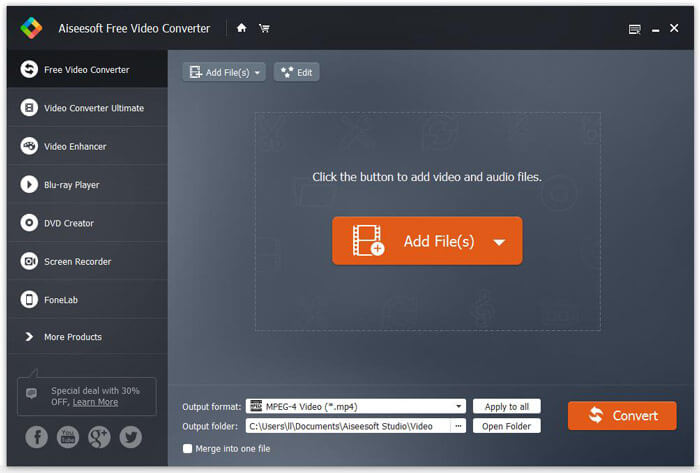
〈ステップ2〉[Output format]のプルダウンボタンをクリックし、出力形式として[MPEG-4 Video (*.mp4)]を選択します。変換後ファイルを保存する出力フォルダーも設定できます。

〈ステップ3〉動画に特定のテーマを追加したい場合は、上部メニューの[Edit]ボタンをクリックして、適切なテーマを選びます。すべての設定が完了したら、[Convert]ボタンをクリックしてM2TSファイルをMP4に変換し始めます。

パート2。M2TSをMP4オンラインに変更する方法
無料でオンライン上でM2TSをMP4に変換したい場合は、「FVC Free Online Video Converter」が最適です。無料のオンラインマルチメディアコンバーターとして、ほぼすべての主流動画・音声をMP4、FLV、MKV、MOV、M4V、MTS、TS、M2TS、WMV、ASF、VOB、MP3、AACなどに変換することができます。さらに、操作も非常に簡単です。
〈ステップ1〉FVC Free Online Video Converterの公式サイトにアクセスします。上部の[Add Files to Convert]をクリックします。その後、[FVC launcher]をダウンロードしてインストールします。

〈ステップ2〉変換したい動画を選択します。MP4動画にしたい場合は、[MP4]をクリックし、続けて[Convert]をクリックします。

〈ステップ3〉変換後のMP4動画はデスクトップに保存するだけで構いません。その後、自動的に変換が開始されます。
パート3。ConvertFilesを使用してM2TSをMP4に変換する方法
ConvertFilesは、200以上の形式のビデオ、オーディオ、画像、ドキュメント、プレゼンテーション、およびアーカイブをサポートするWebベースのM2TSからMP4へのコンバーターです。以下の簡単な手順に従って、M2TSファイルからMP4オンラインへの変換を開始します。
〈ステップ1〉ConvertFilesの公式ページにアクセスします。[Browse]ボタンをクリックして、ローカルのM2TSファイルをアップロードします。
〈ステップ2〉[Input format]ボックスをクリックして[HDV Video File(.m2ts)]を選択し、[Output format]ボックスで出力形式として[MPEG-4 Video File(.mp4)]を選びます。
〈ステップ3〉[Convert]ボタンをクリックして、無料でM2TSからMP4への変換を開始します。変換には数分かかる場合があります。完了後、表示されるダウンロードリンクをクリックして、変換済みのMP4ファイルをダウンロードできます。
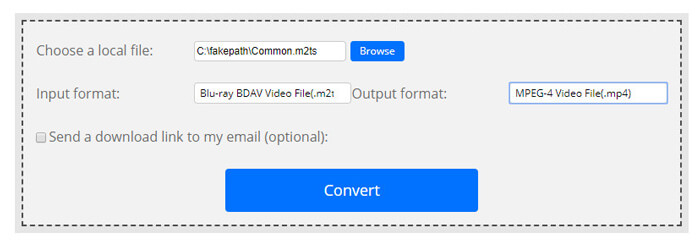
入力形式が無効なため、変換に失敗する場合があります。高い成功率を達成するために、代わりに無料のM2TSコンバーターを試すことができます。
パート4。VLCでM2TSをMP4に変換する方法
VLC Media Playerは、Windows、Mac、Linux、iOS、Android向けのオープンソースマルチメディアプレーヤーです。また、M2TSファイルをMP4、MOV、AVIなどに変換するための優れたM2TSからMP4へのコンバーターとしても機能します。さらに、トリミング、切り取り、回転、画像効果の追加など、M2TSファイルを編集できます。
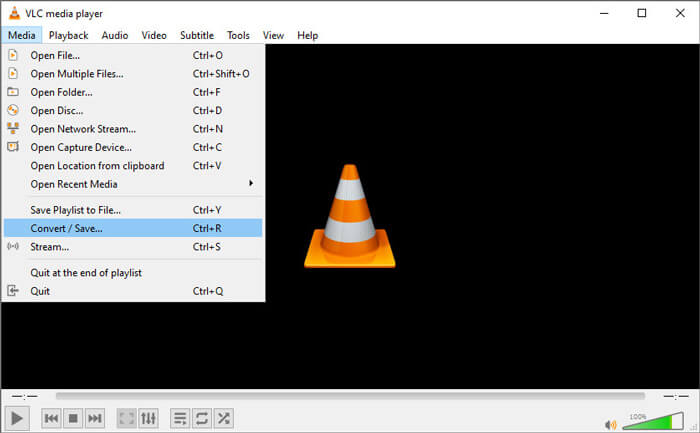
〈ステップ1〉パソコンにVLC Media Playerをダウンロードして起動します。[Media > Convert / Save...]をクリックして次に進み、[Add...]ボタンをクリックしてM2TSファイルを追加します。
〈ステップ2〉[Convert / Save]ボタンをクリックして、変換画面に入ります。[Profile]のプルダウンボタンから、出力形式として[Video - H.264 + MP3 (MP4)]を選択します。
〈ステップ3〉[Browse]ボタンをクリックして保存先フォルダーを指定します。その後、[Start]ボタンをクリックしてM2TSからMP4への変換を開始します。
パート5。ハンドブレーキを使用してM2TSからMP4をエクスポートする方法
HandBrakeは、ほぼすべての形式のビデオを変換できる、もう1つの無料のオープンソースビデオトランスコーダーです。次の手順で、Handbrakeを試してM2TSファイルをMP4に変換できます。
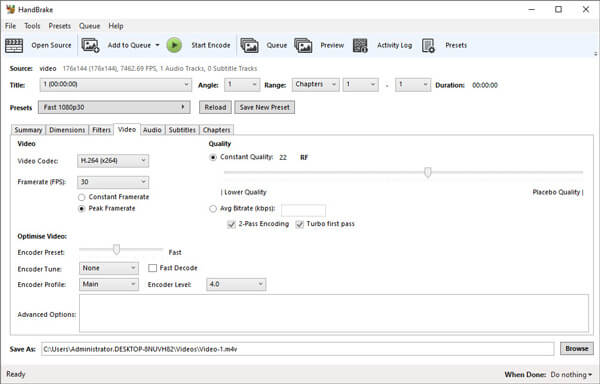
〈ステップ1〉HandBrakeをWindows/Macに無料でダウンロード、インストールして起動します。左上の[Open Source]をクリックし、ローカルフォルダーからM2TSファイルを読み込みます。
〈ステップ2〉M2TSファイルに対する各種設定を調整できます。[Summary]タブのFormatのプルダウンから[MP4]を選択します。[Video]タブでは、ビデオコーデック、画質、フレームレート、最適化などを細かく調整できます。
〈ステップ3〉[Browse]ボタンをクリックして保存先フォルダーを指定します。その後、[Start Encode]ボタンをクリックして、無料でM2TSをMP4に変換し始めます。
パート6。M2TSからMP4への変換に関するFAQ
M2TSとMP4の違いは何ですか?
M2TSはMPEG-2TransportSystemの略です。これはBlu-rayディスクオーディオビデオコンテナファイル形式であり、ビデオ、オーディオ、およびその他のストリームを多重化するために使用されます。通常、M2TSファイルは同じ品質のMP4ファイルよりも大きくなります。 MP4ファイルはほとんどすべてのメディアプレーヤーでサポートされていますが、M2TSファイルは少数のプレーヤーでしか再生できません。
PCでM2TSファイルを再生するにはどうしたらいいですか?
M2TSファイルは、Windows Media Player、VLC Media Player、5K Player、SMPlayer、Splashなどの一般的なメディアプレーヤーアプリケーションで直接開くことができます。SonyPictureMotionBrowserSoftwareを使用してM2TSファイルを再生することもできます。
VLCでM2TSファイルを再生できますか?
はい。 WindowsおよびMacのVLCMediaPlayerでM2TSファイルを再生できます。 VLCメディアプレーヤーを実行し、[メディア]をクリックして[ファイルを開く]をクリックするだけで、VLCでM2TSファイルを再生できます。それがコーデックの問題で機能しない場合は、最初にM2TSをVLCでサポートされているビデオ形式に変換する必要があります。
まとめ
上記の5つの無料の方法を使用すると、M2TSファイルをMP4に簡単に変換できます。比較した後、FVC Free M2TSConverterは最高のM2TSからMP4へのコンバーターになるはずです。ハードウェアアクセラレーションテクノロジーにより、MP4ファイルを数分で高品質でエクスポートします。この無料のコンバーターを一度に試すことができます。
-
 TSをMP4に変換する方法に関する包括的なガイド
 TSファイルとは何ですか?TSをMP4に変換したいですか?この投稿では、TSをMP4に変換するための無料のオンライン方法を紹介します。
-
 MTSファイルをMP4に変換する方法
 MTSファイルをMP4に変換する方法がわかりませんか?このガイドでは、品質を損なうことなく、WindowsまたはMacでMTS形式をMP4に変更する6つの無料で簡単な方法を紹介します。
-
 MTSをMP3に無料で変換する2つの簡単な方法
 MTSファイルからMP3オーディオを抽出する必要がありますが、方法がわかりませんか?この投稿では、MTS / M2TSを高音質のMP3に変換するのに役立つ2つの簡単な方法を共有しています。
